
DLT entity registration is usually rejected because the business name or details on the form do not match your documents, the scans are unclear, the wrong entity type was picked, or the letter of authorisation is missing or in the wrong format. Read the remark on your DLT portal, fix exactly that point and resubmit. Approval normally takes a few working days, and every resubmission restarts the wait. This page covers rejection reasons, approval time, the “POI already registered” message and entity errors in Fast2SMS.
Why was my DLT entity registration rejected?
| Reason | Example | Fix |
|---|---|---|
| Name does not match documents | “Demo Traders Pvt Ltd” on the form, “Demo Traders Private Limited” on the certificate | Copy the legal name exactly from your PAN, GST or incorporation certificate. |
| Unclear or cut-off scans | Blurry photo, edges missing, wrong page | Upload clear colour scans of the full document as PDF or image. |
| Wrong entity type | A proprietorship registered as a private limited company | Pick the type that matches your legal registration. The document list depends on it. |
| Letter of authorisation problems | Missing, unsigned, unstamped, or not in the portal’s format | Download the portal’s own format, fill every field, sign and stamp it on letterhead. |
| Authorised person mismatch | The name on the letter differs from the ID proof uploaded | Use the same person and spelling on the letter and the ID proof. |
| Missing business proof | No GST certificate and no other business document | Upload another proof the portal accepts for your entity type. |
How long does DLT entity approval take?
Usually a few working days after you submit. It depends on the portal’s queue and on how clean your documents are. A rejection and resubmission start the wait again, so it pays to get the first submission right. Since TRAI’s February 2025 amendment, the sender registration process is also to include physical verification of the business, biometric authentication of the authorised person and linking the entity to a unique mobile number, so keep the authorised person available during registration.
How to fix a rejected entity registration
-
Read the remark
Open your application on the DLT portal and read the reviewer’s remark. Portals usually send it by email too.
-
Fix only what the remark mentions
Correct the name, re-upload the document or redo the letter of authorisation. Changing everything can lead to a new mismatch.
-
Check every name once more
The business name, the authorised person’s name and the details on each document must match exactly, including “Pvt Ltd” versus “Private Limited”.
-
Resubmit or raise a ticket
Resubmit the application. If you believe the rejection is wrong, raise a ticket with the portal’s support and attach your proof.
“Organization with this POI is already registered”: what does it mean?
POI means proof of identity. The message says the identity document you entered is already linked to an entity on that DLT platform. Before trying anything else:
- Ask your team whether someone already registered the business, for example an earlier SMS provider, an agency or a colleague.
- Look in your old emails for a DLT approval email or an Entity ID.
- If you cannot find the old account, raise a ticket with the portal’s support with your documents and ask how to recover access.
If an Entity ID already exists, use it. Registering the same business again on another portal creates duplicate Entity IDs and confusion later.
Entity errors in Fast2SMS DLT Manager
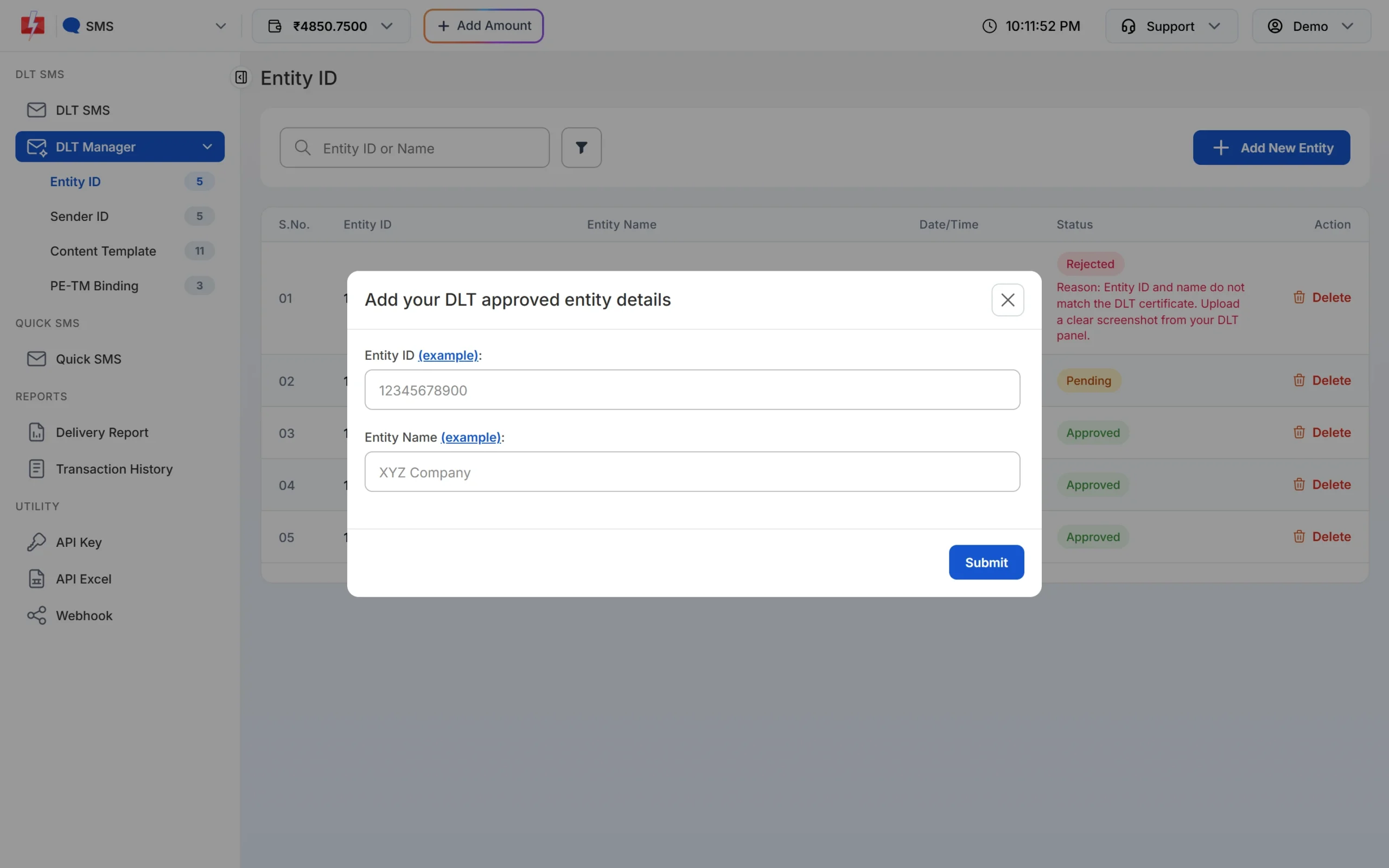
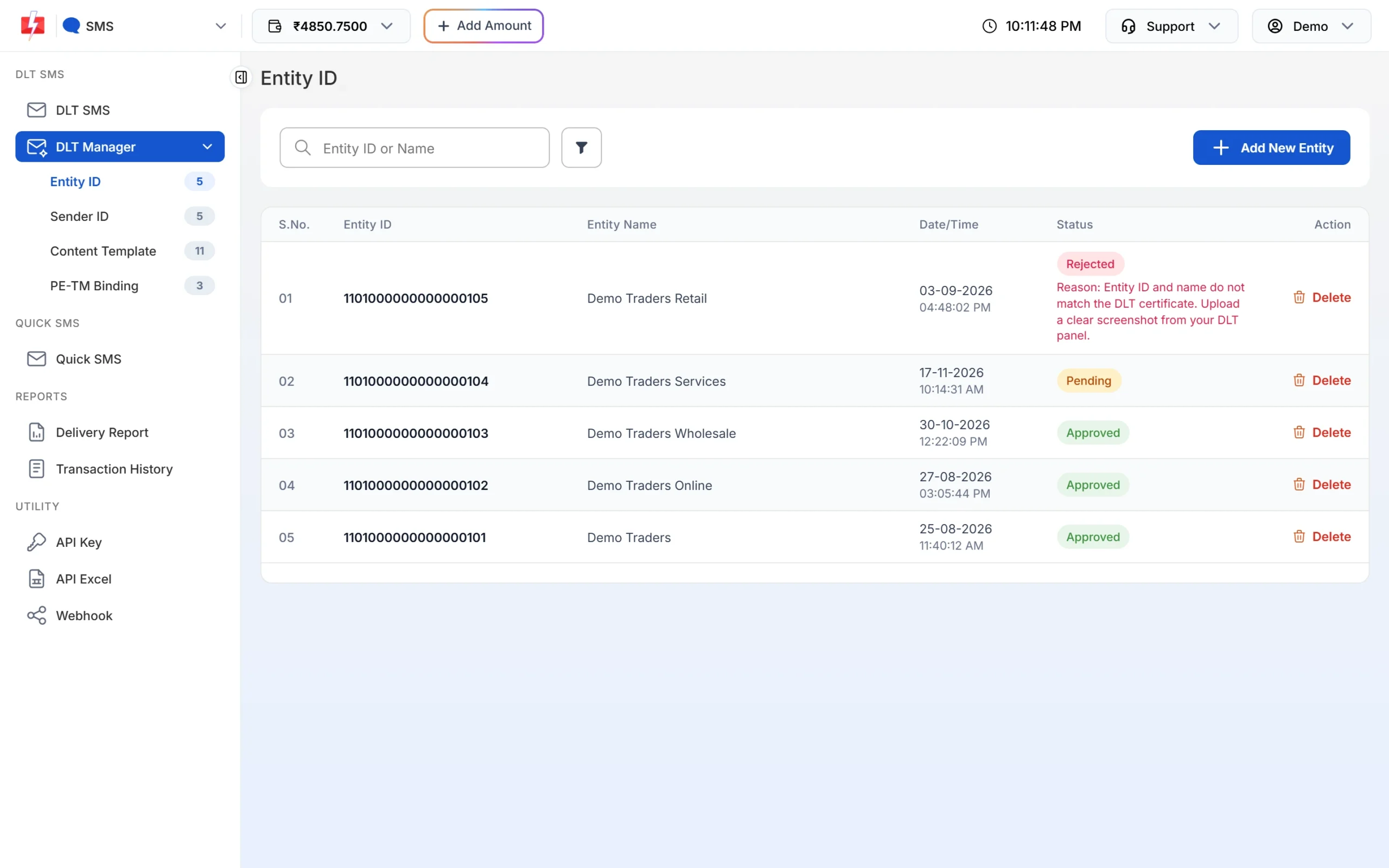
After your entity is approved on DLT, add it in Fast2SMS under DLT Manager > Entity ID > Add New Entity. When you leave the Entity ID box, the panel checks the ID on the DLT platform. If it is found, the name is filled in and the entity is approved at once. If not, you upload a screenshot and the entity waits as Pending for a manual check.
| Message | Meaning | Fix |
|---|---|---|
| Invalid Entity ID (with “Check example carefully”) | The ID is too short or not a number. | Copy the full Entity ID from your portal. It is a long number, digits only. |
| Please enter entity name & upload screenshot | The ID could not be confirmed on the DLT platform automatically. | Type the entity name and upload a clear screenshot of your approved entity. |
| Entity already approved in your account. | You added this ID before. | Use the existing row. |
| Entity already pending in your account. | You added it and it is waiting for a check. | Wait for the check. Do not add it twice. |
| Entity blocked | The entity is on a block list. | Contact Fast2SMS support. |
If our team rejects the entity, the reason is shown in red under the status, for example when the Entity ID and name do not match the DLT certificate.
Frequently asked questions
Why is my DLT entity registration rejected?
Mostly because the name or details differ from your documents, the scans are unclear, the entity type is wrong, or the letter of authorisation is missing or in the wrong format.
How long does DLT entity approval take?
Usually a few working days. A rejection and resubmission restart the wait.
Can I register on DLT without GST?
Often yes. Many portals accept other business proofs depending on your entity type. Check your portal’s document list.
Can I register on another portal if one rejects me?
You can, but fix the cause first: the same documents will face the same rules everywhere. Avoid having two Entity IDs for one business.
Where do I find my Entity ID after approval?
On your DLT portal dashboard or profile and in the approval email.
Why is my entity pending in Fast2SMS?
The Entity ID could not be confirmed automatically, so our team checks your screenshot. A clear screenshot speeds this up.