
A DLT header (sender ID) is usually rejected because it does not clearly match your business or brand name, uses a generic word, looks like another company or a government body, or was sent without proof that the brand is yours. To fix it, pick a header closer to your registered name or upload brand proof such as a trademark certificate, then submit again. This page covers the common rejection reasons on the DLT portal and in Fast2SMS, and what proof to upload.
Why was my DLT header rejected?
| Reason | Example | Fix |
|---|---|---|
| Header does not match the entity or brand | Entity “Demo Traders” applies for QKSHOP |
Use a header the reviewer can link to your name, such as DMTRDS, or upload proof that you own the brand. |
| Generic word | OFFERS, ALERTS, INFORM |
Generic words do not identify a business. Use a short form of your brand. |
| Looks like another company’s brand | A header close to a well-known brand you do not own | Only the brand owner can register its name. Choose your own. |
| Looks like a government body, bank or regulator | Headers that suggest a ministry, a bank or TRAI | Not allowed unless you are that organisation. |
| Reserved string | A string the Department of Telecommunications has allotted for other purposes | Pick a different header. |
| Missing or weak justification | No reason given for a new header, or no brand proof | Write a short reason and attach proof such as a trademark certificate or your website. |
| Wrong format | Spaces, symbols, more than 6 characters, letters and digits mixed together | Follow the portal’s format: 6 letters for service and transactional headers. |
| Header already taken | Another entity registered it first | Choose another option. If it is your trademark, raise a complaint with the portal and attach proof. |
Why reviewers are stricter now
TRAI’s February 2025 amendment to the commercial communication regulations asks operators to have a separate person approve header registrations. That person checks the justification you give and looks at how many headers you already have and how many of your headers were blacklisted. A clear reason for each header and a tidy header list make approval easier.
What proof to upload for a header
- Trademark certificate or application, when the header is a brand name different from your company name.
- Website or app listing that shows the brand belongs to your business.
- A short note explaining how the header is formed, for example “DMTRDS = Demo Traders”.
Make sure the names on every document match the entity name on your DLT account.
How to fix a rejected header
-
Read the rejection remark
Open the header on your DLT portal and read the remark. It usually says what is missing or wrong.
-
Change the header or add proof
If the header does not match your brand, choose one closer to your name. If it does match but the reviewer could not see the link, keep it and attach proof.
-
Submit again
Submit the header with a short justification. If you think the rejection is wrong, raise a ticket with the portal’s support.
-
Add it in Fast2SMS once approved
In DLT Manager > Sender ID, click Add New Sender ID, select your entity, type the header exactly as approved and upload a screenshot that shows the Sender ID and its approved status.
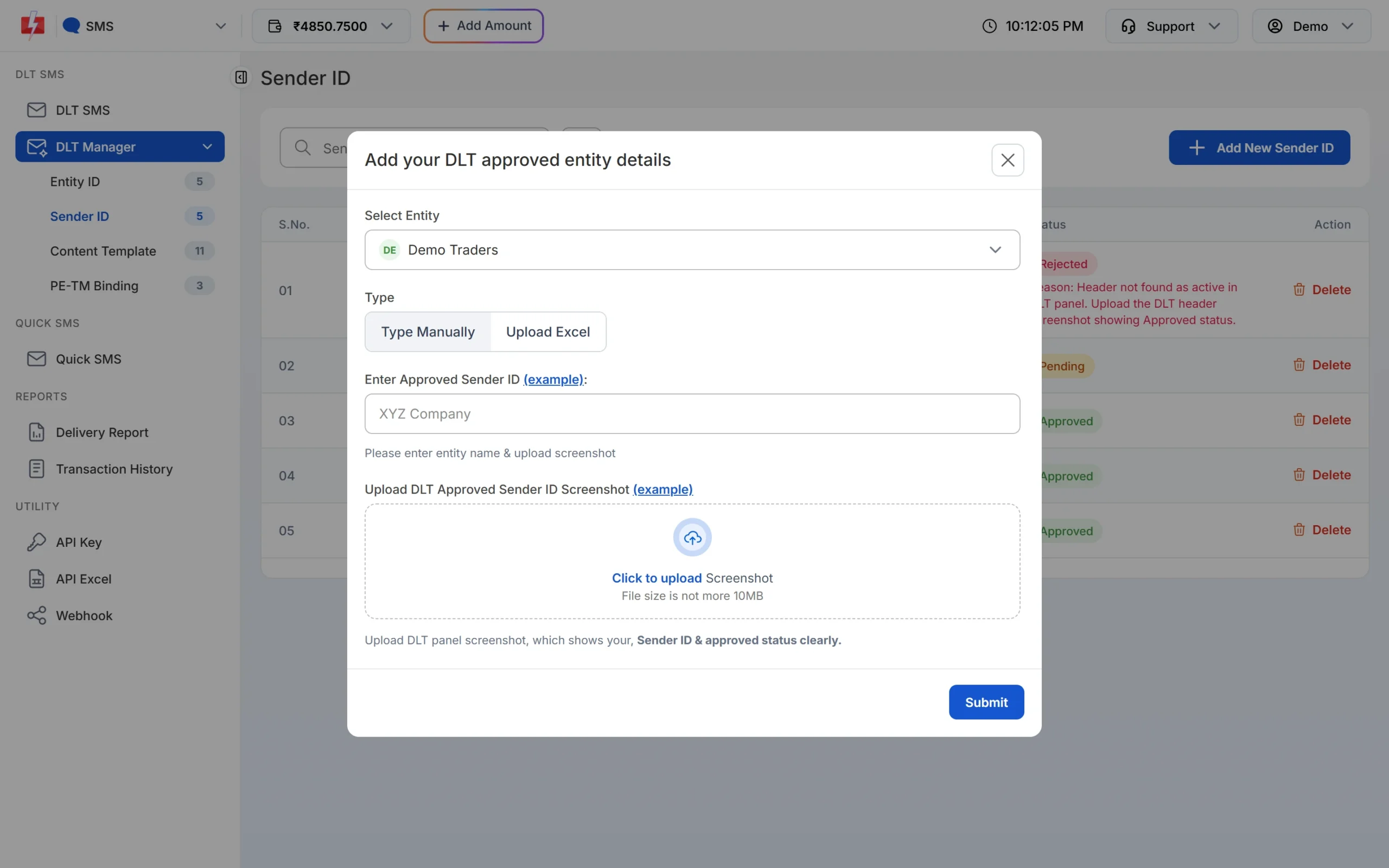
The screenshot must show the Sender ID and its approved status.
Header rejected in Fast2SMS
Every Sender ID you add in Fast2SMS starts as Pending and is checked against your screenshot. If the check fails, the status changes to Rejected with the reason in red. A common reason is that the header could not be seen as active on the DLT portal, with a request to upload a screenshot showing the approved status.
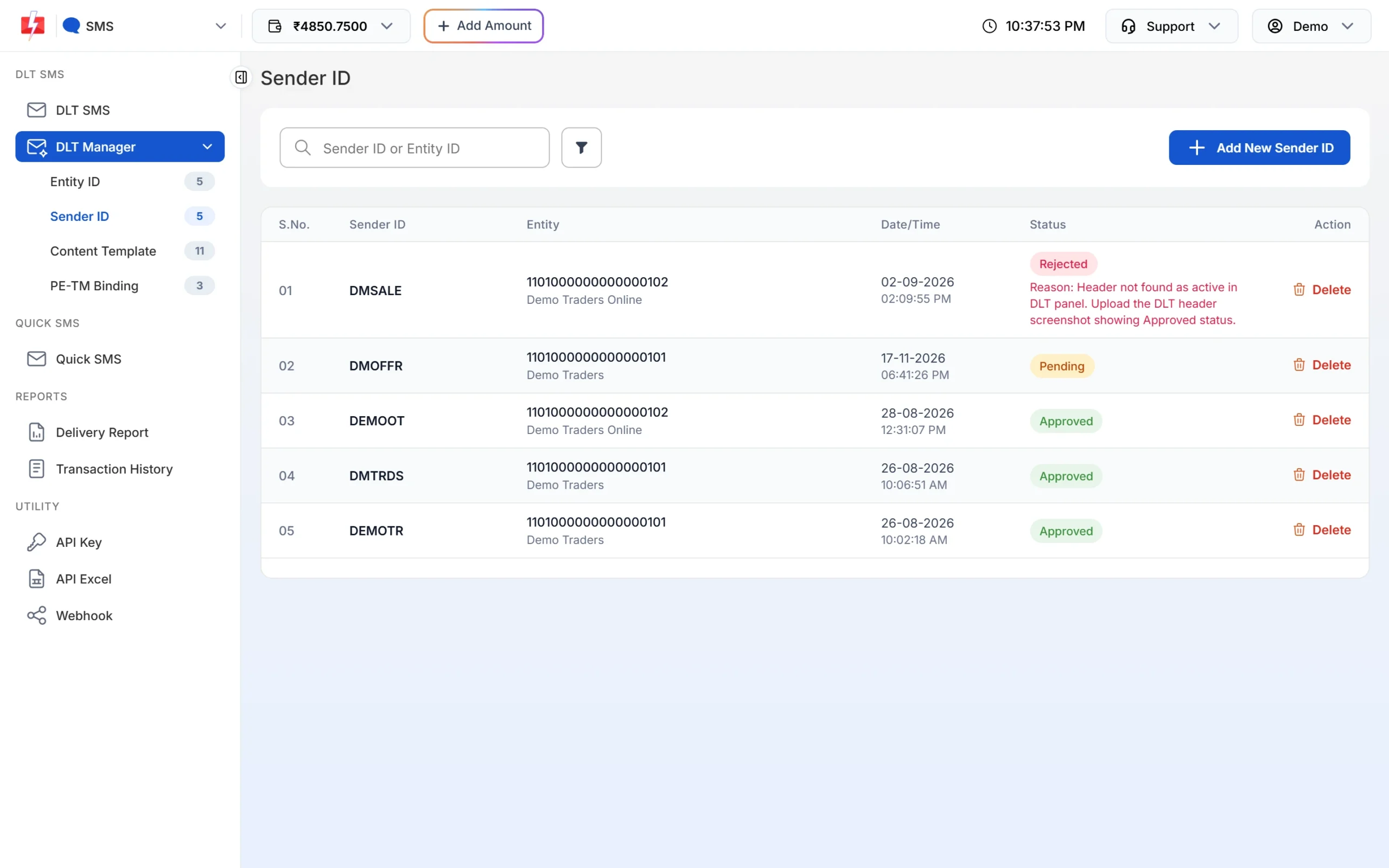
- Screenshot does not show approved status: take a fresh screenshot from your DLT portal with the header and its status visible.
- Header spelled differently: type it exactly as on DLT, including capital letters.
- Header under a different entity: select the entity the header is registered under.
- “Sender ID blocked, contact Fast2SMS support.”: the header is on a block list. Contact support.
To try again, click Delete on the rejected row and add the Sender ID again with the right details.
Frequently asked questions
Why is my DLT header rejected for brand mismatch?
The reviewer could not link the header to your entity name. Choose a header closer to your name or upload proof such as a trademark certificate.
Can I register a header with my shop name if it differs from my company name?
Usually yes, if the reviewer can see that the shop name belongs to your business. Attach proof such as a trademark certificate or a website that shows the shop name with your business details.
Can I register a generic header like OFFERS?
Generic words are usually rejected because they do not identify your business.
Someone else registered my brand as a header. What can I do?
Raise a complaint with your DLT portal’s support and attach proof that you own the brand.
Why is my header pending in Fast2SMS?
Every new Sender ID waits for a manual check of your screenshot. A clear screenshot speeds this up.
Can I appeal a header rejection?
Usually you fix the issue and resubmit. If you think the decision is wrong, contact the portal’s support with proof.