
Best WooCommerce SMS and WhatsApp Plugins in India Compared
Looking for the best WooCommerce SMS plugin for your Indian store, or the best WooCommerce WhatsApp plugin? The choice matters more than it looks. A WooCommerce SMS notification plugin in India has to do more than send “order placed”. It has to follow DLT rules, cover cash on delivery, send shipping updates, and ideally reach customers on WhatsApp as well, where many of them read messages first.
This guide compares the WooCommerce SMS and WhatsApp notification plugins Indian stores ask us about: SMS Alert, miniOrange, COD Order Confirmation for India, WooSMS with its WooAlert WhatsApp plugin, and our own free Fast2SMS plugin. Every competitor fact comes from that product’s public page, linked in the text. If a page does not mention a feature, we write “not stated” and leave it there. No ratings, no guesses.
What to look for in a WooCommerce SMS notification plugin in India
Most stores pick a plugin because it sends “order placed” and “order shipped”. Three months later they want COD confirmation, abandoned cart messages and a festival campaign, and the plugin cannot do it. Check these points up front.
- Events covered. Every WooCommerce order status, plus shipping events (shipped, delivered) and custom statuses from courier plugins such as Out for Delivery or RTO. Admin alerts for new orders and low stock help too.
- WhatsApp on the official API. Ask how WhatsApp messages are sent. Messages sent through the official WhatsApp Business API use approved templates and are sent automatically from your store.
- DLT for SMS. Every SMS in India needs a registered header and an approved template in the right category (Transactional, Service Implicit or Promotional). The plugin should let you pick your approved templates and map variables.
- Invoice PDF. Sending the invoice as a PDF on WhatsApp saves you “please send the bill” chats.
- Abandoned cart. A reminder after a set delay brings some shoppers back. It should respect consent and a do-not-send list.
- Back in stock. Customers subscribe on a sold-out product and get a message when it returns.
- Campaigns. Bulk SMS or WhatsApp to your customers, with scheduling and a test send.
- Billing. Free plugin plus per-message cost, credits with one provider, a yearly plan, or a subscription. Know which one you are signing up for.
- Logs and retry. When a message fails, you need to see why and send it again.
Best WooCommerce SMS and WhatsApp plugins compared
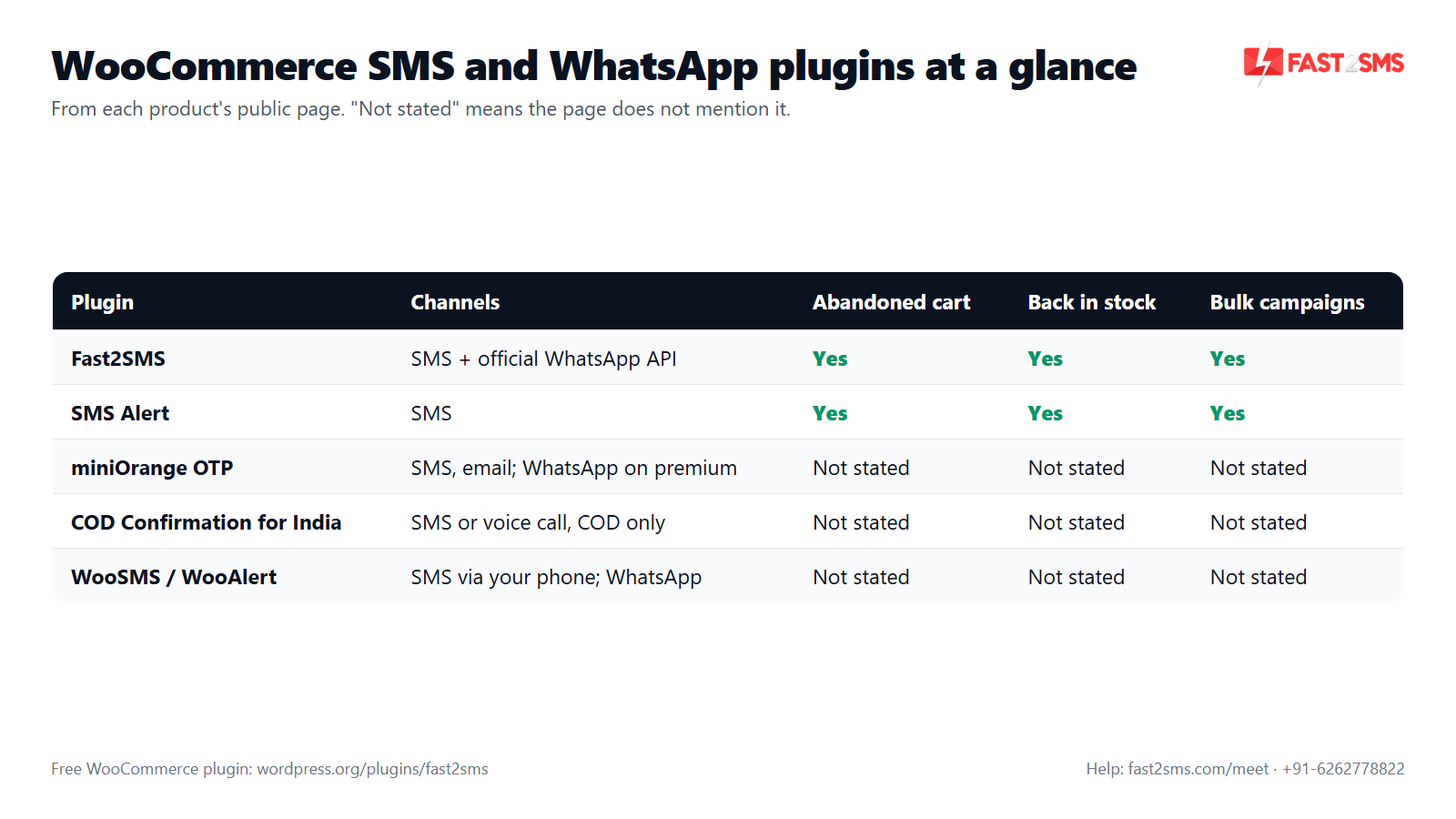
Here is how the plugins line up. “Not stated” means the product’s public page does not mention it. It does not mean the feature is missing, so ask the developer if it matters to you.
| Plugin | Channels | Events covered | Invoice PDF on WhatsApp | DLT mentioned | How you pay |
|---|---|---|---|---|---|
| Fast2SMS (WordPress.org) | SMS, WhatsApp or both per event | All order statuses, shipping, custom statuses, COD, abandoned cart, back in stock, review, welcome, admin alerts | Yes, auto-generated | Yes | Free plugin, pay per message |
| SMS Alert (WordPress.org) | SMS | New orders, all order statuses, admin SMS, abandoned cart, low and out of stock, back in stock | Not stated | Yes | SMS Alert account credits |
| miniOrange OTP (WordPress.org) | SMS, email; WhatsApp mentioned | WooCommerce order status SMS; low and out of stock on premium | Not stated | Not stated | Free version, yearly plans |
| COD Order Confirmation for India (WordPress.org) | SMS or voice call | COD order confirmation only | Not stated | Not stated | Prepaid balance, ₹0.40 per SMS, ₹2.00 per call |
| WooSMS / WooAlert (woosms.in) | SMS through your Android phone; WhatsApp | New order SMS; WhatsApp order status and COD confirmation | Not stated | Not stated | Subscription plan |
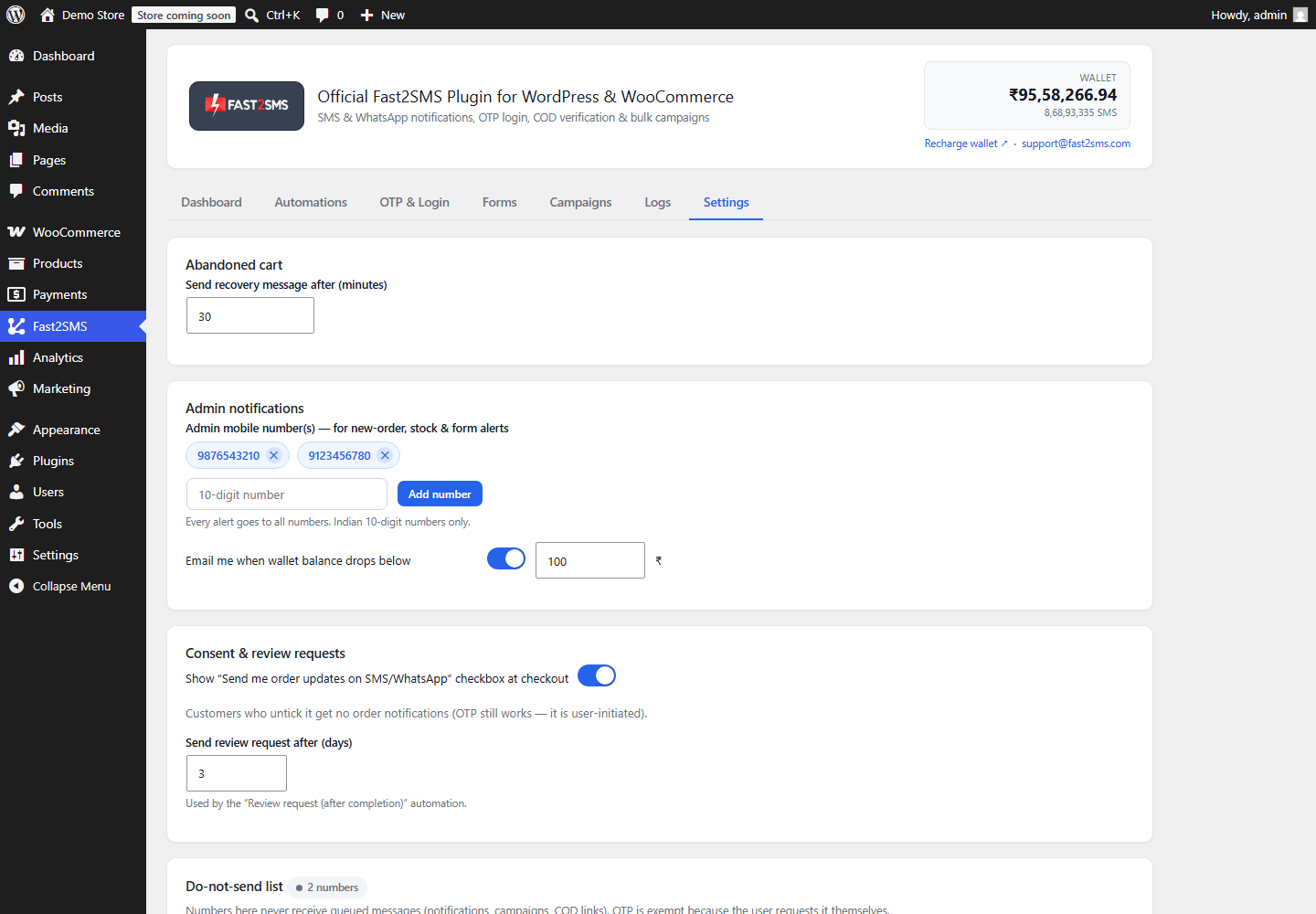
The recovery and marketing features on their own look like this:
Short profiles of each WooCommerce SMS and WhatsApp plugin
Fast2SMS – OTP Login & SMS Notifications
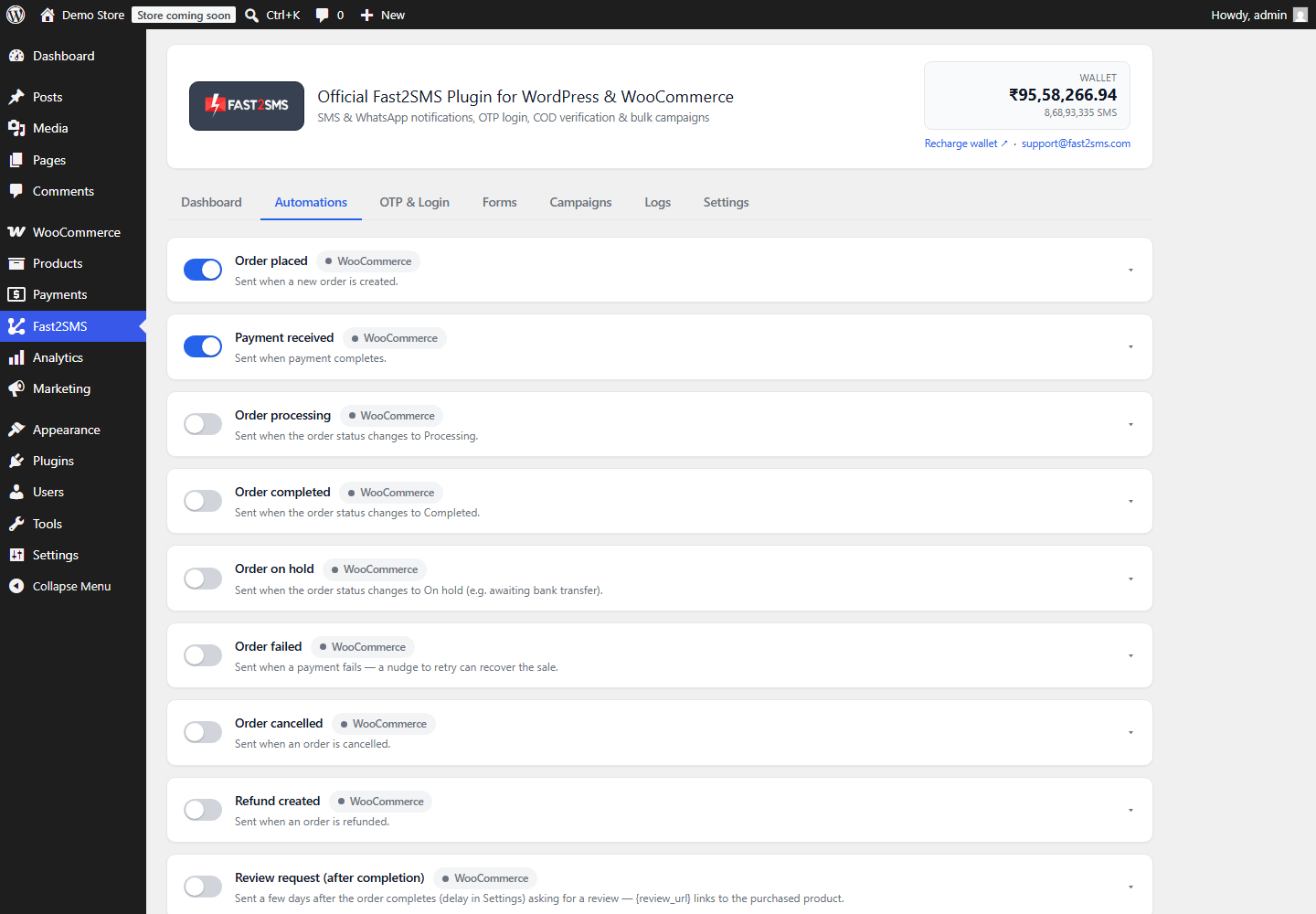
This is our plugin, so read this part knowing that. It is free on WordPress.org with no licence and no monthly fee. You connect your own Fast2SMS API key and pay only per message. It is built for India only (10-digit numbers). Every WooCommerce event gets its own card in the Automations tab, where you choose SMS, WhatsApp or both, pick an approved DLT or WhatsApp template, map variables, check a live phone preview and send a test. The same plugin handles OTP login too.
SMS Alert
SMS Alert, by Cozy Vision Technologies, calls itself a WooCommerce SMS plugin for OTP, order notifications, abandoned cart recovery and stock alerts. Its page lists SMS for new orders and all order statuses, admin SMS, custom templates with dynamic order variables and custom order meta, abandoned cart reminders (compatible with block-based checkout), low stock and out of stock alerts, a back in stock notifier and promotional SMS campaigns to customer groups. It states DLT compliant SMS for Indian stores. You need an SMS Alert account, demo accounts include free test credits, and its FAQ says only the SMS Alert gateway is supported. It lists 50+ plugin integrations, including shipment tracking, booking and multivendor plugins, and 24×7 email support.
miniOrange OTP Login, Verification and SMS Notifications
The miniOrange plugin on WordPress.org is mainly an OTP plugin, but its feature list includes SMS Notifications for WooCommerce Order Status. Its WooCommerce SMS Notifications add-on sends messages to buyers, sellers and admins when an order is placed or its status changes. WooCommerce low stock and out of stock notifications, and Dokan and WCFM vendor SMS notifications, are listed as premium. The page also says you can send order notifications on WhatsApp and asks you to contact miniOrange for details. Its pricing page lists yearly plans. A separate older miniOrange WooCommerce SMS notification listing now shows as closed on WordPress.org at the author’s request.
COD Order Confirmation for India
COD Order Confirmation for India focuses on one message: confirming COD orders. In SMS mode the customer gets an SMS with an order link and taps Confirm or Cancel. In voice call mode the plugin calls the customer, who presses 1 to confirm. The page states ₹0.40 per SMS and ₹2.00 per call, charged from a balance you recharge inside the plugin, and a COD orders menu shows each order’s status.
WooSMS and WooAlert
WooSMS turns your own Android phone into the SMS gateway for your WooCommerce store. You install the plugin and the Android app, choose a subscription plan, and customers get an SMS when a new order is placed. The same team’s WooAlert page describes WhatsApp order status notifications, COD order confirmation on WhatsApp and customisable templates, and says messages can be sent without an API. That page also describes a separate WhatsApp platform on the official Cloud API.
How the free Fast2SMS WooCommerce WhatsApp and SMS plugin covers the checklist
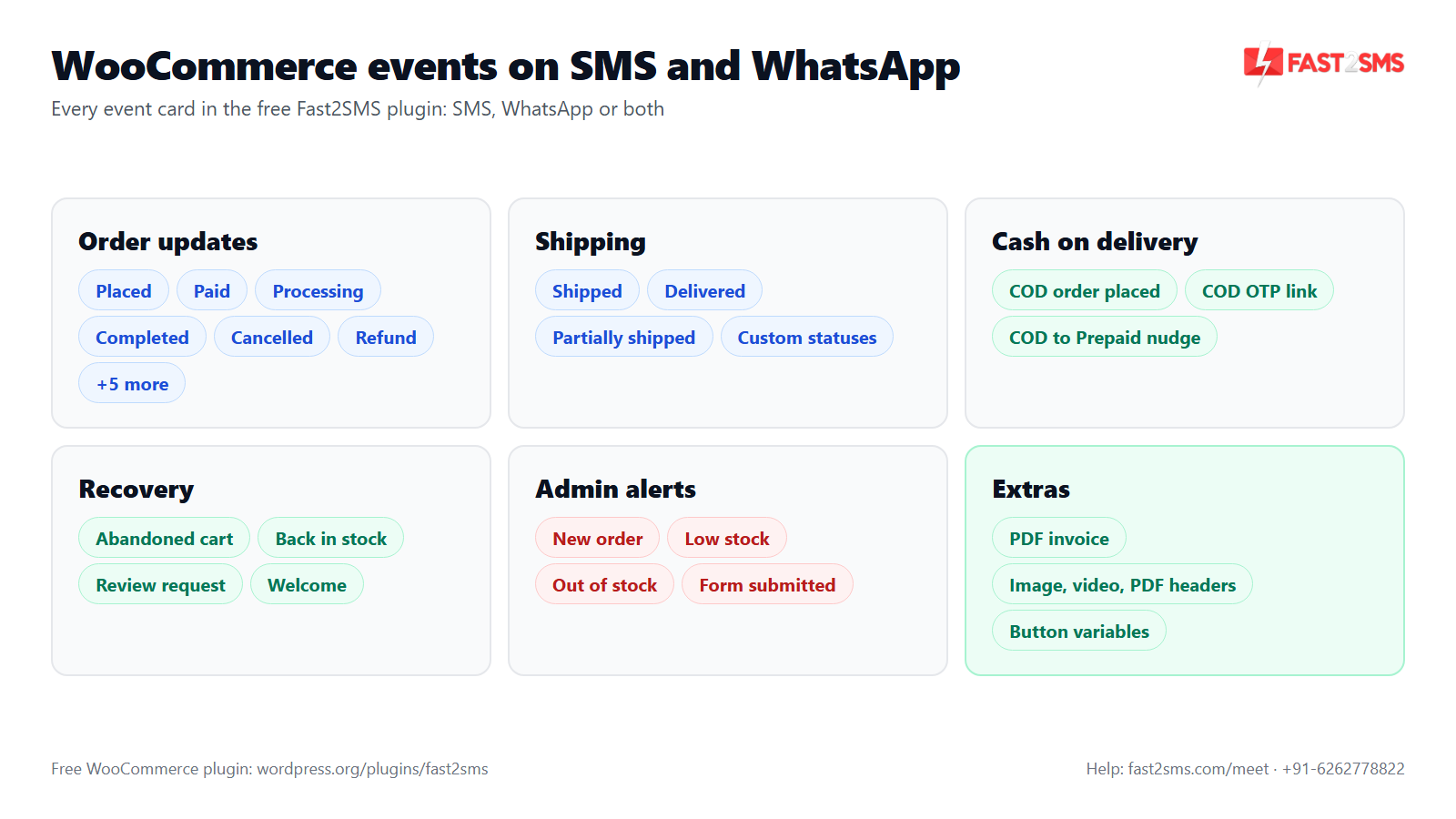
Order, shipping and COD events
Customer order events: Order placed, Order pending payment, Payment received, Order processing, Order completed, Order on hold, Order failed, Order cancelled, Refund created, Order partially refunded and Note added to order. Shipping events: Order shipped, Order delivered and Order partially shipped. Custom order statuses from courier and workflow plugins, such as In Transit, Out for Delivery or RTO, are detected and get their own card. For COD there is COD order placed, with an optional one-tap COD OTP confirmation link, and a COD to Prepaid nudge that cancels itself once the customer pays. Our WooCommerce order status SMS and WhatsApp guide covers each event, and the COD to Prepaid guide explains the nudge.
Each card can also alert the admin. Admin alerts cover New order, Low stock, Out of stock and Form submitted, sent to up to 10 admin numbers. You get 25+ order variables (name, order ID, amount, items, city, pincode, coupon, pay link and more), and any order meta key can become a custom variable.
WhatsApp, PDF invoice and costs
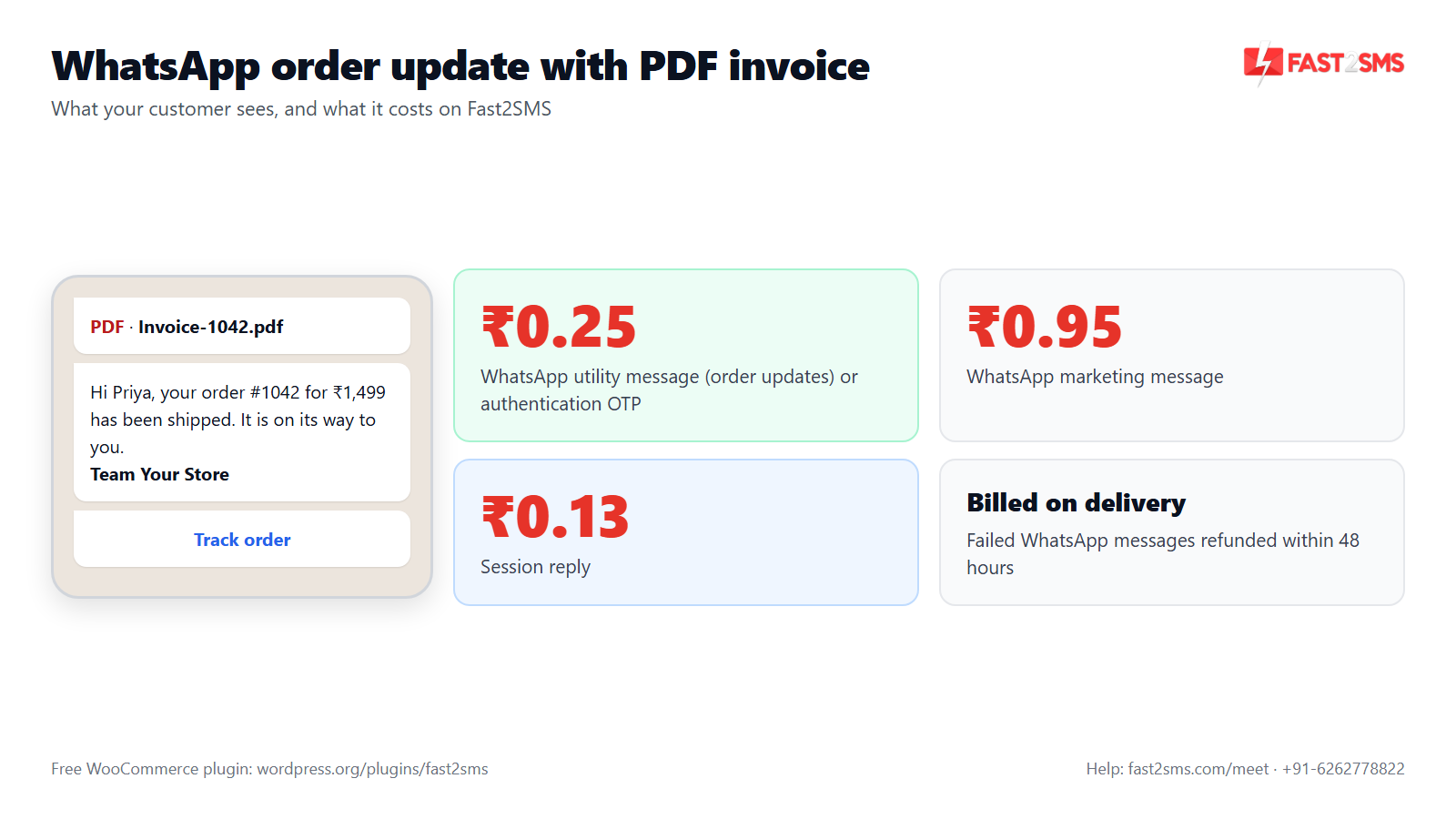
WhatsApp templates can carry an image, video or PDF header. The plugin can auto-generate a PDF invoice and send it through the {invoice_url} variable, and dynamic URL buttons are supported with a “Button variable” row. See WooCommerce WhatsApp notifications for template setup, and why WhatsApp templates get rejected if Meta turns one down.
DLT for SMS
For SMS, you pick from your approved DLT templates in the same card. DLT categories are now Transactional, Service Implicit and Promotional (Service Explicit has merged into Promotional). Templates use typed tags such as {#numeric#}, {#alphanumeric#} and {#url#}. Your PE-TM chain must be bound to a registered TMD, and from 30th September mismatched chains are blocked. Our DLT templates for WooCommerce guide has ready examples.
Abandoned cart, back in stock and campaigns
Abandoned cart recovery sends after a delay you set in Settings. Back in stock adds a “Notify me when back in stock” option and messages subscribed customers when the product returns. Review request and Welcome new customer round out retention. At checkout you can show a consent checkbox (“Send me order updates on SMS/WhatsApp”), and a do-not-send list stops marketing messages to anyone on it. Read more in our guides on abandoned cart SMS and WhatsApp and the back in stock notifier.
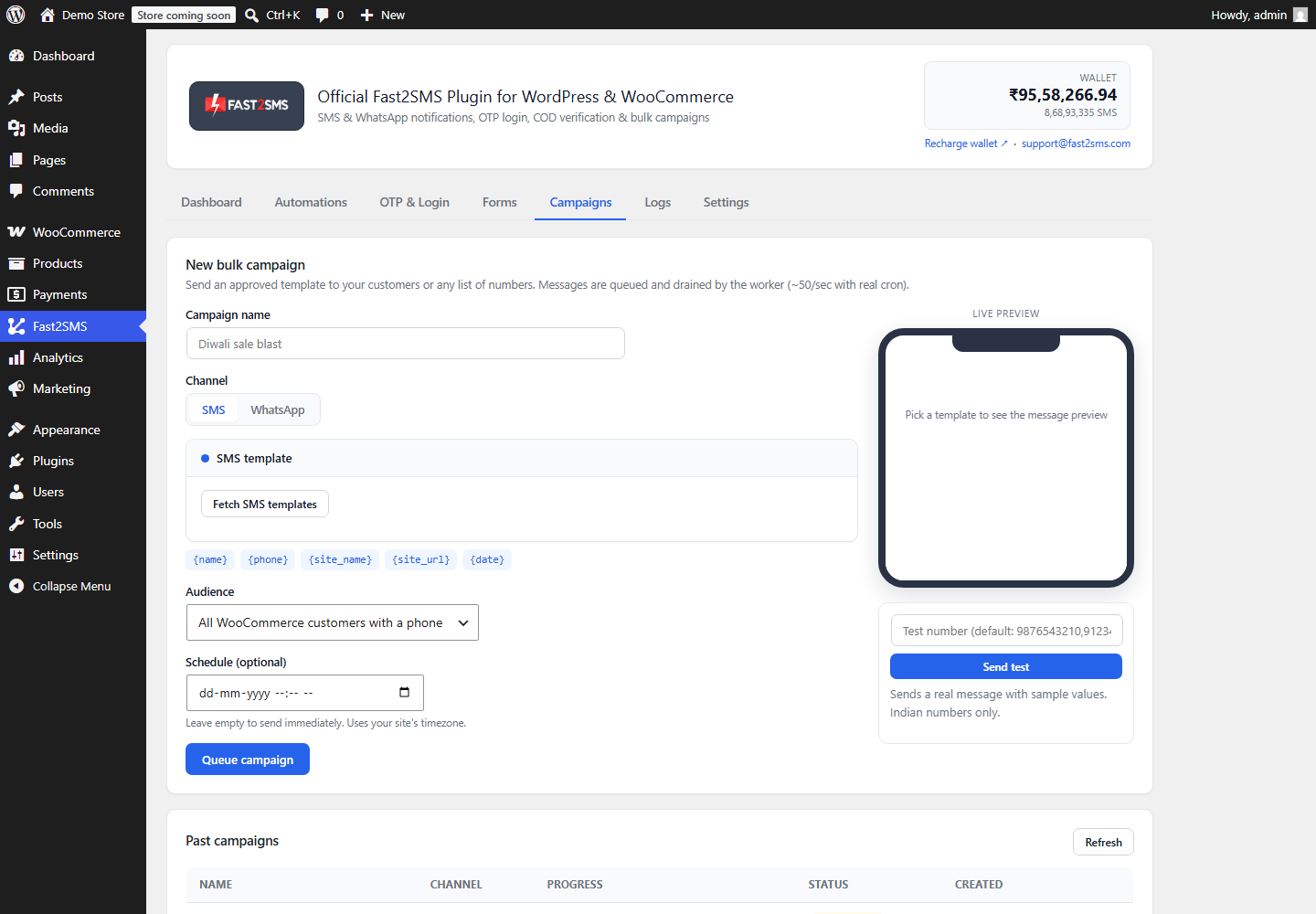
The Campaigns tab sends bulk SMS or WhatsApp to all WooCommerce customers, all WordPress users, or a pasted or CSV list. You can send now or schedule, preview and test first, and the queue retries automatically while skipping the do-not-send list. See WooCommerce SMS marketing and bulk campaigns.
Logs and delivery
The Logs tab shows each message’s event, channel, masked number, status, error and time, with one-click retry, retry all failed and CSV export. For steady sending, the Dashboard gives you a ready cron URL or the wp fast2sms worker WP-CLI command, with WP-Cron as a fallback. The plugin is HPOS compatible.
Pricing: free WooCommerce plugin, pay only per message
- The plugin is free: no licence, no monthly fee, no setup fee.
- WhatsApp OTP and order updates: ₹0.25 per delivered message; failed WhatsApp messages are refunded within 48 hours.
- SMS: your DLT SMS rate per message.
- High volume? Rates are negotiable: call +91-6262778811, email [email protected] or book a free meeting.
- Free signup with ₹50 test credit.
When another WooCommerce SMS plugin may suit you better
Here is our honest view of when to look past Fast2SMS.
- You sell outside India. Fast2SMS works with Indian 10-digit numbers only. The SMS Alert FAQ says you can request extra countries, and miniOrange says it supports OTP worldwide.
- You want to send SMS from your own phone SIM. WooSMS is built around an Android phone acting as the SMS gateway.
- You want COD confirmation by voice call. COD Order Confirmation for India offers a voice call mode.
- You run bookings, LMS, memberships or a multivendor store. SMS Alert lists booking, LMS, Dokan and MultiVendorX integrations. miniOrange lists Dokan and WCFM vendor SMS as premium.
- You want email and SMS from one plugin. miniOrange covers email as well as SMS.
Which WooCommerce SMS and WhatsApp plugin should you pick?
| Your store | Look at |
|---|---|
| Indian D2C store that wants SMS and WhatsApp order updates, PDF invoice and recovery messages, pay per message | Fast2SMS |
| SMS-first store that also needs booking or LMS plugin alerts | SMS Alert |
| Store already using miniOrange for OTP that wants order SMS in the same plugin | miniOrange |
| Only needs COD confirmation, including voice calls | COD Order Confirmation for India |
| Small store that wants to send SMS from its own Android phone | WooSMS |
Also comparing OTP plugins? Read our best WooCommerce OTP plugins guide. Moving off an international provider? See WooCommerce Twilio SMS alternative for India.
Want your WooCommerce SMS and WhatsApp updates set up for you? Our team will do it with you, free.
We will pick the right events, map your DLT and WhatsApp templates and send test messages with you on a call. Schedule a free meeting, call +91-6262778822 or email [email protected].
Frequently asked questions
What is the best WooCommerce SMS plugin for India?
The best WooCommerce SMS plugin for India is one that follows DLT, covers every order and COD event, and bills fairly; Fast2SMS and SMS Alert both mention DLT on their pages. Fast2SMS adds WhatsApp on the same event cards and is free, with pay-per-message billing.
What is the best WooCommerce WhatsApp plugin?
The best WooCommerce WhatsApp plugin sends order updates automatically through the official WhatsApp Business API, supports media headers like a PDF invoice, and lets you send SMS on the same event. Fast2SMS does this for Indian stores, at ₹0.25 per delivered utility message.
Is there a free WooCommerce SMS notification plugin in India?
Yes, the Fast2SMS plugin is a free WooCommerce SMS notification plugin for India, with no licence, no monthly fee and no setup fee. You pay only per message from your Fast2SMS wallet, and new signups get ₹50 test credit.
Which WooCommerce order events can send SMS or WhatsApp?
In Fast2SMS, every order status can send SMS or WhatsApp, from Order placed and Payment received to Order cancelled and Refund created, plus shipping, COD, recovery and admin events. Custom statuses from courier plugins get their own cards too.
Does SMS Alert send WhatsApp messages?
The SMS Alert page on WordPress.org describes SMS notifications and OTP, and it does not mention WhatsApp, so ask SMS Alert directly if you need WhatsApp. Its page does list abandoned cart, back in stock and promotional SMS campaigns.
Does miniOrange send WooCommerce order notifications?
Yes, the miniOrange OTP plugin lists SMS Notifications for WooCommerce Order Status, sent to buyers, sellers and admins when an order is placed or changes status. Low stock and out of stock alerts and vendor SMS for Dokan and WCFM are listed as premium features.
What happened to the miniOrange SMS notification plugin for WooCommerce?
The separate “miniOrange OTP Verification and SMS Notification for WooCommerce” listing on WordPress.org now shows as closed at the author’s request and is not available for download. The main miniOrange OTP plugin still lists WooCommerce order status SMS.
Do I need DLT registration for WooCommerce SMS notifications?
Yes, you need DLT registration for any WooCommerce SMS notification in India, because every SMS must match a registered header and an approved template. You also need a PE-TM chain bound to a registered TMD, and from 30th September mismatched chains are blocked.
Do WhatsApp order notifications need DLT?
No, WhatsApp order notifications do not need DLT registration, because DLT rules apply only to SMS sent in India, not to WhatsApp Business API messages. You do need a WhatsApp template approved by Meta. You can send order updates on WhatsApp and SMS together on the same event card.
How much does a WooCommerce WhatsApp notification cost?
On Fast2SMS, a WhatsApp utility message such as an order update costs ₹0.25 per delivered message, a marketing message costs ₹0.95, and a session reply ₹0.13. WhatsApp is billed on delivery, and failed WhatsApp messages are refunded within 48 hours.
Can I send a PDF invoice on WhatsApp from WooCommerce?
Yes, the Fast2SMS plugin can auto-generate a PDF invoice and send it as the document header of a WhatsApp template through the {invoice_url} variable. You attach it to any order event card, such as Order completed or Order shipped.
Can a WooCommerce plugin send abandoned cart SMS and WhatsApp?
Yes, Fast2SMS sends abandoned cart recovery on SMS or WhatsApp after a delay you set, and SMS Alert lists abandoned cart reminder SMS. In Fast2SMS, customers on the do-not-send list never get these messages. See our abandoned cart guide.
How do back in stock notifications work in WooCommerce?
A back in stock notifier lets shoppers subscribe on a sold-out product and messages them when it is available again. Fast2SMS adds a “Notify me when back in stock” option and sends SMS or WhatsApp, and SMS Alert lists a back in stock notifier for SMS.
Can I send bulk SMS or WhatsApp campaigns to WooCommerce customers?
Yes, the Fast2SMS Campaigns tab sends bulk SMS or WhatsApp to all WooCommerce customers, all WordPress users or a CSV list, now or on a schedule. It retries failed messages and skips the do-not-send list. SMS Alert also lists promotional SMS campaigns.
How do I send COD confirmation messages in WooCommerce?
Turn on the COD order placed event and add the one-tap COD OTP confirmation link, so the customer confirms the order before you ship. Fast2SMS does this on SMS or WhatsApp, and COD Order Confirmation for India offers SMS and voice call confirmation.
What is a COD to Prepaid nudge in WooCommerce?
A COD to Prepaid nudge is a message sent after a COD order that invites the customer to pay online instead, using a pay link. In Fast2SMS you set the delay in minutes, and the nudge cancels itself once the order is paid.
Can I get new order alerts on WhatsApp as a store owner?
Yes, Fast2SMS sends admin alerts for New order, Low stock, Out of stock and Form submitted to up to 10 admin numbers on SMS or WhatsApp. Any customer event card can also copy the admin with the “Also alert admin” switch.
Does the plugin support custom order statuses like Out for Delivery or RTO?
Yes, Fast2SMS auto-detects custom order statuses added by courier and workflow plugins, such as In Transit, Out for Delivery or RTO, and gives each one its own event card. You can also add statuses by slug with “Custom order status (manual slugs)”.
How do I stop marketing messages to customers who opt out?
Add their numbers to the do-not-send list in Fast2SMS Settings, and marketing messages such as abandoned cart, welcome, review, campaigns, back in stock and COD to Prepaid will never go to them. You can also add a consent checkbox at checkout.
Can I check whether WooCommerce SMS and WhatsApp messages were delivered?
Yes, the Fast2SMS Logs tab shows every WooCommerce SMS and WhatsApp message with its event, channel, masked number, delivery status, error and time. You can retry one message or all failed ones with one click, and export the logs as CSV for your records.
What is the difference between WhatsApp utility and marketing messages?
Utility messages are about something the customer already did, like an order update or shipping notice, while marketing messages promote offers or products. On Fast2SMS, utility messages cost ₹0.25 and marketing messages ₹0.95 per delivered message.
Can I send WooCommerce SMS from my own Android phone?
Yes, WooSMS says it turns your Android phone into the SMS gateway for your WooCommerce store, using its plugin, its Android app and a subscription plan. Fast2SMS works differently: messages go out through Fast2SMS with your DLT templates.
Why was my WooCommerce WhatsApp template rejected?
Common reasons a WhatsApp template is rejected include a wrong category, unclear variables, or promotional wording inside a utility template. Fix the wording and resubmit. Our WhatsApp template rejected FAQ lists the common reasons and fixes.
Can I use Twilio for WooCommerce SMS in India?
Any provider you use for WooCommerce SMS in India still needs DLT registration, approved templates and a valid PE-TM chain for every message. Fast2SMS is built for India with DLT templates inside the plugin. Compare the two in our Twilio alternative guide.
Do WooCommerce notification plugins need a cron job?
For reliable sending, Fast2SMS gives you a ready cron URL or the wp fast2sms worker WP-CLI command, with WP-Cron as a fallback. The SMS Alert FAQ says its abandoned cart messages use built-in scheduling without a manual server cron.
Is the Fast2SMS plugin compatible with WooCommerce HPOS?
Yes, the Fast2SMS plugin is compatible with WooCommerce High-Performance Order Storage (HPOS), so order events keep working after you switch. The WooCommerce features switch on automatically when WooCommerce is installed, and the plugin also works on plain WordPress.
Can one plugin handle both WooCommerce OTP and notifications?
Yes, the free Fast2SMS plugin handles OTP login, checkout OTP and COD OTP along with SMS and WhatsApp notifications, so you manage one plugin and one wallet. Checkout OTP works with the classic (shortcode) checkout only, not the block checkout.
Can someone help me set up WooCommerce SMS and WhatsApp notifications?
Yes, the Fast2SMS team will help you set up WooCommerce SMS and WhatsApp notifications for free, including templates and test messages. Schedule a free meeting, call +91-6262778822 or email [email protected].
Choosing your WooCommerce SMS and WhatsApp plugin
List the events you need today and the ones you will want in three months: COD confirmation, abandoned cart, back in stock, a festival campaign. Then pick the plugin that covers them on the channels your customers read. If you run an Indian store and want SMS and WhatsApp in one free plugin with per-message billing, install Fast2SMS and test it with the ₹50 signup credit.
Need help? Schedule a free meeting · [email protected] · +91-6262778822 · Sales and volume pricing: +91-6262778811