
Fast2SMS asks for documents only for a few things: DLT registration (done on the operator’s DLT portal), adding your DLT records and PE-TM binding in Fast2SMS, WhatsApp Business API (Meta business verification) and RCS brand registration. This checklist tells you which documents each step needs, where you upload them, and the file size and format rules, so you can keep everything ready before you start.
Documents at a glance
| For | Main documents | Where you upload them |
|---|---|---|
| DLT registration (entity, sender ID, templates) | Business PAN, one business proof, ID proof of the authorised person, Letter of Authorisation | The operator’s DLT portal, not Fast2SMS |
| Adding DLT records in Fast2SMS | Screenshots of your approved entity, sender ID and templates (or the DLT portal Excel export) | SMS > DLT Manager |
| PE-TM binding | DLT binding request screenshot, one company document, authorised person’s PAN and Aadhaar or Voter ID | DLT Manager > PE-TM Binding |
| WhatsApp Business API | Business documents for Meta business verification | Meta Business Manager |
| RCS brand registration | GST certificate, brand icon and cover image, website links | RCS > Create RCS > Registration Form |
1. DLT registration on the operator portal
To send DLT SMS you first register your business (the Principal Entity) on one DLT portal, such as Jio, Airtel, Vi, BSNL, Smartping or Tata. One registration works for all operators. Each portal has its own list and format, so check it at the time of registration. Usually you need:
- Business PAN card: the PAN of the company or firm. For a proprietorship, the proprietor’s PAN.
- One business proof: GST certificate, Certificate of Incorporation, TAN, trade licence, Shop and Establishment certificate, or MSME certificate.
- Address proof of the business, if the portal asks for it separately.
- ID proof of the authorised person: PAN card, Aadhaar, Voter ID, passport or driving licence.
- Letter of Authorisation (LOA) on company letterhead, signed and stamped, in the portal’s format.
- A working email ID and mobile number for the portal login and OTPs.
The entity registration fee is charged by the portal: ₹5,900 per year including GST on every portal (at the time of writing). Fast2SMS does not charge for adding your DLT entity, sender IDs and templates, or for PE-TM binding.
Sending in bulk? For high SMS volumes our team offers discounted rates. Talk to our team or see SMS pricing.
No GST? See DLT registration without GST. Trusts, schools and NGOs can follow DLT registration for trusts and societies.
2. Adding your DLT records in Fast2SMS
After the portal approves your entity, sender IDs (headers) and content templates, add them in DLT Manager:
- Entity ID: if Fast2SMS can confirm your Entity ID with the DLT platform, it is approved at once and no screenshot is needed. Otherwise enter the entity name and upload a screenshot from the DLT portal, and the entity waits for manual approval.
- Sender ID: enter the approved sender ID and upload the DLT approved sender ID screenshot, or upload the Excel file exported from your DLT portal.
- Content Template: paste the approved text and upload the DLT approved screenshot, or upload the portal’s Excel export.
Screenshot uploads take up to 5 files. The browser refuses a single file over 10 MB (“File size is not more 10MB”), and the total cannot go over 50 MB (“Maximum 50MB size is allowed.”).
3. PE-TM binding documents
TRAI requires your entity to be chained to the telemarketer (TM) that sends your SMS. You send the chain request to Fast2SMS’s TM ID on your DLT portal, then submit proof in Fast2SMS.
-
Open PE-TM Binding and confirm the request
Go to SMS, DLT Manager, PE-TM Binding. Copy the TM ID shown on the page, send the request from your DLT portal, then tick “I’ve sent the request to TM ID … from DLT Panel”.
-
Upload the binding screenshot and company document
In Submit binding request, select your entity and upload:
- DLT Binding Request Screenshot: an image, up to 10 MB.
- One company document: choose the type in Select Document Type (PAN, TAN, GST Certificate, Trade License, Shop & Establishment Certificate, MSME Certificate, Certificate of Incorporation or Other) and upload it as a PDF or image, up to 10 MB.
- Authorised person: the person’s name, PAN card and Aadhaar or Voter ID, each file up to 10 MB.
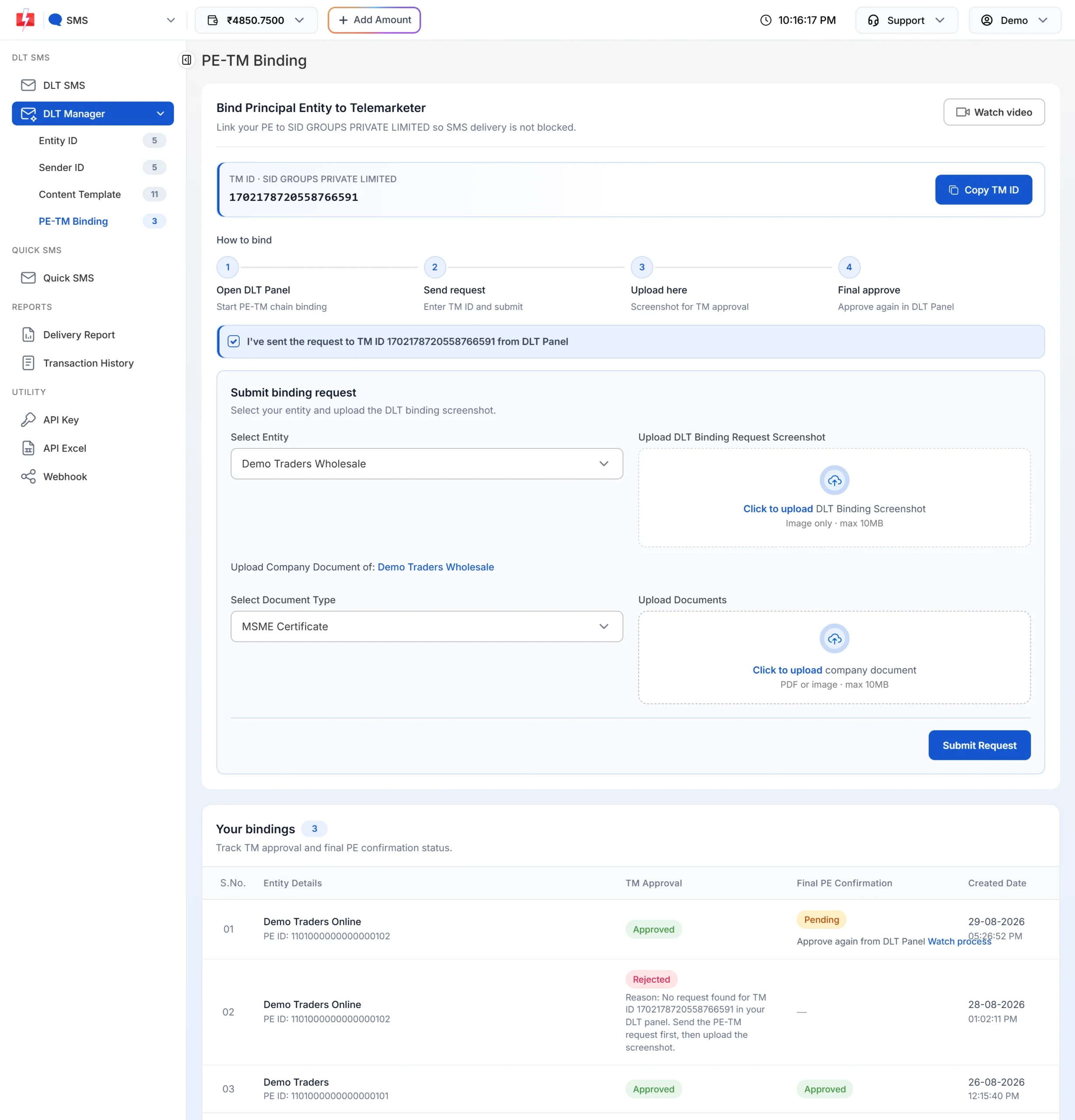
The PE-TM binding form and its document uploads. -
Submit and finish on the DLT portal
Click Submit Request. You see “PE-TM Binding created successfully and documents uploaded for verification”. After TM approval, approve the chain again on your DLT portal.
Files with the extensions .php, .exe, .zip, .mp4, .mp3, .mov and .mkv are refused. Upload a clear PDF, JPG or PNG instead.
4. WhatsApp Business API
You do not upload business documents to Fast2SMS to connect WhatsApp. You connect your number with Facebook login. Meta business verification is done in Meta Business Manager with documents in your business name. A verified business gets a higher starting messaging limit (2K unique customers per 24 hours at the time of writing). Our guide Meta business verification for WhatsApp API in India lists the documents Meta accepts and common rejection reasons.
5. RCS brand registration
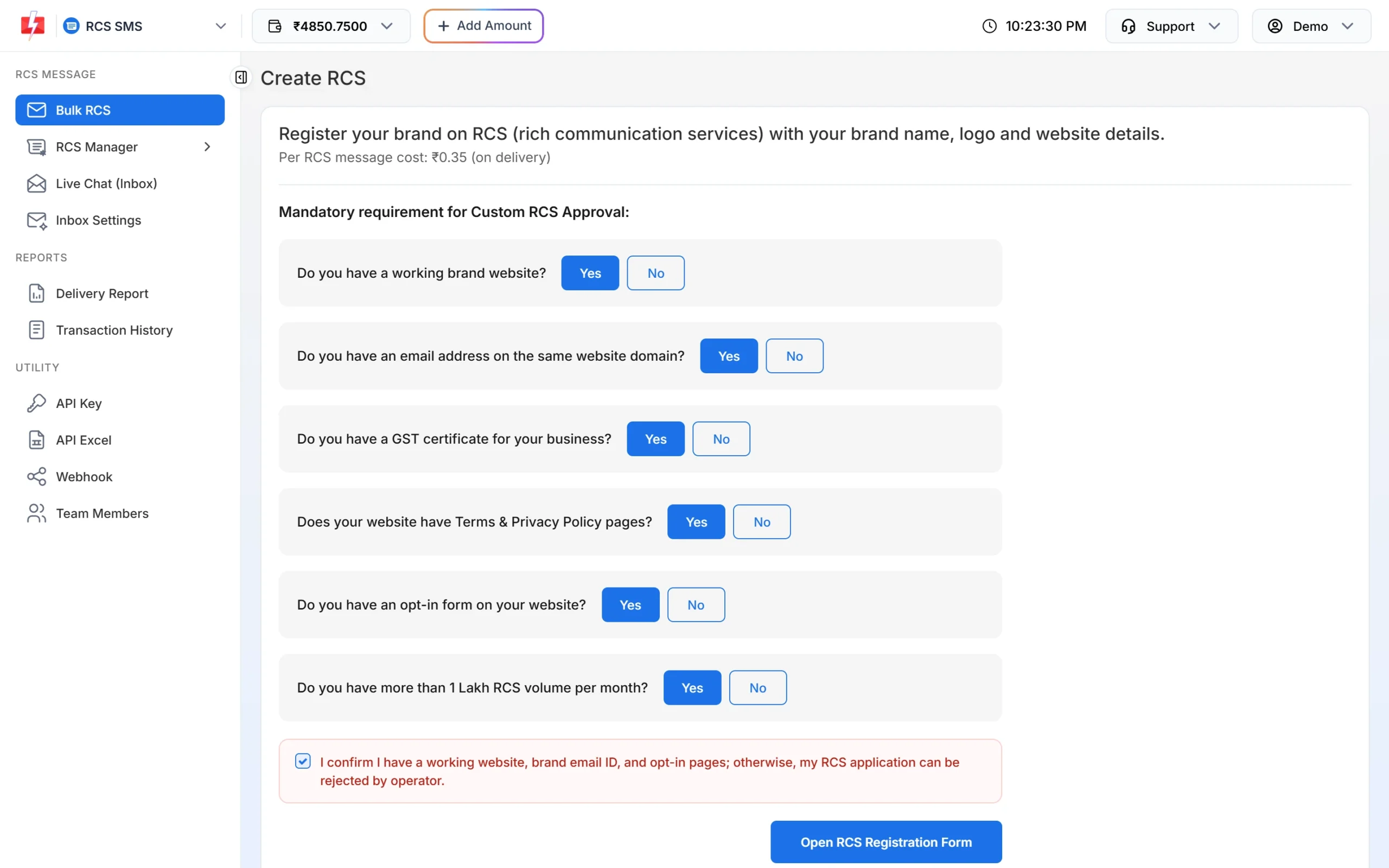
Open RCS and the Create RCS page. Before the form opens, you answer Yes to each requirement: a working brand website, an email address on the same website domain, a GST certificate, Terms and Privacy Policy pages on the website, an opt-in form on the website, and more than 1 lakh RCS messages per month.
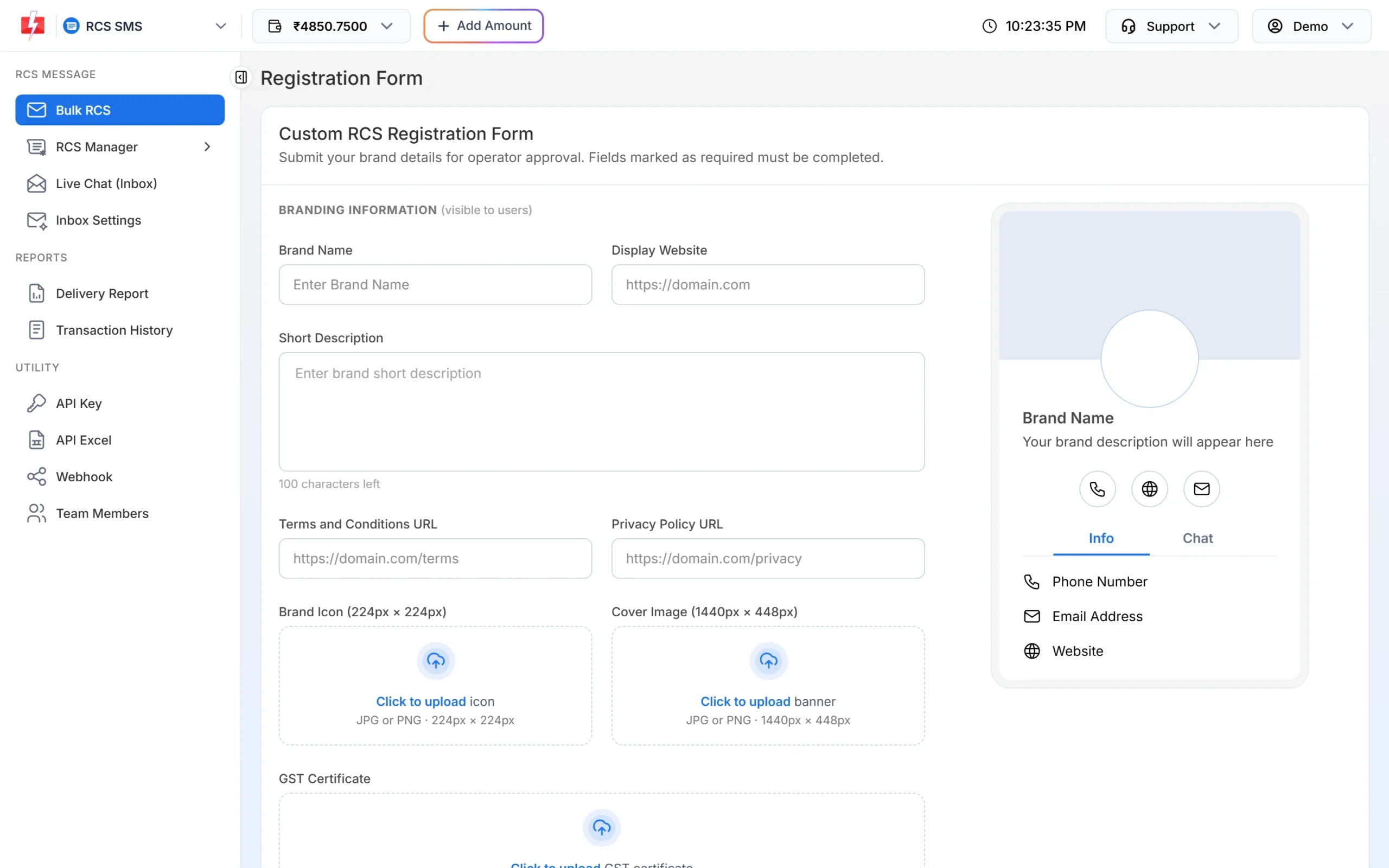
The Custom RCS Registration Form then asks for:
- Brand name, display website and a short description (up to 100 characters).
- Terms and Conditions URL and Privacy Policy URL.
- Brand Icon 224 × 224 px and Cover Image 1440 × 448 px, JPG or PNG, up to 2 MB each.
- GST Certificate as PDF, JPG or PNG, up to 5 MB.
- A display phone number (verified by OTP), a display email on your website domain, a contact person’s name and email (verified by OTP), and your customer opt-in URL.
Operator approval may take 3 to 7 days. The final confirmation email from the operator must be answered from the contact person’s email.
Document errors and what they mean
| Message | Fix |
|---|---|
| “Please upload your GST certificate.” | The RCS form needs the GST certificate file. |
| “GST certificate must be a PDF, JPG or PNG file.” | Save the certificate in one of these formats. |
| “GST certificate must not be larger than 5 MB.” | Compress or rescan the file below 5 MB. |
| “You must have a GST certificate for RCS Approval.” | RCS approval needs a GST certificate. Answer Yes only when you have one. |
| “File size is not more 10MB” | A DLT screenshot is over 10 MB. Crop or compress it. |
| “Maximum 5 files are allowed.” | Upload at most 5 screenshots for one DLT record. |
| “This entity already has a PE-TM binding. Use Migration Required to re-submit if needed.” | The entity is already bound. You do not need to upload documents again unless Fast2SMS asks for a migration. |
One more thing: your profile name
If your Fast2SMS account is Aadhaar-KYC verified, the Full Name field in Personal Detail is locked and cannot be edited there.
Frequently asked questions
Which documents do I need for DLT registration?
Usually your business PAN, one business proof such as a GST or MSME certificate, an ID proof of the authorised person and a Letter of Authorisation. Each DLT portal has its own list, so check it when you register.
Do I upload my DLT documents to Fast2SMS?
No. DLT documents go to the operator’s DLT portal. In Fast2SMS you only add your approved records in DLT Manager, with screenshots where asked, and the PE-TM binding documents.
What documents are needed for PE-TM binding?
The DLT binding request screenshot, one company document (for example PAN, GST or MSME certificate), and the authorised person’s name, PAN card and Aadhaar or Voter ID. Each file can be up to 10 MB.
Can I register for DLT without GST?
Yes. A GST certificate is only one of the accepted business proofs. Others include an MSME certificate, trade licence or Shop and Establishment certificate.
What does RCS registration need?
A working website with Terms and Privacy pages and an opt-in form, an email on your website domain, a GST certificate (PDF, JPG or PNG up to 5 MB), a 224 × 224 icon and a 1440 × 448 cover image.
Does WhatsApp API need documents?
Connecting a number does not. Meta business verification, which raises your limits, needs business documents that you submit to Meta.
How much does DLT registration cost?
The portal charges ₹5,900 per year including GST for entity registration (at the time of writing). Fast2SMS does not charge for adding DLT records or PE-TM binding.
Why was my PE-TM binding rejected?
The rejection reason is shown under TM Approval on the PE-TM Binding page. A common one is that no request was found for the TM ID on your DLT portal, so send the request first and then upload the screenshot.
Related guides
- PE-TM binding (chain binding) in Fast2SMS: what it is and how to do it
- DLT Manager in Fast2SMS: add Entity ID, Sender ID and templates
- DLT registration fees and validity on each portal
- Meta business verification for WhatsApp API in India
- RCS brand registration: requirements, approval time and rejection reasons
- DLT registration with Fast2SMS