
PE-TM Mismatch Emails from Jio, Airtel, Vi & BSNL: The Real Reason (One TMD Sending Through Another TMD)
The PE-TM mismatch emails are not coming from one operator any more. Jio TrueConnect started them, and businesses are now seeing the same “PE-TM chain binding error”, “unauthorized TM-D” and “hash code mismatch” language from Airtel, Vi, BSNL, Tata and Smartping DLT platforms too, on SMS and on email, every single day. Most senders react by re-checking templates and headers, which changes nothing, because the cause sits somewhere they cannot see: the telemarketer named in their chain is delivering their SMS through a different telemarketer’s operator connectivity. This article explains that mechanism in plain language, why it is now blocked, why the notice is addressed to you, and the one change that ends the emails for good.
Signup NowSchedule Free Meeting
Watch: the warning explained on screen
The notices, whichever operator sent yours
Jio’s version is the most widely received. The SMS from JIODLT-S reads “URGENT: PE-TM Chain mismatch detected for your SMS traffic… Traffic is not being blocked as of now, but will be blocked starting 30-Sep… please check with your Telemarketer for corrective action”, and the email from [email protected] is titled “PE-TM Chain Binding Errors Detected – Action Required”, listing your PE name, PE ID, the traffic date and a table of flagged TMD routes.
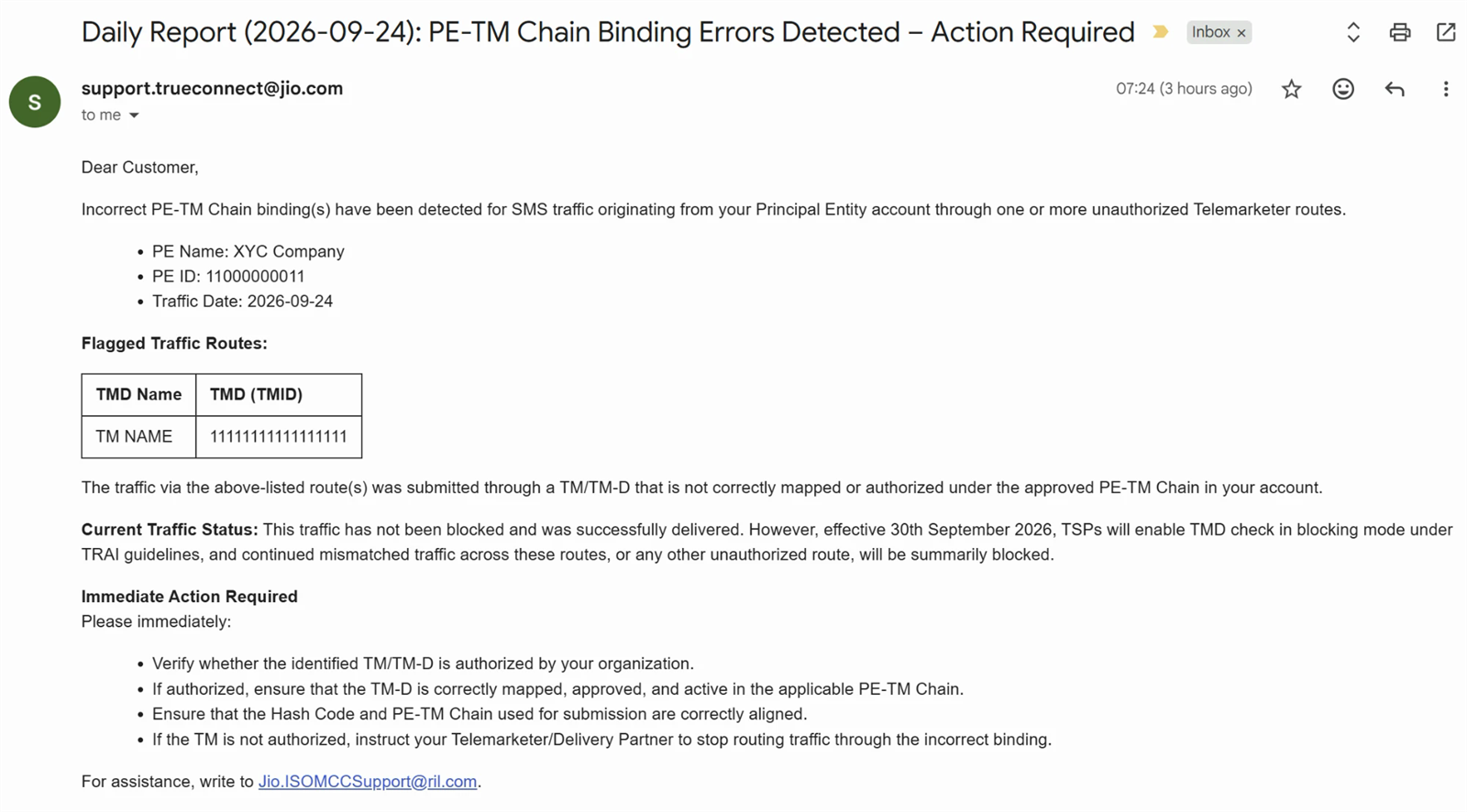
The other operators’ DLT platforms use their own wording, but every version says the same three things: your traffic was submitted through a TM/TM-D not mapped or authorized under your approved PE-TM chain; the hash code at submission did not match; and from 30th September such traffic will be blocked under TRAI’s PE-TM Binding Framework. Different sender, identical diagnosis. The exact Jio text is decoded line by line in the PE-TM mismatch warning explained.
The real reason, in one picture
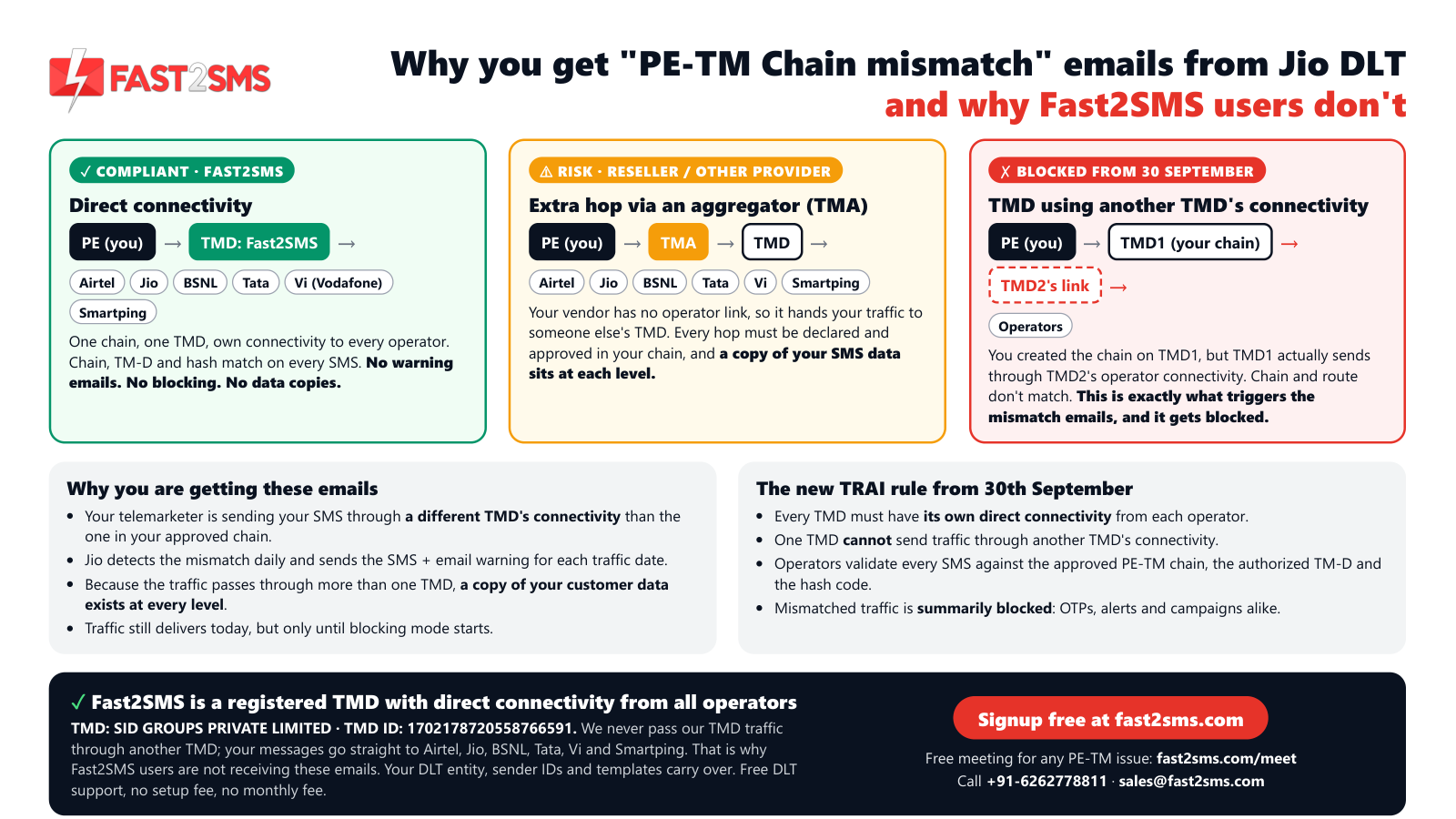
Here is what has been happening behind many SMS panels in India. You, the Principal Entity, created a PE-TM chain naming your provider as the telemarketer, call it TMD1. On paper TMD1 is a delivery telemarketer. In practice TMD1 does not hold its own connectivity with every operator; to reach Jio or Airtel it hands your messages to TMD2, a bigger telemarketer that does. The operator sees traffic for your PE arriving over TMD2’s connection, looks up your approved chain, finds TMD1, and flags a mismatch. That is the email.
Under the old regime this borrowing was tolerated. Under the PE-TM Binding Framework it is not:
- Every TMD must hold its own direct connectivity from each operator it delivers to.
- One TMD cannot send traffic through another TMD’s connectivity. The chain must terminate at the telemarketer that physically hands the SMS to the network.
- Every message is checked for three things: the approved chain, the authorized TM-D, and the hash code that fingerprints that chain. Background: DLT hash code explained.
- From 30th September, anything that fails the check is summarily blocked, OTPs included.
Why the email comes to you and not to your vendor
DLT holds the Principal Entity responsible for its own traffic. Your PE ID is on every message, the chain is created and approved from your login, and only you can create a new chain to a different TMD. So the operator writes to the entity that can act, and tells you to “check with your Telemarketer for corrective action”. Your vendor may already know; some have been quietly hoping the enforcement date would move.
The part nobody mentions: copies of your data
When traffic travels PE → TMA → TMD1 → TMD2 → operator, each hop is a separate company handling your message content and your customers’ mobile numbers. OTPs, order values, account alerts: a copy sits at every level. Direct connectivity is not only a compliance question; it is the difference between one party seeing your customer data and three.
Find out which route you are actually on
- Open the operator email and note the flagged TMD ID.
- Log in to that operator’s DLT portal and open your PE-TM chain: note the TMD in your approved chain (if a chain exists at all; status guide: PE-TM chain status explained).
- Ask your vendor for their TMD ID and whether they hold direct connectivity with that operator.
If the flagged ID differs from the TMD in your chain, your traffic is riding someone else’s connectivity: exactly the blocked pattern. If the three IDs match and you are still flagged, the chain is probably not approved on that operator; see the seven mismatch causes.
Your two options before the deadline
Option A: Make your current vendor deliver on their own connectivity
Ask them to submit your traffic only through their own TMD connectivity on every operator, and to prove it with their TMD ID. Many resellers and small telemarketers cannot, because they never had direct operator links; that is why they borrowed them. If the answer is a delay or a new “partner”, assume the emails will continue.
Option B: Bind to a TMD that already has direct connectivity everywhere
Fast2SMS registered TMD: SID GROUPS PRIVATE LIMITED · TMD ID 1702178720558766591
Direct connectivity with Airtel, Jio, BSNL, Tata, Vi and Smartping. Fast2SMS never passes its TMD traffic through another TMD: your messages go straight from your approved chain to the operator. That is why Fast2SMS users are not receiving these emails, and why their traffic is not affected by the 30th September blocking.
- Signup free at fast2sms.com; no setup or monthly fee, pay per SMS.
- Add your existing DLT details: entity ID, sender IDs and approved templates carry over; the DLT system is automated with auto approvals.
- Create a PE-TM chain to TMD 1702178720558766591 on each operator portal and complete both approvals: Jio, Airtel, Vi, BSNL, Tata, Smartping.
- Move your sending to the panel or the bulk SMS API. The daily emails stop because the mismatch stops.
Getting these emails daily? Talk to our team, free.
Bring the operator email and your PE ID to a short call; we identify which TMD is carrying your traffic and bind your chain correctly on every operator with you. Schedule a free meeting, call +91-6262778811 or email [email protected].
Frequently asked questions
Why am I getting PE-TM mismatch emails from more than one operator?
Because the same borrowed route is used on every operator your traffic touches. Each DLT platform checks independently and each flags the mismatch on its own network.
What does “one TMD sending traffic from another TMD” mean?
The telemarketer in your chain (TMD1) does not have its own operator connectivity, so it delivers your SMS through a second telemarketer’s connection (TMD2). The operator sees TMD2, your chain says TMD1, mismatch.
Is this a problem with my templates, headers or entity registration?
No. Those stay valid. The problem is the delivery route versus the approved chain. Re-approving templates will not stop the emails.
My vendor says they are a TMD. Why the mismatch then?
Being registered as a TMD is not the same as holding direct connectivity with every operator. Ask which operators they connect to directly and whether your traffic ever passes through another TMD.
Will my SMS actually stop after 30th September?
Yes, on any route that mismatches: the operator drops the messages at handover, OTPs and transactional alerts included, with no per-message appeal.
Why do Fast2SMS users not receive these emails?
Fast2SMS (SID GROUPS PRIVATE LIMITED, TMD ID 1702178720558766591) holds direct connectivity with Airtel, Jio, BSNL, Tata, Vi and Smartping and never routes through another TMD, so the approved chain and the actual route are the same and the check passes.
Do I need to re-register on DLT to switch?
No. Your entity, headers and templates belong to your PE. You add a new PE-TM chain to the new TMD on each operator and point your sending at the new panel or API.
How long does the switch take?
Usually a day: chain requests take minutes per portal, Fast2SMS accepts promptly, and you complete the PE-side approval. Support does it with you on a free call.
What about the copies of my data at other TMDs?
Moving to a direct route stops new copies immediately; only one party, the delivery telemarketer, handles your traffic from then on.
Does this affect WhatsApp or RCS?
No. The framework applies to DLT SMS. Many businesses use Smart OTP on WhatsApp with SMS fallback as a safety net during migration.
Where do I get help?
Free meeting: fast2sms.com/meet. Sales: +91-6262778811 / [email protected]. Existing accounts: [email protected].
End the emails by ending the borrowed route
The notices stop the day your approved chain and your actual delivery route become the same thing. Bind to a TMD with its own connectivity everywhere, and they do.
Signup NowSchedule Free Meeting
Sales: +91-6262778811 · [email protected] | Support: [email protected]