
Why Your WhatsApp Message Failed With “Maintain Healthy Ecosystem” Error?
 If your WhatsApp also shows up “Maintain Healthy Ecosystem” then you’re most welcome to this article! Come and let’s look into it’s root cause and demonstrate on the solution.
This failure status is not a technical glitch or system error. This message is blocked by Meta to avoid overburdening of spam messages and protect users from excessive promotional communication. In other words, this restriction is a part of WhatsApp’s Per-User Marketing Template Message Limits, which actually controls how many promotional messages a user can receive within a specific period of time. In this article we are going to delve into what this error actually means, why it happens and practical steps needs to be taken to prevent it in future.
What does “Maintain Healthy Ecosystem” Error mean?
WhatsApp’s environment is designed to feel personal and low noise as it says “End-to-end encryption.” For monitoring and upkeeping of this environment Meta continuously keeps an eye on how often users are receiving marketing messages and how they are responding to those messages. As soon as Meta feels that delivering another promotional message may reduce user experience it blocks that messages automatically as the recipient has already received maximum number of marketing messages allowed during a specific period. So, in simple words, it is just a protective measure taken by Meta to safeguard users from unwanted promotional messages.
Why Meta Applies This Restriction?
Meta’s ecosystem is built upon user engagements and if users starts getting frustrated with promotional messages they can likely:
- Report businesses as spam (might affect businesses if received in big number)
- Block business numbers
- Ignore marketing messages entirely
- Reduce engagement
These restrictions are applied only to Promotional messages not on Utility or Promotional messages as it has more chances of being reported as spammy.
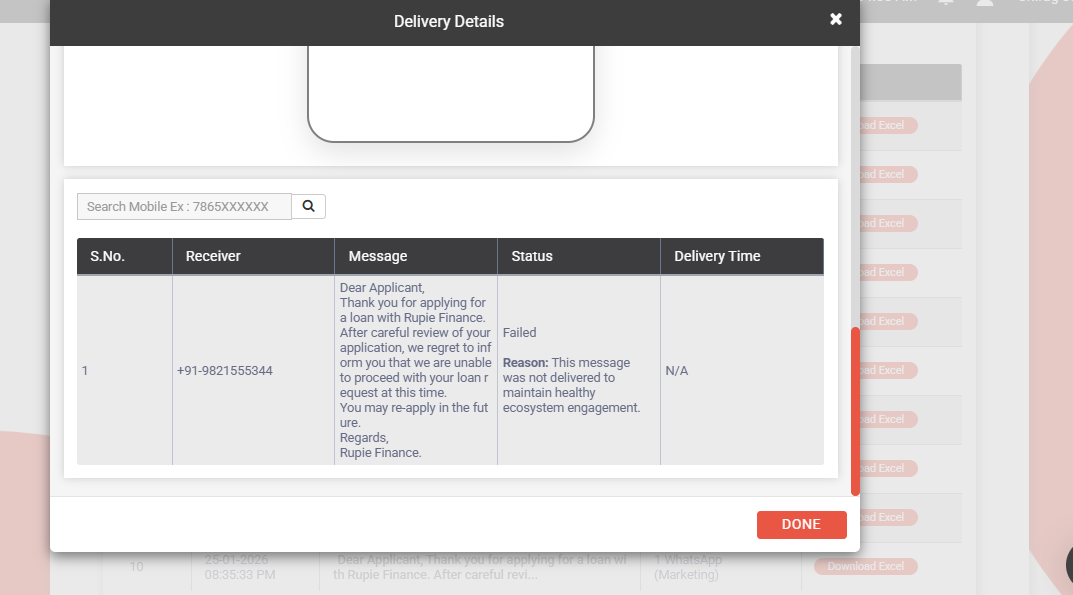
Actions That Triggers This Error
- Excessive Promotional Messages: Sending multiple marketing messages to the same user within short timeframe increases chances of getting blocked.
- Low User Engagement: Meta monitors how user interacts with the messages and if users frequently ignores messages, don’t reply, don’t engage then further marketing messages are more likely to be restricted.
- Misclassification of Content: Sometimes templates that are actually Utility gets categorized under Marketing template. This naturally applies the restrictions of Marketing messages to so-called Utility message.
- Per-User Marketing Limits Reached: The recipient has already received the maximum number of marketing messages allowed during a certain period.
Common Error Codes Section
| API | Code |
| WhatsApp Cloud API | 131049 |
| WhatsApp On-Premises API | 131026 |
For complete WhatsApp error code documentation, refer to:https://developers.facebook.com/docs/whatsapp/cloud-api/support/error-codes
Fast2SMS Solution Section
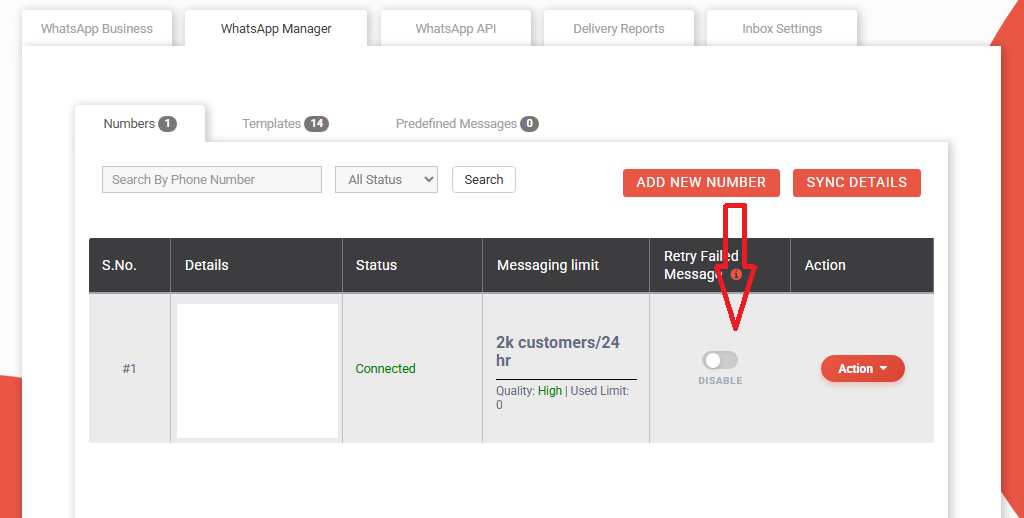
If your messages fails due to Healthy Ecosystem issue, Fast2SMS provides solution in the form of automatic retry mechanism.
Steps to Enable Automatic Retry
- Login to Fast2SMS panel.
- Navigate to:
WhatsApp Business → WhatsApp Manager - Enable the “Retry Failed Messages” option.
Messages that fails due to Healthy Ecosystem restrictions are automatically retried the next day.
How to Prevent This Error In Future Campaigns?
We all have heard, “Prevention is better than cure”, similarly we can’t deliver the message once it is blocked by Meta so the only thing in our hands is to follow better strategy to prevent this error in future.
Use the Correct Template Category
Choose template categories carefully:
- Utility Messages: Order updates, reminders, service alerts.
- Authentication Messages: OTPs, verification.
- Marketing Messages: For promotional contents.
Request Misclassified Template Review
If Meta has incorrectly categorized your template as Marketing, submit a review request. Convey the clear justification that the message is incorrectly classified under Marketing template.
Controlled Frequency of Messages
Avoid sending repeated promotional messages to the same user within a short duration window. Instead, make the breathable gaps between different campaigns, prioritize important messages first, avoid regular sending of promotional messages.
Target only Opted-In Users
Send marketing messages only to the users who have opted in or showed interest in your brand/business as they engage more, put less grievances and reduce ecosystem blocks.
Deliver Valuable Contents
Provide users with meaning information like exclusive offers, product updates, helpful tips, service notifications, etc and avoid sending generic promotional messages repeatedly.
Respect User Preferences
Allow customers to opt out if they no longer wish to receive marketing messages. This will inculcate trust, improve quality rating and reduce delivery failures.
Utilize Active Conversations
If a user already has an open marketing conversation, use it effectively by sending follow-up messages instead of starting multiple campaigns.
Frequently Asked Questions (FAQs)
Q.1) Is this issue from Fast2SMS?
Answer – NO. This behaviour is controlled by WhatsApp (Meta).
Q.2) Can this limit be removed?
Answer – NO, as these limits are imposed by Meta directly.
Q.3) Will retying works immediately?
Answer – Generally NO. It is recommended to wait and allow Fast2SMS’s Retry Mechanism to work and resend the message the next day.
Q.4) Does this affect Utility or Authentication templates?
Answer – NO. This issue mainly affects Marketing Templates.
Final Conclusion
The “Maintain Healthy Ecosystem” failure is not a technical error but a protective delivery control by Meta to reduce spam risks from marketing messages. However, please note if your message gets failed due to unhealthy ecosystem you can retry mechanism of Fast2SMS. Businesses that manage template categories correctly will see significantly better delivery outcomes. Understanding this process helps you craft message campaigns smartly and build healthier messaging with clients. If you continue facing issues, please contact the Fast2SMS Support Team for assistance.