
If a team member cannot log in, cannot see WhatsApp chats, or cannot see a business number in Live Chat, the cause is almost always in their settings under Account Setting > Team Members: WhatsApp access is not ticked, no number is assigned, the status switch is off, or their role only shows assigned chats. This page lists every Live Chat access message, what it means, and the exact fix for the account owner.
First, check the team member’s settings
-
Open Team Members as the account owner
Log in with the owner account and go to Account Setting > Team Members (also in the WhatsApp menu under Utility). Only the owner can open this page. Find the person in the list and look at three columns: Access (WhatsApp / RCS), Show Contacts and Status.
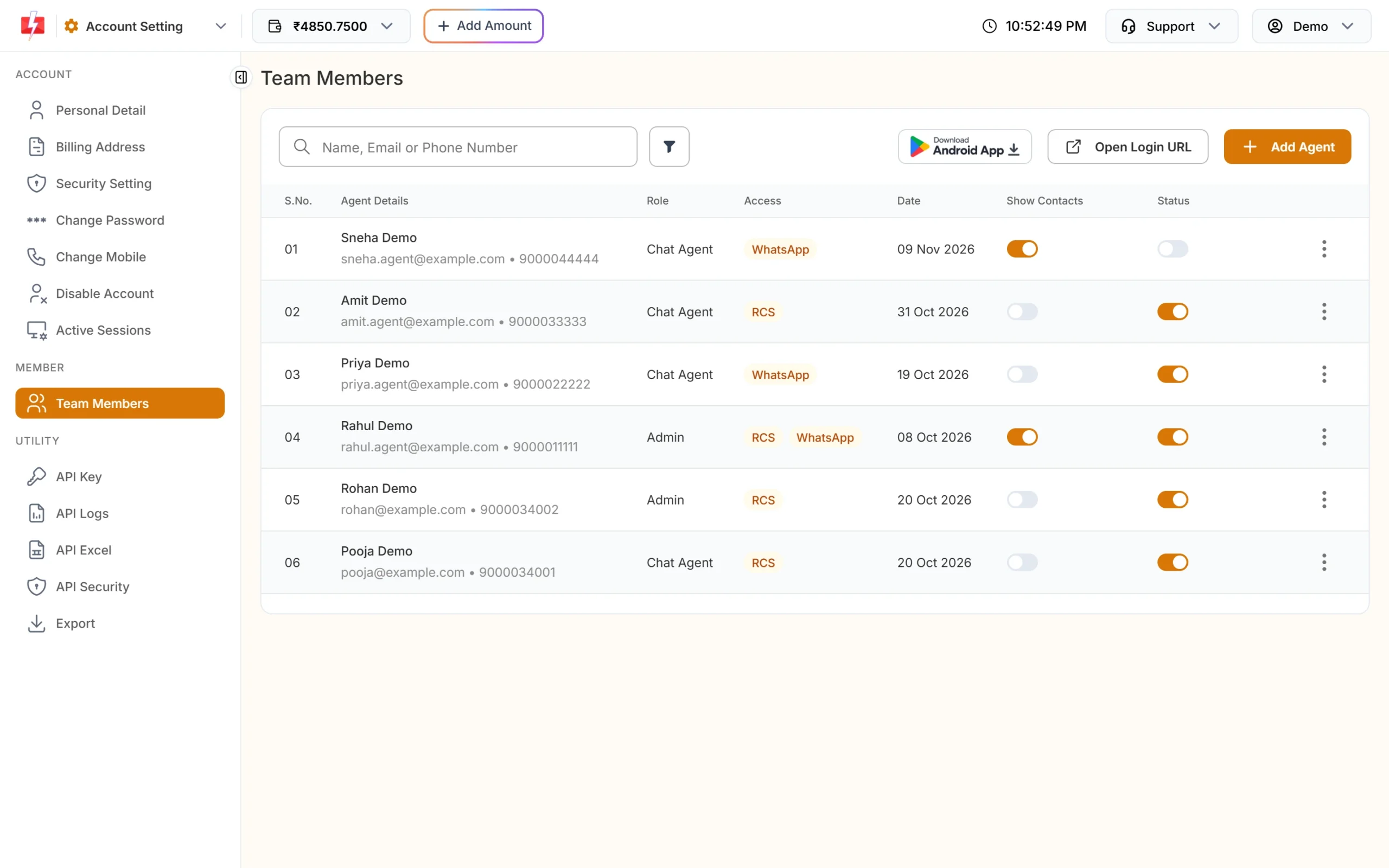
One agent here has Status off, so they cannot work in Live Chat. -
Edit the agent and fix the access
Click the three dots on the row and choose Edit. Under ACCESS SETTINGS, tick WhatsApp and choose at least one business number. This is needed for Admins as well: WhatsApp access only counts when a number is assigned. Check Agent Role, then click Save Agent. Leave the password blank to keep the current one.
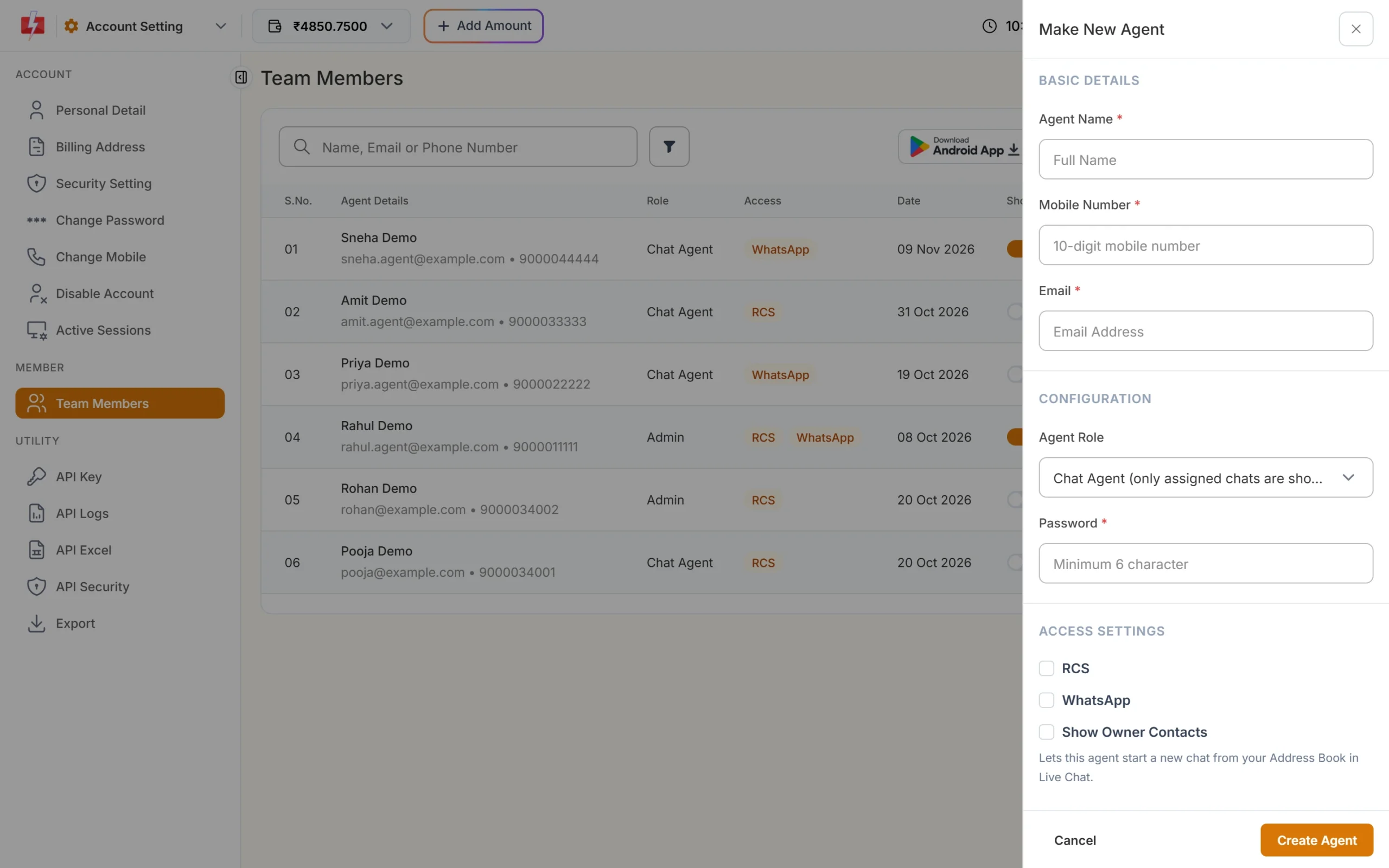
Access settings in the agent drawer: tick WhatsApp and pick the numbers. -
Turn on Status and, if needed, Show Contacts
Back in the list, switch Status on and confirm with Yes, Update. Switch Show Contacts on if the agent should start new chats from your Address Book. This switch saves at once.
-
Ask the agent to log in again
Agents log in on the agent login page, not on the owner login. Click Open Login URL on the Team Members page to copy the link and send it to them. They can also use the Fast2SMS Agent Login Android app.
Every Live Chat access message, explained
At login
| Message | Why it appears | Fix |
|---|---|---|
| “No WhatsApp or RCS access assigned. Please contact your admin.” | The agent has no channel that counts. WhatsApp ticked without any number also counts as no access. | Edit the agent, tick WhatsApp and choose a number (or tick RCS and choose a bot). |
| “Invalid credentials or account inactive.” | Wrong email or password, or the agent’s Status is off. | Check the email in the list, switch Status on, or set a new password with Edit. |
| “Your account is blocked.” | The login is blocked. | The account owner should contact Fast2SMS support. |
Inside Live Chat
| Message | Why it appears | Fix |
|---|---|---|
| “Your account does not have access to WhatsApp Live Chat. Please contact your administrator to get access enabled.” | The agent has RCS access but not WhatsApp. | Tick WhatsApp in the agent’s access settings and choose a number. |
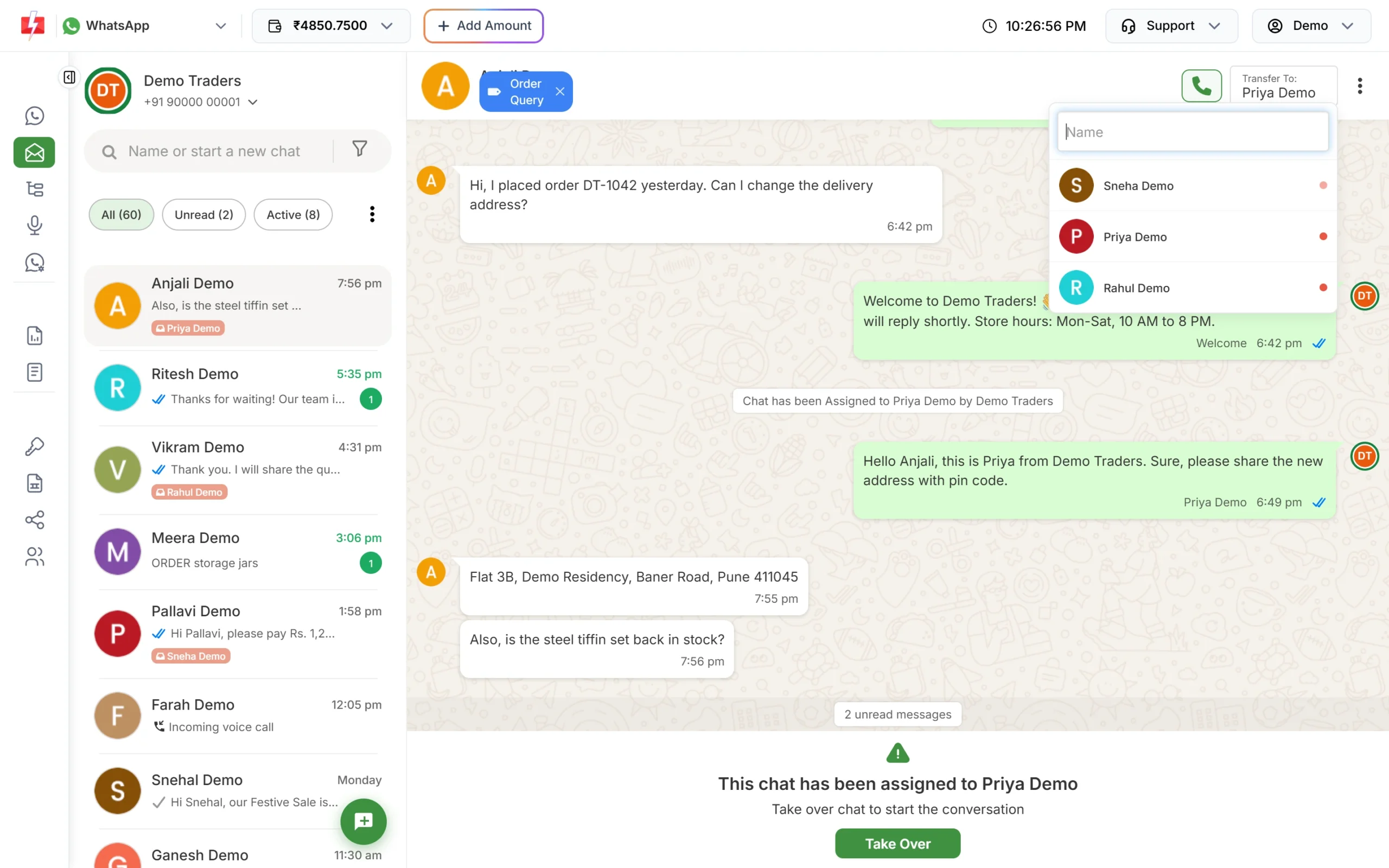
| “You do not have any WhatsApp Business Numbers assigned to your account. Please contact your administrator to get access to WhatsApp Live Chat.” | No number is assigned. For a Chat Agent, it also shows when none of their numbers has a chat assigned to them yet. | Assign a number. For a Chat Agent, also assign at least one chat with Transfer To, or make them an Admin. |
| “Account deactivated” | The owner switched the agent’s Status off. They are logged out on their next action. | Switch Status on and ask them to log in again. |
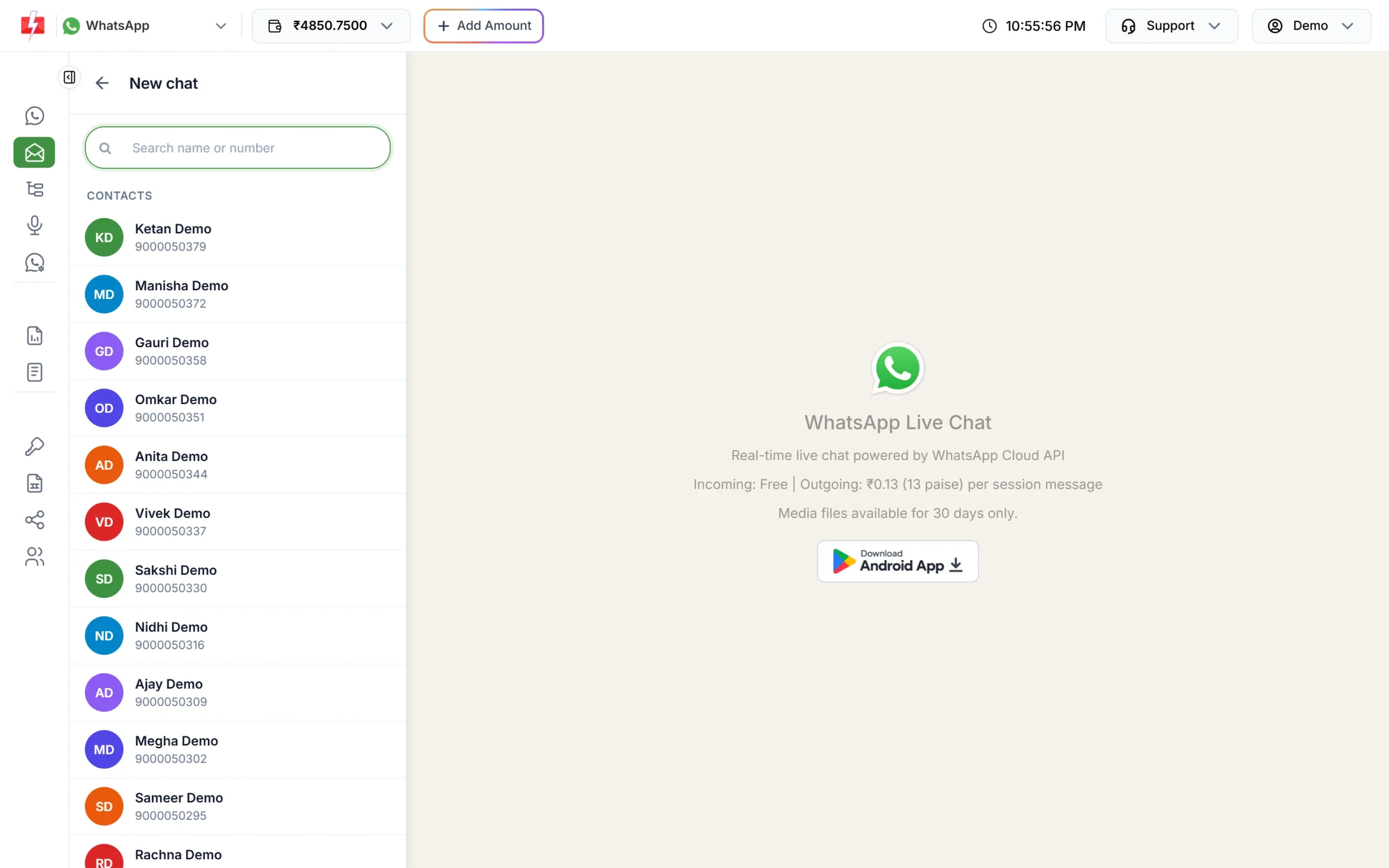
| “You do not have access to the owner contacts.” | Show Owner Contacts is off, so the agent cannot browse your Address Book in New chat. | Turn on Show Contacts for the agent, or let them type the number instead. |
| “A chat with this number already exists. Please ask the owner to assign it to you.” | A Chat Agent tried to start a new chat with a customer who already has a chat that is not theirs. | The owner or an Admin opens that chat and uses Transfer To to give it to the agent. |
| “No active WhatsApp business number found.” / “This WhatsApp business number is not available.” | Shown when starting a new chat, when the business number cannot be used for it. | Check the number shows Connected in WhatsApp Manager > Numbers and is assigned to the agent. Then reload Live Chat. |
| “maximum tags created” | The business number already has more than 100 tags. | Reuse existing tags instead of creating new ones. |
| “Insufficient wallet balance” / “Add money in your wallet before using Live Chat” | Agents send from the owner’s wallet, and it is empty. | The owner adds money with Add Amount. |
On other pages
“This page is only available to the account owner.” shows when an agent opens settings, wallet or transaction pages. Agents only have Live Chat (WhatsApp), Live Chat (RCS) and Logout in their menu. An agent who opens Bulk WhatsApp is sent to Live Chat.
Chat Agent or Admin: who sees what
| Chat Agent | Admin | Owner | |
|---|---|---|---|
| Numbers shown | Assigned numbers that have at least one chat assigned to them | All assigned numbers | All connected numbers |
| Chats shown | Only chats assigned to them | All chats on their numbers | All chats |
| Transfer To, bulk assign and extra filters | No | Yes | Yes |
| Start a chat from your Address Book | Only with Show Owner Contacts on | Only with Show Owner Contacts on | Yes |
| Delete chat, see the message price | No | No | Yes |
Common questions from owners
- “My agent sees an empty inbox.” A Chat Agent sees only chats assigned to them. Assign chats with Transfer To or Assign Multiple Chats, or change the role to Admin.
- “My agent was logged out.” Changing the agent’s password or switching their Status off logs them out.
- “My agent can’t start a chat from contacts.” Turn on Show Contacts. Without it, the New chat box asks for a mobile number instead.
Frequently asked questions
Why can’t my team member see WhatsApp chats in Fast2SMS?
Usually WhatsApp access is not ticked, no number is assigned, or they are a Chat Agent with no chats assigned yet. Fix it in Account Setting > Team Members > Edit.
Does an Admin agent need a number assigned?
Yes. WhatsApp access only works when at least one business number is assigned, for Admins too. Without it the login says “No WhatsApp or RCS access assigned.”
Where do team members log in?
On the agent login page. Copy its link with Open Login URL on the Team Members page, or use the Fast2SMS Agent Login Android app.
Can a team member send bulk WhatsApp campaigns?
No. Agents only get Live Chat. Bulk WhatsApp, templates, wallet and settings stay with the account owner.
How long does an agent stay logged in?
An agent login lasts 30 days, unless the owner changes their password or switches their Status off.
What does “Account deactivated” mean in Live Chat?
The owner turned the agent’s Status off. Switch it back on in Team Members and the agent can log in again.
Can I limit an agent to one WhatsApp number?
Yes. In the agent’s access settings, choose only that business number.
Related guides
- How to add team members (agents) in Fast2SMS and set their roles
- WhatsApp Business API login: where the owner and team log in
- Assign WhatsApp chats and use labels, tags and notes in Live Chat
- WhatsApp Live Chat in Fast2SMS: team inbox, agents and auto replies
- Incoming WhatsApp messages not showing in Live Chat: how to fix