
These WhatsApp utility templates for real estate developers, builders and brokers cover the messages buyers expect after they show interest or book: enquiry replies, site visits, booking receipts, allotment letters, payment demands, construction updates, registration, loan disbursement, possession and maintenance. Each template has the body text, sample values, buttons and the reason it fits the utility category. Launches, price-rise alerts and referral schemes are marketing, and the last section shows how to keep them apart.
Before you use these templates
- Your WhatsApp number is connected in Fast2SMS, and your customers agreed to get WhatsApp messages from you. See WhatsApp opt-in and opt-out rules.
- Pick Utility as the template type. Meta still decides the final category and can change it later, so nobody can promise that a template stays utility.
- Every body below starts and ends with fixed words, never a variable, because Meta rejects that. Keep it that way when you edit. See template character limits and variable rules.
- Fast2SMS allows up to 3 quick reply (Custom) buttons, 2 Visit website buttons and 1 Call Phone Number button per template. See WhatsApp template buttons.
- A utility template is about one buyer’s own enquiry, visit, unit or payment. Project launches and price news to your lead list are marketing.
Enquiries and site visits
1. Enquiry received
Template name: property_enquiry_reply
Hi {{1}}, thank you for your enquiry about {{2}}. Our property advisor {{3}} will call you on this number within {{4}} to share the details you asked for.- Sample values: {{1}} = Nikhil, {{2}} = 2 BHK homes at Demo Heights, {{3}} = Demo Patil, {{4}} = 2 hours
- Header and buttons: Call Phone Number: “Call advisor”
- Why it is utility: It answers a request the buyer made. A brochure with offers or “last few units” would make it marketing.
2. Site visit booked
Template name: site_visit_booked
Hi {{1}}, your site visit to {{2}} is booked for {{3}} at {{4}}. Use the button below for directions, or reply to this message to change the time.- Sample values: {{1}} = Nikhil, {{2}} = Demo Heights, Wakad, {{3}} = Sunday, 23 Nov, {{4}} = 11 AM
- Header and buttons: Visit website: “Get directions” (your map link)
- Why it is utility: It confirms a visit the buyer booked.
3. Visit reminder
Template name: site_visit_today
Hi {{1}}, a reminder of your visit to {{2}} today at {{3}}. Our advisor {{4}} will meet you at the site office. Please call us if you are running late.- Sample values: {{1}} = Nikhil, {{2}} = Demo Heights, {{3}} = 11 AM, {{4}} = Demo Patil
- Header and buttons: Call Phone Number: “Call site office”
- Why it is utility: A reminder about the buyer’s own visit.
Booking and documents
4. Booking amount received
Template name: booking_amount_receipt
Hi {{1}}, we have received your booking amount of Rs {{2}} for unit {{3}} in {{4}}. The receipt is attached, and our customer relations team will share the next steps within {{5}} working days.- Sample values: {{1}} = Kavya, {{2}} = 2,00,000, {{3}} = B-1204, {{4}} = Demo Heights, {{5}} = 3
- Header and buttons: Document header (PDF) with the receipt
- Why it is utility: A receipt for the buyer’s own payment.
5. KYC documents pending
Template name: booking_kyc_pending
Hi {{1}}, to complete the booking of unit {{2}} we still need {{3}}. Please upload it with the button below or hand it over at the site office.- Sample values: {{1}} = Kavya, {{2}} = B-1204, {{3}} = the PAN card copy of the co-applicant
- Header and buttons: Visit website: “Upload documents”
- Why it is utility: It asks for what the buyer’s own booking needs. Ask for a copy through your secure link, never for the number in chat.
6. Allotment letter
Template name: allotment_letter_pdf
Hi {{1}}, the allotment letter for unit {{2}} in {{3}} is attached. Please check your name, unit details and payment plan, and tell us within {{4}} days if anything needs correction.- Sample values: {{1}} = Kavya, {{2}} = B-1204, {{3}} = Demo Heights, {{4}} = 7
- Header and buttons: Document header (PDF) with the allotment letter
- Why it is utility: It delivers a document about the buyer’s own unit.
7. Registration appointment
Template name: agreement_registration_slot
Hi {{1}}, the registration of your agreement for unit {{2}} is fixed at {{3}} on {{4}} at {{5}}. Please bring the original ID and address proof of all buyers.- Sample values: {{1}} = Kavya, {{2}} = B-1204, {{3}} = the sub-registrar office, Pimpri, {{4}} = 4 Dec, {{5}} = 11:30 AM
- Header and buttons: Call Phone Number: “Call CRM team”
- Why it is utility: An appointment that is part of the buyer’s own purchase.
Payments and construction
8. Payment demand
Template name: payment_demand_letter
Hi {{1}}, the installment of Rs {{2}} for unit {{3}} is due on {{4}} on completion of {{5}}. The demand letter with payment details is attached.- Sample values: {{1}} = Kavya, {{2}} = 4,85,000, {{3}} = B-1204, {{4}} = 15 Dec, {{5}} = the 8th floor slab
- Header and buttons: Document header (PDF) with the demand letter
- Why it is utility: A billing notice for the buyer’s own unit, linked to the agreed payment plan.
9. Installment received
Template name: installment_received
Hi {{1}}, we have received Rs {{2}} towards unit {{3}} on {{4}}. Your total paid amount is now Rs {{5}}. The receipt is attached.- Sample values: {{1}} = Kavya, {{2}} = 4,85,000, {{3}} = B-1204, {{4}} = 12 Dec, {{5}} = 18,40,000
- Header and buttons: Document header (PDF) with the receipt
- Why it is utility: A receipt and balance update for the buyer.
10. Home loan amount received
Template name: home_loan_tranche_received
Hi {{1}}, we have received Rs {{2}} from {{3}} as a home loan disbursement for unit {{4}}. Your account statement with us has been updated.- Sample values: {{1}} = Kavya, {{2}} = 12,00,000, {{3}} = Demo Bank, {{4}} = B-1204
- Header and buttons: None
- Why it is utility: It reports a payment made for the buyer’s own unit.
11. Construction update
Template name: construction_progress_update
Hi {{1}}, a construction update for {{2}}: {{3}} was completed as of {{4}}. Photos and the full progress report are in your buyer login.- Sample values: {{1}} = Kavya, {{2}} = Demo Heights, Tower B, {{3}} = the 10th floor slab, {{4}} = 30 Nov
- Header and buttons: Visit website: “Open buyer login”
- Why it is utility: Progress on the project the buyer has bought into. Mentioning units still for sale would make it marketing.
Possession and after
12. Possession ready
Template name: possession_handover_slot
Hi {{1}}, possession of unit {{2}} in {{3}} is ready. Please book your handover slot with the button below, and our team will walk you through the unit and hand over the keys.- Sample values: {{1}} = Kavya, {{2}} = B-1204, {{3}} = Demo Heights
- Header and buttons: Visit website: “Book handover slot”
- Why it is utility: It tells the buyer their own home is ready.
13. Maintenance due
Template name: maintenance_charge_due
Hi {{1}}, the maintenance charge of Rs {{2}} for unit {{3}} for {{4}} is due on {{5}}. You can pay online with the button below. Please ignore this message if you have already paid.- Sample values: {{1}} = Kavya, {{2}} = 3,600, {{3}} = B-1204, {{4}} = December, {{5}} = 10 Dec
- Header and buttons: Visit website: “Pay maintenance”
- Why it is utility: A billing reminder for the owner’s own unit.
14. Service request registered
Template name: service_request_logged
Hi {{1}}, your request {{2}} about {{3}} in unit {{4}} has been registered. Our maintenance team will visit on {{5}}, and you can reply here to change the time.- Sample values: {{1}} = Kavya, {{2}} = MR-3302, {{3}} = a leaking bathroom tap, {{4}} = B-1204, {{5}} = 22 Nov
- Header and buttons: None
- Why it is utility: It confirms a request the owner raised.
These would be marketing
These go to people who already know you, but each one sells. Send them as marketing templates, only to people who agreed to get offers on WhatsApp.
| Message | Why Meta treats it as marketing | What to do instead |
|---|---|---|
| New launch: 2 and 3 BHK homes at {{1}} from Rs {{2}} lakh. Book a site visit. | A project launch to your list is promotion. | Marketing template, to opted-in leads. |
| Hi {{1}}, prices at Demo Heights go up from {{2}}. Book now at the current price. | It pushes a purchase with urgency. | Marketing template. |
| Thank you for your payment. Refer a friend and get a Rs 1 lakh voucher. | A referral offer added to a receipt makes the whole template marketing. | Send the receipt template above, and the offer separately. |
What these templates cost
At the time of writing, Fast2SMS charges ₹0.25 per utility message and ₹0.95 per marketing message, and your account may have its own rates. A builder that sends a demand letter, a receipt and a construction update to 800 buyers a month sends 2,400 messages: ₹600 as utility, or ₹2,280 if a referral offer turned those templates into marketing. See WhatsApp API price in India.
Sending in bulk? For high WhatsApp volumes our team offers discounted rates. Talk to our team or see WhatsApp pricing.
How to add these real estate templates in Fast2SMS
-
Open the template form
Go to WhatsApp Manager > Templates and click Add Template. If you have more than one WhatsApp number, pick the sender number at the top right.
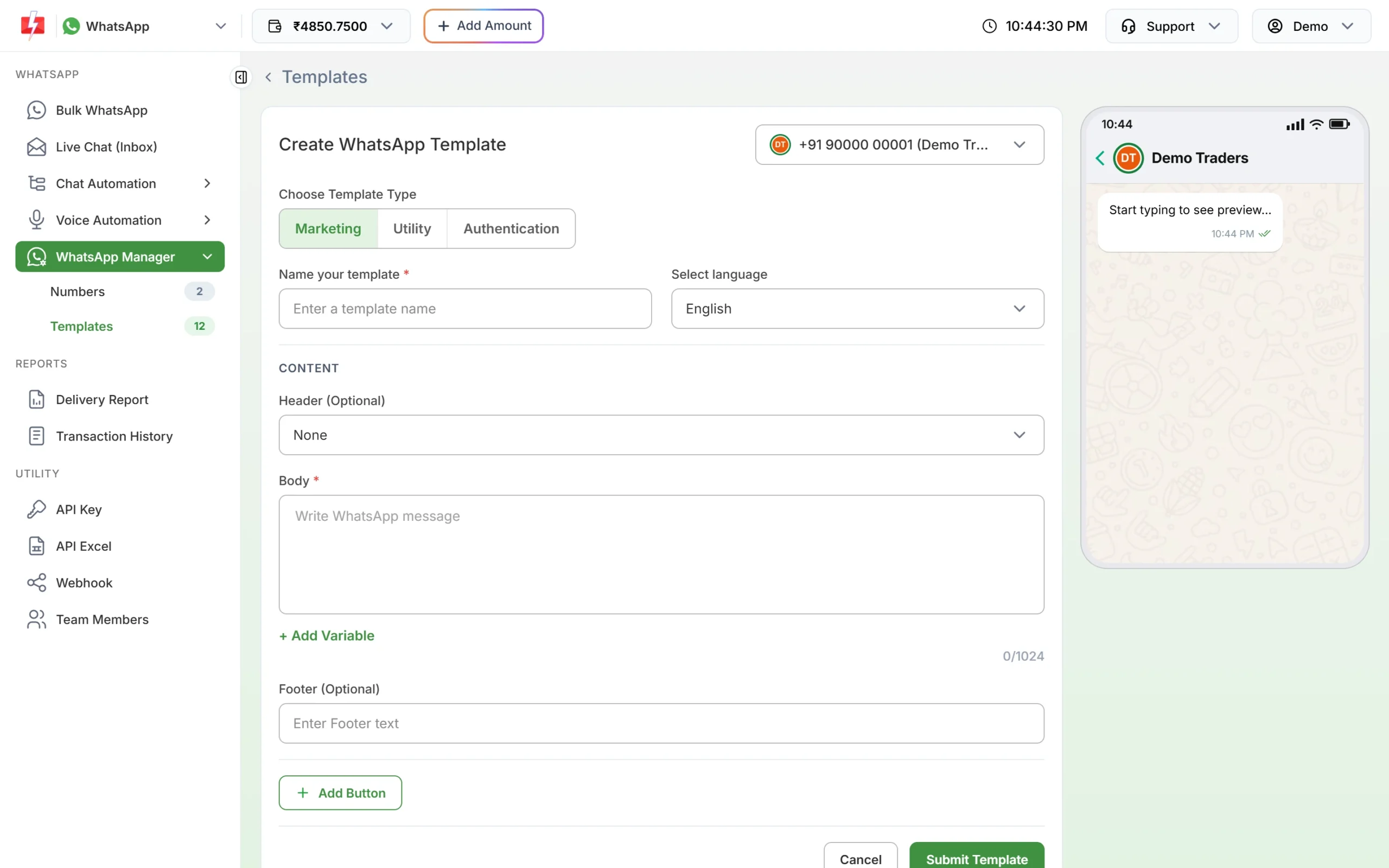
Click Utility under Choose Template Type. -
Choose Utility and paste the text
Under Choose Template Type, click Utility. Type the template name, for example payment_demand_letter, and pick the language. Paste the body, put each value in with + Add Variable, and fill the boxes under Samples for body content with the sample values from this page.
-
Add the header and buttons, then submit
For demand letters, allotment letters and receipts, set Header to Document and upload a sample PDF (up to 100MB). Click Add Button for the buttons listed with each template, then Submit Template. Meta reviews it, usually within 24 hours.
-
Check the category after approval
Click Sync Template to fetch the latest status. The badge under each approved card shows the category Meta gave it. If a template you submitted as Utility shows Marketing, Meta approved it as marketing; read the template again for any promotional line.
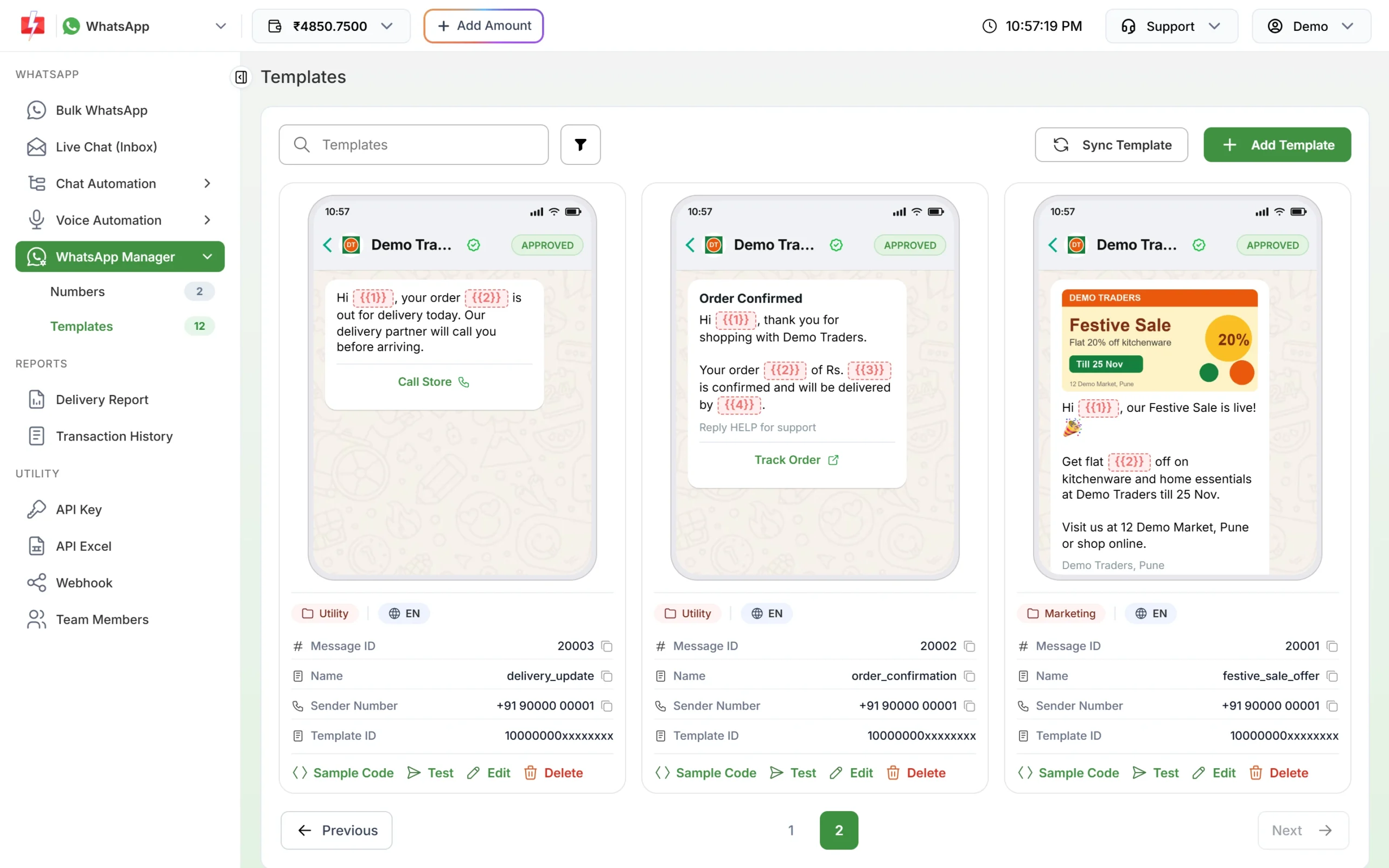
The category badge under each approved template. -
Send it
For a whole tower, upload the buyer list as a CSV with one column per variable in Bulk WhatsApp; you upload a header file for each campaign, or send each buyer’s own PDF with the media template API. The template picker has a Utility tab.
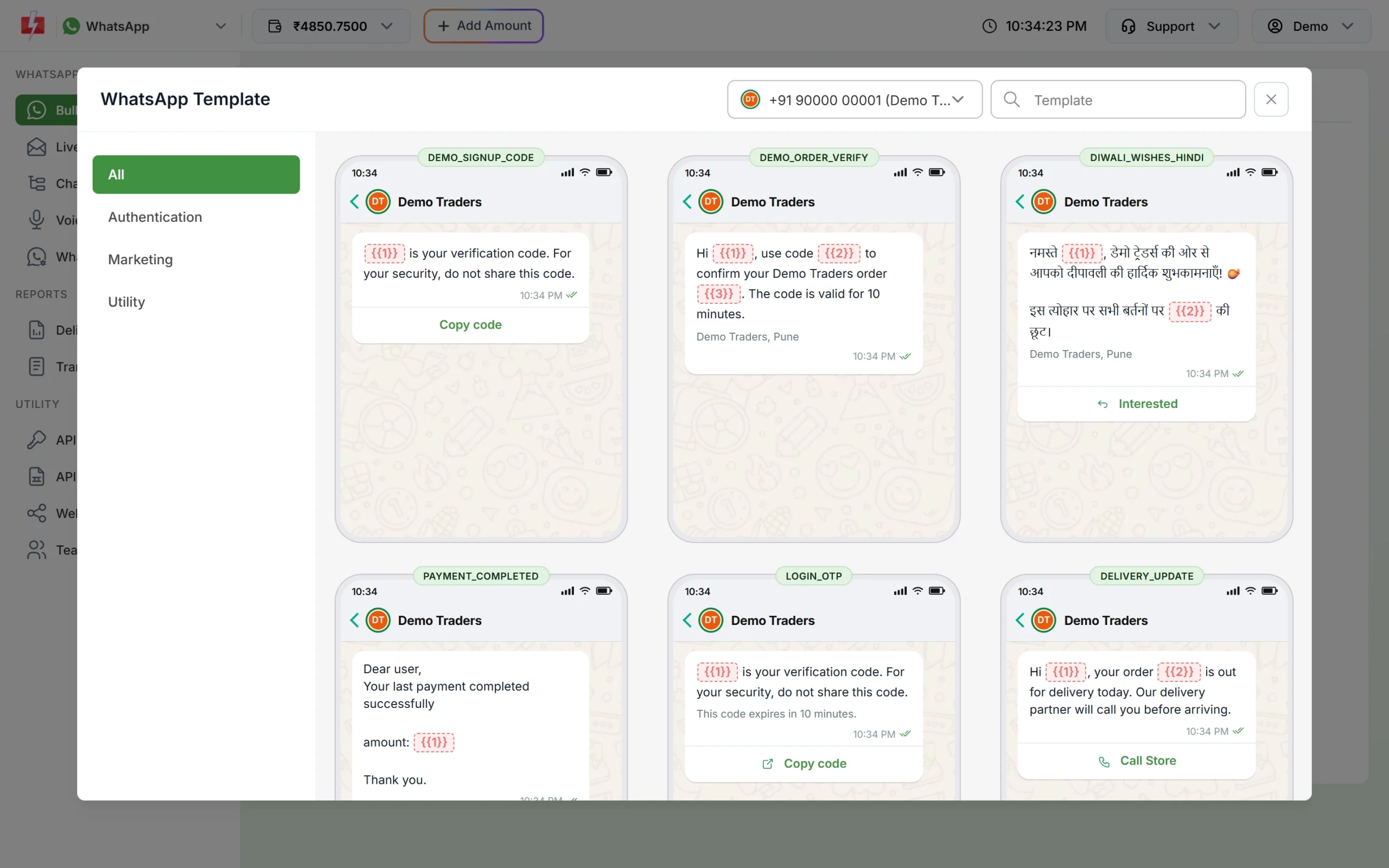
Pick an approved utility template from the Utility tab.
Frequently asked questions
Is a site visit confirmation a utility message?
Yes. It confirms a visit the buyer booked, as long as it has no offer in it.
Are construction updates utility?
Updates on a project sent to people who bought in it fit utility when they contain no sales content. The same update sent to leads to sell units is marketing.
Can I send new launch messages to old enquiries?
Only as a marketing template, and only to people who agreed to get offers from you on WhatsApp.
Can I send demand letters and allotment letters as PDFs?
Yes. Use a utility template with a Document header. Each buyer’s own PDF can be sent by API.
Can a broker use these templates?
Yes. Change the wording to your own name and the projects you handle.
Can I ask buyers for their PAN or Aadhaar number on WhatsApp?
No. Meta’s policy does not allow asking for full ID numbers. Ask buyers to upload copies through your secure link.
Related guides
- Bulk SMS and WhatsApp for Real Estate
- Bulk SMS and WhatsApp for Housing Societies and Property Management
- Send a WhatsApp template with image, video or PDF by API
- WhatsApp utility vs marketing templates: examples that get the right category
- WhatsApp CRM: manage leads and customers from the shared inbox