
Sometimes it happens that your SMS is failed to deliver. You can check the status of SMS in the delivery report section in Fast2SMS. The following image describes that the message is failed. It is shown in red, and the Description column gives the reason.
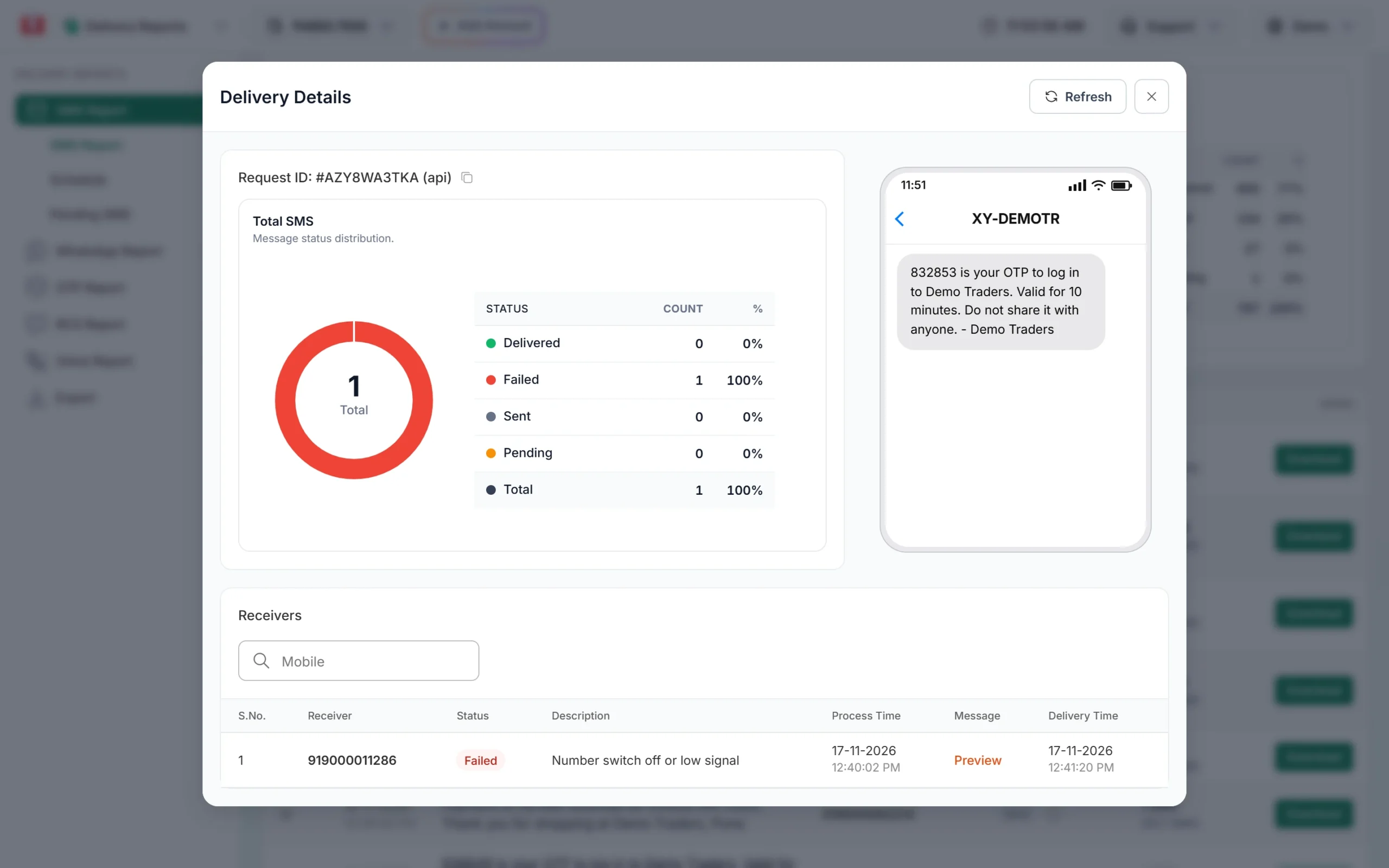
Reasons behind a failed SMS
- Invalid number
- Subscriber is not available at that time
- Inbox memory is full or exceeded
- SMS timeout after all retry
- Network failed
- Unidentified Subscriber, No response from the handset.
- Number out of coverage area/ Switched Off.
- The recipient cannot receive incoming messages.
- Network or Protocol Failure other than the listed.
- Short Message rejected by MS because of no memory capacity to store the messages.
- Congestion Encountered at the visited MSC or the SGSN.
- Recipient MS has no SMS subscription.
- No allocated IMSI or directory number for the mobile subscriber in the HLR.
- The PLMN has rejected the short message because the MS failed authentication.
- All the retries from different operators have been made.
Note : Our system works on submission basis. Means as soon as you push the SMS from our system it will debit the SMS cost, now its on operators when they will deliver or mark that SMS as failed.
Frequently asked questions
Am I charged for SMS that fail?
Yes, for DLT SMS. The charge is taken when the SMS is submitted to the operator, and failed numbers are not refunded automatically. Numbers removed as duplicate or invalid before sending are not charged. Read failed SMS charges and refunds.
Why does my SMS fail for every number?
When all numbers fail, the cause is usually DLT: the text does not match the template, the header is not linked to it, a link is not whitelisted or the PE-TM chain is incomplete. See SMS not delivered: DLT errors.
What does Sent mean in the SMS delivery report?
Sent means the SMS reached the operator but the final delivery report has not come back yet. It usually changes to Delivered or Failed on its own. Learn the SMS report statuses.
Why does the report show Delivered when the customer did not get the SMS?
Delivered means the operator confirmed the SMS reached the phone. Ask the customer to check spam or promotions folders in their messaging app, blocked senders and the right SIM. Read SMS delivered but not received.