
Yes, you can edit an approved WhatsApp template, but only its content (header, body, footer and buttons). The name, language and sender number stay fixed, and Meta does not let you change the category of an approved template. Meta allows one edit in 24 hours and 10 edits in 30 days, and every edit goes back for review. This guide shows how to edit a template in Fast2SMS and what to do when Meta moves a Utility template to Marketing.
What you can and cannot change
| Part of the template | Can you edit it? |
|---|---|
| Header (text, image, video or document) | Yes |
| Body text and variables | Yes |
| Footer | Yes |
| Buttons | Yes |
| Template name | No. “Template name cannot be changed (Meta restriction).” |
| Language | No. “Template language cannot be changed (Meta restriction).” |
| Sender number | No. A template belongs to the number it was created for. |
| Category of an APPROVED template | No. Meta does not allow it. Create a new template in the right category. |
Which templates can be edited, and how often
At the time of writing, Meta’s rules are:
- APPROVED: up to 1 edit in 24 hours and 10 edits in 30 days.
- REJECTED and PAUSED: unlimited edits.
- PENDING (in review) and DISABLED: cannot be edited. Wait for the review, or create a new template if it is disabled.
Templates created by Meta Direct Send show “Direct Send template” on the card and cannot be edited or deleted.
How to edit an approved WhatsApp template in Fast2SMS
-
Open the template
Go to WhatsApp Manager > Templates, find the template (search by name helps) and click Edit on its card.
-
Change the content
The Edit WhatsApp Template page opens with the name and language locked. Change the header, body, footer or buttons. The phone preview on the right updates as you type.
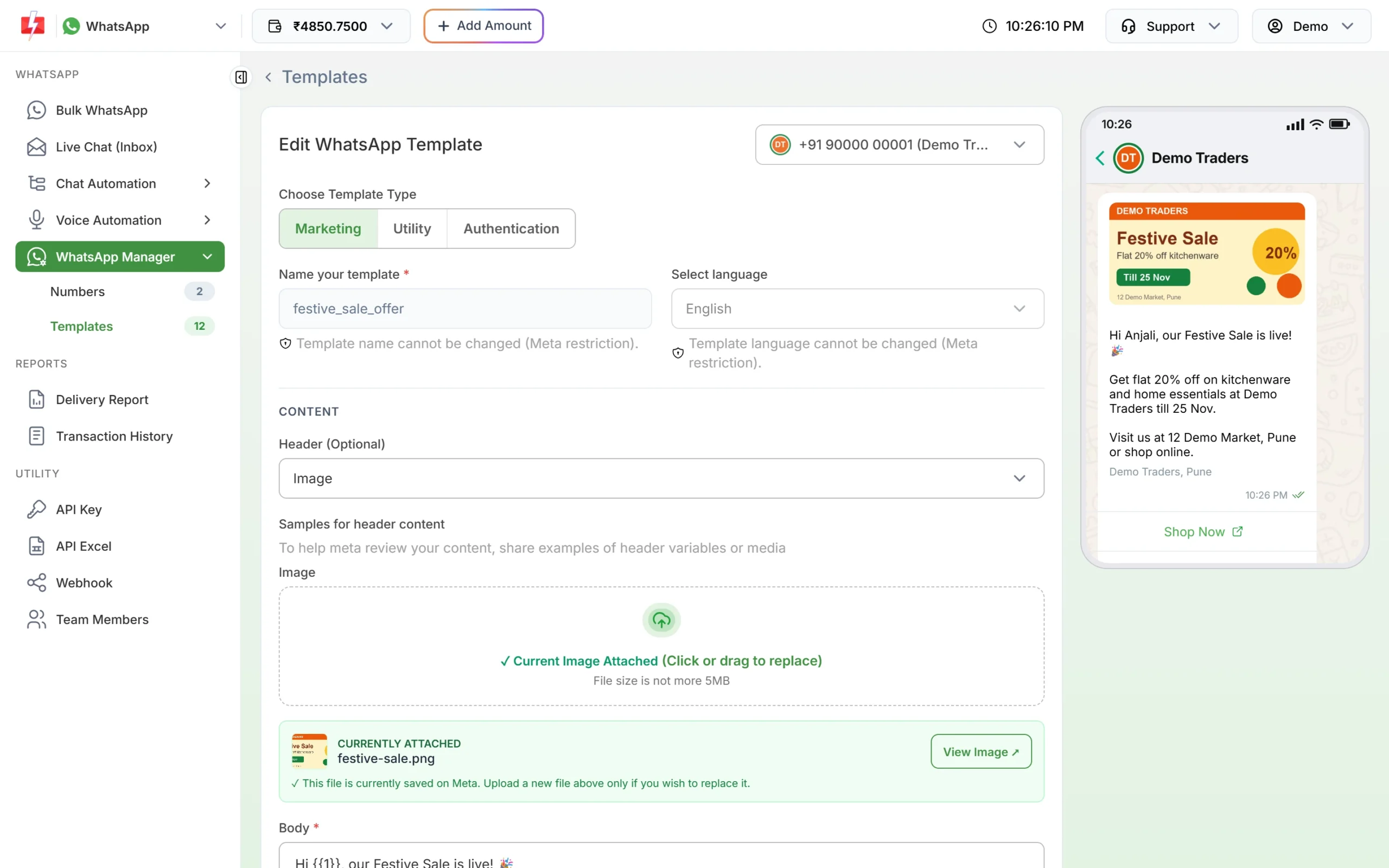
Name and language are locked. The current header image is shown as CURRENTLY ATTACHED. -
Keep or replace the header file
If the template has an image, video or document header, the current file is shown as CURRENTLY ATTACHED and is kept if you do nothing. To replace it, upload a new file. The form warns you that the new file will replace the current one when you update.
-
Submit the update
Click Update Template, check the preview in the confirmation window and confirm. If you changed the content you see “Template updated and submitted for Meta review.” The card turns PENDING.
-
Wait for approval before sending
While the template is PENDING it is not listed in Bulk WhatsApp and cannot be sent by API. Meta’s review can take up to 24 hours. Click Sync Template to refresh the status.
Can I change the category of a WhatsApp template?
Not for an approved template. The type buttons (Marketing, Utility, Authentication) appear on the edit page, but Meta does not accept a category change on an approved template. Do this instead:
- Click Add Template and create a new template with the right category and a new name.
- Wait until it is APPROVED.
- Switch your campaigns or API calls to the new template’s Message ID.
- Delete the old template when you no longer need it.
For a REJECTED template you can fix the category and resubmit it.
Why did my Utility template become Marketing?
Meta checks that the category matches the content. A Utility template must be non-promotional and about something specific to the customer, such as their order, payment or appointment. If it includes an offer, a discount, an upsell or a renewal push, Meta treats it as Marketing.
- When you submit: since April 2025, a Utility template that Meta sees as marketing is approved as Marketing instead of being rejected.
- After approval: Meta can move an approved Utility template to Marketing. It usually gives 1 day of notice by email. The template stays approved and can still be sent.
- Templates that are really OTPs: a Marketing or Utility template that Meta thinks should be Authentication is set to REJECTED at the start of the next month.
| Stays Utility | Becomes Marketing |
|---|---|
| “Hi {{1}}, your order {{2}} has been shipped and will reach you by {{3}}.” | “Hi {{1}}, your order {{2}} has been shipped. Use code SAVE10 for 10% off your next order.” |
| “Your payment of ₹{{1}} for invoice {{2}} is received. Thank you.” | “Payment received. Renew your plan today and get 2 months free.” |
| “Reminder: your appointment is on {{1}} at {{2}}.” | “Congratulations” with no clear reason, or a mix of update and offer |
What it means for your cost
The category decides the price per message. At the time of writing, the Fast2SMS rate is ₹0.25 for Utility and ₹0.95 for Marketing (see the WhatsApp pricing page for current rates). Once the panel syncs the change, the template card shows the new category and messages are charged by the category shown. Click Sync Template after you get Meta’s email.
Sending in bulk? For high WhatsApp volumes our team offers discounted rates. Talk to our team or see WhatsApp pricing.
How to get the Utility category back
- Request a review: in Meta’s WhatsApp Manager, open the banner about the change, click “Go to Business Support”, open Template Category Updates, select the template and click Request Review. Meta gives you 60 days.
- Write a clean Utility template: remove every promotional line and submit it again as a new Utility template.
Meta also warns that repeated wrong categories can lead to limits on Utility messages for your account, so pick the category honestly.
Frequently asked questions
Can I edit an approved WhatsApp template?
Yes, the header, body, footer and buttons. The template then goes back to review and cannot be sent until approved again.
How many times can I edit a WhatsApp template?
An approved template up to once in 24 hours and 10 times in 30 days. Rejected and paused templates can be edited any number of times.
Can I rename a WhatsApp template?
No. Create a new template with the new name. If you delete an approved template, Meta does not let you reuse that name for 30 days.
Can I change the template language?
No. Create a separate template for each language.
Why does my edited template show PENDING?
Every content change is reviewed by Meta again. This can take up to 24 hours.
Will my API calls break after an edit?
The Message ID stays the same, but sends fail while the template is PENDING. Plan edits outside busy hours.
Can I edit a template while it is in review?
No. Wait until Meta approves or rejects it.