
The GSM-7 character set is the 7-bit alphabet that lets one SMS carry 160 characters. It is defined in the GSM standard (3GPP TS 23.038). If your text uses only characters from this set, it goes as a normal English SMS. If it has even one character outside it, the whole message is sent as Unicode (UCS-2), and one SMS then holds only 70 characters.
This page has the full GSM-7 table, the characters that count as two, and the everyday characters that switch a message to Unicode. It also explains one thing that matters in Fast2SMS: the panel uses a stricter rule than the standard, so some characters that are in GSM-7 still make your SMS Unicode here.
GSM-7 basic character set (the table)
The basic GSM-7 table has 128 positions. Each character in it uses one of the 160 places in an SMS. Here they are, grouped so they are easy to scan.
| Group | Characters in GSM-7 | Unicode in Fast2SMS? |
|---|---|---|
| Capital letters | A B C D E F G H I J K L M N O P Q R S T U V W X Y Z | No |
| Small letters | a b c d e f g h i j k l m n o p q r s t u v w x y z | No |
| Digits | 0 1 2 3 4 5 6 7 8 9 | No |
| Space and line breaks | space, line feed (new line), carriage return | No |
| Keyboard punctuation | ! ” # $ % & ‘ ( ) * + , – . / : ; < = > ? @ _ | No |
| Currency and other symbols | £ ¥ ¤ § ¡ ¿ | Yes |
| Accented Latin letters | à è é ì ò ù Ç É Ä Ö Ñ Ü ä ö ñ ü Å å Ø ø Æ æ ß | Yes |
| Greek capital letters | Δ Φ Γ Λ Ω Π Ψ Σ Θ Ξ | Yes |
The last column is the part to remember. In the GSM standard, letters like é or the £ sign still fit in a 160-character SMS. Fast2SMS decides the type of your message with a simpler check: if every character is plain ASCII (the basic English keyboard set), the SMS is English. If not, it is Unicode. So é, £ and the Greek letters are GSM-7 in theory, but in Fast2SMS they turn the message into Unicode. The safe set is the first five rows.
Extension table: characters that count as two
GSM-7 has a small extension table. Each of these characters is sent as an escape code plus the character, so it takes two of the 160 places.
| Character | Name | In Fast2SMS |
|---|---|---|
| { } | curly brackets | Counted as 2 each |
| [ ] | square brackets | Counted as 2 each |
| | | vertical bar (pipe) | Counted as 2 |
| ^ | caret | Counted as 2 |
| ~ | tilde | Counted as 2 |
| \ | backslash | Two places in the standard. Avoid it in SMS text. |
| € | euro sign | Not plain ASCII, so the SMS becomes Unicode |
| (form feed) | page break control character | Never needed in an SMS |
A few of these will not change much, but a message close to 160 characters can tip over into 2 SMS. Use round brackets ( ) instead of square or curly ones.
Keyboard characters that are not in GSM-7
Almost every character on an English keyboard is in GSM-7, either in the basic table or the extension table. The one exception is the backtick (`), the key next to 1 on most keyboards. Type a straight apostrophe (‘) instead.
Common characters that switch an SMS to Unicode
These are the characters we see most often in messages that were meant to be English. Most of them arrive by copy and paste from Word, a website, WhatsApp or a phone keyboard.
| Character | Where it usually comes from | Use instead |
|---|---|---|
| ₹ | Typed on purpose for prices | Rs. |
| “ ” ‘ ’ (curly quotes) | Word, Google Docs, phone keyboards | Straight quotes ” and ‘ |
| Long dashes (en dash, em dash) | Word and websites change a hyphen on their own | A plain hyphen – or a comma |
| … (one-character ellipsis) | Phone keyboards, Word | Three full stops … |
| • (bullet) | Lists copied from documents | A hyphen or a new line |
| Emoji | Phone keyboards, WhatsApp | Words like “Sale” or “New” |
| Non-breaking space (invisible) | Web pages and Word | Delete the space and type it again |
| Hindi or any Indian script | On purpose | Keep it, but plan for 70 characters per SMS |
The invisible ones are the hardest to spot. If the counter says Unicode and you cannot see why, paste the text into Notepad, then retype the spaces, quotes and dashes from the keyboard.
How many characters fit: 160, 153, 70 and 66
A single English SMS holds 160 characters. When a message is longer, it is split into parts and each part carries a small hidden header so the phone can join them again, which leaves 153 characters per part. Unicode works the same way with smaller numbers. These are the limits Fast2SMS uses:
| Message type | 1 SMS | 2 SMS | 3 SMS | Each extra SMS | Longest message |
|---|---|---|---|---|---|
| English (GSM-7, plain ASCII in Fast2SMS) | 160 | 306 | 459 | +153 | 1,530 characters (10 SMS) |
| Unicode (UCS-2) | 70 | 133 | 199 | +66 | 859 characters (13 SMS) |
Every part is charged as one SMS, so the cost of a campaign is valid numbers x SMS parts x your rate per SMS. One stray curly quote in a 150-character offer turns 1 SMS into 3. See the current rates on the bulk SMS pricing page.
Sending in bulk? For high SMS volumes our team offers discounted rates. Talk to our team or see SMS pricing.
How to check the character set in Fast2SMS
-
Check the template badge
Open DLT Manager > Content Template. Each template card shows EN for English or UN for Unicode. Fast2SMS sets this from the approved text you pasted, so a template with a ₹ sign or a curly apostrophe shows UN, and every SMS from it is Unicode.
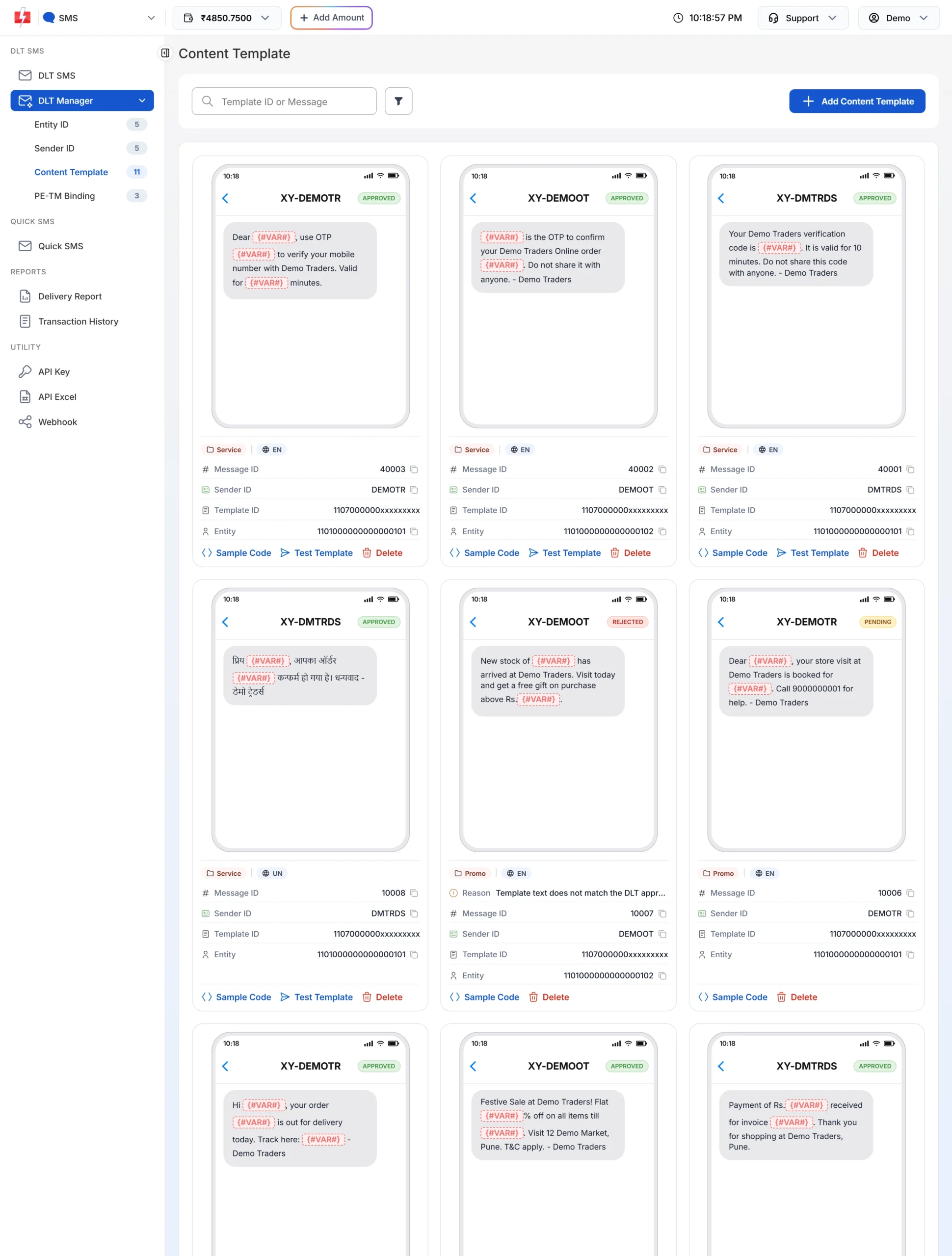
EN means English (160 per SMS), UN means Unicode (70 per SMS). -
Watch the counter while you fill variables
On the DLT SMS page, after you pick a template and type the variable values, the counter under the phone preview shows characters and parts, for example 107/1 SMS. The values you type count too, so a customer name with an accented letter can change the result.
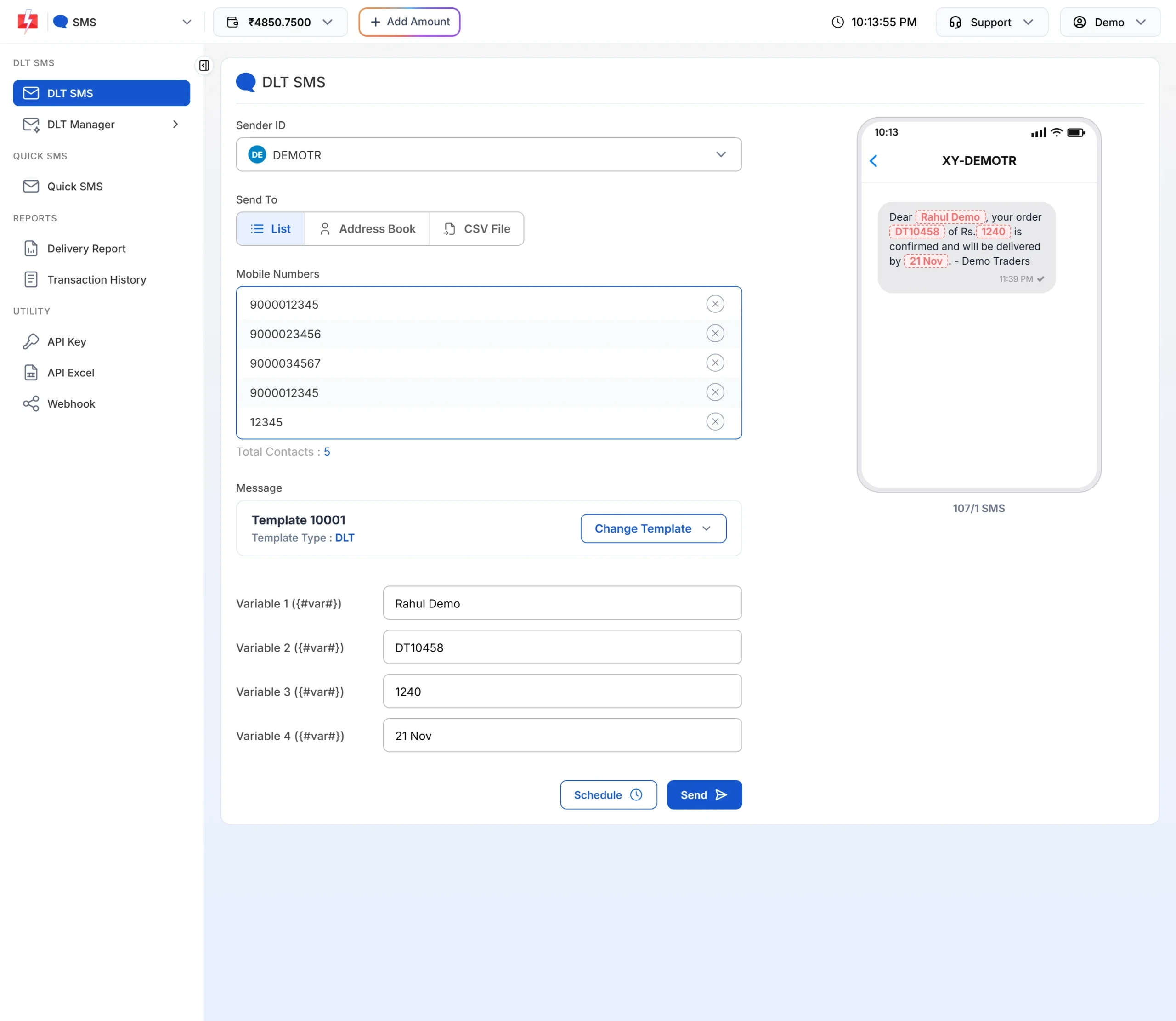
107 characters, 1 SMS. -
By API, ask for the details
Add
sms_details=1to your DLT SMS API request. The response then includessms_language(english or unicode),character_countandsms_count. If you see unicode where you expected english, look for a hidden character in your variable values.
Common problems and fixes
| Problem | Likely cause | Fix |
|---|---|---|
| English template shows UN | The approved text has ₹, a curly quote or a long dash | Register a corrected English template on your DLT portal and add it to Fast2SMS |
| “Only English alphabets are allowed in message text or select Unicode SMS.” | A variable value has a non-ASCII character in an English template | Remove the character, for example an emoji or é, and send again |
| 159 characters but 2 SMS | Brackets, pipes or tildes count as two | Use round brackets and plain words |
| Names with accents become Unicode | é, ñ, ü and similar letters are not plain ASCII | Store a plain English spelling for SMS, if the customer is fine with it |
Frequently asked questions
What is the GSM-7 character set?
It is the default 7-bit alphabet for SMS, defined in 3GPP TS 23.038. It covers English letters, digits, common punctuation, some accented letters and a few Greek letters, and lets one SMS hold 160 characters.
Is UCS-2 the same as Unicode SMS?
Yes. When a message has a character outside GSM-7, it is sent in UCS-2, a 16-bit encoding. Each character takes twice the space, so one SMS holds 70 characters.
Is the ₹ symbol part of GSM-7?
No. The ₹ sign makes the SMS Unicode. Write “Rs.” to keep the message in English.
Why does é make my SMS Unicode in Fast2SMS when it is in GSM-7?
Fast2SMS treats any character outside plain ASCII as Unicode. It is a simpler and safer check, so stick to the basic English keyboard set if you want 160 characters.
Which characters count as two in an English SMS?
In Fast2SMS, { } [ ] | ^ and ~ each count as two. In the GSM standard the backslash also takes two places.
Do spaces and new lines count?
Yes. Each space and each line break counts as one character, but they do not make the SMS Unicode.
Can I mix Hindi and English in one SMS?
Yes, but the whole message is then Unicode, so 70 characters fit in one SMS and 133 in two.