
An SMS with even one emoji, curly quote or ₹ sign is sent as Unicode. A Unicode SMS holds 70 characters instead of 160, so the same text is split into more parts, and each part is charged as one SMS. That is why an offer that costs 1 SMS in plain English can cost 2 or even 3 SMS once an emoji is added.
This page explains why emojis and special characters raise your SMS cost, which characters cause it, and how to check and fix your text in Fast2SMS before you pay. For the full table of limits, see our guide to SMS character limits for English and Hindi.
Why does one emoji change the SMS cost?
Every SMS has the same fixed size. Plain English text is sent with the GSM 7-bit alphabet, where each character is small, so 160 characters fit in one SMS. Emojis, Hindi letters and many symbols are not part of that alphabet. When even one of them is in the message, the whole message is sent as Unicode, where each character takes about twice the space. Only 70 characters then fit in one SMS.
The whole message switches, not just the emoji. One small emoji at the end changes the limit for every other character in the text.
| Same offer, written as | Sent as | SMS parts per number |
|---|---|---|
| Plain English, 121 characters | English | 1 |
| The same text with one emoji at the end | Unicode | 2 |
| A longer offer, 155 characters, plain English | English | 1 |
| The same 155-character offer with one emoji | Unicode | 3 |
| “Don’t miss…” typed with a straight apostrophe (132 characters) | English | 1 |
| “Don’t miss…” with a curly apostrophe copied from a phone or Word | Unicode | 2 |
| “Shoes from Rs.499…” (102 characters) | English | 1 |
| “Shoes from ₹499…” (100 characters) | Unicode | 2 |
The cost of a campaign is valid numbers x SMS parts x rate per SMS. So a 2-part message sent to 10,000 numbers is 20,000 SMS, and a 3-part message is 30,000 SMS, for the same offer. At the time of writing a DLT SMS costs ₹0.25 down to ₹0.11 per SMS part, depending on your recharge amount. See the current rates on the bulk SMS pricing page.
Sending in bulk? For high SMS volumes our team offers discounted rates. Talk to our team or see SMS pricing.
Which characters turn an SMS into Unicode?
In Fast2SMS, any character outside the basic English keyboard set makes the whole message Unicode. These are the usual ones:
- Emojis of any kind, including hearts, stars and flags
- Hindi, Marathi, Tamil, Bengali or any other Indian script
- Curly quotes and apostrophes (“ ” ‘ ’). Phones, WhatsApp and Word often add these on their own.
- The ₹ sign. Write “Rs.” instead.
- Long dashes, bullet points (•) and the single-character ellipsis (…)
- Symbols such as ©, ™ and the degree sign (°)
- Letters with accents, such as é
Characters that count as two in an English SMS
Some characters keep the message in English but use two places each: { } [ ] | ^ ~. A message with a few of them can cross 160 and become 2 SMS. Use round brackets ( ) instead of square or curly ones.
How to check your SMS count before you pay
-
Watch the counter under the preview
On the DLT SMS page, pick your template and fill the variables. The counter under the phone preview shows characters and parts. For example, 107/1 SMS means 107 characters in 1 SMS. The count includes the values you typed in the variables, so a long name or an emoji in a value can push it up.
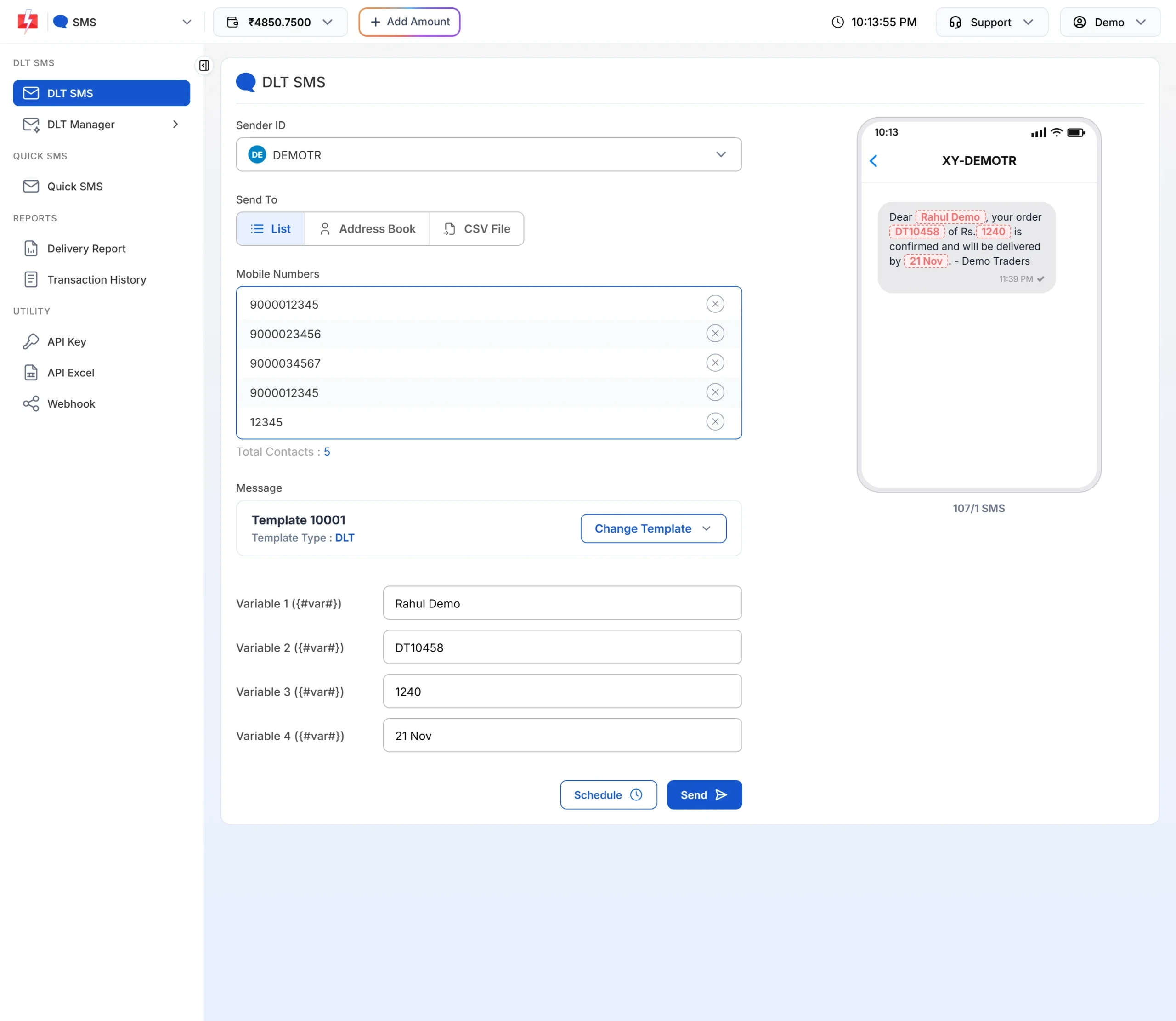
The counter under the preview: 107 characters, 1 SMS. -
Check Total Messages in the confirmation popup
Click Send. The Message Preview & Confirmation popup shows Total Messages, which is the number of SMS parts per number. For Quick SMS it also shows Total Character. If Total Messages is higher than you expected, click Cancel, clean the text and check again.
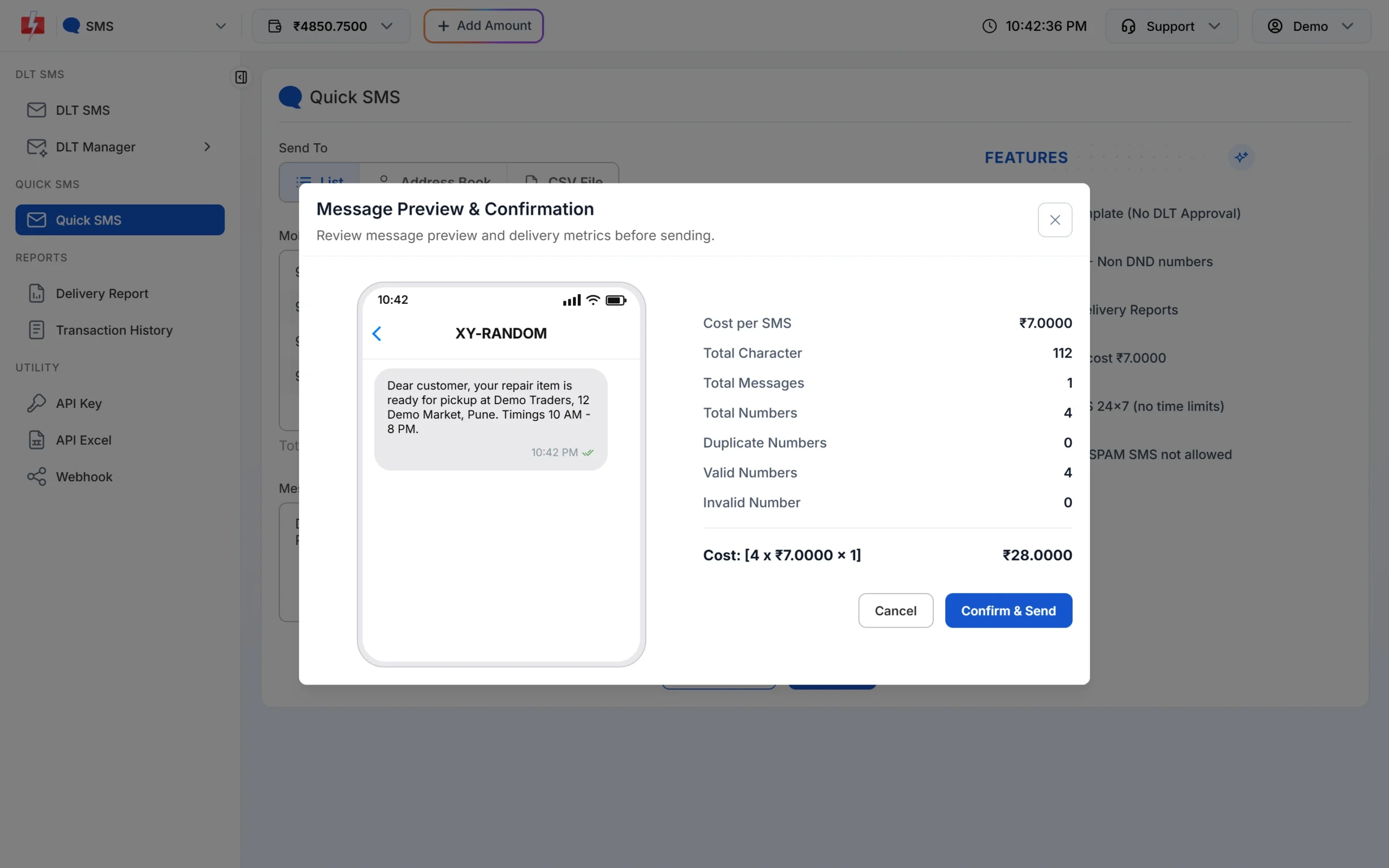
112 characters of plain English: 1 SMS per number. -
Sending by API? Ask for the details
Add
sms_details=1to your DLT SMS API call. The response then includessms_language(english or unicode) andsms_count(parts per number). If you see unicode where you expected english, look for a hidden character in your variable values.
How to remove hidden Unicode characters
- Retype quotes and apostrophes. Paste your text into a plain text editor such as Notepad and type every quote and apostrophe again from the keyboard.
- Write “Rs.” instead of ₹. It is the most common reason an English SMS becomes Unicode.
- Drop emojis from English SMS. Words like “Sale”, “New” or “Today only” do the same job without the extra cost.
- Replace bullets and long dashes with a comma, a full stop or a plain hyphen.
- Check your template, not only your values. If the approved DLT template itself has a curly apostrophe or a ₹ sign, every SMS from it is Unicode. The template card in DLT Manager > Content Template shows UN for Unicode and EN for English. To fix it, register a corrected English template on your DLT portal.
When is Unicode worth paying for?
Unicode is not a mistake when you mean it. A Hindi or regional-language message can be easier for your customers to read, and that can be worth the extra parts. In that case, keep the text short: one Unicode SMS holds 70 characters and two hold 133. Our guide on DLT templates in Hindi and regional languages explains the setup.
Emojis are different. They make the SMS longer without adding meaning, and some basic phones may not show them. If you want pictures, buttons or emojis in a business message, a rich channel such as RCS is built for that.
Frequently asked questions
Does one emoji really double the SMS cost?
It can. One emoji makes the whole message Unicode, so the limit drops from 160 to 70 characters. Any message longer than 70 characters then needs at least 2 SMS parts, and one over 133 characters needs 3.
Why is my 100-character SMS charged as 2 SMS?
The message has at least one Unicode character, such as an emoji, a curly quote or the ₹ sign. Unicode allows 70 characters in one SMS, so 100 characters need 2 parts.
Is the ₹ symbol a special character in SMS?
Yes. The ₹ sign is not in the basic English set, so it turns the SMS into Unicode. Write “Rs.” to keep the message in English.
Do spaces and full stops count as characters?
Yes. Spaces, line breaks and punctuation all count, but they do not turn the SMS into Unicode.
How do I know if my message is going as Unicode?
The template card in DLT Manager shows UN for Unicode templates. For each send, the counter and the Total Messages line in the confirmation popup show the parts. By API, sms_language in the response says english or unicode.
Does the same rule apply to Quick SMS?
Yes. Quick SMS uses the same part rules. Type your text, click Send and check Total Character and Total Messages in the popup.
Do Hindi SMS always cost more than English?
Per character, yes, because Hindi is Unicode and one SMS holds 70 characters. A short Hindi message of up to 70 characters still costs 1 SMS.