
The Fast2SMS DLT SMS API sends an SMS from your own approved sender ID, using a DLT template you have already added in DLT Manager. You call one URL, /dev/bulkV2 with route=dlt, and pass the sender ID, the template’s Message ID, the values for its variables and the mobile numbers. This guide is for developers and business owners who want to send order updates, alerts, reminders or OTPs from their own website, app or software. It covers every parameter, ready code in cURL, PHP, Python, Node.js, Java, C# and Go, the response, the charges and the common errors.
Before you start
- DLT registration: your business (entity), sender ID (header) and content template must be approved on a DLT portal.
- DLT Manager: the entity, sender ID and content template must be added in Fast2SMS DLT Manager and show Approved. The template must be linked to the sender you will use.
- API key: from API Key under UTILITY. API Access must be switched on.
- Wallet balance: enough for the SMS you send. Unlike Quick SMS, the DLT route has no first-recharge rule.
- A server: call the API from your backend. Never put the API key in app or browser code.
How the DLT SMS API works
When you send through route=dlt, you do not send the SMS text. You send the Message ID of a template saved in DLT Manager, plus the values for its {#var#} places. Fast2SMS builds the final text from the approved template, so the text always matches what DLT approved. This is the main difference from the DLT Manual route, where you send the full text yourself.
message parameter takes the short Message ID shown on the template card in DLT Manager (for example 10001). It does not take the 19-digit DLT Content Template ID. Passing the 19-digit ID is the most common reason for error 424.Endpoint and authentication
| URL | https://www.fast2sms.com/dev/bulkV2 |
| Method | POST (JSON, form-urlencoded or multipart) or GET with query parameters |
| Header | authorization: YOUR_API_KEY |
| Route | route=dlt |
Send the key in the authorization header. The API also reads an authorization query parameter, but only use that in no-code tools that cannot set headers, because full URLs end up in server and proxy logs.
Parameters
| Parameter | Required | Rules |
|---|---|---|
route |
Yes | dlt |
sender_id |
Yes | One of your own approved sender IDs in DLT Manager, in exactly the same case (DEMOTR is not demotr). |
message |
Yes | The Message ID of an approved template that is linked to this sender. |
variables_values |
If the template has variables | Values separated by |, one per {#var#}, in the same order as in the template. Each value is cut to 40 characters. |
numbers |
Yes | 10-digit Indian mobile numbers, separated by commas. A leading 91 is removed. |
schedule_time |
No | Send later. A future time as DD-MM-YYYY-HH-MM (IST) or a Unix timestamp. |
sms_details |
No | 1 adds character count, SMS parts, rate, valid and invalid numbers and amount to the response. |
udf1, udf2, udf3 |
No | Your own reference text, for example an order ID. Stored with the SMS and returned in webhooks. |
You do not need to send a language. Fast2SMS detects it from the template text. A flash parameter is ignored.
Send your first DLT SMS
-
Find the Message ID and sender ID
Open the SMS app, then DLT Manager and Content Template. Each approved template card shows its Message ID, the linked Sender ID, the masked Template ID and the Entity. Click the copy icon next to the Message ID.
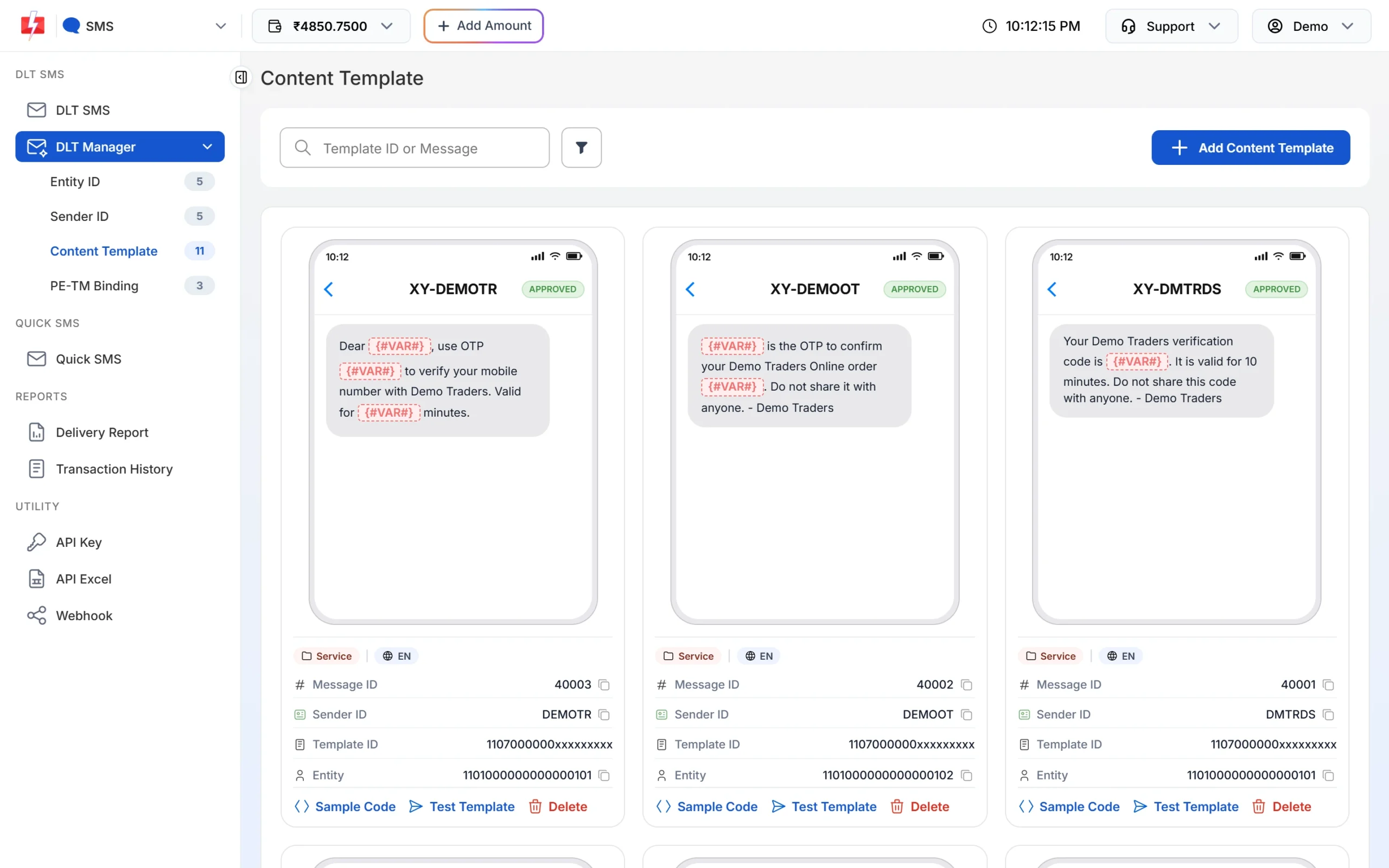
The Message ID on the card is the value for the message parameter. -
Copy the sample code (optional)
Click Sample Code on the card. Choose cURL, PHP, Node.js or Python. The snippet already has your sender ID, the Message ID and
route=dlt. Replace the variable values and the number.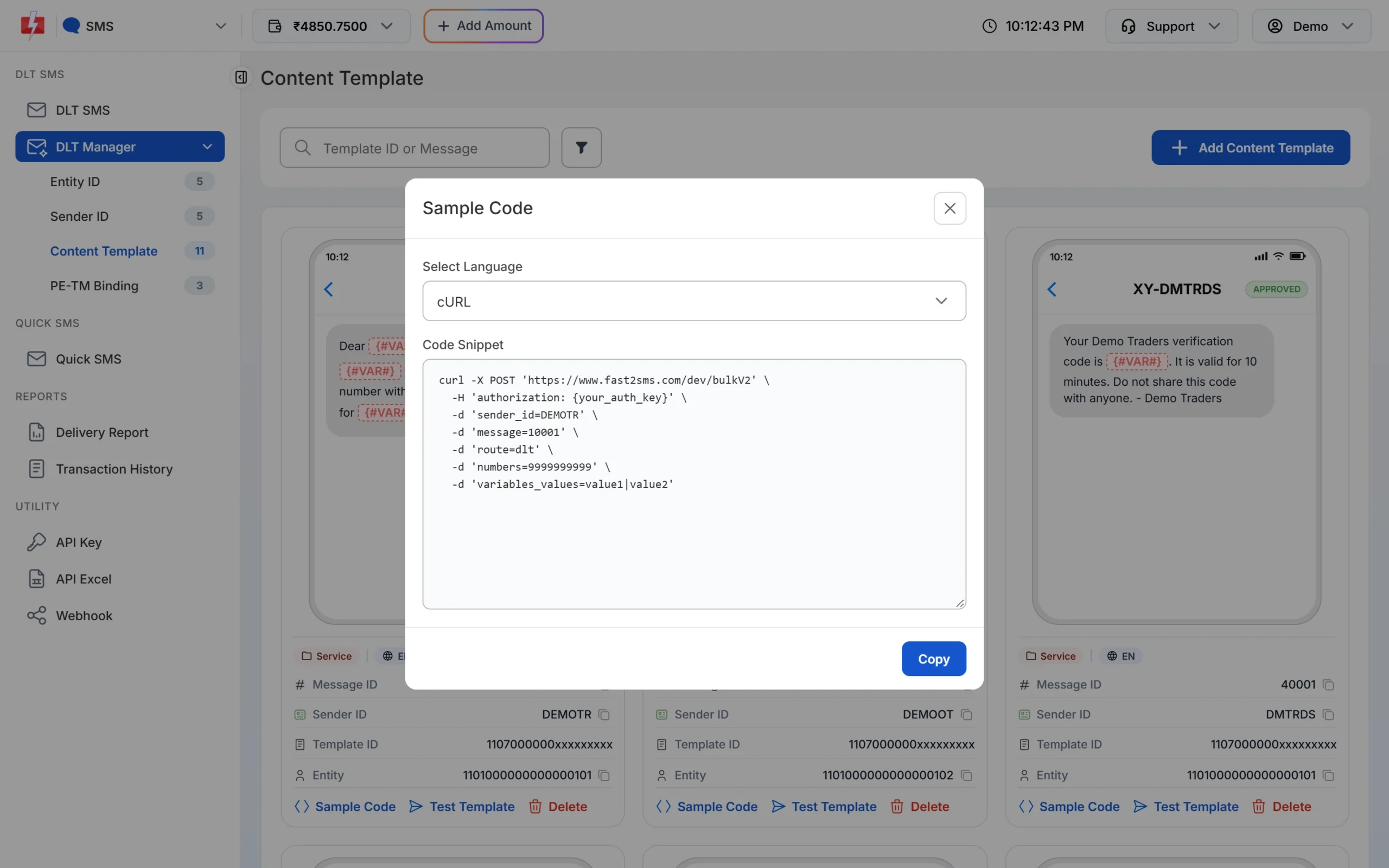
Sample Code fills in the sender ID and Message ID for you. -
Copy your API key
Go to API Key. Click View, enter the OTP sent to your account mobile and copy the key. Keep API Access switched on.
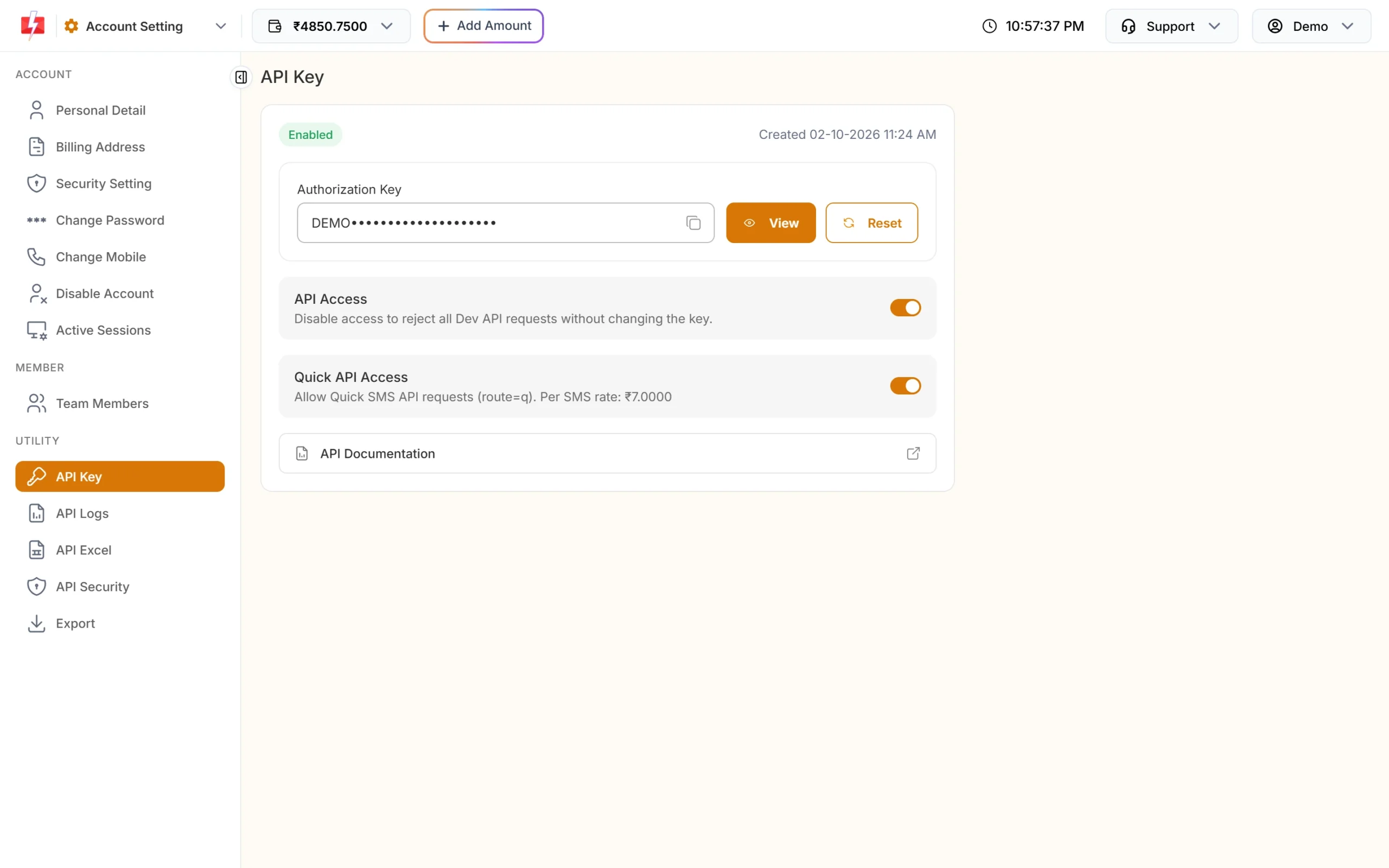
Store the key in your server settings, not in your code repository. -
Send the request and save the request ID
Run one of the code samples below. A good reply has
"return": trueand arequest_idthat starts with S. Save it. You need it to check delivery. -
Check the call in API Logs
Every call made with your key appears in API Logs for 7 days, with the endpoint, HTTP code, response and your server IP. Delivery status per number is in Delivery Report.
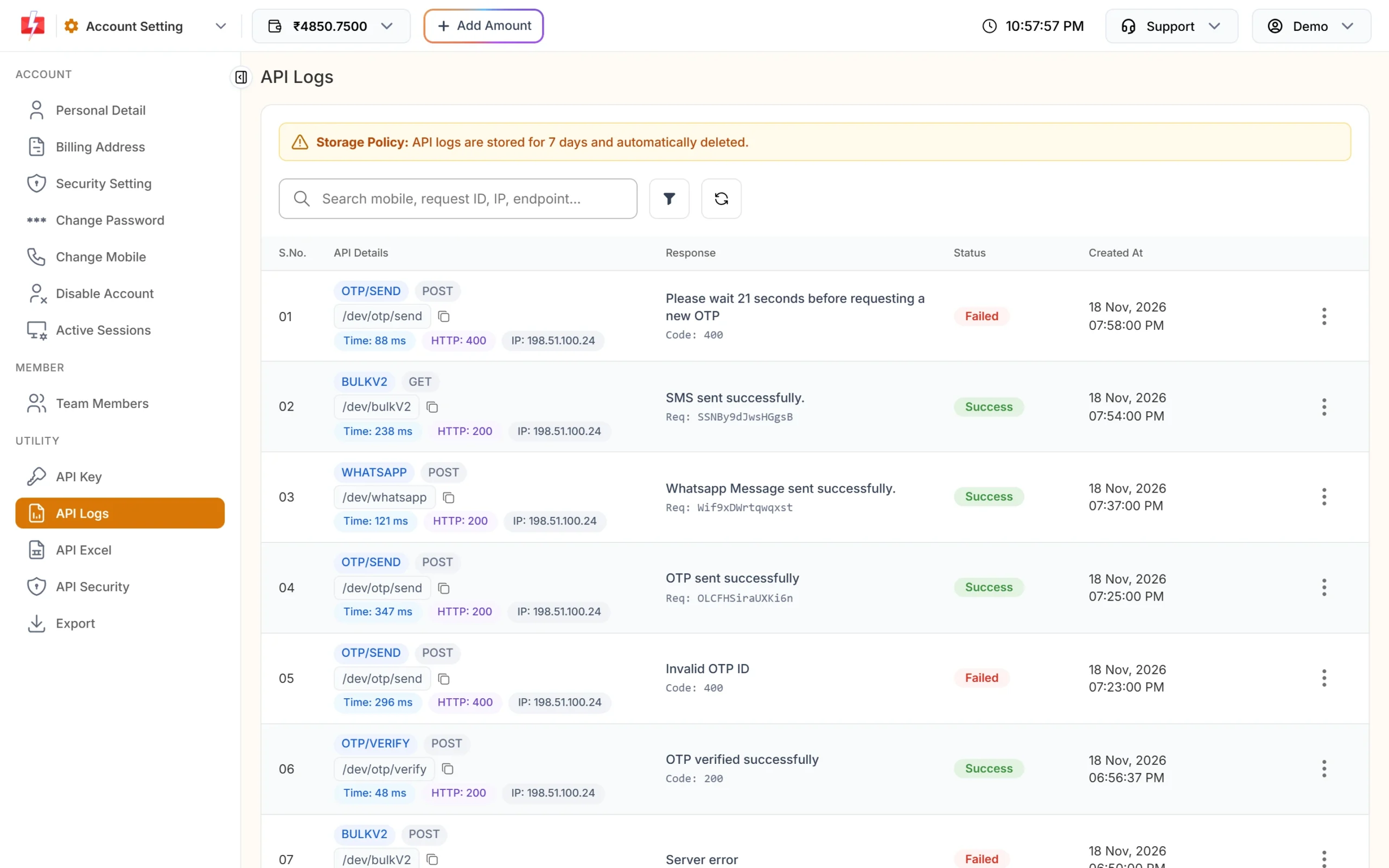
A successful bulkV2 call in API Logs.
Code examples
All examples use the same template: Message ID 10001 on sender DEMOTR, with the text “Dear {#var#}, your order {#var#} of Rs.{#var#} is confirmed and will be delivered by {#var#}. – Demo Traders”. Use your own sender ID, Message ID and values.
cURL (POST JSON)
curl -X POST "https://www.fast2sms.com/dev/bulkV2" \
  -H "authorization: YOUR_API_KEY" \
  -H "Content-Type: application/json" \
  -d '{"route":"dlt","sender_id":"DEMOTR","message":"10001","variables_values":"Rahul|DT10458|1240|21 Nov","numbers":"9999999999"}'
cURL (GET)
--data-urlencode takes care of the spaces and | signs in the values.
curl -G "https://www.fast2sms.com/dev/bulkV2" \
  -H "authorization: YOUR_API_KEY" \
  --data-urlencode "route=dlt" \
  --data-urlencode "sender_id=DEMOTR" \
  --data-urlencode "message=10001" \
  --data-urlencode "variables_values=Rahul|DT10458|1240|21 Nov" \
  --data-urlencode "numbers=9999999999"
PHP
<?php
$payload = [
    'route'            => 'dlt',
    'sender_id'        => 'DEMOTR',
    'message'          => '10001',
    'variables_values' => 'Rahul|DT10458|1240|21 Nov',
    'numbers'          => '9999999999',
];

$ch = curl_init('https://www.fast2sms.com/dev/bulkV2');
curl_setopt_array($ch, [
    CURLOPT_POST           => true,
    CURLOPT_RETURNTRANSFER => true,
    CURLOPT_TIMEOUT        => 20,
    CURLOPT_HTTPHEADER     => [
        'authorization: YOUR_API_KEY',
        'Content-Type: application/json',
    ],
    CURLOPT_POSTFIELDS     => json_encode($payload),
]);
$body = curl_exec($ch);
curl_close($ch);

$res = json_decode($body, true);
if (!empty($res['return'])) {
    echo 'Sent. Request ID: ' . $res['request_id'];
} else {
    echo 'Failed: ' . ($res['status_code'] ?? '') . ' ' . json_encode($res['message'] ?? 'no response');
}
Python
import requests

API_KEY = "YOUR_API_KEY"

payload = {
    "route": "dlt",
    "sender_id": "DEMOTR",
    "message": "10001",
    "variables_values": "Rahul|DT10458|1240|21 Nov",
    "numbers": "9999999999",
}

r = requests.post(
    "https://www.fast2sms.com/dev/bulkV2",
    headers={"authorization": API_KEY},
    json=payload,
    timeout=20,
)
data = r.json()
if data.get("return"):
    print("Sent. Request ID:", data["request_id"])
else:
    print("Failed:", data.get("status_code"), data.get("message"))
For GET, use requests.get(url, headers=..., params=payload). The library encodes the values for you.
Node.js
Node.js 18 and later have fetch built in.
const API_KEY = "YOUR_API_KEY";

async function sendDltSms() {
  const res = await fetch("https://www.fast2sms.com/dev/bulkV2", {
    method: "POST",
    headers: { authorization: API_KEY, "Content-Type": "application/json" },
    body: JSON.stringify({
      route: "dlt",
      sender_id: "DEMOTR",
      message: "10001",
      variables_values: "Rahul|DT10458|1240|21 Nov",
      numbers: "9999999999",
    }),
  });
  const data = await res.json();
  if (data.return) return data.request_id;
  throw new Error(`${data.status_code} ${JSON.stringify(data.message)}`);
}

sendDltSms().then(console.log).catch(console.error);
Java
Uses the HttpClient that comes with Java 11 and later.
import java.net.URI;
import java.net.http.HttpClient;
import java.net.http.HttpRequest;
import java.net.http.HttpResponse;

public class SendDltSms {
    public static void main(String[] args) throws Exception {
        String json = "{\"route\":\"dlt\",\"sender_id\":\"DEMOTR\",\"message\":\"10001\","
                    + "\"variables_values\":\"Rahul|DT10458|1240|21 Nov\",\"numbers\":\"9999999999\"}";

        HttpRequest request = HttpRequest.newBuilder()
                .uri(URI.create("https://www.fast2sms.com/dev/bulkV2"))
                .header("authorization", "YOUR_API_KEY")
                .header("Content-Type", "application/json")
                .POST(HttpRequest.BodyPublishers.ofString(json))
                .build();

        HttpResponse<String> response = HttpClient.newHttpClient()
                .send(request, HttpResponse.BodyHandlers.ofString());

        System.out.println(response.statusCode() + " " + response.body());
    }
}
C# (.NET)
using System;
using System.Net.Http;
using System.Text;

var client = new HttpClient();
var json = "{\"route\":\"dlt\",\"sender_id\":\"DEMOTR\",\"message\":\"10001\","
         + "\"variables_values\":\"Rahul|DT10458|1240|21 Nov\",\"numbers\":\"9999999999\"}";

var request = new HttpRequestMessage(HttpMethod.Post, "https://www.fast2sms.com/dev/bulkV2");
request.Headers.TryAddWithoutValidation("authorization", "YOUR_API_KEY");
request.Content = new StringContent(json, Encoding.UTF8, "application/json");

var response = await client.SendAsync(request);
Console.WriteLine(await response.Content.ReadAsStringAsync());
Go
package main

import (
	"bytes"
	"encoding/json"
	"fmt"
	"io"
	"net/http"
	"time"
)

func main() {
	payload, _ := json.Marshal(map[string]string{
		"route":            "dlt",
		"sender_id":        "DEMOTR",
		"message":          "10001",
		"variables_values": "Rahul|DT10458|1240|21 Nov",
		"numbers":          "9999999999",
	})

	req, _ := http.NewRequest("POST", "https://www.fast2sms.com/dev/bulkV2", bytes.NewReader(payload))
	req.Header.Set("authorization", "YOUR_API_KEY")
	req.Header.Set("Content-Type", "application/json")

	client := &http.Client{Timeout: 20 * time.Second}
	resp, err := client.Do(req)
	if err != nil {
		panic(err)
	}
	defer resp.Body.Close()

	body, _ := io.ReadAll(resp.Body)
	fmt.Println(resp.StatusCode, string(body))
}Success response
{
  "return": true,
  "request_id": "Sa1B2c3D4e5F6g7",
  "message": ["SMS sent successfully."]
}
Note that message is a list, not plain text. “SMS sent successfully.” means Fast2SMS accepted the SMS and queued it for the operator. It does not mean the phone has received it. Use the request_id to check delivery in Delivery Report or with a webhook.
You may also see these replies with "return": true:
["SMS scheduled successfully."]when you sentschedule_time.["After approval, SMS will be sent."]when the account or message is held for a manual check before sending.
Response with sms_details=1
Add "sms_details": 1 to see what was counted and charged:
"sms_details": {
  "character_count": 120,
  "per_sms_rate": "0.2500",
  "sms_count": 1,
  "sms_language": "english",
  "total_valid_number": 2,
  "total_invalid_number": 0,
  "valid_numbers": ["9999999999", "8888888888"],
  "invalid_numbers": [],
  "amount_debited": "0.5000"
}
The rate and amount in this example are only for illustration. Your rate depends on your plan. See the current rates on the bulk SMS pricing page.
Always check “return”, not only the HTTP code
Read the return field on every reply. A low wallet balance can come back with HTTP 200 and "return": false (status_code 416). If your code only checks for HTTP 200, it will think the SMS went out when it did not.
Common errors and fixes
Errors look like {"return":false,"status_code":424,"message":"..."}. The HTTP status is 400 unless shown otherwise.
| status_code | message | What to do |
|---|---|---|
| 412 (HTTP 401) | Invalid Authentication, Check Authorization Key | The key is missing, wrong or was reset. Copy it again from API Key. |
| 413 (HTTP 401) | Invalid Authentication, Authorization Key Disabled | Turn API Access on. |
| 414 (HTTP 401) | IP is blacklisted from Dev API section | API Security is on. Add your server’s public IP in API Security. |
| 405 | Numbers Missing | Add the numbers parameter. |
| 406 | Invalid Sender ID | The sender is not your approved sender, or the case is different. Copy it from DLT Manager. |
| 411 | Invalid Numbers | Every number was invalid. Send 10-digit Indian mobiles that start with 6, 7, 8 or 9. |
| 416 | You don’t have sufficient wallet balance | Add money to your wallet. |
| 424 | Invalid Message ID (or Template, Entity ID) | Use the Message ID, not the 19-digit Template ID, and make sure the template is linked to that sender. |
| 424 (HTTP 401) | Invalid Schedule Date & Time… | schedule_time is in the wrong format or in the past. |
| 425 | Invalid Template | The template is not approved. Check its status in DLT Manager. |
| 426 | Invalid link used in variables | A variable starts with a Fast2SMS short link that is not yours or not approved. |
| 429 | Invalid characters in … The text is not valid UTF-8 | Send UTF-8 text and URL-encode GET values. Nothing was sent or charged. |
| 500 | Entity blocked / Content template blocked / Sender id blocked | The DLT record is on the block list. Contact support. |
For every error code, open API Documentation from the API Key page. To see exactly what your server sent, open the call in API Logs and click View Details.
Charges, timing and delivery
- Cost: your plan rate x valid numbers x SMS parts. English text is 1 part up to 160 characters, 2 parts up to 306 and 3 parts up to 459. Hindi and other Unicode text is 1 part up to 70 characters, 2 up to 133 and 3 up to 199.
- When the wallet is charged: when the queued SMS is processed, shortly after the API reply.
- Failed numbers: DLT SMS that fail at the operator are not refunded automatically.
- Invalid numbers: they are dropped and not charged. You only get error 411 when every number is invalid.
- Promotional templates at night: if the template is Service Explicit or Promotional, or the sender is numeric, SMS sent outside roughly 10 AM to 9 PM are held and sent the next morning. Transactional (Service Implicit) templates go out at any time.
Check delivery
Use one of these:
- Delivery Report in the panel. Search by the request ID or mobile number.
- Webhook: Fast2SMS posts the delivery status to your URL. Webhooks fire only for SMS sent through the API.
- DLR API:
GET https://www.fast2sms.com/dev/dlr/{request_id}with your key. It looks back 7 days.
Frequently asked questions
Is the Message ID the same as the DLT Template ID?
No. The Message ID is a short number Fast2SMS gives each template in DLT Manager. The DLT Template ID is the 19-digit ID from the DLT portal. The DLT SMS API needs the Message ID.
Can I send to many numbers in one call?
Yes. Put the numbers in numbers, separated by commas. Every number gets the same text. To send different text to different numbers in one call, use /dev/custom.
Do I need to send the full SMS text?
No. On route=dlt you send only the Message ID and the variable values. If you want to send the full text with your Entity ID and Template ID, use the DLT Manual route.
Why is my variable value cut short?
Each value in variables_values is cut to 40 characters. Keep values short, or split long text across two variables in your DLT template.
Can I use GET instead of POST?
Yes, both work with the same parameters. POST with JSON is cleaner. With GET, URL-encode every value.
Can I send OTPs with the DLT SMS API?
Yes. Use your own approved OTP template and put the code your app made in variables_values. Your app then checks the code itself. Smart OTP is the easier choice if you want Fast2SMS to create and verify the code.
Is there a limit on how many numbers I can send in one request?
No fixed maximum is published. For very large lists, send in smaller batches so that a network error or timeout does not affect the whole list.
Does the API support Hindi SMS?
Yes. If your approved template is in Hindi, the language is detected and the SMS is counted as Unicode.