
Yes, you can register DLT templates in Hindi, Marathi, Tamil, Bengali or any other Indian language. Register the template on your DLT portal with the Unicode content type and paste the exact script you will send. Fast2SMS detects Hindi and other non-English text automatically and sends it as a Unicode SMS. The only real difference is length: one Unicode SMS holds 70 characters, against 160 for English.
This guide explains how to register a Hindi or regional language DLT template, how it is added to Fast2SMS, how Unicode SMS are counted and charged, and the common mistakes that break delivery.
Can I register a DLT template in Hindi?
Yes. All DLT portals accept templates in Indian languages. When you register the template, choose the Unicode (regional) content type, not English or Text. Paste the message exactly as you will send it, in the same script, with the same words and punctuation. Variables such as {#var#} stay in English letters inside the Hindi text.
Example of a Hindi transactional template:
प्रिय {#var#}, आपका ऑर्डर {#var#} कन्फर्म हो गया है। धन्यवाद - Demo Traders
Mixed text is also fine. A template that uses Hindi words with some English words (like “order” or a brand name) is still a Unicode template, because it contains Hindi characters.
How to add a Hindi DLT template to Fast2SMS
-
Open Add Content Template
Go to DLT Manager > Content Template and click Add Content Template. Select your entity, tick the sender IDs this template is linked to on DLT, and enter the Content Template ID from your DLT portal.
-
Paste the approved Hindi text
Choose the Template Type, then paste the text in Copy-Paste Approved Message Text exactly as approved on DLT. You do not pick a language. Fast2SMS sees the Hindi characters and saves the template as Unicode. The counter under the box shows how many SMS parts the text uses. Upload the DLT approval screenshot and click Submit.
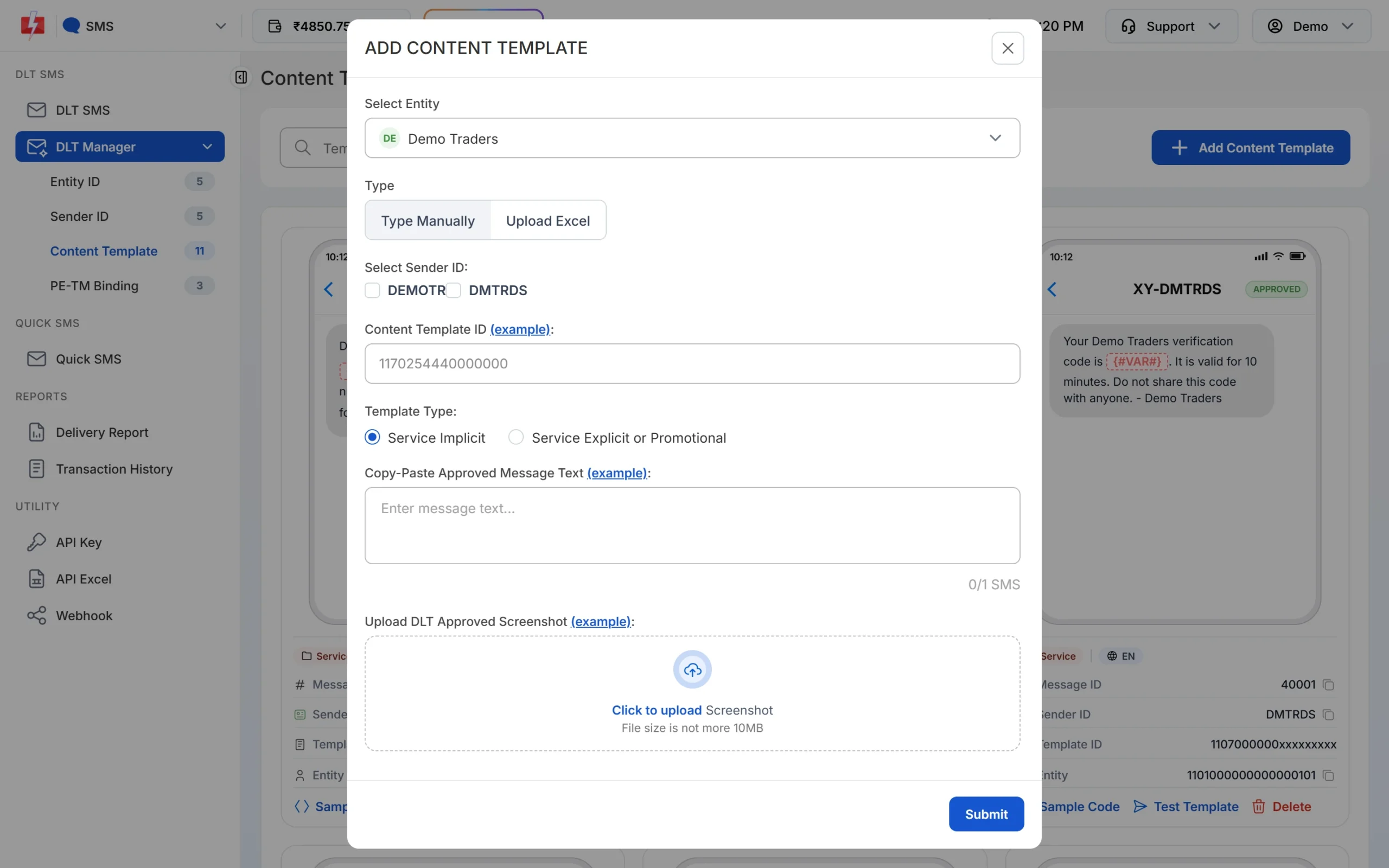
Paste the approved text. The SMS counter updates as you type. -
Check the UN badge
After approval, the template card shows the Hindi text and a UN badge (Unicode). English templates show EN. Use the Message ID on the card when you send by API.
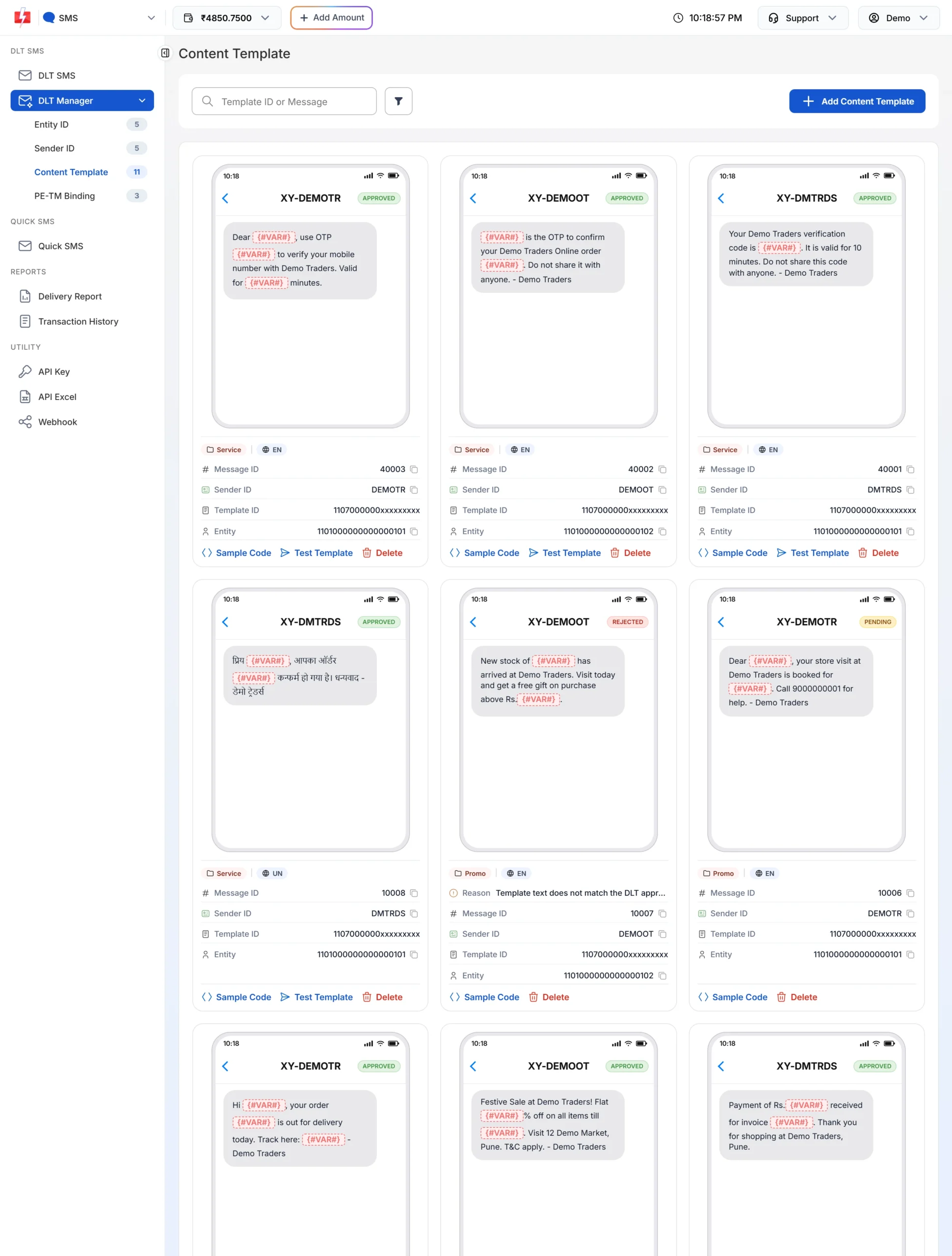
A Hindi template shows the UN badge next to its category. -
Send and check the report
Send it from DLT SMS like any other template. In Delivery Report > SMS Report, Hindi messages appear in their own script with the normal statuses.
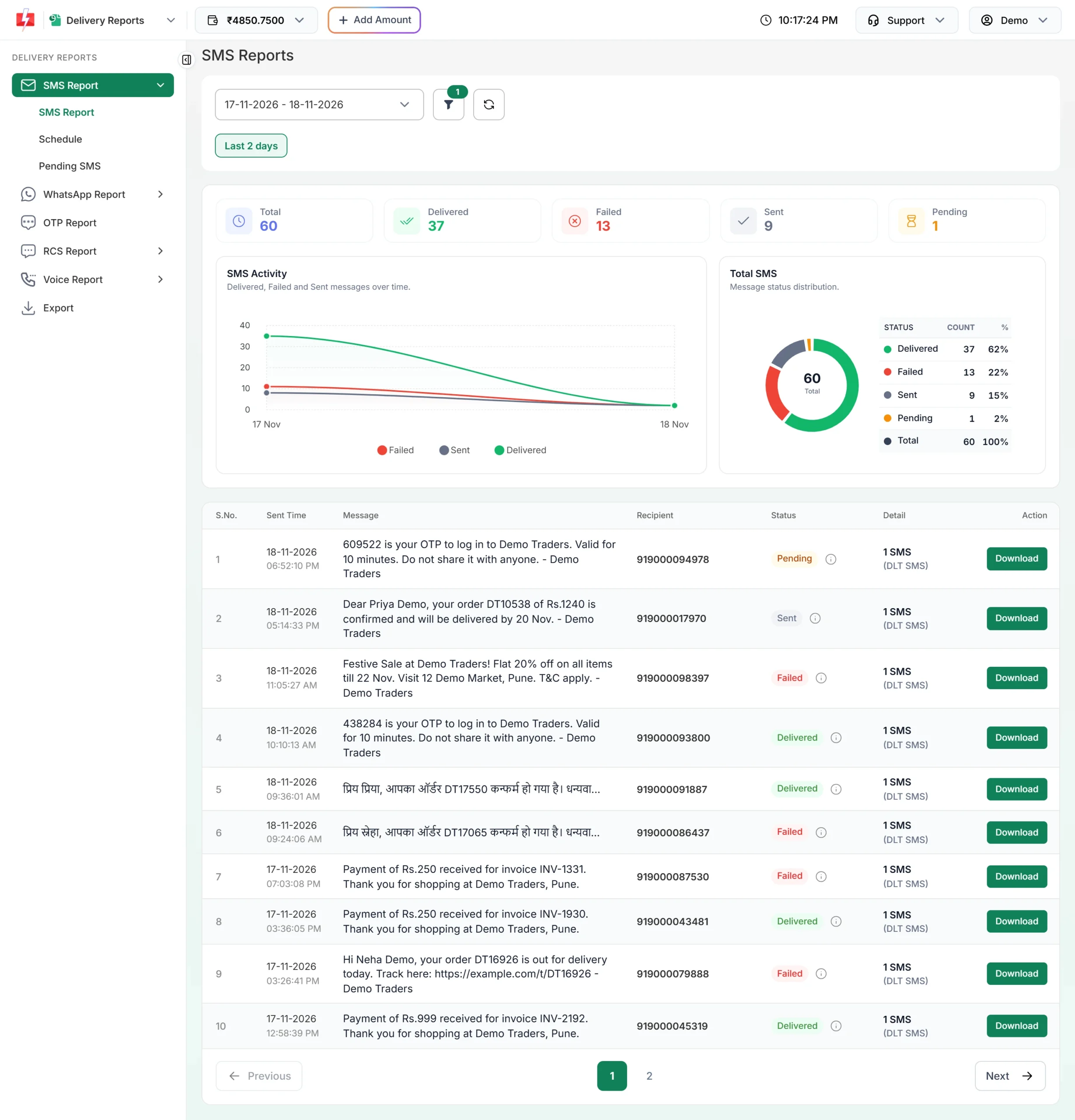
Hindi SMS in the delivery report.
How many characters fit in one Hindi SMS?
SMS are charged per part, so length matters more for Unicode messages. In Fast2SMS:
| Message length | English (GSM) | Hindi / Unicode |
|---|---|---|
| 1 SMS | Up to 160 characters | Up to 70 characters |
| 2 SMS | Up to 306 characters | Up to 133 characters |
| 3 SMS | Up to 459 characters | Up to 199 characters |
| Each part after that | About 153 more | 66 more |
| Longest message | 10 parts (1,530 characters) | 13 parts (859 characters) |
Cost = numbers x parts x your rate per SMS. A 100-character Hindi SMS is 2 parts, so it costs twice as much as a short English SMS. See current rates on the bulk SMS pricing page.
Common problems and fixes
| Message or problem | Cause and fix |
|---|---|
| “Only English alphabets are allowed in message text or select Unicode SMS.” | The template is English but the text you send has a non-English character. This often comes from a Hindi word or a symbol inside a variable value. Keep variable values in English, or register a Unicode template. |
| “Only Unicode are allowed in message text or select English SMS.” | The template is Unicode but the text you send has no Unicode characters. Use the Hindi template text as approved. |
| English message counted as Unicode | A curly quote, an emoji or a special dash turns the whole message into Unicode. Replace them with plain characters in the template on DLT and in Fast2SMS. |
| Hindi SMS fails at the operator | The text does not match the DLT template exactly. Copy the text again from your DLT portal. A different matra or a missing full stop (।) is enough to break the match. |
| Hindi shows as boxes on some phones | Very old phones may not show some Indian scripts. Keep a short English version for customers who ask. |
Frequently asked questions
Can I send Hindi SMS through DLT?
Yes. Register the template with the Unicode content type on your DLT portal and add it to Fast2SMS. It is sent like any other DLT SMS.
Which languages are supported?
Any language that can be written in Unicode, which includes Hindi, Marathi, Gujarati, Punjabi, Bengali, Tamil, Telugu, Kannada, Malayalam, Odia and Urdu.
Do I need a separate template for Hindi and English?
Yes. Each language version is a separate DLT template with its own Template ID.
Why is my Hindi SMS charged as 2 SMS?
A Unicode SMS holds only 70 characters in one part. Longer text is split into more parts, and each part is charged.
Can the variable values be in Hindi?
In a Unicode template, yes. In an English template, no: one Hindi character in a variable turns the message into Unicode and Fast2SMS refuses it as a language mismatch.
Can I use Hinglish (Hindi in English letters)?
Yes. Hinglish uses English letters, so it is a normal English template with 160 characters per SMS.