
You can use voice calls to qualify leads: a recorded message calls your whole lead list, and only people who press a key (for example “press 1 to talk to our sales team”) are connected live to your agents. In Fast2SMS this is a Call Patch campaign. Your team talks only to interested people, and every connected call is recorded for 30 days.
This guide is for sales teams in real estate, home interiors, solar, car dealers, travel and other businesses that get many enquiries and want to reach them fast. It covers agent groups, the call flow, costs and how to follow up from the report.
How lead qualification with Call Patch works
- Fast2SMS calls every number in your list and plays your recorded menu, for example “Hi, this is Demo Interiors about your modular kitchen enquiry. Press 1 to talk to our designer now.”
- If the person presses 1, the call is connected to an agent in the agent group you chose for key 1.
- If no agent picks up, the caller hears your “no agent available” message.
- The report shows who answered, who pressed which key, which agent took the call, the talk time and a recording.
People who do not press a key simply hear the menu and the call ends. You can follow up with them later by SMS or WhatsApp.
Before you start
- A paid transaction of ₹100 or more and enough wallet balance. Call Patch holds more per number than a Simple call (see costs below).
- Two approved voice files: a Menu (press a key) file and a No Agent Available file. The free Sample – Call Patch files (Hindi and English) let you test first.
- Agents who can take calls on their mobile phones during the campaign.
- A lead list of people who enquired with you. Calls go to non-DND numbers between 10 AM and 9 PM.
How to set up a lead qualification campaign
-
Create an agent group
Open Agent Groups in the Voice menu and click Create Group. Type a Group Name (up to 60 characters), then add each agent’s name and 10-digit mobile number. Use Add Agent for more rows. A group can have 1 to 50 agents. Click Create Group to save it.
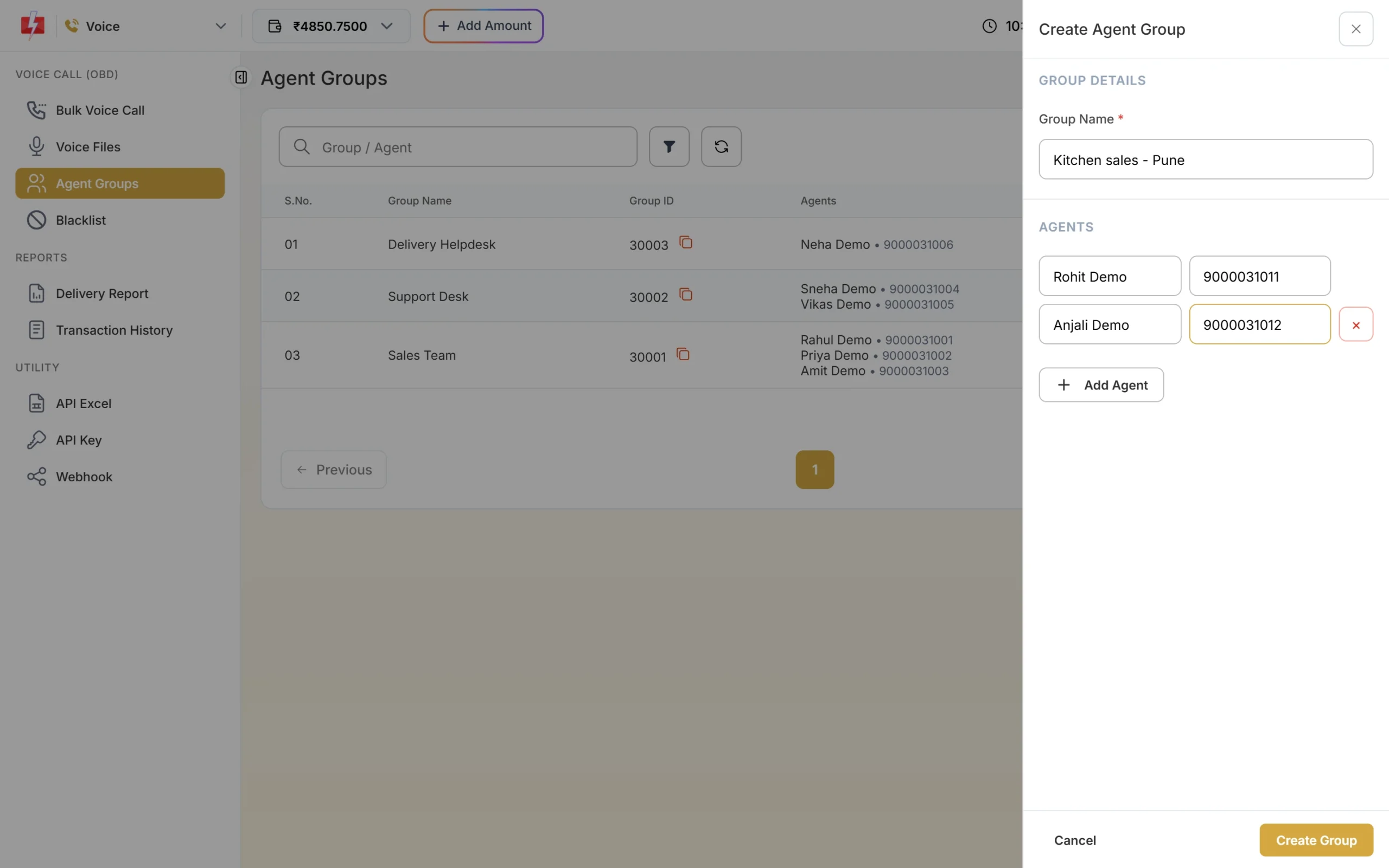
One group per team, for example sales and support. Creating agents and agent groups is free. The operator sees only a code and “Agent 1, 2”, never your agents’ names.
-
Start a Call Patch campaign
Open Bulk Voice Call, type a Campaign Name such as “Modular kitchen enquiry – callback” and choose Call Patch. The hint reads “The caller presses a key to be connected to one of your agents.” Add your lead numbers under Send To.
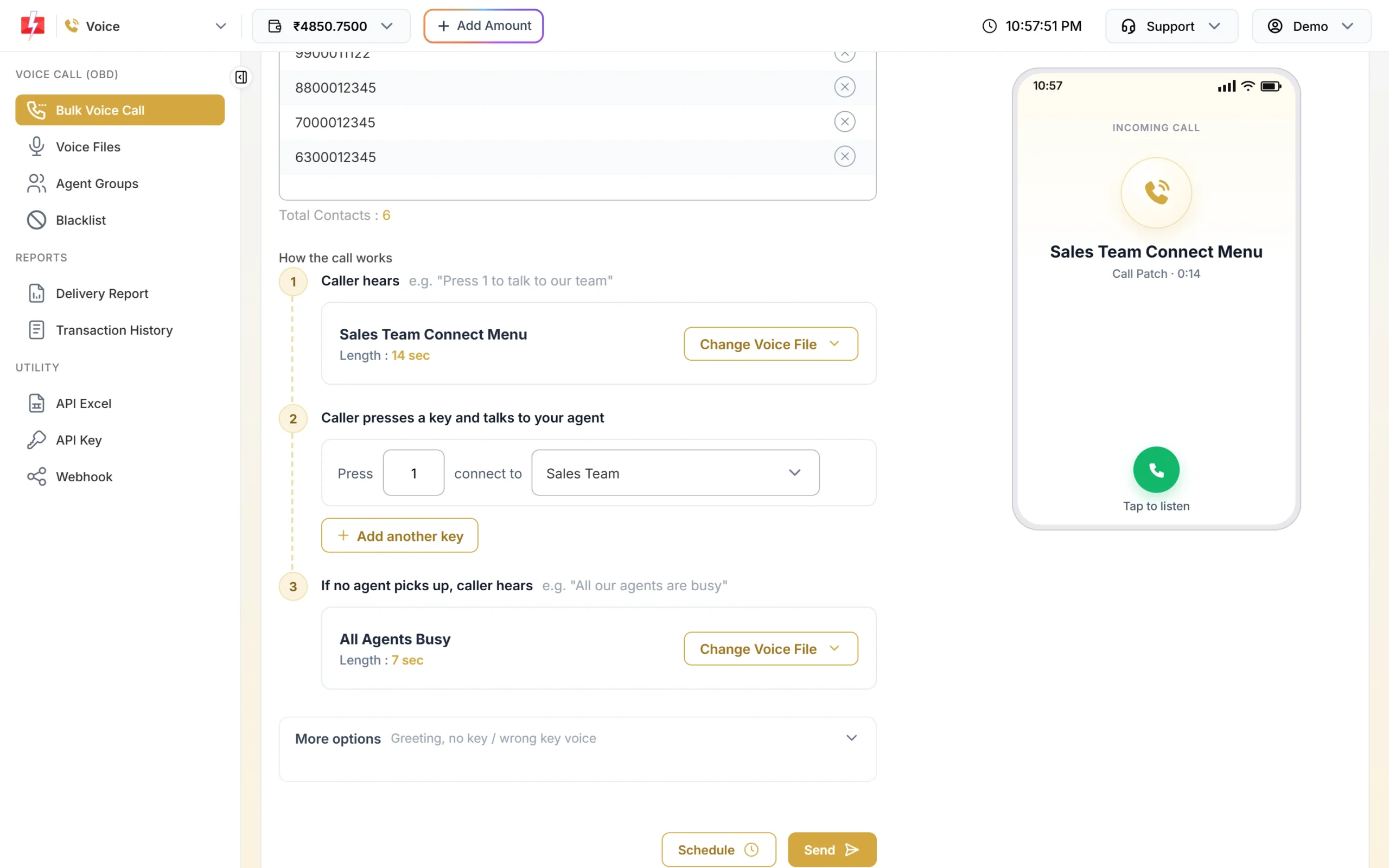
Call Patch connects interested callers to your team. -
Build the call flow
Under How the call works:
- 1. Caller hears: your menu file, for example “Press 1 to talk to our team”.
- 2. Caller presses a key and talks to your agent: set Press 1 connect to your agent group. Click Add another key to send key 2 to a different group, such as a Hindi-speaking team.
- 3. If no agent picks up, caller hears: your “all our agents are busy” file.
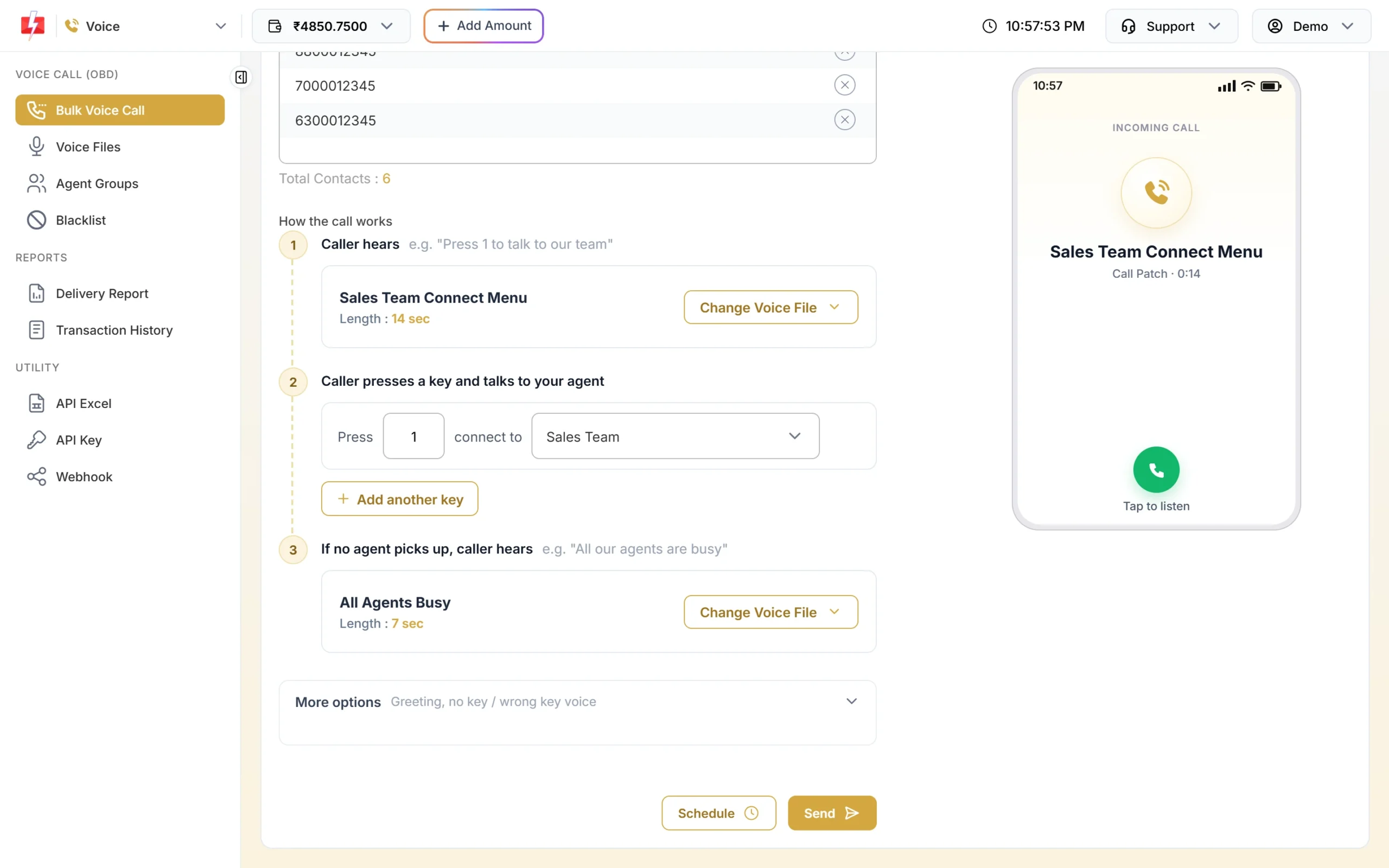
Each key goes to its own agent group. A key can be used only once. -
Send and keep agents ready
Click Send, check the Campaign Preview & Confirmation popup and click Confirm & Send. Calls start within a minute, so tell your agents before you send and keep their phones free.
-
Follow up from the report
Open Delivery Report > Voice Report and click the campaign. For each number you see the status, a description such as “Connected to agent” or “Agent did not answer”, the Key pressed, the Agent number, the duration with agent talk time, and a Recording you can play or download.
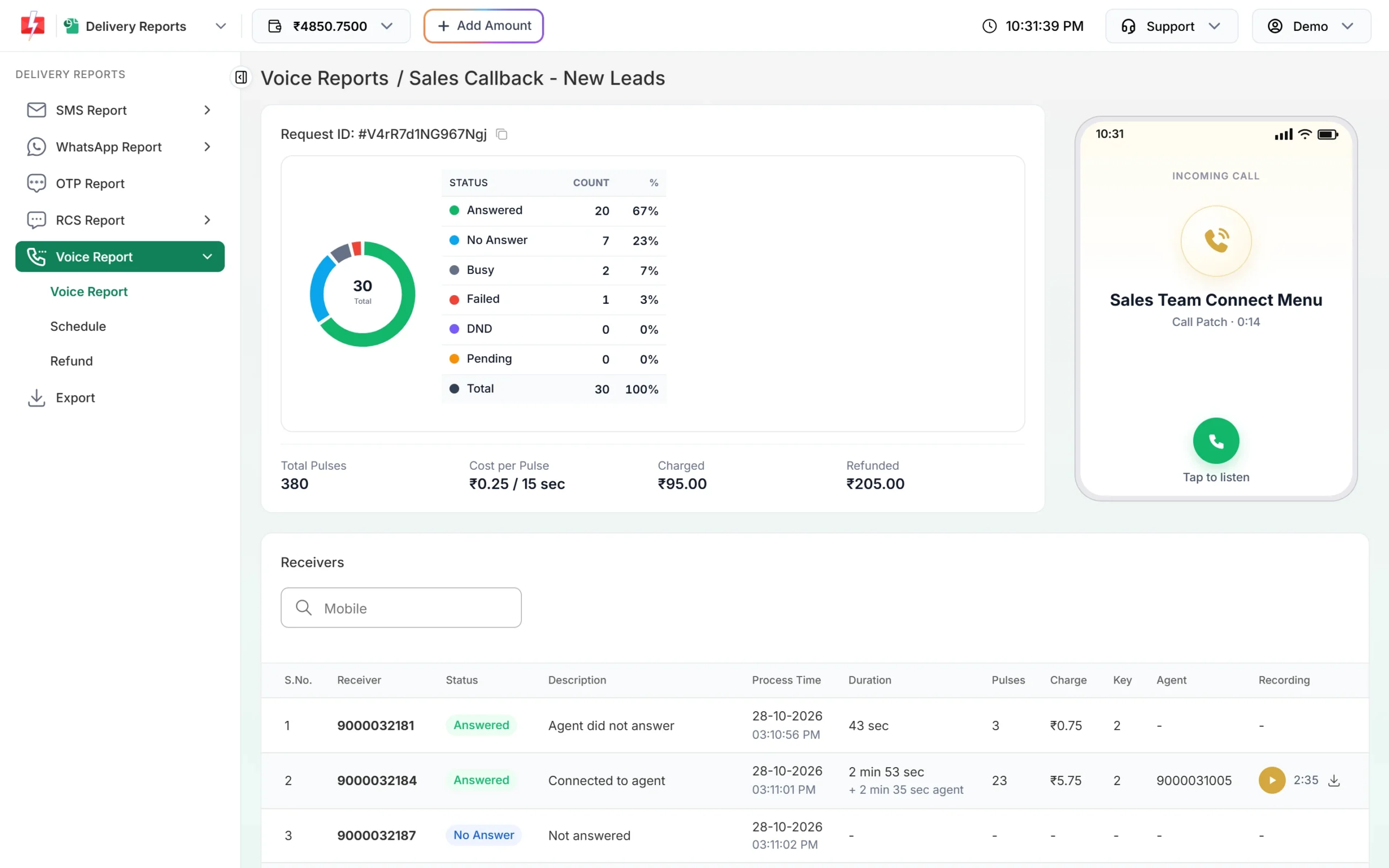
Use the Key and Agent columns to plan follow-ups.
How to sort your leads after the campaign
Download the Excel file from the campaign row. It has the Mobile, Status, Duration, Agent Talk (sec), Key Pressed, Agent and Reason columns. Sort the leads like this:
| What the report shows | What it means | Next step |
|---|---|---|
| Connected to agent, long agent talk time | Hot lead | Agent follows up with a quote or visit |
| Key pressed, “Agent did not answer” or “Agent busy” | Interested, but missed | Call back the same day |
| Answered, no key | Heard the message, not ready | Send details on SMS or WhatsApp |
| No Answer or Busy | Not reached | Try again in a new campaign another day |
| DND | Not called | Reach them only through a channel they opted in to |
What a Call Patch call costs
At the time of writing the rate is ₹0.25 per 15-second pulse. A Call Patch call has two legs, and both are charged: the customer’s call time and your agent’s talk time, each rounded up to 15-second pulses. The pricing page gives this example: 30 seconds with the agent is 4 + 2 = 6 pulses, ₹1.50.
- When you send, Fast2SMS holds a fixed 40 pulses per number (₹10.00 at ₹0.25). Unused money comes back after the campaign.
- If a conversation runs longer than the held amount, the extra is charged after the call as “Voice Call Extra Talk Time”. This can take your wallet below ₹0, and then running campaigns are paused until you recharge.
- Calls that are not answered, busy or DND cost nothing.
Sending in bulk? For high voice call volumes our team offers discounted rates. Talk to our team or see voice call pricing.
Keep extra balance: For long sales calls, keep more money in the wallet than the campaign needs, so a few long conversations do not pause your other campaigns.
Tips for better lead calls
- Mention what the person enquired about: “your enquiry for a 2 BHK in Wakad” gets more key presses than a general pitch.
- Send small batches that your agents can handle. If 200 people press 1 at once and you have 3 agents, many will hear the busy message.
- Run campaigns during your team’s working hours, inside the 10 AM to 9 PM calling window.
- Listen to a few recordings each week to coach agents. Recordings are kept for 30 days.
Frequently asked questions
What is call patching?
Call patching connects a person who receives your automated call to a live agent when they press a key, so the conversation happens on the same call.
How many agents can I add?
1 to 50 agents per group. You can create several groups, and each key from 0 to 9 can go to its own group.
Do agents need an app?
No. Agents get the call on the mobile number you added in the agent group.
Are Call Patch calls recorded?
Yes. Connected calls have a recording in the campaign detail for 30 days. After that it shows “Deleted after 30 days”.
Is there a charge per agent?
No. Agent groups are free. You pay only for call time on both legs of answered calls.
Can I delete an agent group?
Yes, but not while a scheduled or running Call Patch campaign uses it.