
An IVR voice campaign asks the person who answers to press a key, such as “press 1 for Yes, press 2 for No”. In Fast2SMS, a Key Press (DTMF) campaign records which key each caller pressed, and a Call Patch campaign connects the caller to one of your agents when they press a key. Both are set up on the Bulk Voice Call page, and you pay only for answered calls.
Use Key Press for surveys, order or visit confirmations and lead filtering. Use Call Patch when interested customers should talk to your sales or support team right away. This guide shows how to set up each one and how to download the responses.
Before you start
- A Menu voice file that tells the caller which keys to press, uploaded under Voice Files with Used As “Menu (press a key)” and approved. Free Key Press and Call Patch sample files are available for testing.
- For Call Patch: an agent group and a “No Agent Available” voice file.
- Wallet balance and at least one paid transaction of ₹100 or more on your account.
- Calls go only to non-DND numbers between 10:00 AM and 9:00 PM IST.
How to set up a Key Press (press 1) campaign
-
Choose Key Press (DTMF)
Open Bulk Voice Call, enter a Campaign Name and click Key Press (DTMF). The hint reads “Asks the caller to press a key (e.g. 1 for Yes) and records the key in the report.” Add your numbers under Send To with List, Address Book or CSV File.
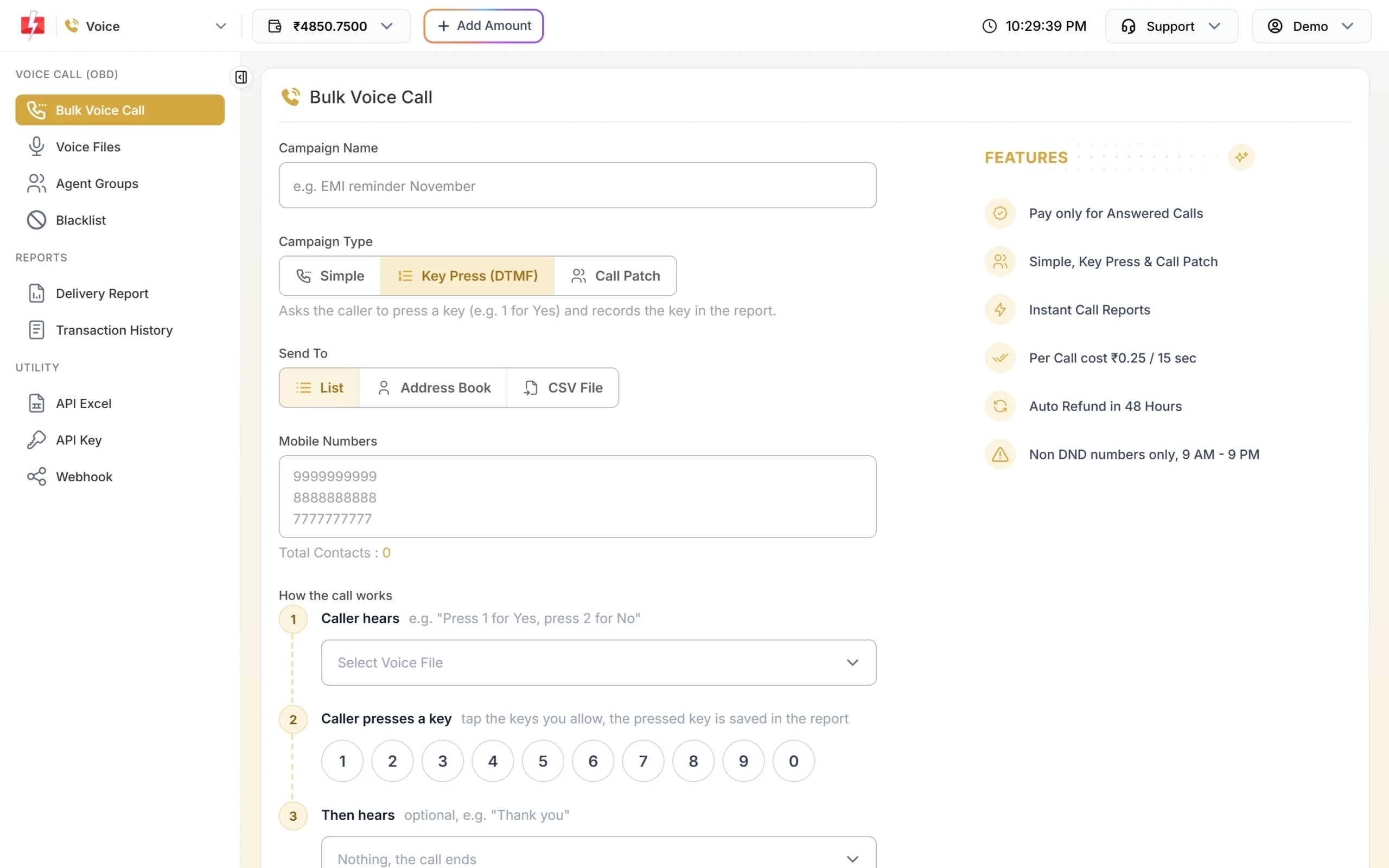
Key Press shows the call flow as three steps. -
Set up how the call works
Under How the call works:
- Caller hears: choose the menu file, for example “Press 1 for Yes, press 2 for No”. This is required.
- Caller presses a key: tap the keys you allow on the 0-9 keypad. The key the caller presses is saved in the report.
- Then hears: optional thank-you file. Leave it as “Nothing, the call ends” if you do not need one.
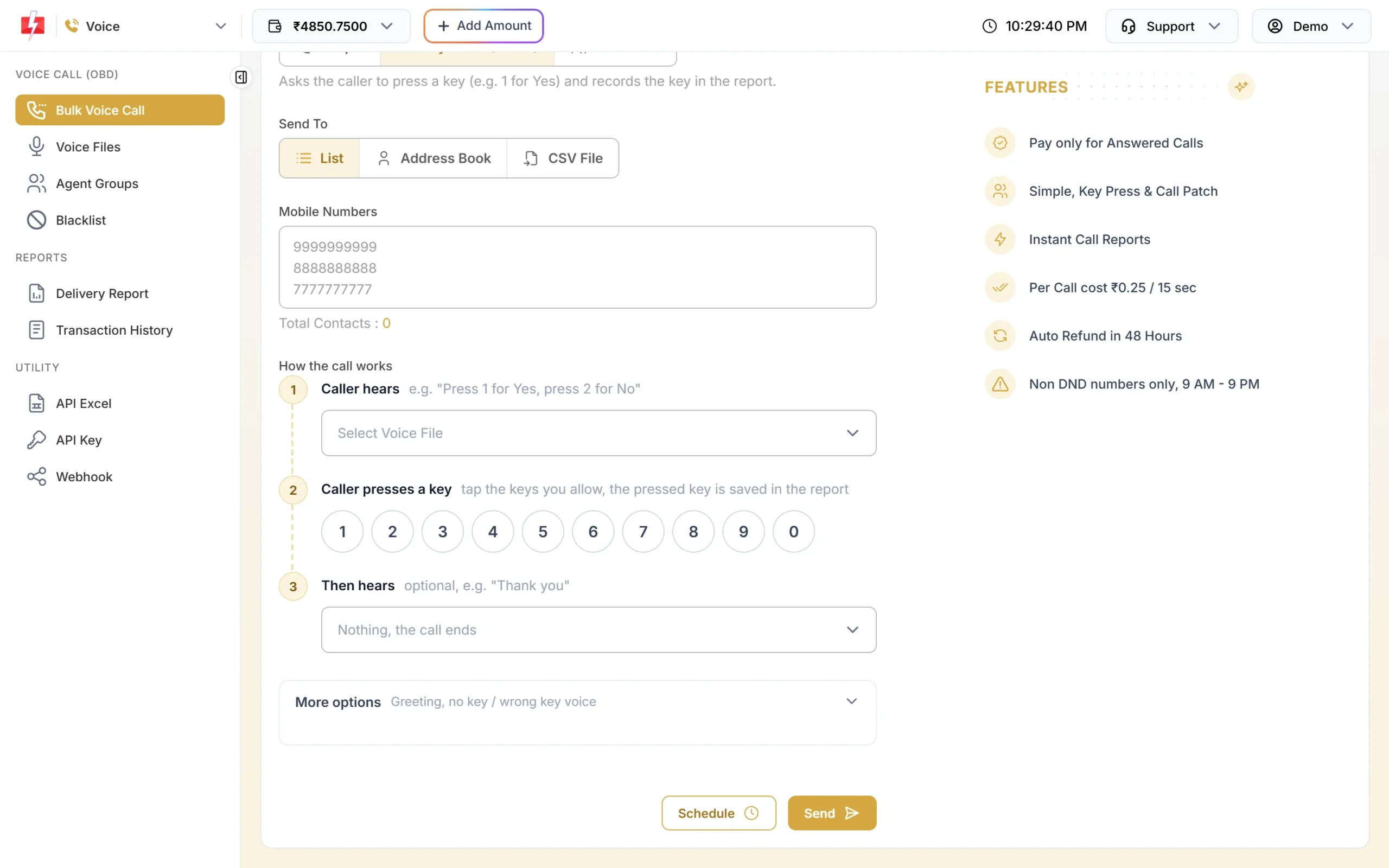
Tap only the keys you want to accept. -
Use More options (optional)
Open More options to add a greeting before step 1, a file for “If no key is pressed”, a file for “If a wrong key is pressed”, the Wait for a key (sec) time from 1 to 10 seconds (default 5), and Repeat step 1 if no key from 0 to 3 times (default 1). Longer waits and repeats make calls longer, which raises the estimate held from your wallet.
-
Send and confirm
Click Send or Schedule, check the cost in Campaign Preview & Confirmation and click Confirm & Send. The estimate covers the menu, the wait time and any repeats. Unanswered calls are refunded after the campaign.
How to set up a Call Patch campaign
-
Create an agent group
Go to Agent Groups in the Voice menu and click Create Group. In Create Agent Group, enter a Group Name such as “Sales team”, then add each agent’s name and 10-digit mobile number. Click Add Agent for more (1 to 50 agents per group), then Create Group. The group gets a Group ID. Your agents’ names are not shared with the operator.
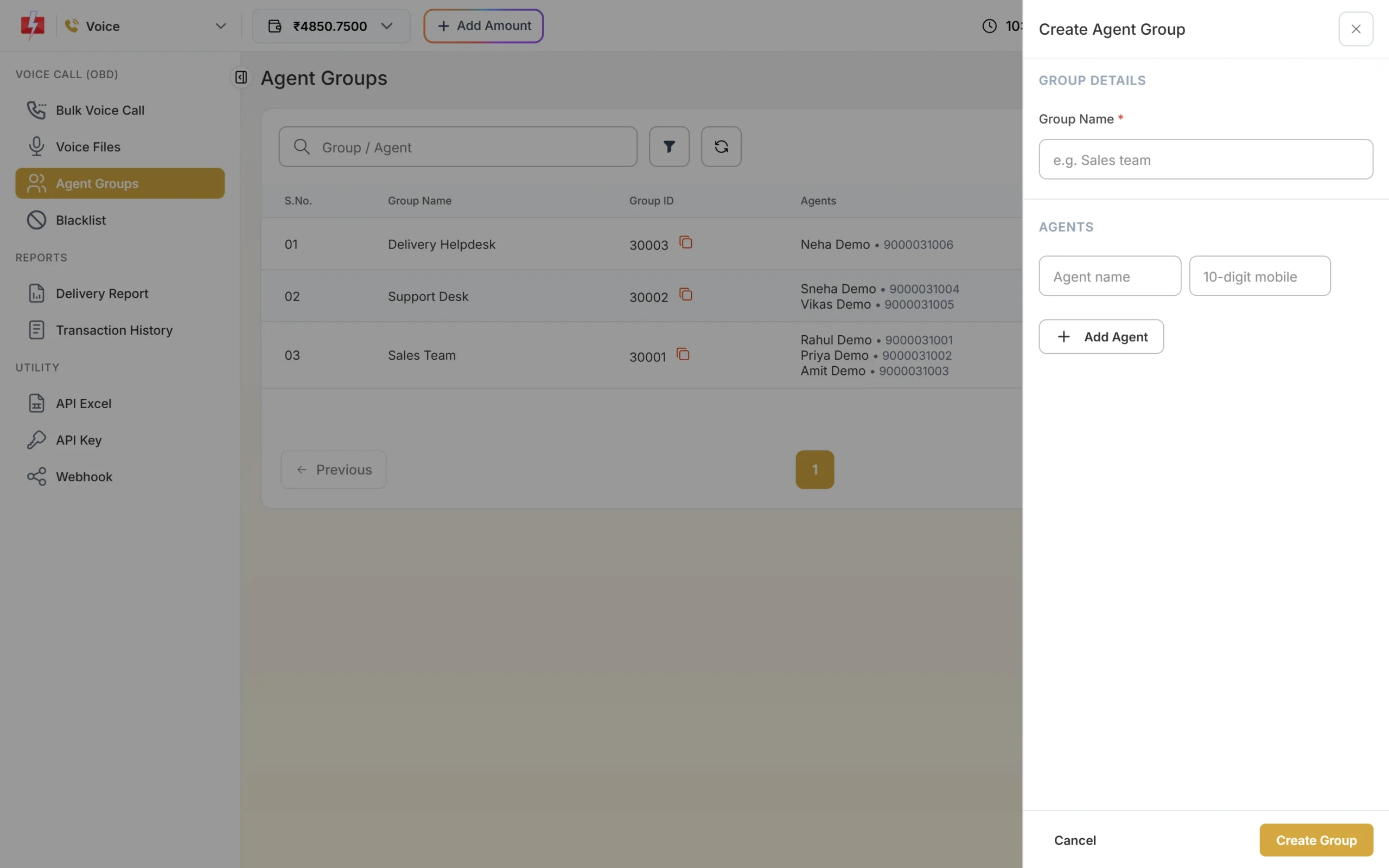
Each group is a team that can take patched calls. -
Choose Call Patch and the menu file
On Bulk Voice Call, click Call Patch. In step 1 Caller hears, pick a menu file such as “Press 1 to talk to our team”.
-
Connect keys to agent groups
In step 2, set Press [key] connect to [agent group]. Click Add another key to send different keys to different teams, for example 1 for Sales and 2 for Support. Each key can be used once. In step 3, choose the file the caller hears If no agent picks up, such as “All our agents are busy”. This file is required.
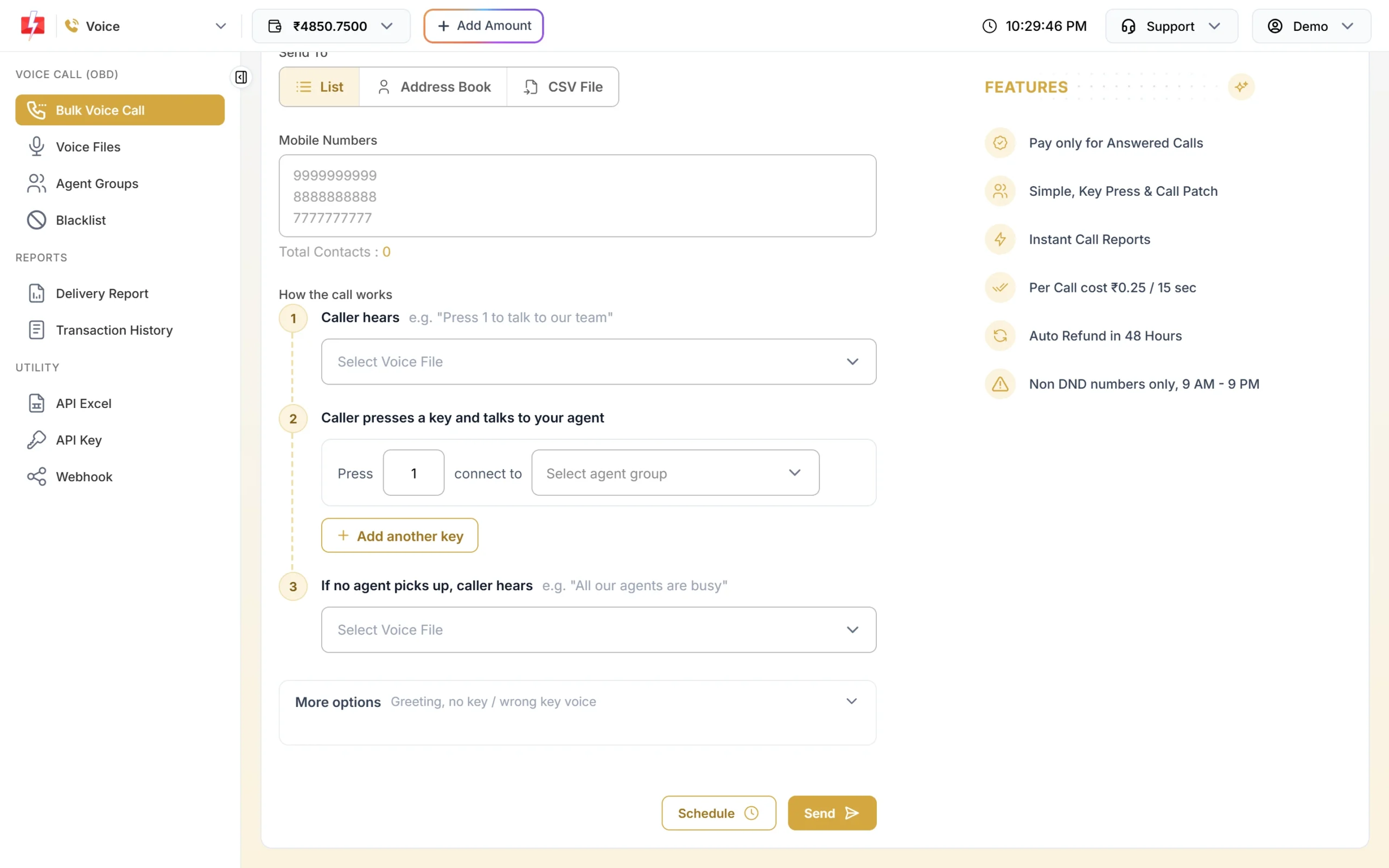
Map each key to an agent group. -
Send and check the cost
Click Send and confirm. For Call Patch, a fixed amount per number is held because talk time is not known in advance. At ₹0.25 per pulse this is ₹10 per number. After the campaign, both the caller’s time and the agent’s talk time are charged in 15-second pulses, and the rest is refunded. If a conversation runs longer than the held amount, the extra is charged after the call as “Voice Call Extra Talk Time”.
Sending in bulk? For high voice call volumes our team offers discounted rates. Talk to our team or see voice call pricing.
How to see and download key press responses
-
Open the campaign in Voice Report
Go to Delivery Report > Voice Report and click the campaign. For a Key Press campaign, the receivers table has a Key column showing the key each caller pressed. A dash means no key was pressed.
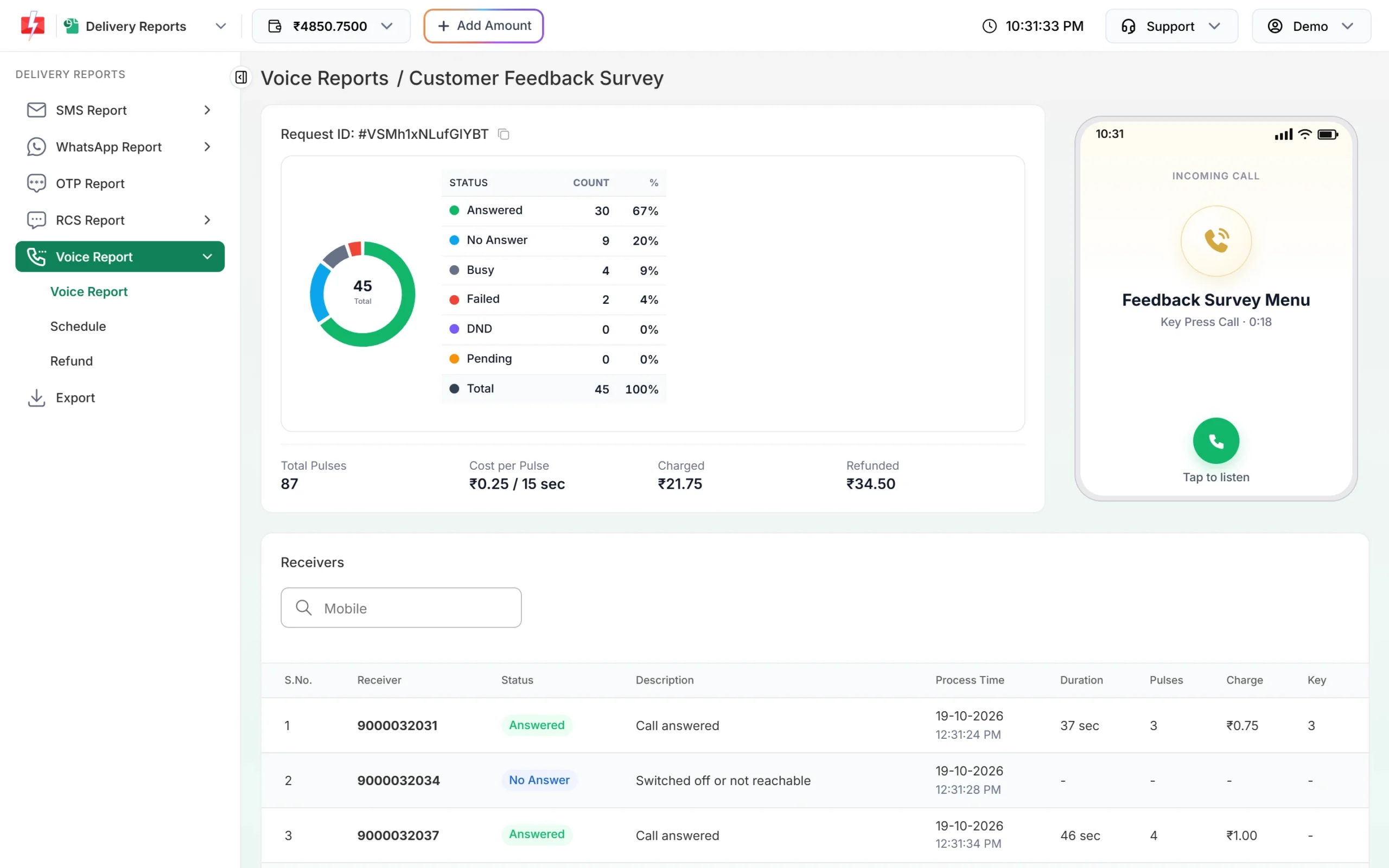
The Key column shows each caller’s answer. -
Check agents and recordings for Call Patch
For a Call Patch campaign, each row also shows the key, the agent who took the call, the agent talk time and a recording player with a download icon. The Description tells you what happened: “Connected to agent”, “Agent did not answer”, “Agent busy” or “Agent not connected”. Recordings are kept for 30 days.
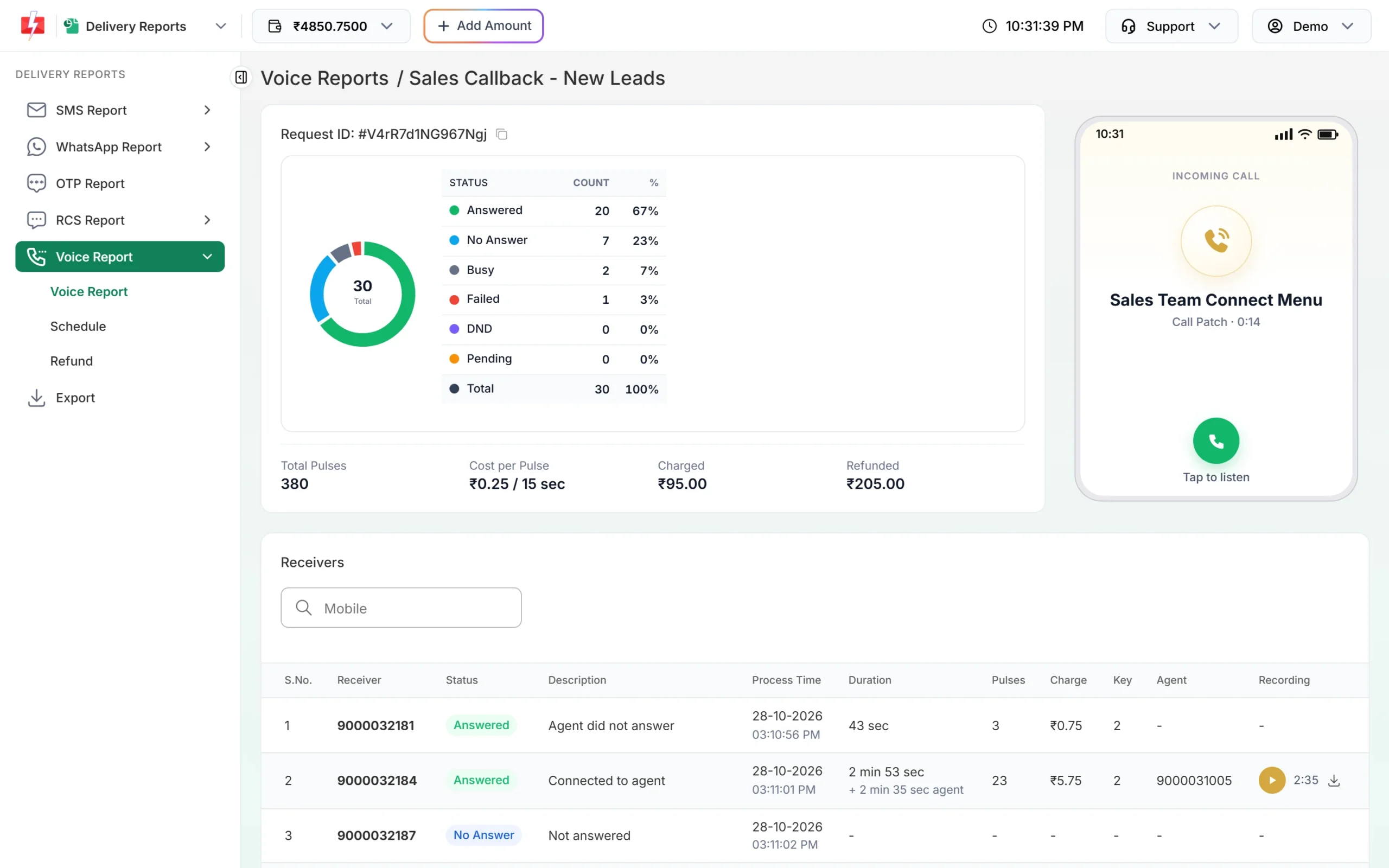
Listen to or download patched calls for 30 days. -
Download the Excel file
On the Voice Report list, click Download on the campaign row. The .xlsx file has Mobile, Status, Start Time, End Time, Duration, Pulses, Charge, Key Pressed, Agent and Reason for every number. Filter the Key Pressed column in Excel to get, for example, everyone who pressed 1.
Common problems and fixes
| Message you see | What to do |
|---|---|
| Choose at least one key (0-9) the caller can press. | Tap one or more keys on the keypad. |
| Choose the voice file the caller hears first (it asks the caller to press a key). | Pick an approved menu file in step 1. |
| Add a key and choose the agent group it connects to. | Fill at least one Press / connect to row. |
| Key N is used twice. Use each key for one agent group only. | Change one of the keys. |
| Choose the voice file that plays when no agent picks up. | Pick a “No Agent Available” file in step 3. |
| No agent groups yet. Create an agent group | Create a group under Agent Groups first. |
| Invalid agent number | Enter a 10-digit Indian mobile number for each agent. |
Frequently asked questions
What is a DTMF or key press voice call?
It is a recorded call that asks the listener to press a key on their phone. The pressed key (DTMF tone) is saved, so you know each person’s answer.
How many keys can I use in a Key Press campaign?
Any of the keys 0 to 9. Tap the ones you allow; other keys count as a wrong key.
How many agents can be in one agent group?
From 1 to 50 agents, each with a name and a 10-digit mobile number.
Are Call Patch calls recorded?
Yes. Patched conversations can be played or downloaded from the campaign detail for 30 days.
How is a Call Patch call charged?
The caller’s time and the agent’s talk time are each rounded up to 15-second pulses and both are charged. Unanswered calls cost nothing.
Can I get key press results on my server?
Yes. A voice webhook sends one request per number after the campaign is settled, including the key pressed and the agent number.
Can I delete an agent group?
Yes, unless a scheduled or running Call Patch campaign uses it.