
WhatsApp error 200005, 200006 and 200007 come from Meta’s template analytics (also called template insights). 200007 means template analytics are not turned on for your WhatsApp Business Account, 200005 means they are not available for your account yet, and 200006 means you tried to turn them off, which Meta does not allow. None of these stop your messages from being sent.
What the three codes mean
| Code | Meta’s meaning | What to do |
|---|---|---|
| 200007 | Template insights have not been enabled for this account | Confirm template analytics in WhatsApp Manager or through the API |
| 200005 | Template insights are not available yet for this account | Nothing for now; Meta has not opened it to the account |
| 200006 | Template insights cannot be disabled once enabled | No action; they stay on |
What template analytics are
Template analytics are Meta’s per-template numbers. At the time of writing they include sent, delivered and read counts, button clicks for marketing and utility templates, and cost data, by day for up to 90 days back. Read and click counts are kept only for 7 days after a message is sent. Meta does not support them for accounts in the EU and Japan.
Before Meta gives you these numbers, you have to confirm template analytics on your account once. Meta notes that confirming lets it add insights such as link tracking and collect anonymised data from your customer chats, and that it cannot be undone.
Why the errors happen
- 200007: a tool or your own code asked for template analytics before they were confirmed on the account.
- 200005: Meta has not made template analytics available for your account.
- 200006: a request tried to switch analytics off after they were confirmed.
How to fix it
-
Use the Fast2SMS report for everyday numbers
You do not need Meta’s template analytics to see how a campaign did. Open Delivery Report in the WhatsApp sidebar. The cards at the top show Delivered, Read, Failed, Sent and Pending totals, and each campaign opens to show its own counts and the status of every number.
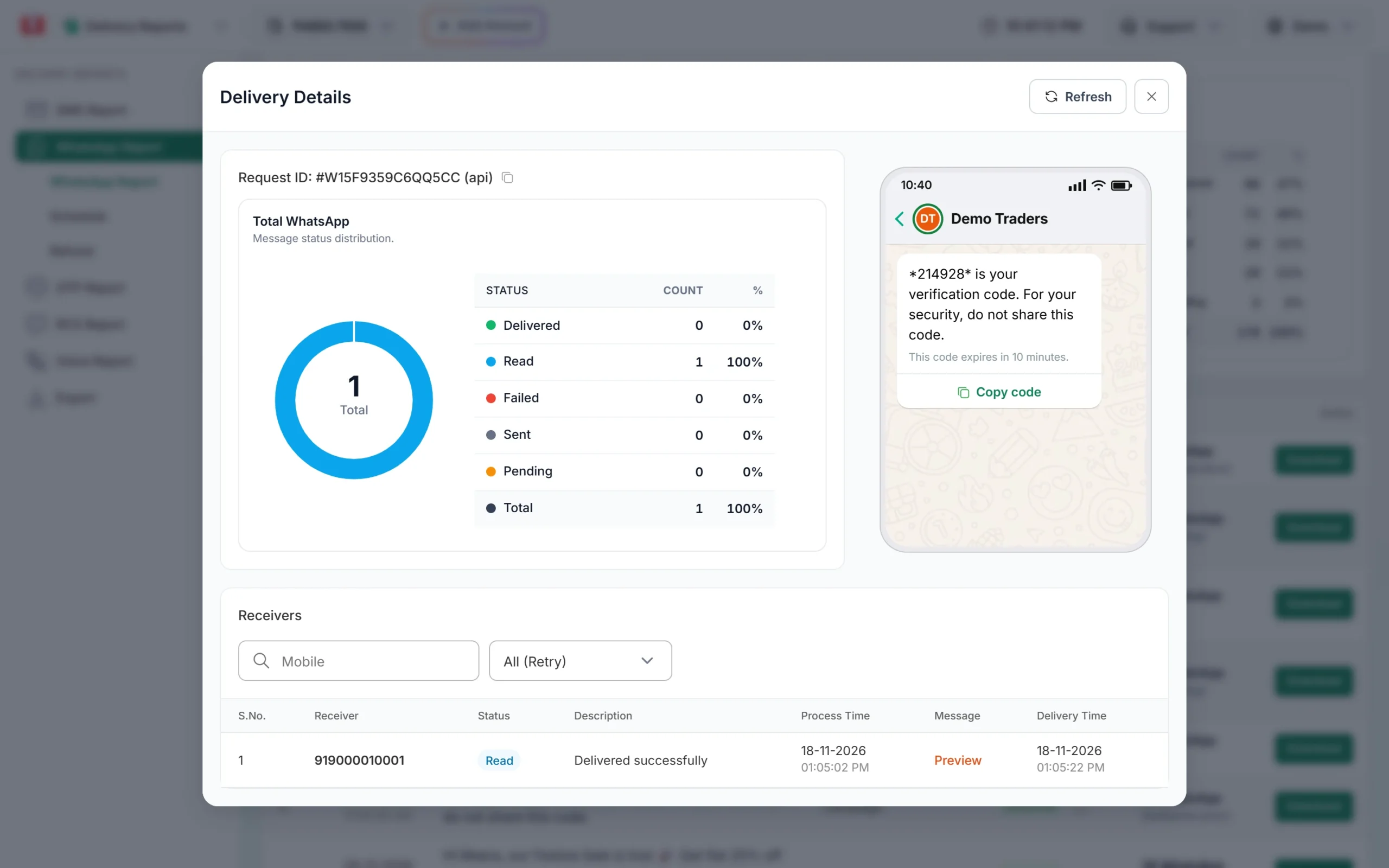
Per-campaign results in Fast2SMS. -
Confirm template analytics for error 200007
If you want Meta’s own template numbers, open your account in Meta. In Fast2SMS, go to WhatsApp Manager > Numbers, click the three-dot menu on your number and choose Meta Manager. In Meta’s WhatsApp Manager, confirm template analytics for the account. Developers can do the same through the API by setting
is_enabled_for_insightstotrueon the WhatsApp Business Account.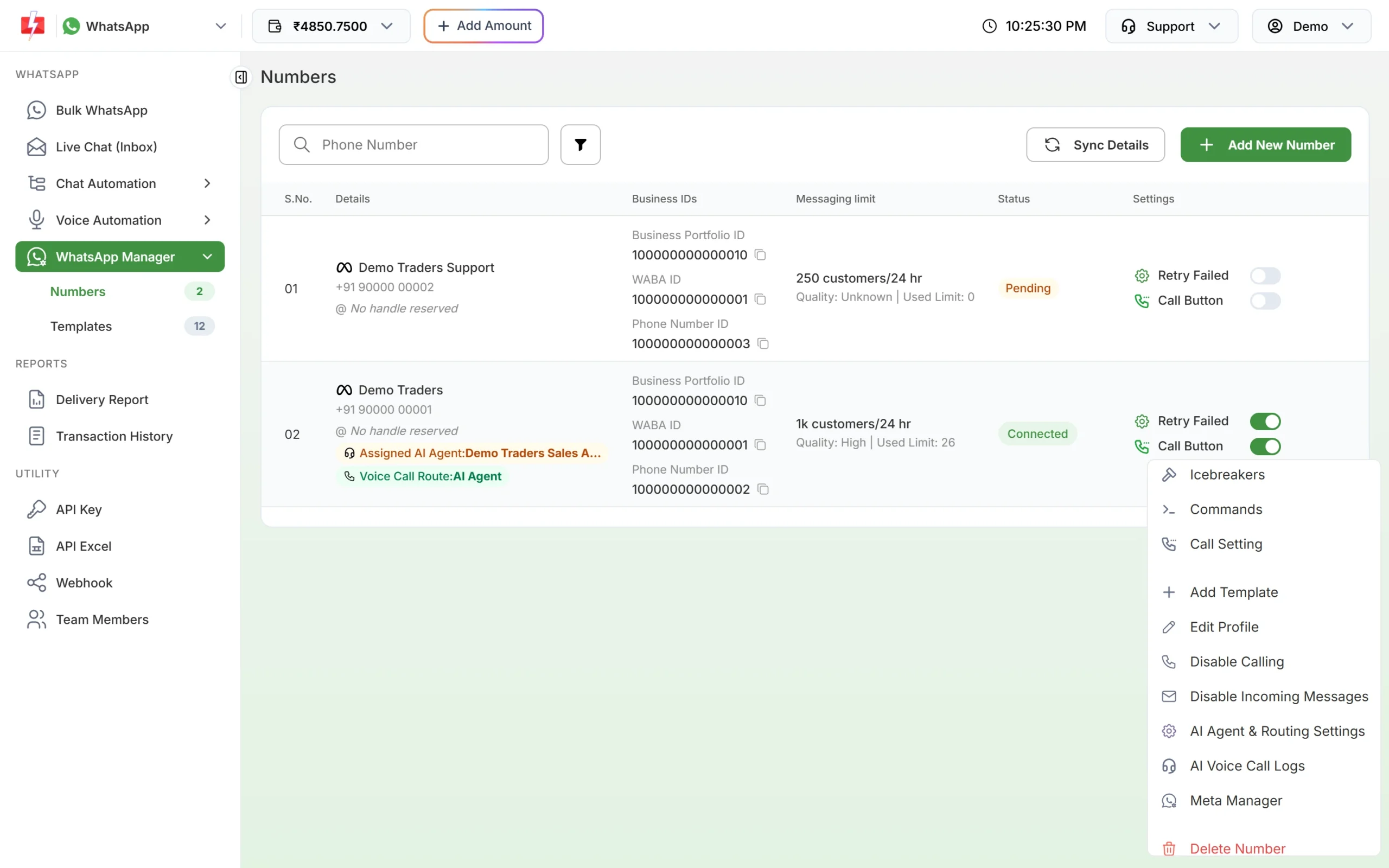
Meta Manager opens your account in Meta. -
For 200005 and 200006, stop retrying
If you get 200005, analytics are not open to your account yet, so retrying will not help. If your code gets 200006, remove the call that tries to switch analytics off. If you only want to stop click tracking on one template, Meta lets you opt that template out of link tracking instead.
How to avoid it
- Check that analytics are confirmed before your code asks for template insights.
- Read the privacy note before confirming, since it cannot be reversed.
- Use the Fast2SMS Delivery Report and Export for campaign results you need every day.
Frequently asked questions
Do template insights errors stop my messages?
No. They only affect requests for analytics. Sending works as usual.
Can I turn off WhatsApp template analytics?
No. Once confirmed, Meta does not allow it to be turned off. You can opt single templates out of link tracking.
How far back do template analytics go?
Up to 90 days at the time of writing, by day. Read and click counts are kept for 7 days after sending.
Do I need template analytics to see read counts in Fast2SMS?
No. The Fast2SMS WhatsApp report shows delivered and read status for every message without it.
Why is my account not eligible (200005)?
Meta decides which accounts get template analytics, and it does not support accounts in the EU and Japan. There is nothing you can switch on from your side.