
Usually yes, but only if international roaming is switched on for the customer’s Indian SIM. You send the SMS or OTP to their Indian number exactly as you always do. Whether it reaches the phone abroad depends on the customer’s operator, their roaming setting and the network they are on in the other country. Neither you nor Fast2SMS can switch roaming on for them, and Fast2SMS does not know the customer is abroad.
This page explains what decides delivery on roaming, what your delivery report shows, and how to make OTP login work for customers who travel.
What decides if a roaming customer gets your SMS
| Factor | Who controls it | What happens |
|---|---|---|
| International roaming on or off on the SIM | The customer and their operator | If roaming is off, the phone is not on any network abroad and the SMS cannot be delivered there |
| Roaming pack or balance | The customer | Operators set their own terms for roaming services, so check the operator’s current terms |
| Signal on the foreign network | The foreign network | Low signal or a switched-off phone delays or fails delivery |
| Your DLT template, header and number | You | Same as in India. A correct DLT SMS is sent the same way |
As one example, Airtel’s international roaming terms say, at the time of writing, that the international roaming service is disabled by default for all customers and is enabled automatically when the customer buys an international roaming pack. Postpaid customers can also enable it through the Airtel app or customer care without a pack. Other operators have their own rules, so customers should check with their operator before they travel.
What your delivery report shows
-
Open the campaign or the number
Go to Delivery Report and click the message to open Delivery Details. Search the customer’s number in Receivers.
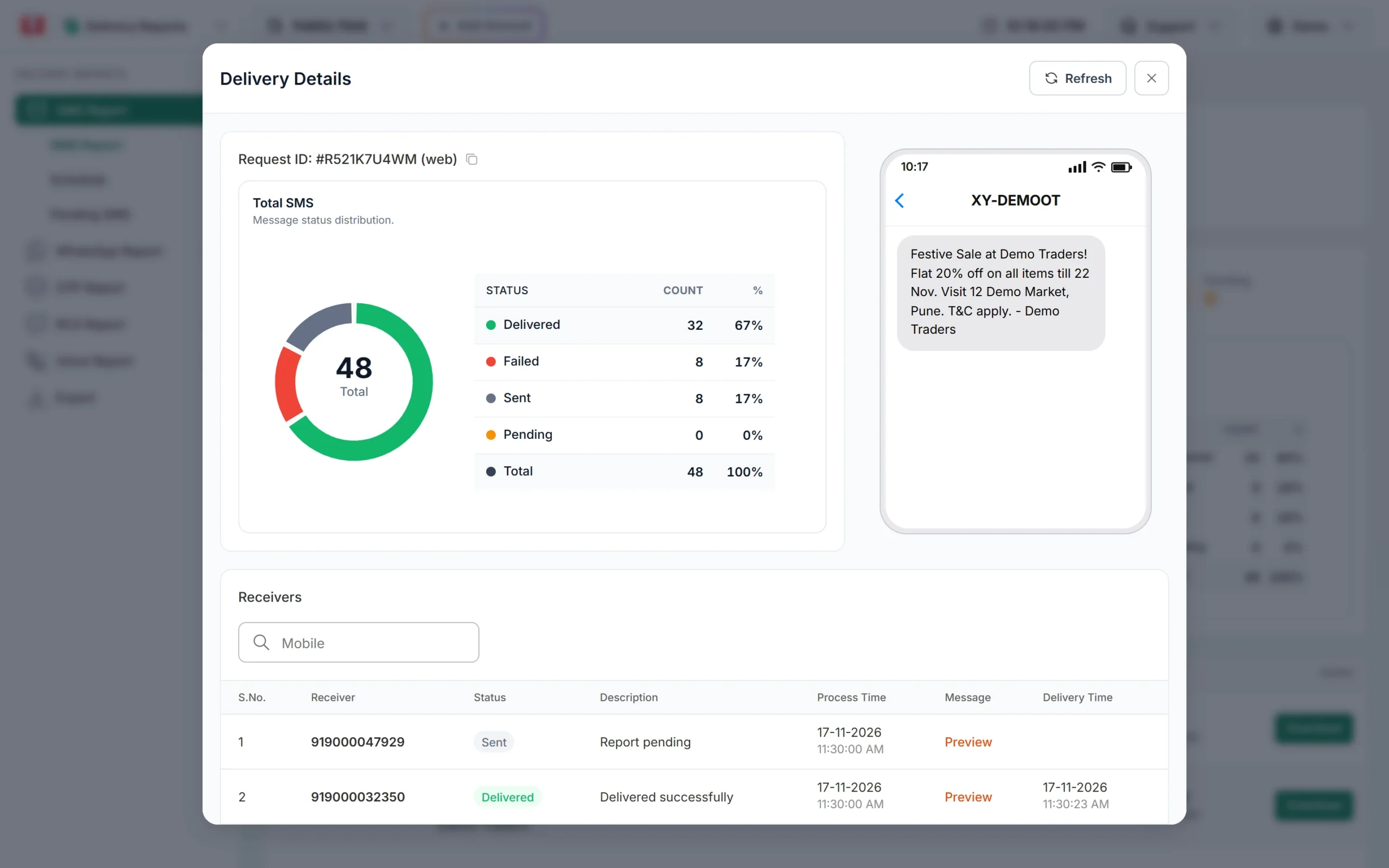
Each number shows its own status and description. -
Read the status
Delivered means the phone got the SMS. Sent with “Report pending” means the operator has not confirmed delivery yet, which can happen when a roaming phone is off or out of coverage. Failed shows the operator’s reason, for example “Number switch off or low signal” or “Number not reachable”.
-
Refresh later
A phone that comes back on the network can still get the SMS later, and the status then changes. Click Refresh in Delivery Details to see the latest status.
Charges work the same as for any other number. DLT SMS are charged for every valid number when the campaign is sent, and numbers that later fail at the operator are not refunded automatically. See am I charged for failed SMS and the bulk SMS pricing page.
Sending in bulk? For high SMS volumes our team offers discounted rates. Talk to our team or see SMS pricing.
How to make OTP login work for customers abroad
- Offer WhatsApp as a second channel. WhatsApp works on Wi-Fi or a local data plan, even when SMS roaming is off. With Smart OTP you can set a WhatsApp fallback on an SMS OTP template. The fallback goes out only when the SMS is reported as failed within about two minutes of sending, so it will not help when the SMS just stays at Sent.
- Add a “Get code on WhatsApp” button. Create a second Smart OTP template with WhatsApp as the main channel, and let the user pick it on your OTP screen. A traveller on hotel Wi-Fi can then log in without SMS.
- Do not shorten OTP expiry too much. Roaming SMS can take longer. Give the user enough time, and show a resend timer. See OTP expiry time in Fast2SMS.
- Tell users before they travel. If your customers often travel, a line in your app such as “Travelling? Keep roaming on for SMS codes, or choose WhatsApp” saves support calls.
Frequently asked questions
Can customers receive OTP SMS on international roaming?
Yes, if international roaming is active on their Indian SIM and the phone is on a network abroad. You send to the Indian number as usual.
Do I need to send SMS differently to a customer abroad?
No. Use the same 10-digit Indian number and the same DLT template. Fast2SMS does not know where the phone is.
Why does the report show Sent for a customer who is abroad?
Sent means the operator has not confirmed delivery yet. With roaming, that often means the phone is off, out of coverage or roaming is not active. It can change later.
Can I send SMS to a foreign SIM my customer uses abroad?
No. Fast2SMS sends only to Indian mobile numbers. Use WhatsApp or email for foreign numbers.
Am I charged if the roaming customer does not get the SMS?
Yes. DLT SMS are charged when sent, and numbers that fail later are not refunded automatically.
Can Fast2SMS switch on roaming for my customer?
No. Only the customer can do that, through their operator’s app, website or customer care.
Will WhatsApp OTP work for a customer without roaming?
Yes, as long as the phone has internet, for example over Wi-Fi, and WhatsApp is set up on that number.