
WooCommerce Abandoned Cart Recovery on WhatsApp and SMS
A shopper fills a WooCommerce cart, reaches checkout, types a mobile number and then leaves. Maybe the phone rang. Maybe they wanted to compare prices. If you only have an email reminder in place, many of these shoppers never hear from you again. A WooCommerce abandoned cart plugin, free to install, that sends the reminder on WhatsApp or SMS reaches them on the phone they just used.
This guide shows how WooCommerce abandoned cart recovery works in the free Fast2SMS plugin: the Abandoned cart recovery event, the delay setting, the consent checkbox at checkout, the do-not-send list, and the choice between an abandoned cart WhatsApp message and a WooCommerce abandoned cart SMS. You will also get ready-to-use message examples and the rules Indian stores must follow for marketing messages.
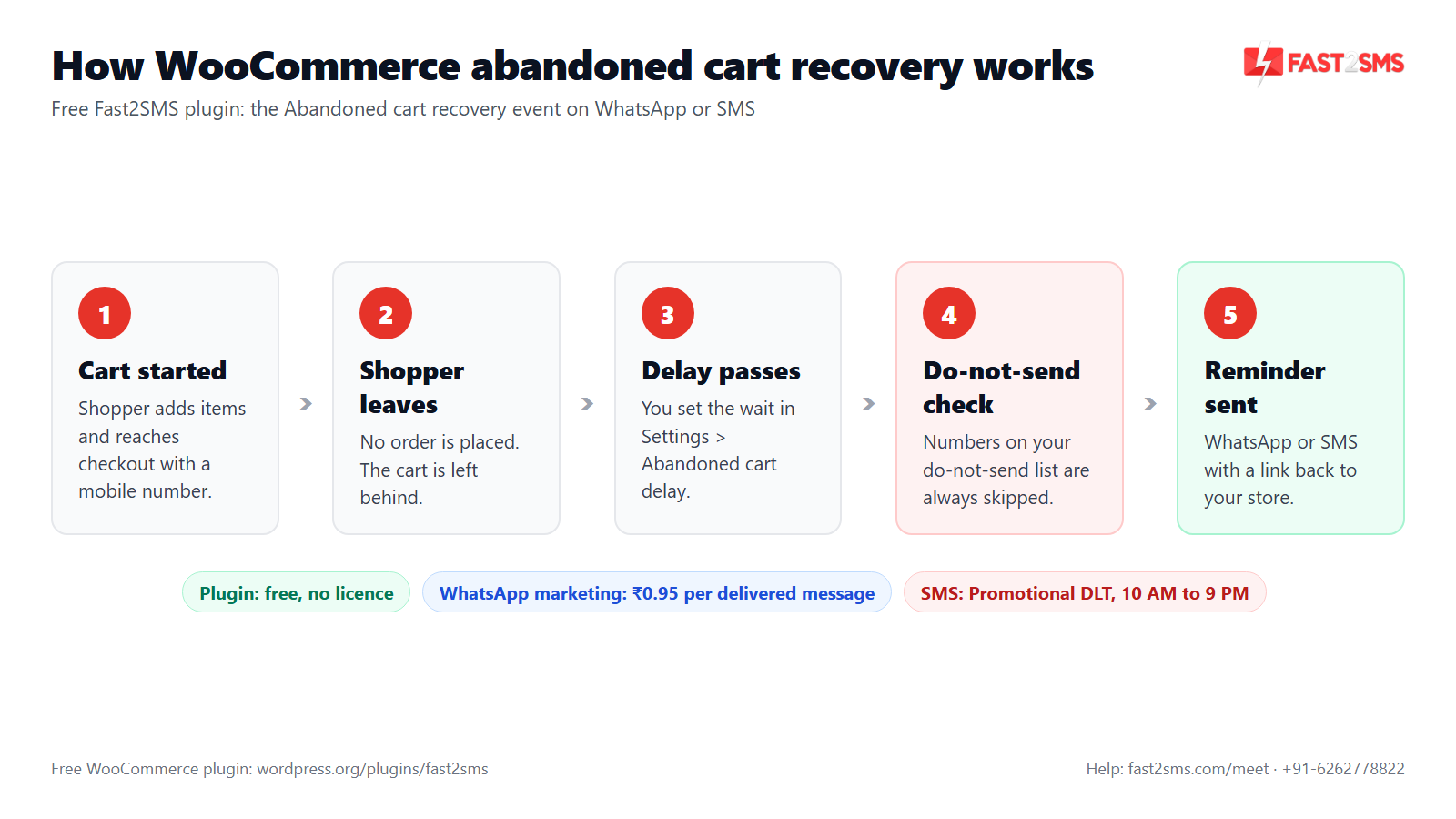
How WooCommerce abandoned cart recovery works on SMS and WhatsApp
The Fast2SMS plugin has an event card called Abandoned cart recovery in its Automations tab. It sits in the recovery and retention group, next to Review request after completion, Back in stock and Welcome new customer.
Here is the flow in plain words:
- A shopper adds products to the cart and starts checkout with their mobile number.
- They leave without placing the order.
- The plugin waits for the time you set in Settings > Abandoned cart delay.
- If the number is on your do-not-send list, nothing is sent.
- Otherwise the shopper gets your reminder on WhatsApp, SMS or both, using the template you picked.
One simple rule sits under all of this: the plugin can only message a shopper whose mobile number it has. Keep the phone field on your checkout form, and make sure customers know you may message them about their cart. The plugin works with Indian 10-digit mobile numbers only.
A free WooCommerce abandoned cart plugin: what “free” means
The plugin “Fast2SMS – OTP Login & SMS Notifications” is free on WordPress.org. There is no licence, no plugin fee and no monthly fee. You connect your own Fast2SMS API key and pay only for the messages you actually send, from your Fast2SMS wallet.
That is different from many recovery tools that charge a monthly plan based on store size or number of carts. With Fast2SMS, a quiet month costs you very little, because there is nothing to pay when no message goes out. The same plugin also works as a WooCommerce SMS plugin and a WooCommerce WhatsApp plugin for order updates, so you don’t need a second tool for those. It is also an OTP plugin for WooCommerce, with login by OTP and phone verification. See our guide on WooCommerce order status SMS and WhatsApp for that side.
How to set up abandoned cart recovery in WooCommerce
You can finish this in one sitting if your template is already approved. If you are new to the plugin, our Fast2SMS WordPress plugin setup guide covers the API key and first steps in detail.
- Install the plugin. In WP Admin go to Plugins > Add New, search “Fast2SMS”, install and activate. WooCommerce features switch on by themselves.
- Add your API key. Open WP Admin > Fast2SMS > Dashboard and paste your key. It is checked live and stored encrypted. Your wallet balance shows in the header.
- Get a marketing template approved. For WhatsApp, a marketing template approved by Meta. For SMS, a Promotional DLT template. More on both below.
- Set the delay. Go to the Settings tab and set the Abandoned cart delay.
- Turn on the consent checkbox. In the same Settings tab, switch on the checkout consent checkbox.
- Switch on the event. In the Automations tab, turn on the Abandoned cart recovery card, choose SMS, WhatsApp or both, and pick your template from the searchable picker.
- Map variables and test. Fill each variable slot from the dropdown, check the live phone preview, and press Send test. The test shows a request_id you can quote to support.
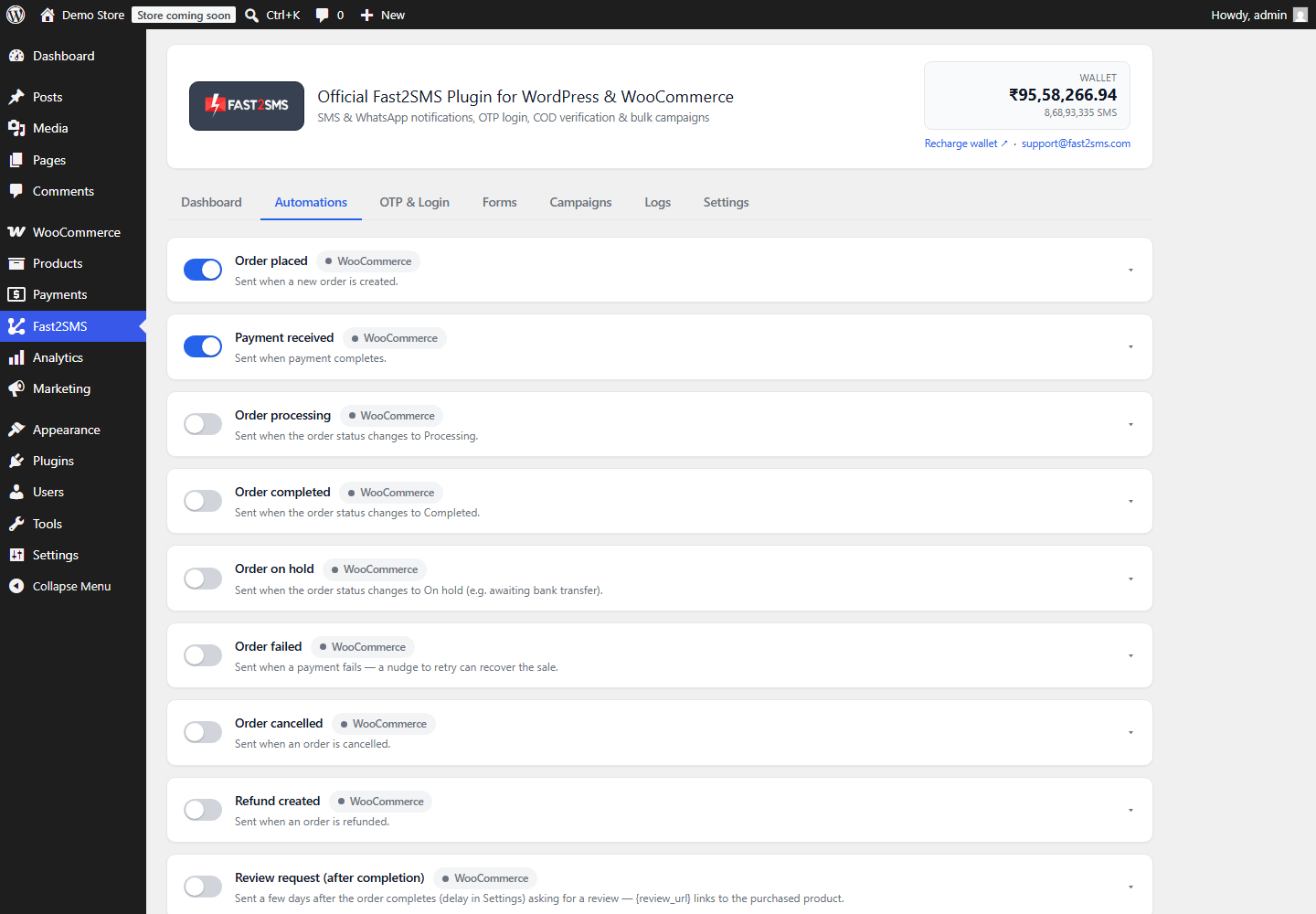
Choosing the abandoned cart delay
The delay is the gap between the shopper leaving and your reminder going out. You set it once in the Settings tab and it applies to every abandoned cart.
There is no single right number, and anyone who quotes you a magic figure is guessing. Think about how your customers shop:
- Too short and you message people who were still deciding, or who were just paying through UPI in another app. That feels pushy.
- Too long and the shopper has already bought elsewhere or forgotten what was in the cart.
- Night-time carts matter if you use SMS. Promotional SMS is delivered only between 10 AM and 9 PM, so a late-night reminder on SMS won’t reach the shopper during the night. WhatsApp has no DLT time window, but a message at 2 AM still annoys people.
Start with a delay that feels polite for your product, watch your Logs tab and your orders for a few weeks, then adjust.
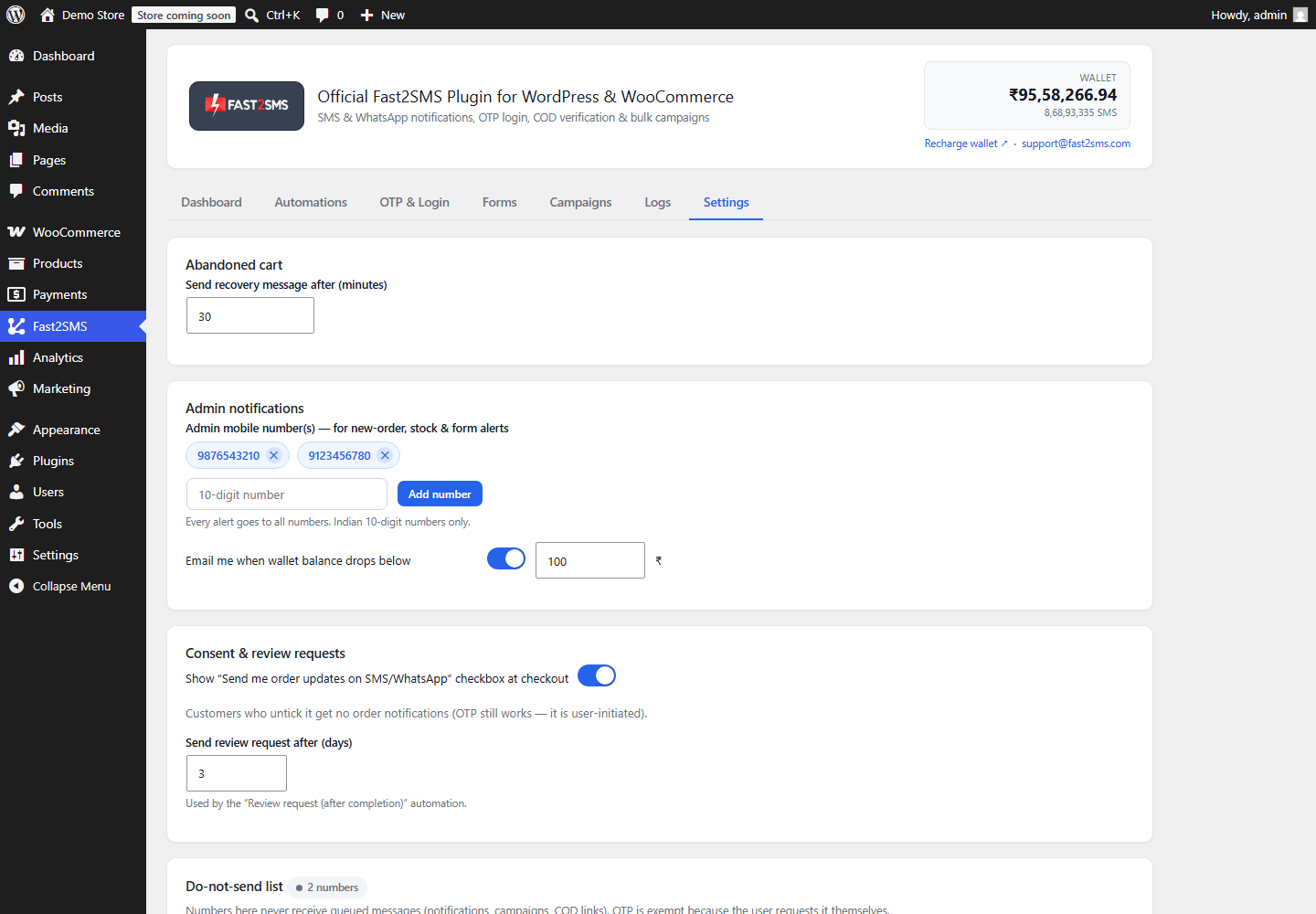
Consent checkbox at checkout and the do-not-send list
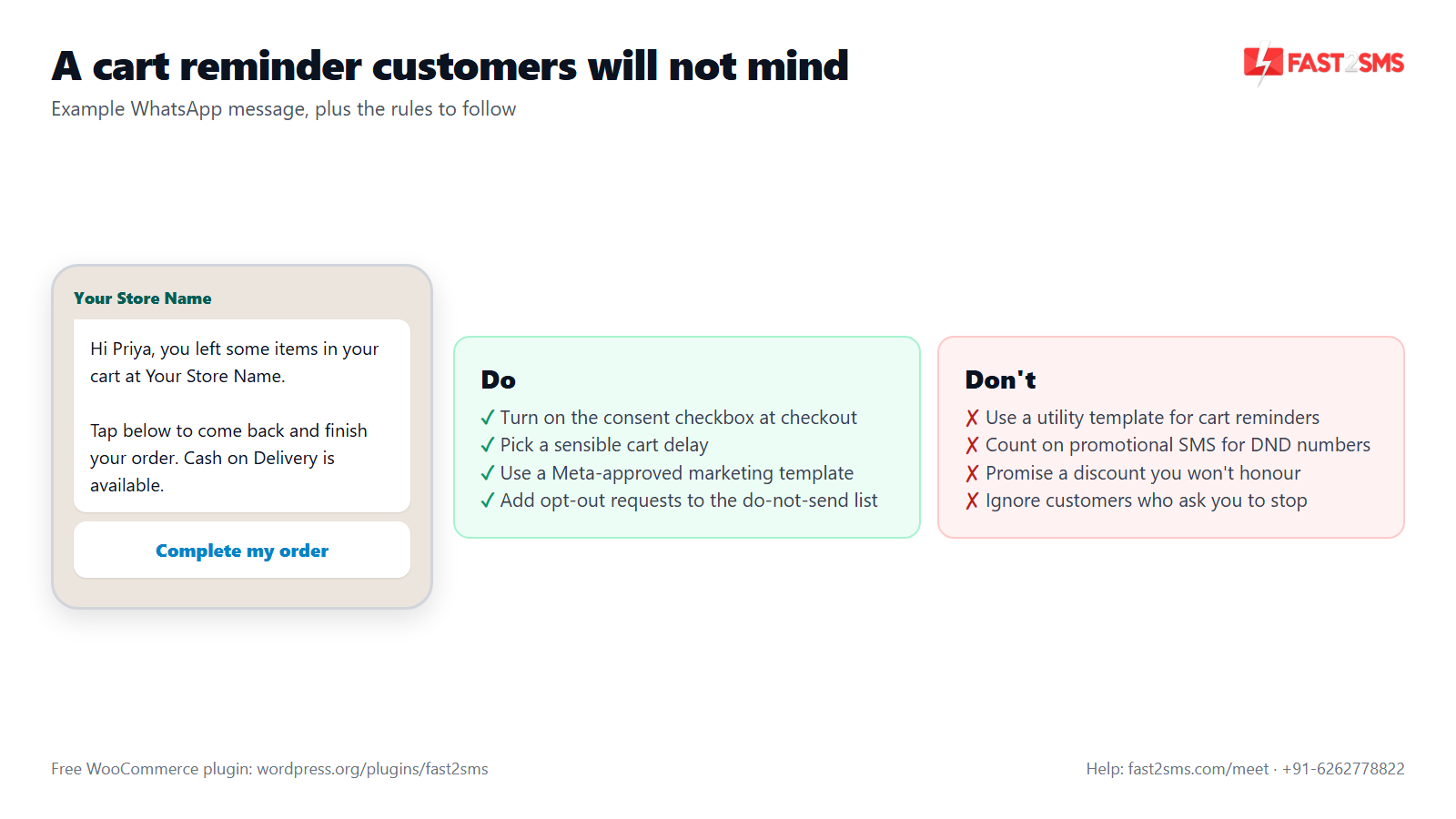
Cart reminders are marketing messages. Treat them with care and customers will not mind them. Two settings help you do that.
The consent checkbox
Turn on the consent checkbox in the Settings tab and your checkout shows a line like “Send me order updates on SMS/WhatsApp”. It gives shoppers a clear, visible choice and gives you a clean record of who agreed to hear from you. WhatsApp’s business rules expect you to have a customer’s opt-in before you send marketing templates, so this checkbox is a good habit, not just decoration.
The do-not-send list
The do-not-send list in Settings is your opt-out list. Numbers on it never get marketing messages from the plugin. That covers abandoned cart, welcome, review request, campaigns, back in stock and COD-to-Prepaid messages. When a customer replies “please stop” or complains, add their number here and they are out of every marketing flow at once.
The list does not touch order updates like order placed or order shipped. Those are service messages the customer needs.
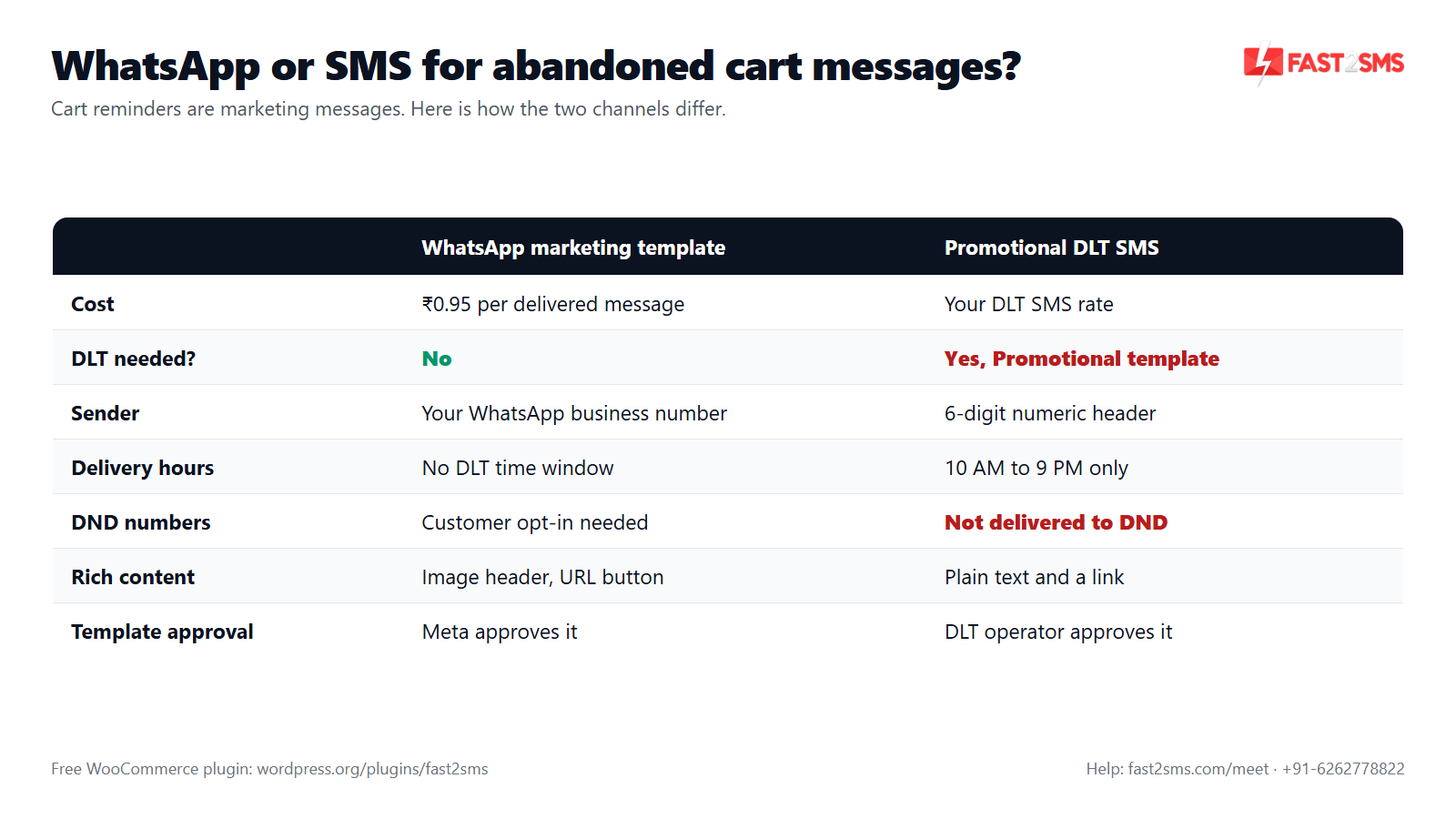
Abandoned cart WhatsApp vs WooCommerce abandoned cart SMS
Both channels work. They follow different rules because a cart reminder counts as marketing on both.
| Point | WhatsApp marketing template | Promotional DLT SMS |
|---|---|---|
| Cost | ₹0.95 per delivered message | Your DLT SMS rate |
| DLT registration | Not needed | Needed, with a Promotional template |
| Sender | Your WhatsApp business number | 6-digit numeric header |
| Delivery hours | No DLT time window | 10 AM to 9 PM only |
| DND numbers | Needs the customer’s opt-in | Not delivered to DND numbers |
| Images and buttons | Image, video or PDF header; URL button | Text and a link |
| Billing | Billed on delivery; failed messages refunded within 48 hours | As per your SMS plan |
WhatsApp marketing template
An abandoned cart WhatsApp message must use a marketing template. Don’t try to pass a cart reminder off as a utility template; Meta reviews the content and can reject or re-categorise a template filed under the wrong category. Our WhatsApp template approval FAQ explains the usual reasons. You can add an image header, such as a product photo or your logo, and a URL button that opens your store. Meta may also limit how many marketing messages one person receives, so a few of your reminders may not be delivered. Tips on staying safe are in WhatsApp marketing without getting banned.
Promotional DLT SMS
A WooCommerce abandoned cart SMS goes out as a Promotional DLT SMS. That means a 6-digit numeric header (not your 6-letter brand header), delivery only between 10 AM and 9 PM, and no delivery to numbers registered on DND. The old Service Explicit category has been merged into Promotional, so consent-based marketing SMS now follows Promotional rules too; our note on Service Explicit to Promotional explains the change. For writing the template itself, see DLT SMS templates for WooCommerce.
Our practical view after setting this up for many Indian stores: WhatsApp is usually the easier start. There is no DLT paperwork, no time window, and you can show the product photo. SMS is useful as a second channel for customers who don’t use WhatsApp, as long as you accept the time window and DND limits. The event card lets you pick SMS, WhatsApp or both.
Pricing: free WooCommerce plugin, pay only per message
- The plugin is free: no licence, no monthly fee, no setup fee.
- WhatsApp OTP and order updates: ₹0.25 per delivered message; WhatsApp marketing messages such as abandoned cart reminders: ₹0.95 per delivered message; failed WhatsApp messages are refunded within 48 hours.
- SMS: your DLT SMS rate per message.
- High volume? Rates are negotiable: call +91-6262778811, email [email protected] or book a free meeting.
- Free signup with ₹50 test credit.
Abandoned cart message examples for WooCommerce
Copy these, change the brand name, and send them for approval. Keep reminders short, friendly and honest. Fill each variable from the dropdown on the Abandoned cart recovery card, and use the values it offers for this event. The live phone preview shows exactly what the shopper will see.
Abandoned cart · WhatsApp marketing template
Hi {{1}}, you left some items in your cart at YourBrand. Tap the button below to come back and finish your order. Cash on Delivery is available. Need help choosing? Just reply to this message.
Header: product photo or logo (optional). Button: “Complete my order”, a URL button pointing to your store. Map {{1}} to the customer name in the variable dropdown.
Abandoned cart with coupon · WhatsApp marketing template
Hi {{1}}, your cart at YourBrand is waiting. Use code COMEBACK10 at checkout to get 10% off your order. Tap below to finish your order.
COMEBACK10 is a fixed code you create yourself in WooCommerce > Marketing > Coupons. Only offer a discount you are happy to give everyone who gets this message.
Abandoned cart · Promotional DLT SMS
Hi {#alphanumeric#}, items in your YourBrand cart are waiting for you. Complete your order here: {#url#} – YourBrand
Sample: Hi Priya, items in your YourBrand cart are waiting for you. Complete your order here: yourbrand.in/cart – YourBrand. Sent from a 6-digit numeric header, 10 AM to 9 PM, not to DND numbers. Use typed tags as shown; read DLT variable tagging if your template keeps getting rejected.
A few writing tips that work well for Indian shoppers:
- Mention Cash on Delivery if you offer it. Some shoppers hesitate to pay online.
- Use the brand name the shopper knows, not your company’s legal name.
- One clear link or button. Don’t send them to your homepage when they had a cart.
- Don’t fake urgency (“only 2 left!”) unless it is true.
Email-only recovery plugins vs WooCommerce abandoned cart SMS and WhatsApp
Most WooCommerce abandoned cart plugins were built around email. Email recovery is cheap and useful, and you don’t have to drop it. It just has limits that matter in India:
| Point | Email-only recovery plugins (in general) | Fast2SMS on WhatsApp and SMS |
|---|---|---|
| What you need from the shopper | An email address | A 10-digit Indian mobile number |
| Where the reminder lands | Inbox, promotions tab or spam folder | WhatsApp chat or SMS inbox on the phone |
| Pricing model | Varies: free versions, paid plans or add-ons | Free plugin, pay per message sent |
| Rules to follow | Email sending rules | Meta marketing templates; DLT Promotional rules for SMS |
| Other messages in the same plugin | Depends on the plugin | Order updates, OTP login, COD confirmation, back in stock, campaigns |
You can run both. Keep your email plugin for email and use Fast2SMS for WhatsApp and SMS. Just space them out so the shopper doesn’t get an email and a WhatsApp in the same minute.
Abandoned cart vs pending payment: not the same thing
An abandoned cart means no order was placed. A pending payment order is different: the order exists, but the UPI or card payment did not finish. The plugin handles that separately with the Order pending payment event and a one-time pending-payment reminder that cancels itself once the order is paid. For COD orders there is also the COD to Prepaid nudge. Both are explained in WooCommerce COD to prepaid and pending payment reminders. Use all three together and you cover every point where a sale can slip away.
Make sure your abandoned cart reminders actually go out
Abandoned cart messages are delayed messages, so they depend on the plugin’s background worker. WordPress’s built-in WP-Cron only runs when someone visits your site. On a quiet night, a reminder can wait until the next visit.
- Set up the server cron. The Dashboard setup checklist gives you a ready cron URL, or you can run
wp fast2sms workerwith WP-CLI. WP-Cron stays as a fallback. - Watch your wallet. Set the low-balance email alert in Settings so reminders don’t stop because the wallet is empty.
- Check the Logs tab. Every message shows event, channel, masked number, status, error and time. Retry one message or all failed ones with a click, or export to CSV.
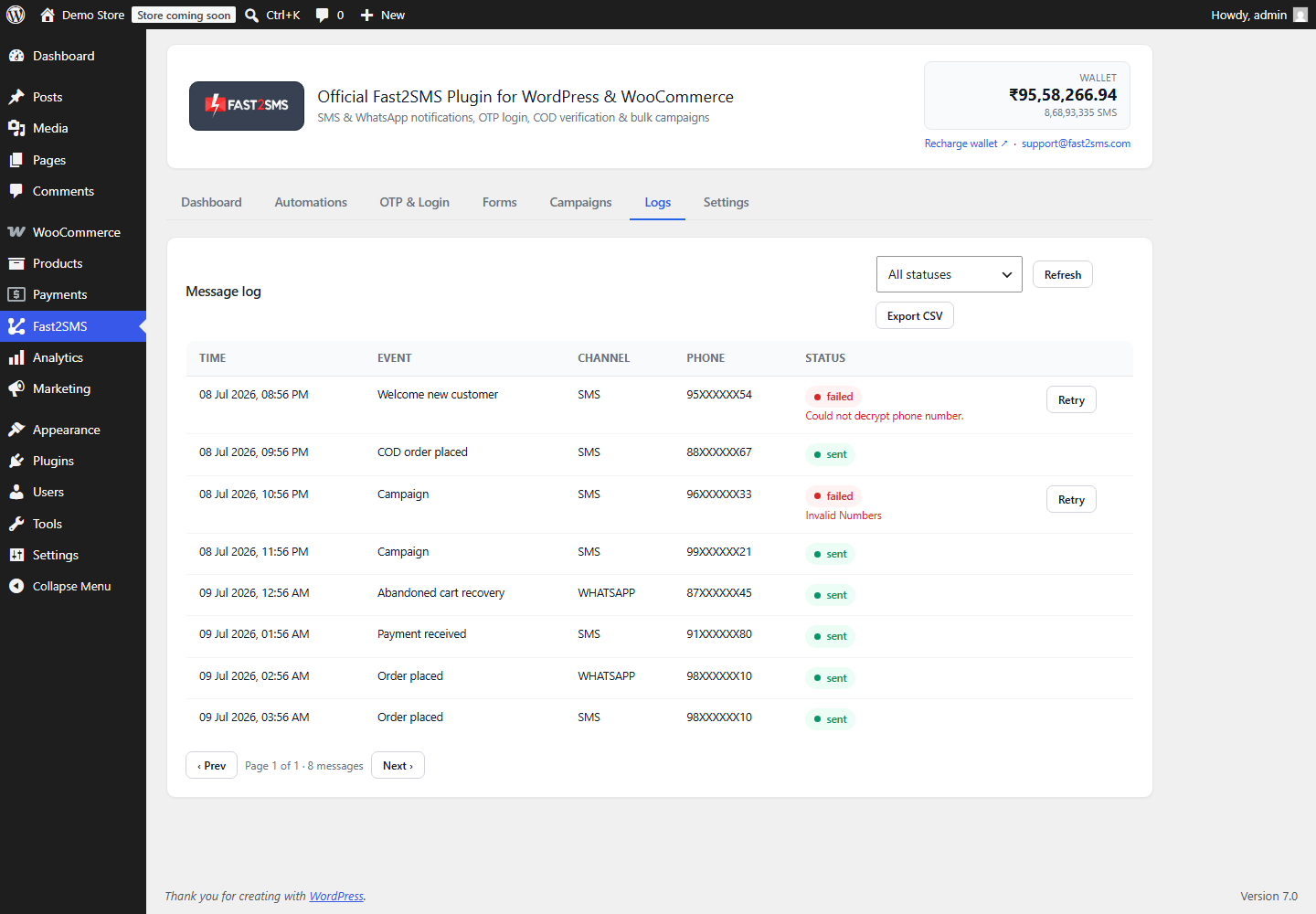
If SMS reminders fail with DLT errors, our SMS not delivered: DLT errors guide lists the usual causes and fixes.
Want help setting up abandoned cart recovery on your WooCommerce store? Our team will do it with you, free.
We can help you write the WhatsApp marketing template, check your Promotional DLT template, and switch on the Abandoned cart recovery event. Schedule a free meeting, call +91-6262778822 or email [email protected].
Frequently asked questions
Is there a free WooCommerce abandoned cart plugin that sends WhatsApp and SMS?
Yes, the Fast2SMS plugin is free on WordPress.org and includes an Abandoned cart recovery event that sends reminders on WhatsApp, SMS or both. There is no licence or monthly fee; you pay only per message from your Fast2SMS wallet.
How does WooCommerce abandoned cart recovery work with Fast2SMS?
When a shopper starts checkout with a mobile number and leaves without ordering, the plugin waits for your abandoned cart delay and then sends your approved template on WhatsApp or SMS. Numbers on your do-not-send list are always skipped.
How much does an abandoned cart WhatsApp message cost in India?
An abandoned cart WhatsApp message uses a marketing template, which costs ₹0.95 per delivered message on Fast2SMS, and failed WhatsApp messages are refunded within 48 hours. High-volume stores can ask sales about negotiated rates.
How much does a WooCommerce abandoned cart SMS cost?
A WooCommerce abandoned cart SMS is charged at your DLT SMS rate on Fast2SMS, the same per-message rate you see in your account, and the plugin itself adds nothing. For high volumes, call sales on +91-6262778811.
Do I need DLT registration to send abandoned cart SMS?
Yes, abandoned cart SMS in India must go through DLT as a Promotional message, using an approved Promotional template on your registered entity. Without DLT approval, operators will not deliver the SMS.
Do I need DLT for abandoned cart WhatsApp messages?
No, WhatsApp messages do not need DLT registration, but you do need a WhatsApp marketing template approved by Meta and the customer’s opt-in to receive marketing messages from your business.
Why is an abandoned cart reminder a marketing message and not a utility message?
A cart reminder asks someone to buy something they have not ordered yet, so it counts as marketing on both WhatsApp and SMS. Utility and transactional templates are meant for existing orders and accounts, like order confirmations or shipping updates.
Which SMS sender header is used for abandoned cart SMS in India?
Abandoned cart SMS goes out as Promotional DLT SMS, which uses a 6-digit numeric header, not your 6-letter brand header. Mention your brand name inside the message text so shoppers know who is writing.
Can I send abandoned cart SMS at night?
No, Promotional SMS in India is delivered only between 10 AM and 9 PM, so a cart left late at night cannot get its SMS reminder during the night. WhatsApp has no DLT time window, though polite timing still matters.
Will abandoned cart SMS reach customers who are on DND?
No, Promotional DLT SMS is not delivered to numbers registered on DND, so those shoppers will not get your SMS reminder. If many of your customers are on DND, use the WhatsApp channel on the Abandoned cart recovery card, with their opt-in.
How long should I wait before sending an abandoned cart reminder?
There is no single right delay; pick a gap that feels polite for your products, long enough for shoppers finishing payment on their own and short enough that they still remember the cart. Then watch your Logs and orders and adjust.
Where do I set the abandoned cart delay in WooCommerce?
Open WP Admin > Fast2SMS > Settings and set the Abandoned cart delay there; you set it once and it applies to every abandoned cart on your store. The same tab also holds the consent checkbox, the do-not-send list, admin numbers and the other delay settings.
What is the consent checkbox at checkout?
It is an optional checkbox on your WooCommerce checkout that reads like “Send me order updates on SMS/WhatsApp”, which you turn on in the plugin’s Settings tab. It gives shoppers a clear choice and gives you a record of who agreed.
How do I stop abandoned cart messages to a customer who asked to opt out?
Add their number to the do-not-send list in the plugin’s Settings tab, and they will never receive abandoned cart reminders again. The same list also stops every other marketing message from the plugin, including campaigns and back in stock alerts.
Which messages does the do-not-send list block?
The do-not-send list blocks all marketing messages from the plugin: abandoned cart, welcome, review request, campaigns, back in stock and COD-to-Prepaid. Service messages like order placed or order shipped are not blocked by it.
Can I send abandoned cart reminders on both WhatsApp and SMS?
Yes, each event card in the Automations tab lets you choose SMS, WhatsApp or both for the same event, including Abandoned cart recovery. If you pick both, you pay for both messages, so most stores start with WhatsApp and add SMS only if they need it.
Is WhatsApp or SMS better for abandoned cart recovery?
For most Indian stores, WhatsApp is the easier choice because it needs no DLT, has no time window, and can show a product photo and a button. SMS helps reach shoppers without WhatsApp, within the 10 AM to 9 PM window and not to DND numbers.
Can I add a product image or button to an abandoned cart WhatsApp message?
Yes, the plugin supports WhatsApp media headers (image, video or PDF) and dynamic URL button variables for your abandoned cart template. Add them to the marketing template when you create it, then map the button variable on the event card.
Can I include a discount coupon in an abandoned cart message?
Yes, you can write a fixed coupon code into your template text, such as “Use code COMEBACK10”, and get it approved with the template. Create that coupon yourself in WooCommerce > Marketing > Coupons, and only offer a discount you are happy to give everyone.
Does the plugin create unique coupon codes for each abandoned cart?
No, the Fast2SMS plugin sends the abandoned cart reminder but does not generate a separate coupon code for each abandoned cart. If you want to offer a discount, create one coupon in WooCommerce and write its code into your approved template text.
Can the plugin recover a cart if the shopper never entered a phone number?
No, SMS and WhatsApp reminders need a mobile number, so a shopper who left before giving one cannot be messaged by the plugin. Keep the phone field on your checkout form so more carts carry a number.
Does WooCommerce abandoned cart recovery work for international numbers?
No, the Fast2SMS plugin works with Indian 10-digit mobile numbers only, so abandoned cart reminders can only go to shoppers with Indian numbers. It is built for stores selling in India, with DLT SMS and WhatsApp through Fast2SMS.
How is an abandoned cart different from an order pending payment?
An abandoned cart has no order at all, while a pending payment order exists but its online payment did not finish. The plugin handles pending payment with the Order pending payment event and a one-time reminder that cancels itself once paid.
Can I keep my email abandoned cart plugin and add WhatsApp and SMS?
Yes, you can keep your email plugin for email reminders and use Fast2SMS for WhatsApp and SMS reminders on the same store. Space the timing out so shoppers don’t get an email and a WhatsApp at the same moment.
How do I test my abandoned cart message before going live?
Use the live phone preview and the Send test button on the Abandoned cart recovery card to send the real template to your own number. The test shows a request_id you can share with Fast2SMS support if something looks wrong.
How do I know if an abandoned cart message was delivered?
Open the Logs tab in the plugin, where each message shows the event, channel, masked number, status, any error and the time. You can retry one failed message or all failed messages, and export the log to CSV.
Why are my WooCommerce abandoned cart messages not being sent?
The usual causes are a missing server cron, an empty wallet, an unapproved template, a number on the do-not-send list, or SMS blocked by DND or the 10 AM to 9 PM window. Check the Logs tab first; it shows the error.
What recovery rate can I expect from WhatsApp and SMS cart reminders?
No honest plugin can promise a fixed recovery rate, because results depend on your products, prices, delay, audience and message. Track your own results: the Logs tab shows what was sent, and your WooCommerce orders show what came back.
What happens to abandoned cart reminders if my wallet balance runs out?
Messages cannot be sent without wallet balance, so abandoned cart reminders will fail until you recharge your Fast2SMS wallet from the Dashboard link. Set the low-balance email alert in the Settings tab, and use the Logs tab to retry failed messages after you top up.
Can the same plugin handle OTP login and order updates too?
Yes, it is also a free WooCommerce OTP plugin with login by OTP, phone verification and checkout OTP, plus order updates on SMS and WhatsApp. Checkout OTP works with the classic (shortcode) checkout only, not the block checkout. See bulk campaigns and back in stock alerts too.
Start recovering WooCommerce carts on WhatsApp and SMS
Install the free plugin, get one marketing template approved, set a polite delay, turn on the consent checkbox and switch on the Abandoned cart recovery event. Keep the do-not-send list up to date and check your Logs every week. That is the whole setup, and you pay only for the reminders that go out.
Need help? Schedule a free meeting · [email protected] · +91-6262778822 · Sales and volume pricing: +91-6262778811