
Bulk voice calls from Fast2SMS can only go out between 10:00 AM and 9:00 PM IST, so the best time to send is inside that window, at an hour when your customers are free to pick up and listen. For most businesses that means late morning or early evening, and starting large lists early so every number is called before 9 PM. You can schedule campaigns in advance, even one per day for up to 31 days.
This guide explains the calling-hours rules in the panel, how to pick a good time for your audience, how scheduling works (including multi-day schedules), and how to cancel a scheduled campaign for a full refund.
Calling hours: what the panel allows
| When you send | What happens |
|---|---|
| Between 10:00 AM and 8:50 PM | Calls start within a minute. |
| After 8:50 PM, or before 10:00 AM | The campaign is scheduled for 10:00 AM the same or next morning. You see “Calling hours are over for today, so your campaign is scheduled for …” |
| Scheduling a time outside 10 AM to 9 PM | Not allowed: “Voice calls can only be sent between 10:00 AM and 9:00 PM (TRAI). Please schedule the campaign inside this time.” |
| Campaign still calling at 9:00 PM | Paused: “Paused at the end of calling hours (9 PM). Resume it after 10 AM.” |
The features box on Bulk Voice Call shows the short version: “Non DND numbers only, 10 AM – 9 PM”.
How to choose the best time for your customers
There is no single best hour for everyone. Think about when your customers can take a call and listen for 20 to 30 seconds:
| Audience | Times worth testing | Times to avoid |
|---|---|---|
| Shoppers and households | 11 AM to 1 PM, 5 PM to 8 PM | Early morning rush |
| Office workers | Lunch hour, after 6 PM | Meeting-heavy mornings |
| Shop owners and traders | Before the shop gets busy, around 10 to 11 AM | Peak selling hours |
| Parents | After school hours | School drop-off and pick-up times |
| Farmers and rural customers | Afternoon, early evening | Field work hours in the morning |
The best way to know is to test. Send the same message to two halves of a list at two different times, then compare the Answered count in the Voice Report.
Timing by type of message
- Appointment reminders: the evening before (before 8:50 PM) or the morning of the visit.
- Delivery updates: the morning of the delivery day.
- Weekend sale: Thursday or Friday evening, plus a short reminder on Saturday morning.
- Event invitation: a few days before, and again on the day.
- Call Patch to sales agents: only when your agents are at work and free to take calls.
How to schedule a voice campaign
-
Fill the campaign form
In Bulk Voice Call, enter the Campaign Name, choose the type, add numbers and pick the voice file as usual.
-
Open Schedule and pick the time
Click Schedule instead of Send. In the drawer, choose Select Date and Enter Time. The time must be at least 1 minute from now and inside 10 AM to 9 PM.
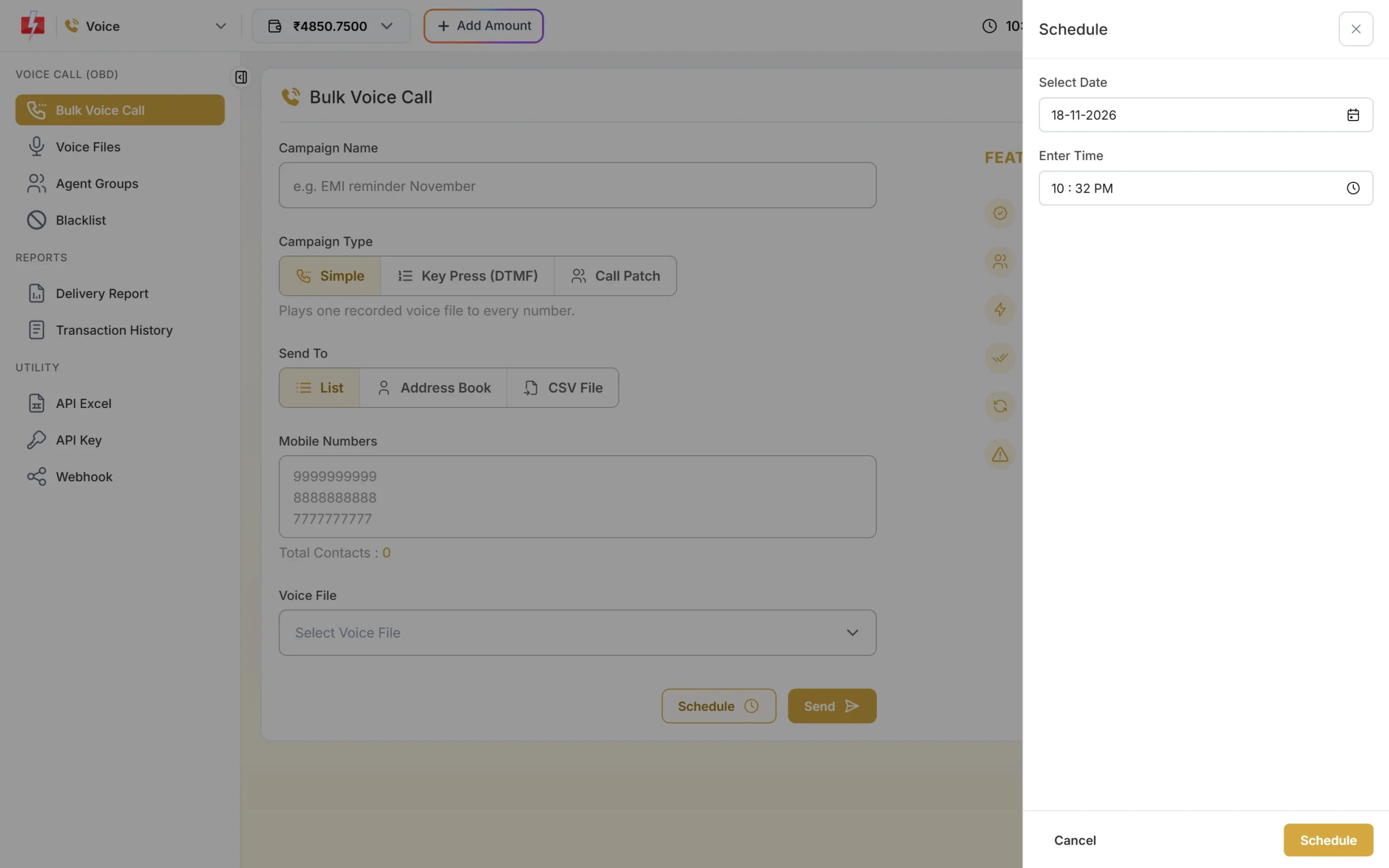
Choose a date and a time inside calling hours. -
Confirm the schedule
Click Schedule in the drawer. The confirmation popup shows the send time and cost. Click Confirm & Schedule. You see “Campaign scheduled for” with the date and time. The amount is held from your wallet now.
-
Check or cancel it in Voice Schedule
Open Delivery Report > Voice Report > Schedule. It lists campaigns due more than 2 minutes from now, with the schedule time, type, number count and held amount. Click Cancel to stop one. The panel asks you to confirm and then shows “Campaign cancelled and amount refunded”.
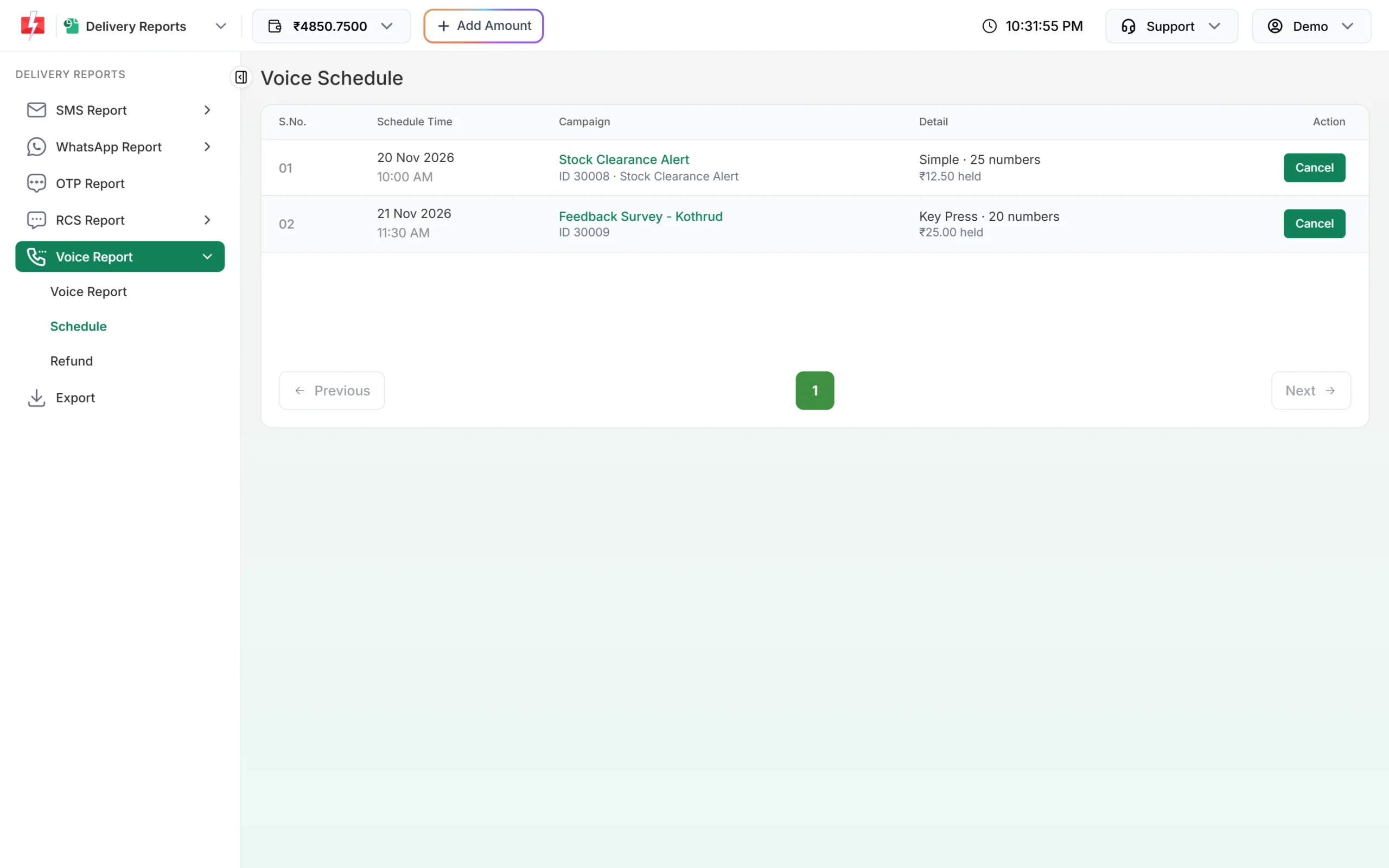
Scheduled campaigns with the amount held for each.
Scheduling the same campaign over many days
If you pick a date range in the Schedule drawer, Fast2SMS creates one campaign per day at the chosen time, for up to 31 days. Each day’s campaign:
- gets the date added to its name, for example “Morning reminder (21 Nov)”,
- has its own held amount, and the confirmation popup shows No. of Schedule Days,
- can be cancelled on its own from Voice Schedule.
You see “N campaigns scheduled, one per day from … to …”. The total of numbers multiplied by days can be at most 10,00,000 in one send.
Large lists and the 9 PM pause
A large list takes time to call. If a campaign is still running at 9 PM, it is paused. To avoid this:
- Start big campaigns in the morning.
- Split very large lists into smaller campaigns spread across the day or across days.
- Keep an eye on the Pending count in Voice Report for running campaigns.
Common problems and fixes
| Message | Fix |
|---|---|
| “Schedule time must be at least 1 minute from now.” | Pick a later time. |
| “Voice calls can only be sent between 10:00 AM and 9:00 PM (TRAI).” | Choose a time inside calling hours. |
| “This campaign has just started calling, so it can no longer be cancelled.” | It has already started. Scheduled campaigns can be cancelled only before they start. |
| Scheduled campaign cancelled at its start time | Your wallet was below ₹0 at the scheduled time. The full amount was refunded; recharge and schedule again. |
| “You already have 50 voice campaigns scheduled or running.” | Cancel ones you do not need or wait for some to finish. |
Frequently asked questions
What time can I send bulk voice calls in India?
With Fast2SMS, between 10:00 AM and 9:00 PM IST. Calls are not placed outside these hours.
What happens if I click Send at 9:30 PM?
The campaign is scheduled for 10:00 AM the next morning. You can cancel it from Voice Schedule.
Can I schedule voice calls for a weekend?
Yes. Any date works, as long as the time is between 10 AM and 9 PM.
Do I get my money back if I cancel a scheduled campaign?
Yes. The full held amount is credited back to your wallet when you cancel before it starts.
How many campaigns can I schedule?
Up to 50 voice campaigns can be scheduled or running at the same time on one account.
Can I schedule voice calls by API?
Yes. The Voice API accepts a schedule_time in IST. See API Excel in the Voice menu.