
A call group (also called a ring group or hunt group) is a set of team members who share the incoming calls on one number. In Fast2SMS Cloud Telephony you create call groups in Call Menu (IVR) > Call Groups and choose how calls are handed out: Ring-All rings everyone at once, Round-Robin spreads calls evenly, Linear rings people in a fixed order, and Least Recent rings the person who has been free the longest. This guide explains each option and shows how to set one up.
Ring group, hunt group, call group: what is the difference?
These names come from office phone systems. A ring group usually means several phones ring together. A hunt group means the system “hunts” for a free person, trying one after another. A call queue adds waiting: callers hold with music until someone is free. In Fast2SMS, one call group covers all three: the distribution strategy decides whether it behaves like a ring group or a hunt group, and the “When nobody answers” settings work as the queue.
The four distribution strategies
| Strategy | How calls are shared | Good for |
|---|---|---|
| Ring-All | All agents ring at the same time; the first to answer gets the call | Small sales teams where the fastest answer matters |
| Round-Robin | Calls are spread evenly, taking turns between agents | Support desks where work should be shared fairly |
| Linear | Agents ring one after another in a set priority order | A main agent with backups who ring next |
| Least Recent | The agent who has been idle the longest rings first | Busy desks where you want to avoid tiring the same person |
You can also turn on Sticky Agent Routing (24h) with any strategy. It sends repeat callers straight to the agent who answered them last, for 24 hours. This helps when a customer calls back about the same order or complaint.
Before you start
- A Cloud Telephony number. If you do not have one yet, see the Cloud Telephony setup guide.
- Team members with an agent licence and Cloud Telephony switched on. Only they appear in the member list of a call group. See add agents and licences.
How to create a call group
-
Open Call Groups
In Cloud Telephony, go to Call Menu (IVR) > Call Groups. The first time, you see “No Call Groups Created”. Click Create Call Group.
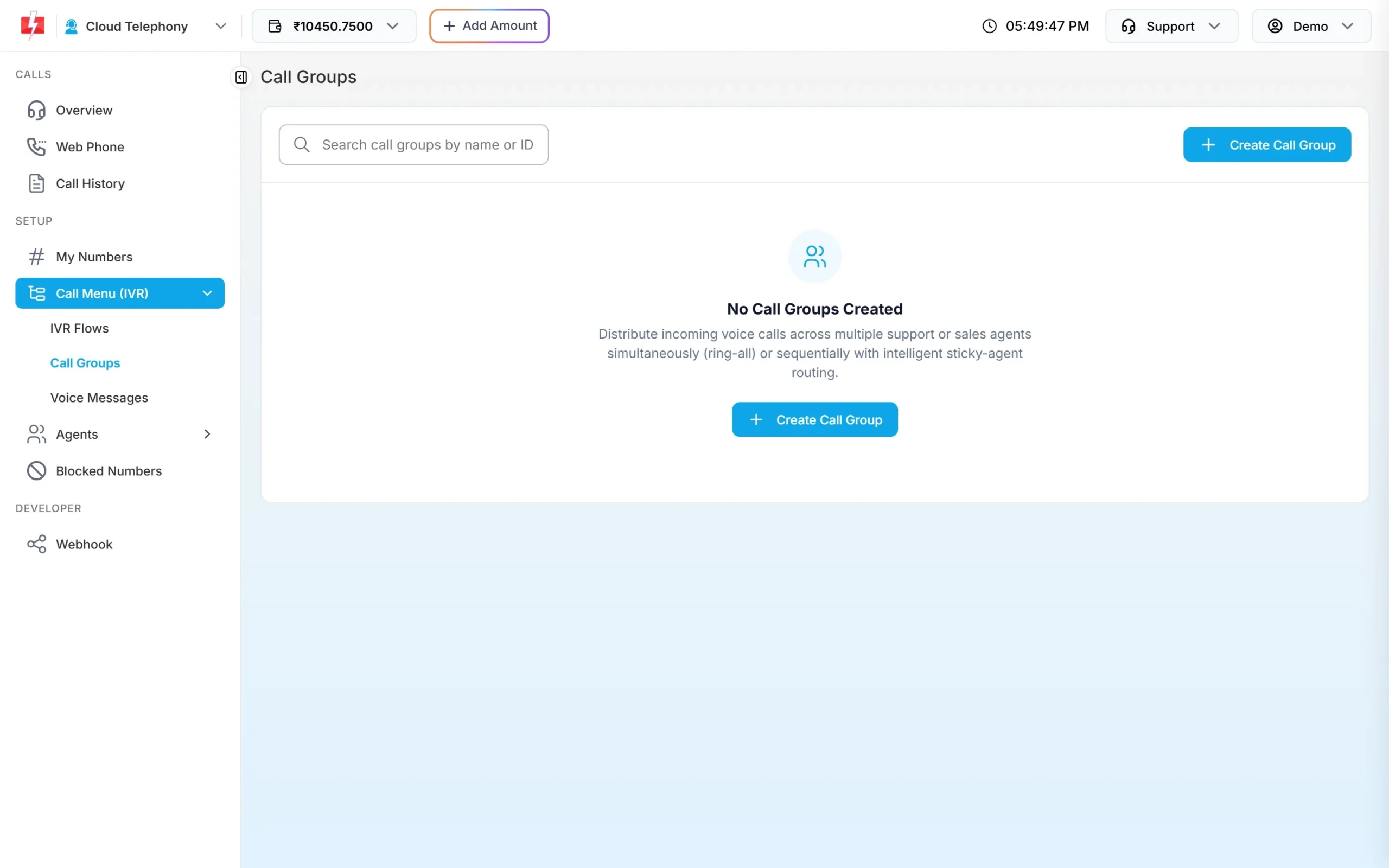
The Call Groups page before your first group. -
Name the group, pick a strategy and members
Enter a Group Name such as “Sales Team”. Choose the Distribution Strategy, then tick the agents under Select Group Members. Each member shows with their extension, for example “Rahul Demo · 101”. Set Ring Timeout (seconds): how long the phones ring on each try (10 to 300 seconds, 60 by default).
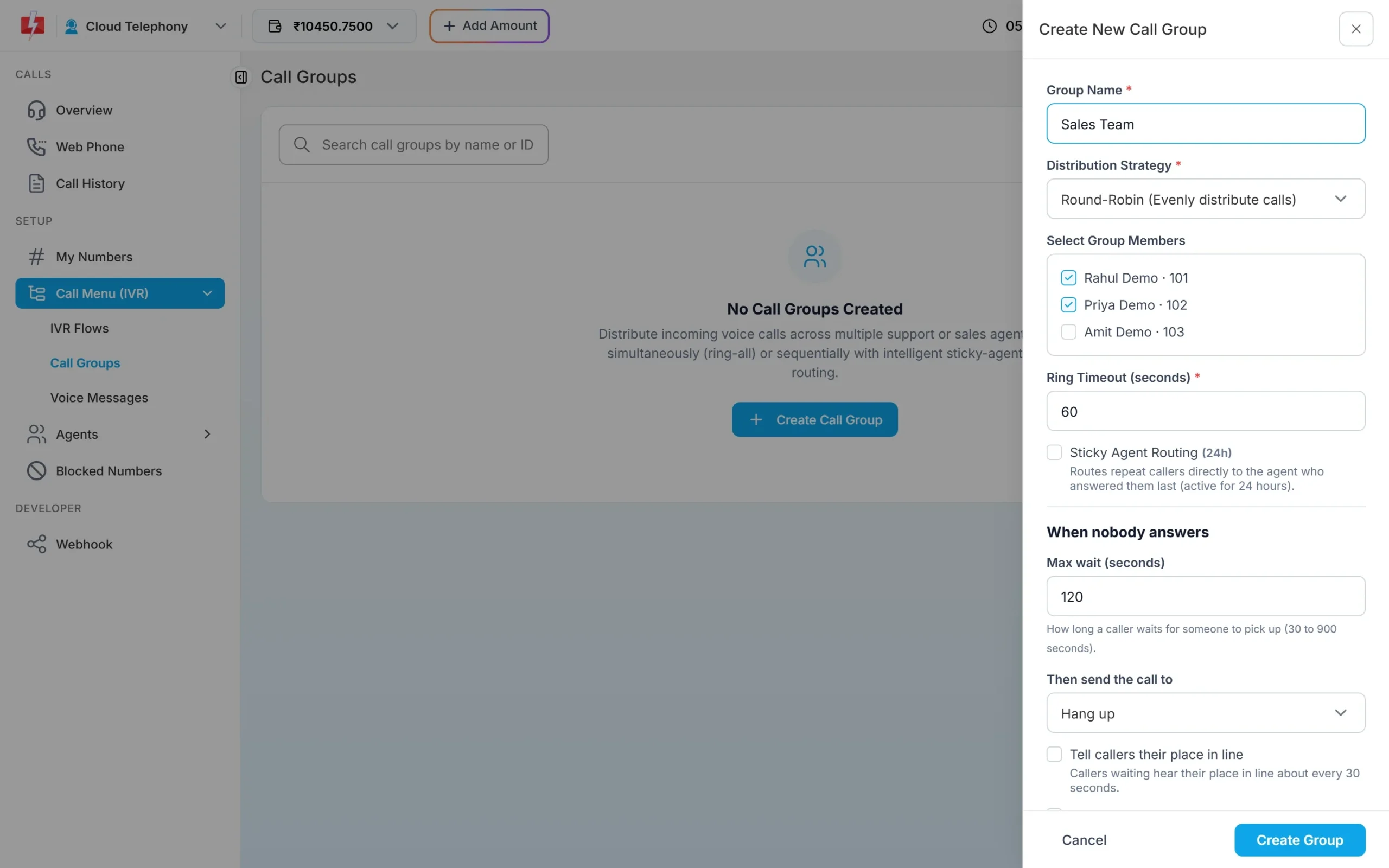
A Round-Robin group with Rahul and Priya. -
Turn on Sticky Agent if callers call back often
Tick Sticky Agent Routing (24h) to send repeat callers to the agent who answered them last. In this example the Support Team uses Ring-All with sticky routing, so a customer who calls again within a day reaches the same person.
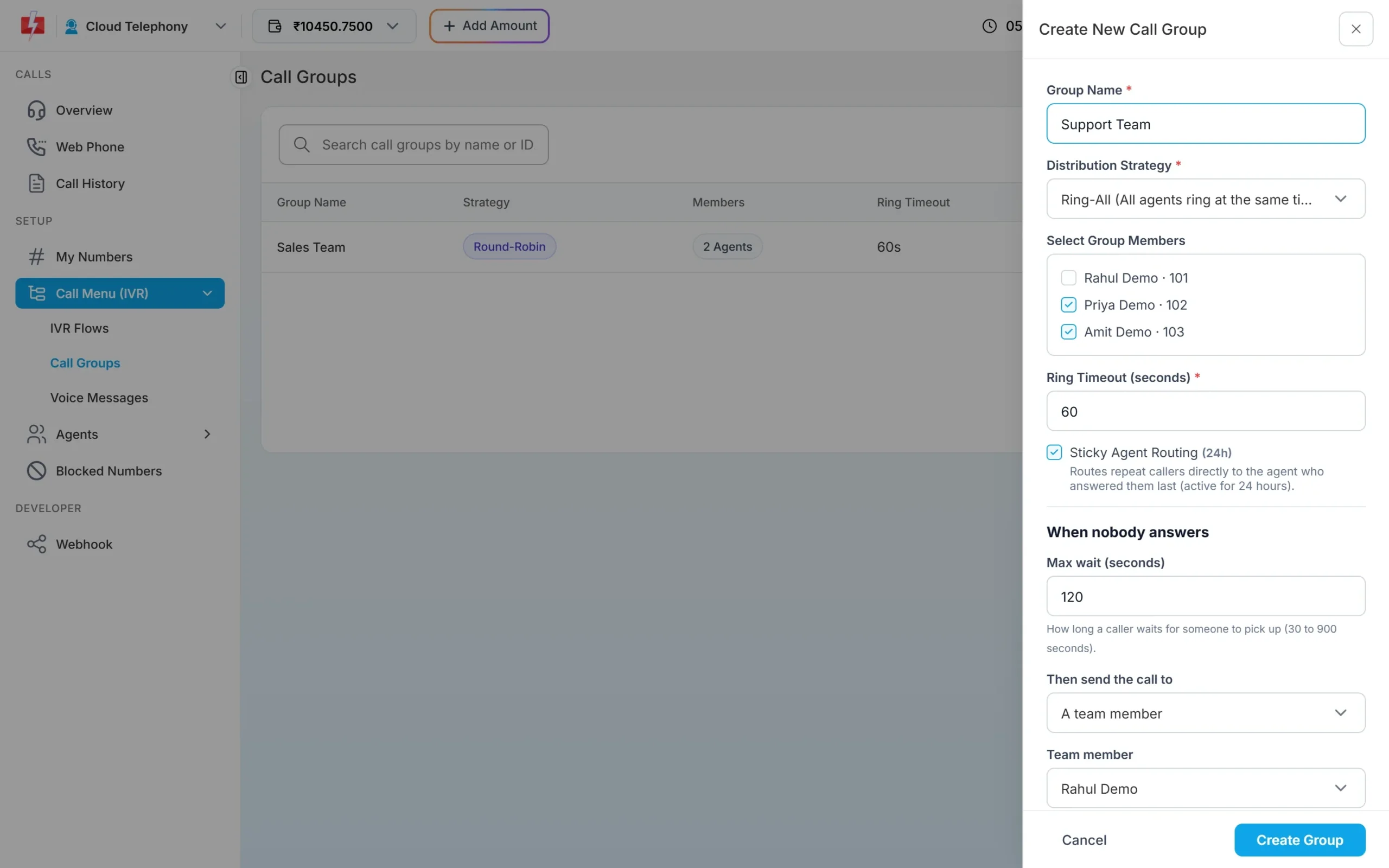
A Ring-All group with Sticky Agent Routing on. -
Set what happens when nobody answers
Under When nobody answers, set Max wait (seconds): how long a caller waits for someone to pick up (30 to 900 seconds, 120 by default). Then choose Then send the call to: Hang up, An IVR flow, Another call group, A team member or An outside number. Two more options: Tell callers their place in line (callers hear their position about every 30 seconds) and Break between calls (a short pause for the agent after each call before the next one rings). Click Create Group.
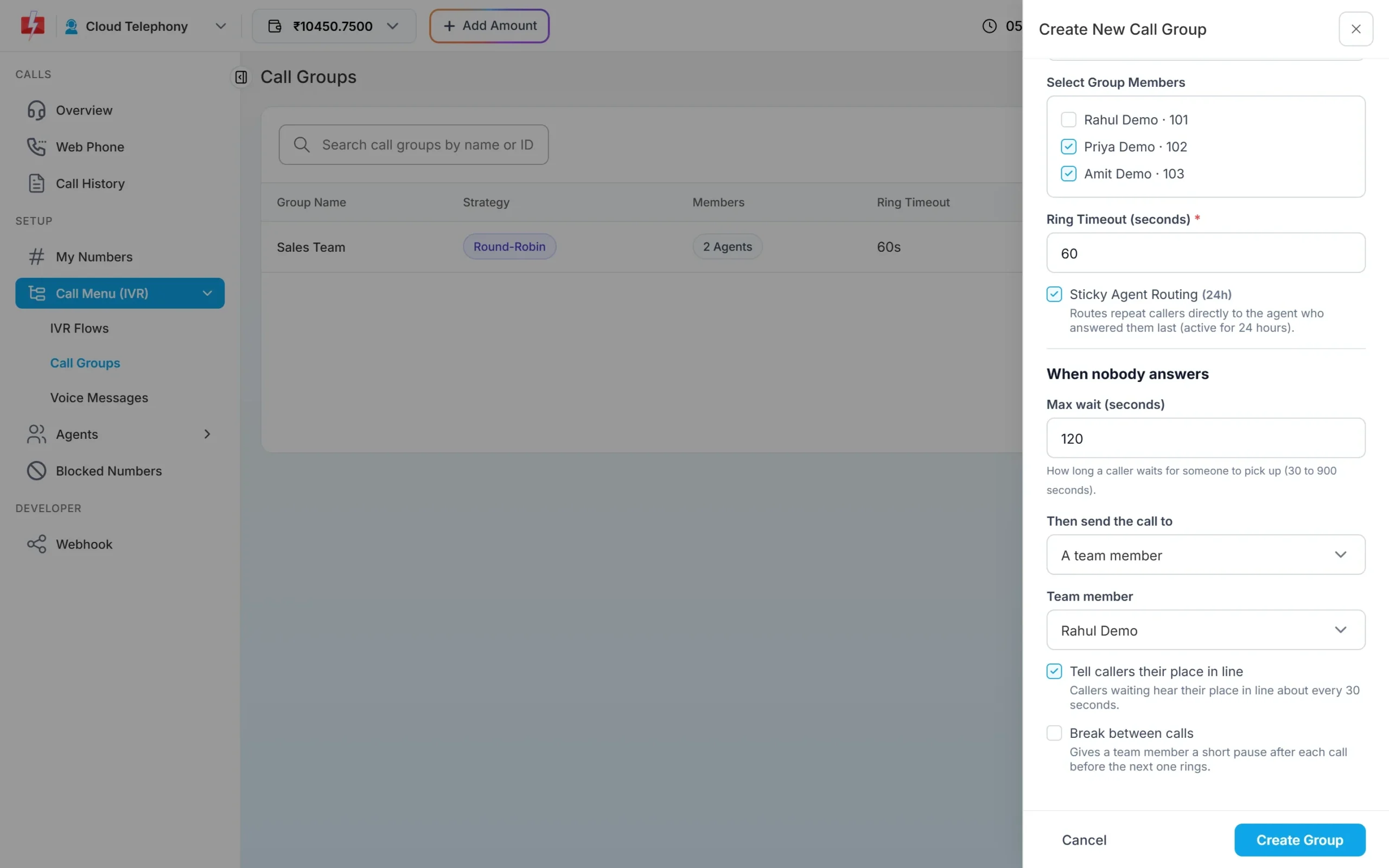
Overflow, place in line and break between calls. -
Check the list
Your groups appear with their strategy, number of members, ring timeout and a Sticky Agent (24h) switch you can flip right from the list. Use the row menu to edit a group later; the button then says Save Changes.
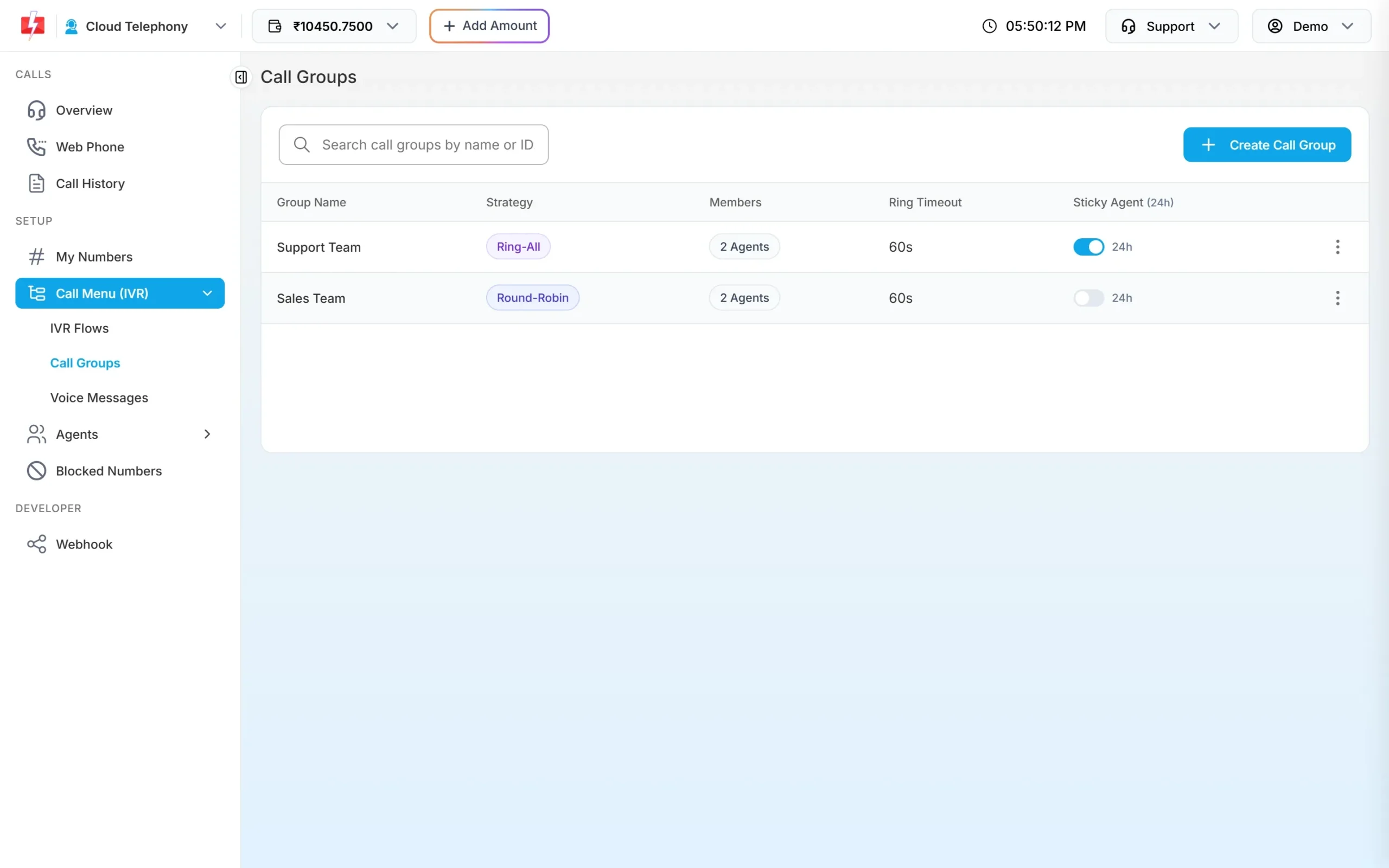
Two call groups ready to use. -
Send calls to the group
A group only rings when calls are sent to it. There are two ways. Directly from a number: in My Numbers, click Configure Route, choose Call Group (Queue) and select the group. From an IVR key: in your IVR flow, add a Ring Group box, set Assign To to Team and pick the group, for example “Press 1 for sales” rings the Sales Team. See IVR setup step by step.
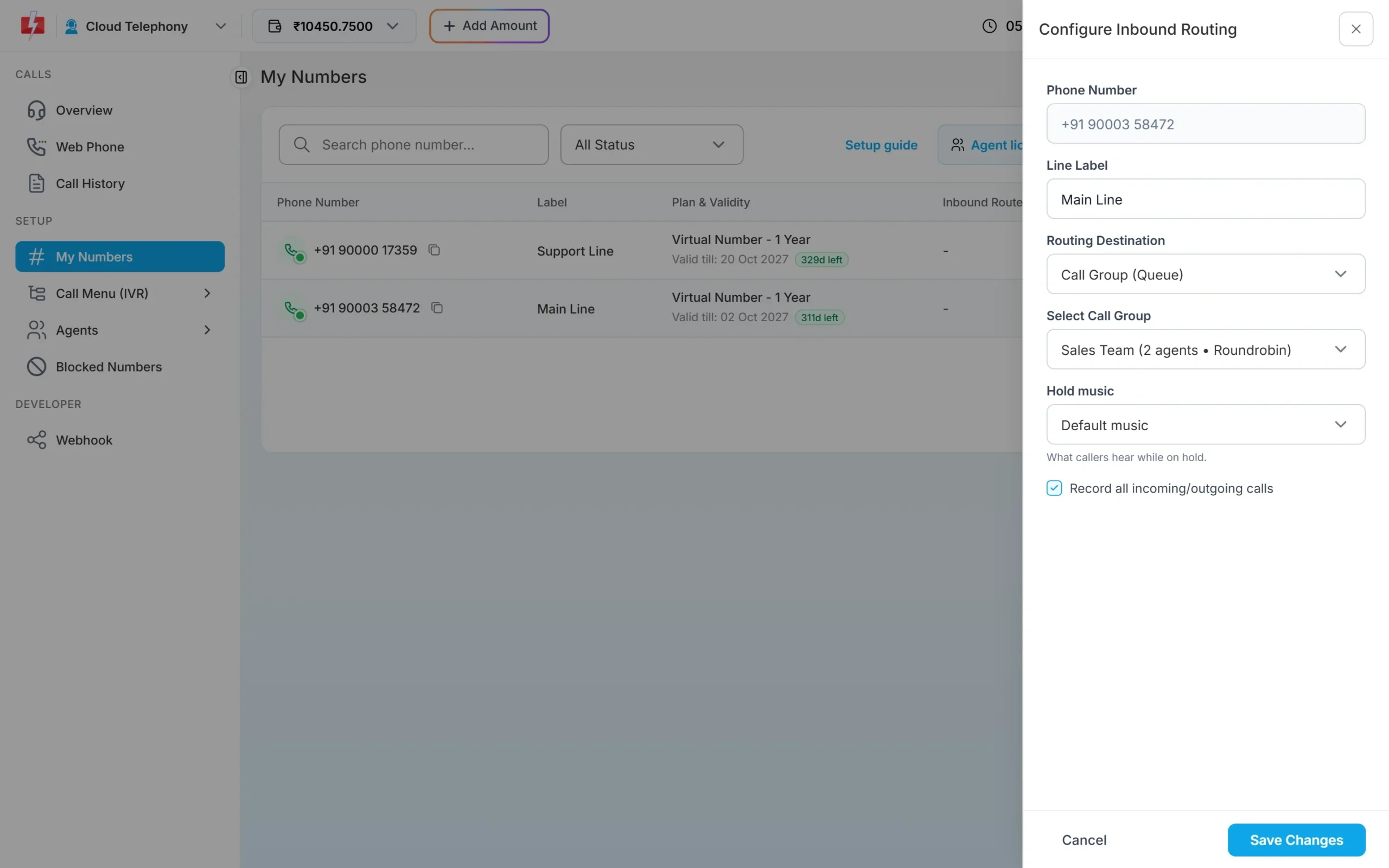
Routing a number straight to the Sales Team group.
Call group settings at a glance
| Setting | What it does | Range / default |
|---|---|---|
| Distribution Strategy | How calls are shared | Ring-All, Round-Robin, Linear, Least Recent |
| Ring Timeout (seconds) | How long the phones ring on each try | 10 to 300, default 60 |
| Sticky Agent Routing (24h) | Repeat callers go to their last agent | On or off |
| Max wait (seconds) | How long a caller waits for an answer | 30 to 900, default 120 |
| Then send the call to | Where the call goes after Max wait | Hang up, IVR flow, another group, a team member, an outside number |
| Tell callers their place in line | Announces queue position | About every 30 seconds |
| Break between calls | Pause for the agent after each call | 1 to 120 seconds, default 10 |
Which strategy should you choose?
- Two or three people selling over the phone: Ring-All. Leads get the quickest answer.
- A support team that handles many calls a day: Round-Robin or Least Recent, so no single agent gets all the calls.
- One main person with backups: Linear, so your senior agent rings first and the others ring only if needed.
- Customers who call back about the same issue: any strategy plus Sticky Agent Routing.
One agent can be in more than one group, for example a supervisor in both Sales and Support.
Common problems and fixes
- A team member is missing from Select Group Members. Only members with an agent licence and Cloud Telephony switched on are listed. Assign a free licence in Agents > Licences.
- The group never rings. Check that the number’s route (or the IVR key) points to this group. The My Numbers list shows the route, for example “Group: Support Team”.
- An agent misses calls when away from the laptop. In Team Members, tick Not online? Ring their mobile number for that agent.
- Callers hang up while waiting. Lower Max wait, add a backup in Then send the call to, and tick Tell callers their place in line.
Frequently asked questions
What is the difference between Ring-All and Round-Robin?
Ring-All rings every agent in the group at once and the first to answer takes the call. Round-Robin gives calls to agents in turn, so the work is shared evenly.
Is a hunt group the same as a call group?
Yes, in Fast2SMS. Choose Linear or Least Recent to make a call group work like a hunt group that tries one person after another.
Can callers hear music while they wait?
Yes. They hear the hold music set for the number in Configure Route, either default music or one of your voice messages.
Do call groups cost extra?
No. Call groups are part of Cloud Telephony. You pay only for numbers and agent licences; at the time of writing a number is ₹1,500 per month and an extra agent ₹600 per month, both billed yearly.
Can I send calls to a mobile if nobody in the group answers?
Yes. In When nobody answers, choose An outside number and enter the mobile number.