
Jewellery store SMS templates for gold scheme instalment reminders, order ready alerts, repair updates and bills are registered on DLT as Service Implicit, because they go to customers about their own scheme, order or item. An instalment, advance or bill payment confirmation sent right after the customer pays is Transactional, and festive offers, gold rate messages and new collection launches are Promotional. Below are 18 copy-paste templates for jewellers, in English and Hindi, each with variable tags, the DLT category, a filled sample, the character count and SMS parts.
Which DLT category for jewellery store SMS
| Message | DLT category | DND numbers and timing |
|---|---|---|
| Instalment due, missed instalment, scheme maturity, passbook link | Service Implicit | Reaches DND numbers, any hour |
| Instalment, advance or bill payment received, sent right after payment | Transactional | Reaches DND numbers, any hour |
| Order ready, repair received, repair ready, e-bill link | Service Implicit | Reaches DND numbers, any hour |
| Festive offers, making charge discounts, gold rate messages, new collections | Promotional | Not to DND numbers, 10 AM to 9 PM only |
Replace “Demo Jewellers” with your showroom name as registered on DLT, and keep it as fixed text. Counts are for the sample shown. Links such as https://demo.example/pb are placeholders: any link or callback number in a template must be whitelisted as a CTA on your DLT portal first, or the SMS fails. These templates follow the usual DLT rules, but approval is always the operator’s decision.
Gold scheme instalment templates
1. Scheme joined, first instalment received
DLT category: Transactional. Variables: {#alphanumeric#}, {#numeric#}.
Welcome to the Demo Jewellers gold scheme. Scheme no {#alphanumeric#}. First instalment of Rs {#numeric#} received. Thank you.Sample message (110 characters, English, 1 SMS): Welcome to the Demo Jewellers gold scheme. Scheme no GS40218. First instalment of Rs 5000 received. Thank you.
2. Instalment due
DLT category: Service Implicit. Variables: {#alphanumeric#}, {#numeric#}.
Dear {#alphanumeric#}, instalment of Rs {#numeric#} for your Demo Jewellers scheme is due on {#alphanumeric#}. Ignore if already paid.Sample message (105 characters, English, 1 SMS): Dear Meena, instalment of Rs 5000 for your Demo Jewellers scheme is due on 5 Dec. Ignore if already paid.
3. Instalment received
DLT category: Transactional. Variables: {#numeric#}, {#alphanumeric#}.
Received Rs {#numeric#} for scheme {#alphanumeric#}. Instalments paid: {#numeric#}. Thank you. - Demo JewellersSample message (85 characters, English, 1 SMS): Received Rs 5000 for scheme GS40218. Instalments paid: 4. Thank you. – Demo Jewellers
4. Instalment missed
DLT category: Service Implicit. Variables: {#alphanumeric#}.
Dear {#alphanumeric#}, the instalment for scheme {#alphanumeric#} due on {#alphanumeric#} is not received yet. Please pay soon. - Demo JewellersSample message (113 characters, English, 1 SMS): Dear Meena, the instalment for scheme GS40218 due on 5 Dec is not received yet. Please pay soon. – Demo Jewellers
5. Scheme passbook link
DLT category: Service Implicit. Variables: {#alphanumeric#}, {#url#}. Whitelist first: your link domain as a CTA on your DLT portal.
View the instalments paid in your Demo Jewellers scheme {#alphanumeric#} here: {#url#}Sample message (99 characters, English, 1 SMS): View the instalments paid in your Demo Jewellers scheme GS40218 here: https://demo.example/pb/40218
6. Scheme matured
DLT category: Service Implicit. Variables: {#alphanumeric#}.
Your Demo Jewellers scheme {#alphanumeric#} matures on {#alphanumeric#}. Please visit the showroom with your passbook to redeem it.Sample message (116 characters, English, 1 SMS): Your Demo Jewellers scheme GS40218 matures on 5 Aug 2027. Please visit the showroom with your passbook to redeem it.
Order, repair and bill templates
7. Custom order advance received
DLT category: Transactional. Variables: {#numeric#}, {#alphanumeric#}.
Received Rs {#numeric#} as advance for order {#alphanumeric#}. Expected ready date {#alphanumeric#}. - Demo JewellersSample message (91 characters, English, 1 SMS): Received Rs 15000 as advance for order OR2231. Expected ready date 20 Dec. – Demo Jewellers
8. Order ready for pickup
DLT category: Service Implicit. Variables: {#alphanumeric#}.
Dear {#alphanumeric#}, your order {#alphanumeric#} is ready at Demo Jewellers. Please collect it with your order slip. - Demo JewellersSample message (114 characters, English, 1 SMS): Dear Meena, your order OR2231 is ready at Demo Jewellers. Please collect it with your order slip. – Demo Jewellers
9. Repair received
DLT category: Service Implicit. Variables: {#alphanumeric#}.
Your {#alphanumeric#} is received for repair at Demo Jewellers. Slip no {#alphanumeric#}. It will be ready by {#alphanumeric#}.Sample message (101 characters, English, 1 SMS): Your gold chain is received for repair at Demo Jewellers. Slip no RP1187. It will be ready by 28 Nov.
10. Repair estimate
DLT category: Service Implicit. Variables: {#alphanumeric#}, {#numeric#}, {#cbn#}. Whitelist first: your callback number as a CTA on your DLT portal.
The repair estimate for slip no {#alphanumeric#} is Rs {#numeric#}. Call {#cbn#} to approve it. - Demo JewellersSample message (97 characters, English, 1 SMS): The repair estimate for slip no RP1187 is Rs 650. Call 9000000001 to approve it. – Demo Jewellers
11. Repair ready
DLT category: Service Implicit. Variables: {#alphanumeric#}.
Your repair item with slip no {#alphanumeric#} is ready at Demo Jewellers. Please bring the slip when you collect it. - Demo JewellersSample message (124 characters, English, 1 SMS): Your repair item with slip no RP1187 is ready at Demo Jewellers. Please bring the slip when you collect it. – Demo Jewellers
12. E-bill after purchase
DLT category: Service Implicit. Variables: {#alphanumeric#}, {#numeric#}, {#url#}. Whitelist first: your link domain as a CTA on your DLT portal.
Thank you for shopping at Demo Jewellers. Your bill {#alphanumeric#} of Rs {#numeric#} is here: {#url#}Sample message (106 characters, English, 1 SMS): Thank you for shopping at Demo Jewellers. Your bill JB70451 of Rs 86400 is here: https://demo.example/bill
13. Bill payment received
DLT category: Transactional. Variables: {#numeric#}, {#alphanumeric#}.
Payment of Rs {#numeric#} received for bill {#alphanumeric#}. Thank you for choosing Demo Jewellers.Sample message (85 characters, English, 1 SMS): Payment of Rs 86400 received for bill JB70451. Thank you for choosing Demo Jewellers.
Festive and launch templates (promotional)
Offers, gold rate messages and launches ask the customer to buy, so they are promotional, even for scheme members. Register them under Promotional with an opt-out line in the fixed text and send them between 10 AM and 9 PM.
14. Festive making charge offer
DLT category: Promotional. Variables: {#numeric#}, {#alphanumeric#}, {#cbn#}. Whitelist first: your callback number as a CTA on your DLT portal.
This festive season get {#numeric#}% off on making charges at Demo Jewellers till {#alphanumeric#}. T&C apply. To stop such SMS, call {#cbn#}.Sample message (126 characters, English, 1 SMS): This festive season get 25% off on making charges at Demo Jewellers till 20 Apr. T&C apply. To stop such SMS, call 9000000001.
15. Gold rate update
DLT category: Promotional. Variables: {#numeric#}, {#cbn#}. Whitelist first: your callback number as a CTA on your DLT portal.
Today's 22K gold rate at Demo Jewellers is Rs {#numeric#} per 10 g. Visit us at 12 MG Road, Pune. To stop such SMS, call {#cbn#}.Sample message (126 characters, English, 1 SMS): Today’s 22K gold rate at Demo Jewellers is Rs 72500 per 10 g. Visit us at 12 MG Road, Pune. To stop such SMS, call 9000000001.
A gold rate message is sent to make people buy, so treat it as promotional. The rate in the sample is only an example.
16. New collection launch
DLT category: Promotional. Variables: {#alphanumeric#}, {#url#}, {#cbn#}. Whitelist first: your link domain and your callback number as a CTA on your DLT portal.
See the new {#alphanumeric#} collection at Demo Jewellers: {#url#} To stop such SMS, call {#cbn#}.Sample message (108 characters, English, 1 SMS): See the new bridal collection at Demo Jewellers: https://demo.example/new To stop such SMS, call 9000000001.
Hindi jewellery SMS templates
Hindi SMS are Unicode: 1 part holds 70 characters and 2 parts hold 133.
17. Instalment due (Hindi)
DLT category: Service Implicit. Variables: {#alphanumeric#}, {#numeric#}.
प्रिय {#alphanumeric#}, Demo Jewellers स्कीम की किस्त Rs {#numeric#} है, कृपया {#alphanumeric#} तक जमा करें।Sample message (79 characters, Unicode, 2 SMS parts): प्रिय Meena, Demo Jewellers स्कीम की किस्त Rs 5000 है, कृपया 5 Dec तक जमा करें।
18. Order ready (Hindi)
DLT category: Service Implicit. Variables: {#alphanumeric#}.
आपका ऑर्डर {#alphanumeric#} Demo Jewellers पर तैयार है। कृपया ऑर्डर स्लिप के साथ आएं।Sample message (75 characters, Unicode, 2 SMS parts): आपका ऑर्डर OR2231 Demo Jewellers पर तैयार है। कृपया ऑर्डर स्लिप के साथ आएं।
Category mistakes to avoid
Under TRAI’s 2025 rules, any offer inside a scheme, order or bill message makes the whole message promotional.
| Mistake | What happens | Do this instead |
|---|---|---|
| Instalment reminder ending with “plus 50% off making charges this week” | Treated as promotional, so it misses scheme members on DND | Keep the reminder plain. Send the offer on a separate promotional template. |
| Daily gold rate SMS registered as Service Implicit | Likely rejection | Register rate and offer messages as Promotional. |
| Instalment receipt registered as Promotional | Held after 9 PM and blocked for DND numbers | Register receipts as Transactional. |
| Scheme maturity SMS that pushes a new scheme | Becomes promotional | Say the maturity date only. Promote the new scheme separately. |
Tips for jewellery templates
- Write Rs, not the rupee symbol, in English templates. The symbol turns the SMS into Unicode and cuts each part to 70 characters.
- Scheme, order and slip numbers in
{#alphanumeric#}, amounts in{#numeric#}as whole rupees without commas. - Do not put weight, purity or price details of a customer’s item in the SMS unless you need to. A bill link is safer on shared phones.
- T&C apply is fine in promotional text, but the offer details must match what you register.
How to add these templates in Fast2SMS DLT Manager
A template from this page works only after the operator approves it on your DLT portal. Then you add it to Fast2SMS once and send it as often as you need. The full steps are in how to register a DLT content template and DLT Manager in Fast2SMS.
-
Register the template on your DLT portal
Log in to the DLT portal where your business is registered and add a content template. Pick the category shown with the template, link it to one approved header, paste the text with its variable tags and add a sample message with real-looking values. Whitelist any link or callback number as a CTA before you submit. The operator’s reviewer decides whether it is approved. When it is, note the Content Template ID and take a screenshot of the approved row.
-
Add it in DLT Manager
In the Fast2SMS SMS app, open DLT Manager > Content Template and click Add Content Template. Select your entity, tick the Sender ID, enter the Content Template ID and choose Service Implicit for Transactional and Service Implicit templates, or Service Explicit or Promotional for promotional ones under Template Type. Paste the approved text exactly as the portal shows it in Copy-Paste Approved Message Text, upload the screenshot and click Submit. Have many templates? Use Upload Excel with the template file exported from your DLT portal.
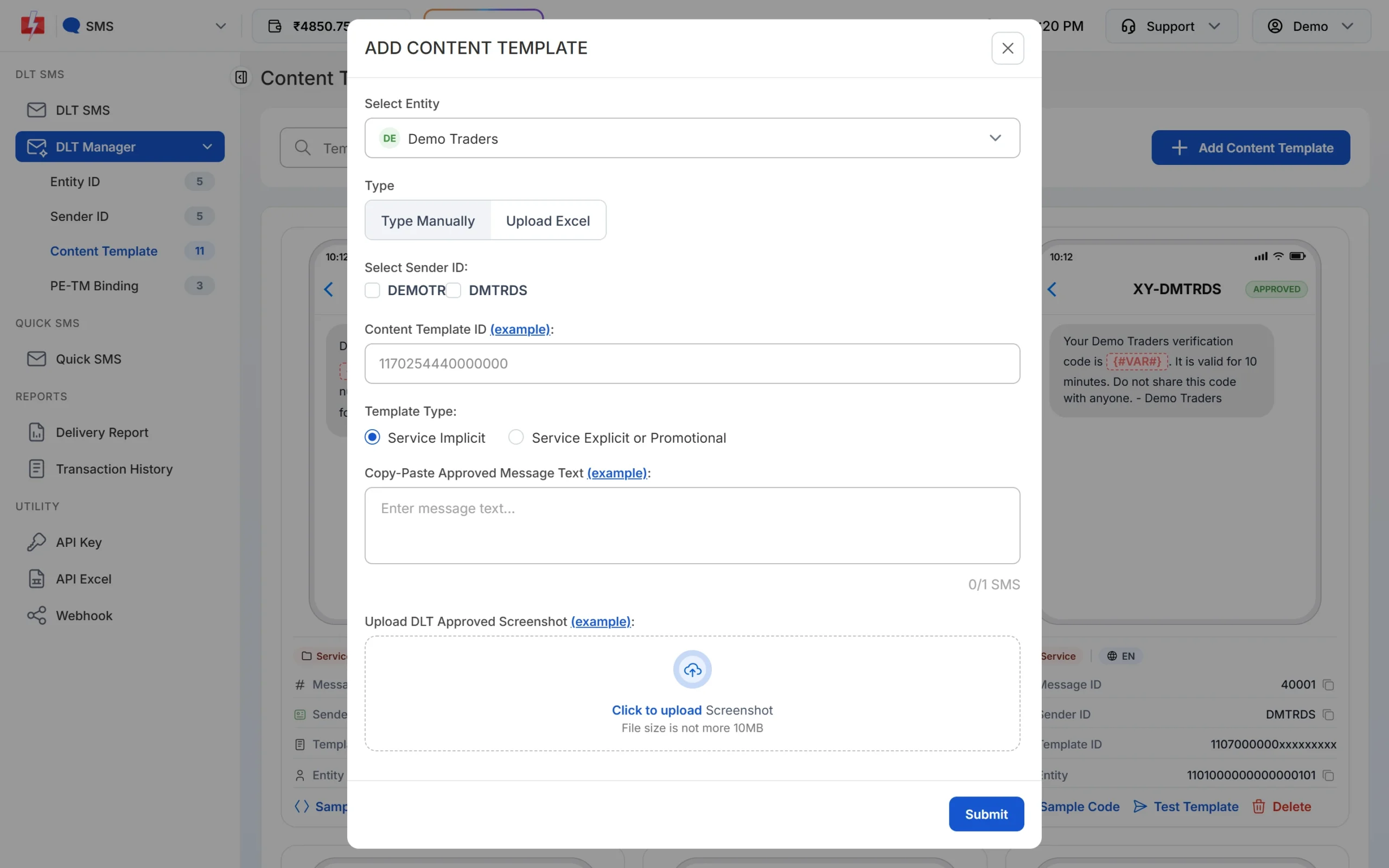
Pick the Template Type that matches the category on your DLT portal. -
Wait for Approved, then test
The template is saved as Pending while Fast2SMS checks it against your screenshot. When the card shows APPROVED, it also shows a Message ID, which is the value you pass as
messagein the API. Click Test Template to send one SMS to your own number and check the text and any link. -
Send or schedule from DLT SMS
Open DLT SMS, choose the Sender ID, add numbers under Send To (List, Address Book or CSV File) and click Select DLT Template. Fill each variable, or map the variables to columns of your CSV so each person gets their own values. The counter under the preview shows characters and SMS parts. Click Send, check the Message Preview & Confirmation popup, then click Confirm & Send, or use Schedule to pick a date and time. Promotional templates go out only between 10 AM and 9 PM. If you send one late in the evening, Fast2SMS holds it and sends it the next morning.
Each SMS part is charged as one SMS for every valid number, so a template that runs into 2 parts costs twice as much per person as a 1-part template. Duplicate and invalid numbers are not charged. See the current rates on the bulk SMS pricing page.
Sending in bulk? For high SMS volumes our team offers discounted rates. Talk to our team or see SMS pricing.
Frequently asked questions
Which DLT category is used for gold scheme instalment reminders?
Service Implicit. It is about the customer’s own scheme, so it reaches DND numbers at any hour. The receipt after payment is Transactional.
Is a gold rate SMS promotional?
Treat it as promotional. It is sent to encourage buying, so register it under Promotional and send it between 10 AM and 9 PM.
Can I send instalment reminders to every scheme member each month?
Yes. Upload a CSV with mobile number, name, amount and due date on the DLT SMS page and map each variable to a column. See how to send bulk SMS from Excel.
Can I send Dhanteras or Akshaya Tritiya offers by SMS?
Yes, on Promotional templates with an opt-out line. See promotional SMS templates for festivals for more samples.
Can the SMS be in Hindi or Gujarati?
Yes. Register the template in that language as Unicode on your DLT portal. Each Unicode part holds 70 characters.
Can I schedule reminders before the due date?
Yes. Use Schedule on the DLT SMS page, or the schedule_time option in the API.
Is approval guaranteed?
No. The operator’s reviewer decides. If a template is rejected, read the remark on your portal and fix that point.