
If your business runs several brands, or belongs to a group of companies, you may wonder how many DLT registrations you need. The short answer: one DLT registration per legal entity (company, firm or proprietor), with as many headers and templates under it as your brands need. This guide covers multiple brands and group companies on DLT, how many headers and templates you can register, how to update your company details, and how to manage it all in one Fast2SMS account.
Do multiple brands need separate DLT registrations?
It depends on whether the brands belong to one legal entity or to several.
| Your situation | What you need |
|---|---|
| One company runs several brands (for example a shop with an online store and a wholesale arm) | One entity registration. Register a separate header for each brand under that entity. |
| A group with several legal entities (separate companies, LLPs or firms) | A separate DLT registration for each legal entity, each with its own Entity ID and fee. |
| A brand whose trademark name is different from the company name | Register under the company. Vi’s FAQ says you can use the trademark name for headers. |
| A reseller or agency sending for clients | Each client registers its own entity. A business cannot send under another business’s Entity ID. |
Vi’s FAQ says that if a group company has several legal entities under it, every legal entity must register separately, and businesses that run several brands under their registered name should use the complete brand name. Each registration costs ₹5,900 per year including GST (at the time of writing), so check how many legal entities really need to send SMS before you register.
Sending in bulk? For high SMS volumes our team offers discounted rates. Talk to our team or see SMS pricing.
How many headers and templates can you register?
| Item | Limit (from Vi’s DLT FAQ at the time of writing) |
|---|---|
| Headers per entity | No limit so far. You need at least one header to send. |
| Templates | Multiple templates under each header, as your business needs. |
| Telemarketers per entity | No limit on the number of telemarketers in your chains. |
| Header ownership | Headers cannot be transferred to another entity. You can surrender one, and it goes back to the header pool. |
| Unused headers | A header inactive for more than 90 days goes back to the pool. |
Portals can set their own limits on bulk requests. For example, Tata’s FAQ allows up to 10 headers in one bulk header request. Only register headers you will use, since idle ones can be lost after 90 days.
How to set up several brands in Fast2SMS
-
Add each Entity ID
Open DLT Manager > Entity ID and click Add New Entity for each legal entity. One Fast2SMS account can hold several entities, each with its own status.
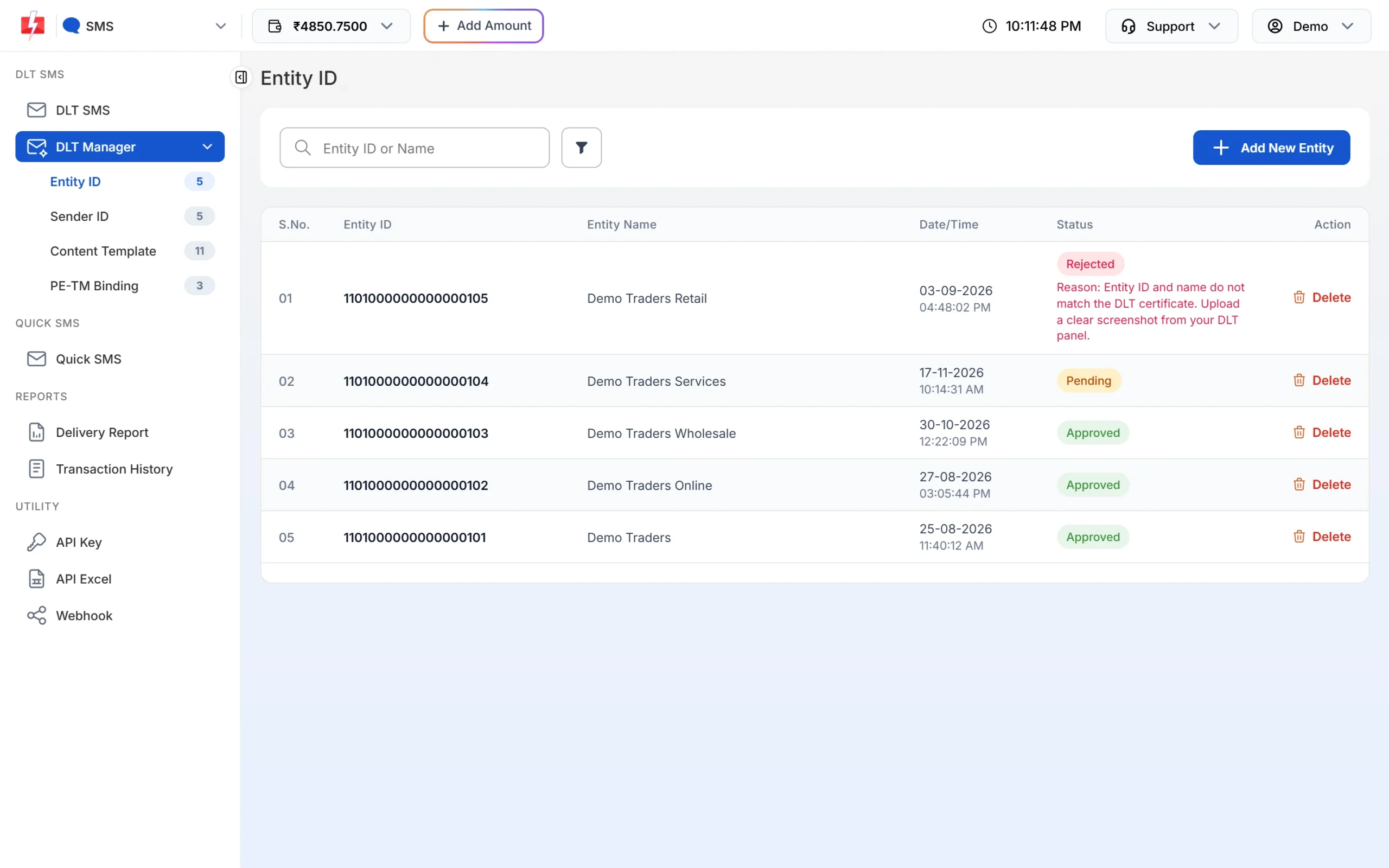
Several entities in one account. -
Add the headers for each brand under the right entity
Open Sender ID, click Add New Sender ID, select the entity and type the approved header, or upload the header Excel from your DLT portal. The list shows which entity each sender belongs to.
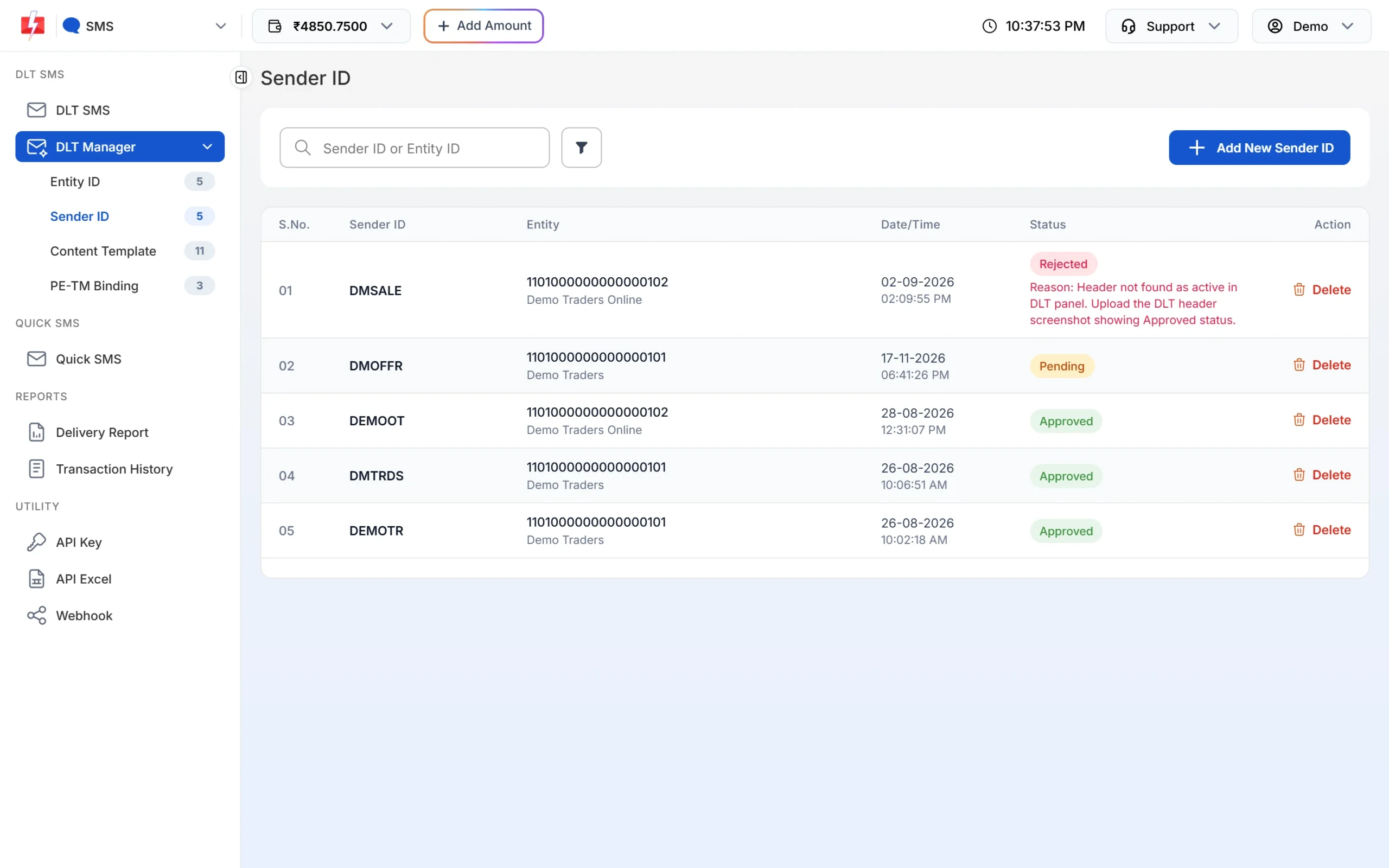
Each sender ID is tied to one entity. -
Add templates and link them to one or more headers
Open Content Template, click Add Content Template, choose the entity, then tick every header under Select Sender ID that the template was approved for. Enter the Content Template ID, the Template Type and the approved text, and upload the screenshot. For many templates, use Upload Excel with the export from your portal.
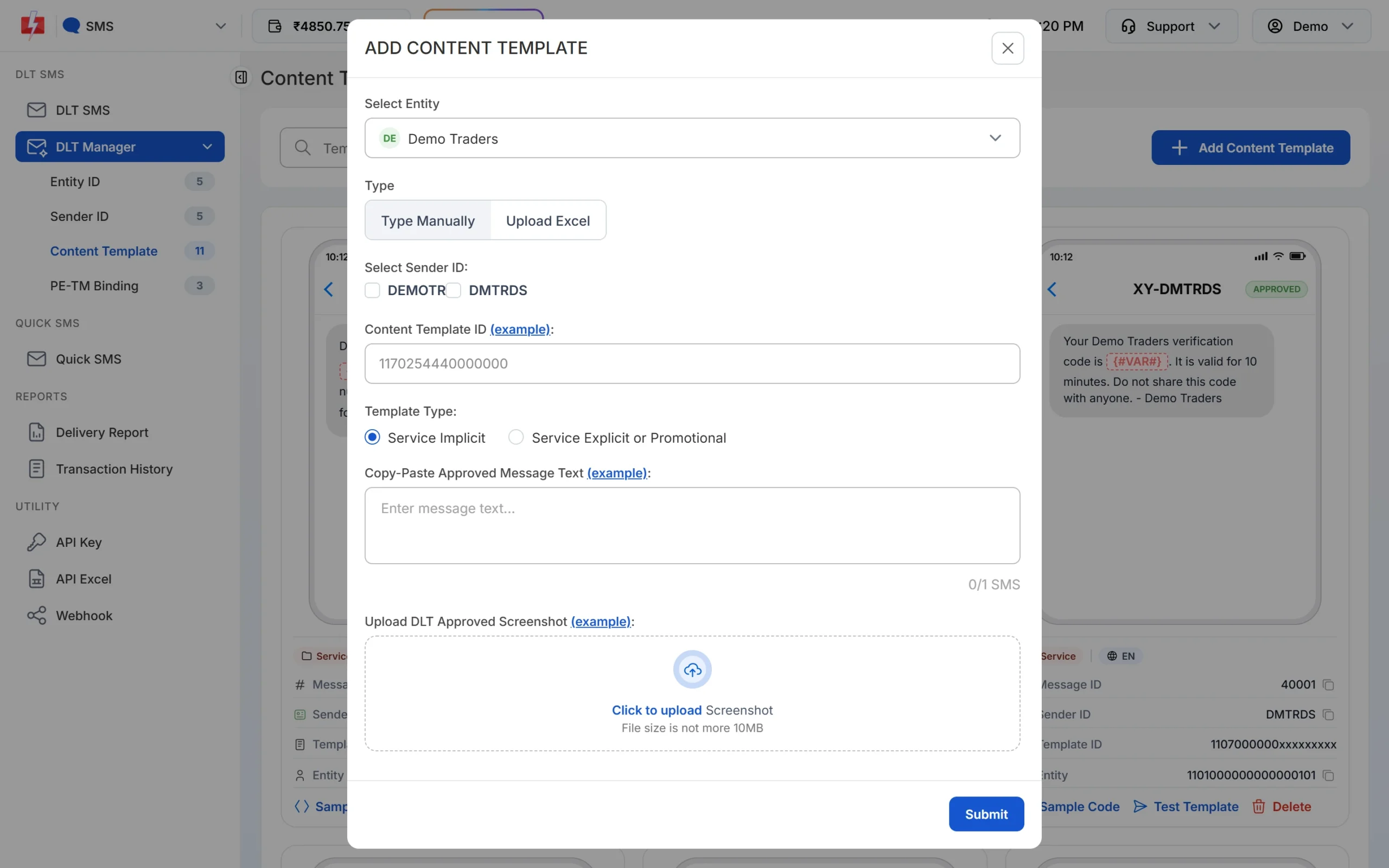
Tick all headers a template is approved for. -
Complete the PE-TM chain for every entity
Each entity needs its own chain with Fast2SMS. Send the request from your DLT portal, then submit it on the PE-TM Binding page, picking that entity in Select Entity. See PE-TM binding in Fast2SMS.
How to update company details on DLT
Changes such as a new address, email or authorised person are made on the portal where you registered, not in Fast2SMS. On Vilpower, for example, you go to account settings, update the account details and confirm with an OTP. The registrar then checks the change, which Vi says takes up to 72 hours. Other portals have similar settings pages.
- Upload new documents if the portal asks, and make sure the business name matches on all of them.
- If a new person takes over, also update the LOA and the login email and mobile number, so renewals and approvals still reach the right person.
- If your Entity ID or entity name changes, contact Fast2SMS support before you delete anything. Deleting an entity in DLT Manager also removes all its sender IDs, templates and linked OTP templates.
Common problems and fixes
| Problem | Fix |
|---|---|
| Template does not show for a header when sending | The template is not linked to that sender. Check the Sender ID shown on the template card, and ask Fast2SMS support to link it if it is missing. |
| Header rejected for brand mismatch | Upload proof that the brand belongs to your entity, such as a trademark certificate, or use a header closer to your registered name. |
| A group company’s header used for another company | Register the header under the entity that actually sends the message. |
| Header lost after months of no use | Headers unused for over 90 days can return to the pool. Register it again if it is still free. |
Frequently asked questions
Can one DLT registration cover all my brands?
Yes, if all brands belong to the same legal entity. Register a header for each brand under that one entity.
Do sister companies need separate DLT registrations?
Yes. Every separate legal entity in a group registers on its own.
Is there a limit on DLT headers?
Vi’s FAQ says there is no limit on the number of headers per entity so far. You need at least one.
How many templates can one header have?
Many. You can register multiple templates under each header as your business needs.
Can I transfer a header to my other company?
No. Headers cannot be transferred. The first entity can surrender it, and the other entity can then apply for it.
Can I use one Fast2SMS account for several entities?
Yes. Add each Entity ID in DLT Manager, complete a PE-TM chain for each, and filter delivery reports by entity.
Where do I change my company address on DLT?
In your account settings on the DLT portal where you registered. The registrar checks the change before it applies.