
A DLT header (also called a sender ID) is the short name your customers see as the sender of your SMS, such as DMTRDS for Demo Traders. Service and transactional headers are 6 letters, promotional headers have traditionally been 6 digits, and every header must clearly belong to your business. This page explains the DLT header rules, how to pick a header that gets approved, and how to add it in Fast2SMS.
यह गाइड हिंदी में पढ़ें: Sender ID क्या होता है (sender ID kya hota hai)? DLT header के नियम और सही नाम कैसे चुनें
What is a sender ID or header?
A header is the sender name registered on the DLT portal for your business. “Header” is the word DLT portals use; SMS providers and developers usually say “sender ID”. They mean the same thing. Every business SMS in India must go out under a header approved for your entity, and each content template you register is linked to a header.
On the phone, the network adds letters around your header, so DMTRDS can appear as something like VM-DMTRDS-S. The two letters in front show the operator and circle, and the letter at the end shows the message type. See what the prefix in a sender ID means.
DLT header rules
| Rule | Details |
|---|---|
| Length | Headers are up to 6 characters on the phone today. Service and transactional headers are normally 6 letters. |
| Letters or digits | Letter headers carry OTPs, alerts and service updates. Promotional SMS have traditionally used a 6-digit numeric header. Fast2SMS has published a notice that portals now also allow alphanumeric headers for promotional templates. |
| No spaces or symbols | Only letters or digits. No spaces, dots, hyphens or special characters. |
| Must relate to your business | The header should match your registered business or brand name. Reviewers may ask for proof such as a trademark certificate or your website. |
| Unique | Once one entity has a header, no other entity can register the same header on any portal. |
| No other brand or government name | You cannot register a header that copies another company’s brand or looks like a government body or bank you are not. |
| Reserved strings | Under TRAI’s rules, headers cannot use strings that the Department of Telecommunications has allotted for other purposes. |
| Used regularly | Since the 2025 amendment, operators temporarily deactivate headers not used for ninety days. You can ask for reactivation. |
TRAI’s February 2025 amendment also asks operators to use a separate reviewer for header approvals, who looks at your justification, how many headers you already have and whether any of your headers were blacklisted. A short, honest reason for each new header helps.
How to choose a good header name
- Shorten your brand so people still recognise it. Drop vowels or use initials: Demo Traders becomes
DMTRDSorDEMOTR. - Avoid generic words such as OFFERS, ALERTS, INFORM or NOTICE. They do not point to your business and are likely to be refused.
- Keep two or three options ready in case your first choice is already taken.
- Think about separate headers by purpose. Some businesses keep one header for OTPs and another for order updates, so customers learn to trust each. One letter header can also carry OTP and service templates, as long as each template is in the right category.
- Use the same spelling everywhere. In Fast2SMS, the sender ID must match your approved header exactly, including capital letters.
How to add your approved header in Fast2SMS
Register the header on your DLT portal first. Once it is approved there, add it to Fast2SMS. Your Entity ID must already be added and approved in DLT Manager.
-
Open Sender ID in DLT Manager
In the SMS app, go to DLT Manager > Sender ID and click Add New Sender ID.
-
Type the header and upload a screenshot
Choose your entity in Select Entity, keep Type Manually, enter the header in Enter Approved Sender ID (3 to 6 characters, exactly as approved), and upload a DLT screenshot that shows the Sender ID and its approved status. Click Submit.
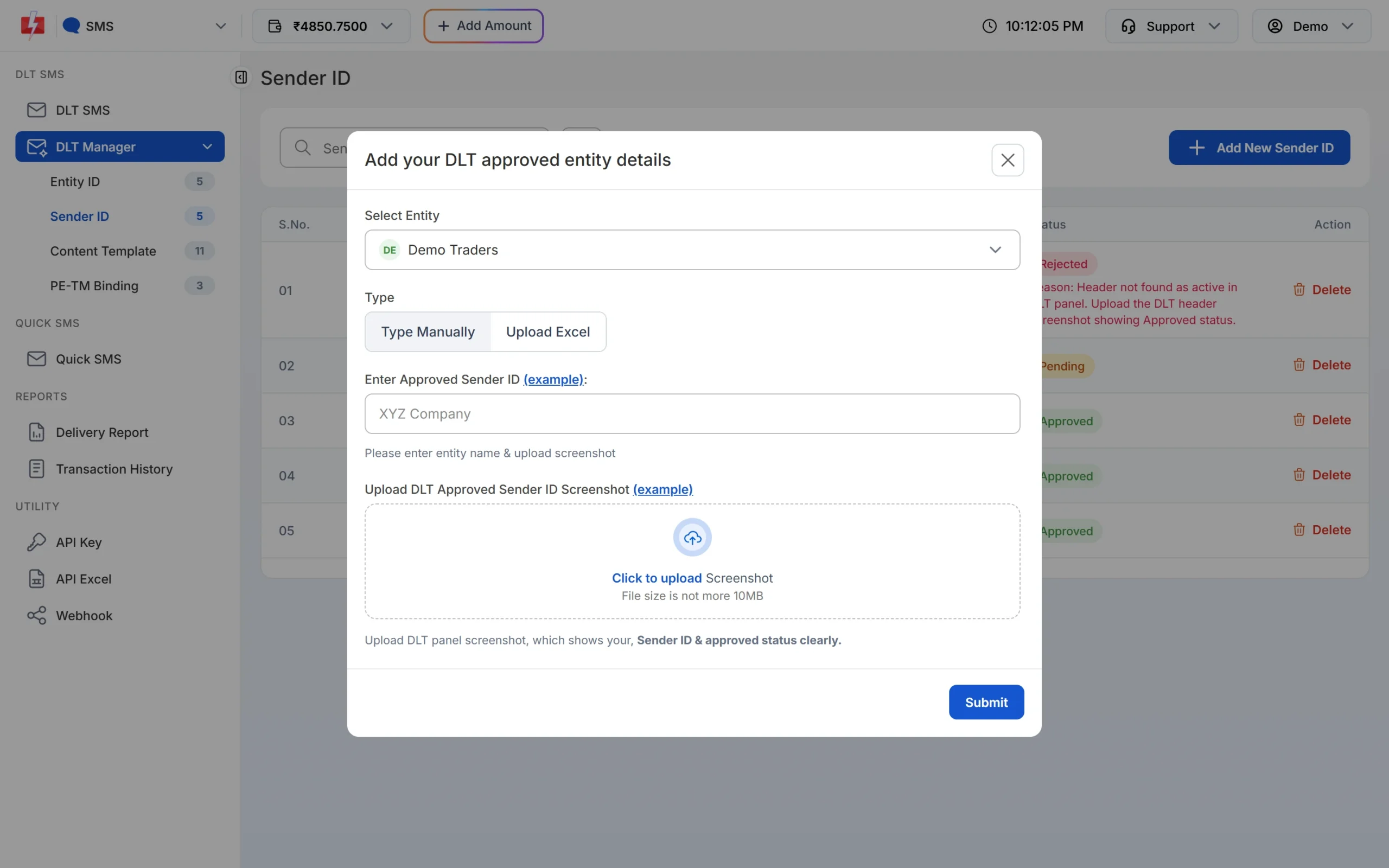
The screenshot must show the Sender ID and its approved status clearly. -
Or upload all headers from your DLT Excel
Choose Upload Excel and upload the header export from your portal (.csv or .xlsx). Only rows with an approved, active, live or verified status are imported.
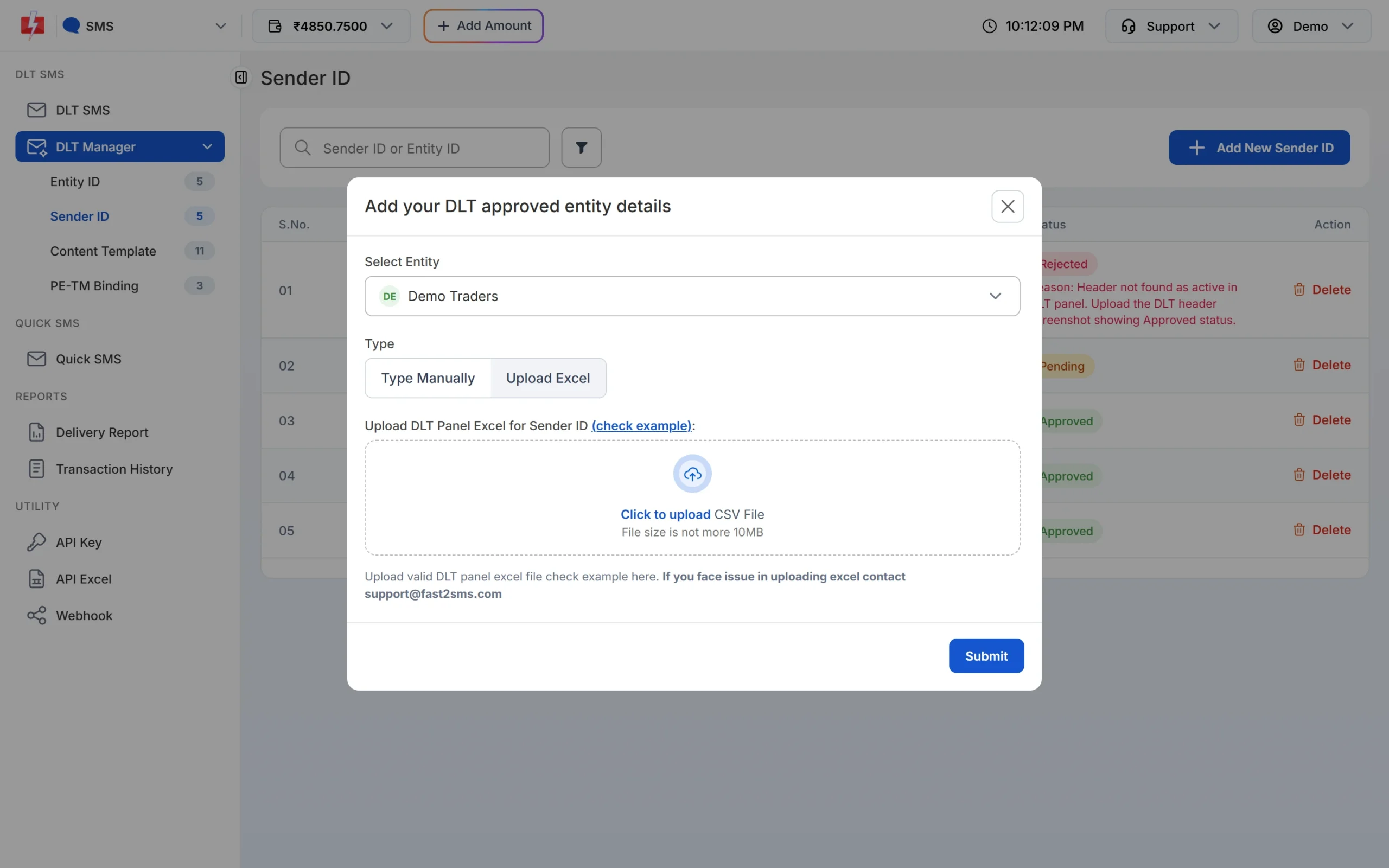
Import many headers in one upload. -
Wait for the check
New Sender IDs show as Pending until our team checks them. Approved headers appear in the Sender ID list on the DLT SMS page. A rejected header shows the reason in red.
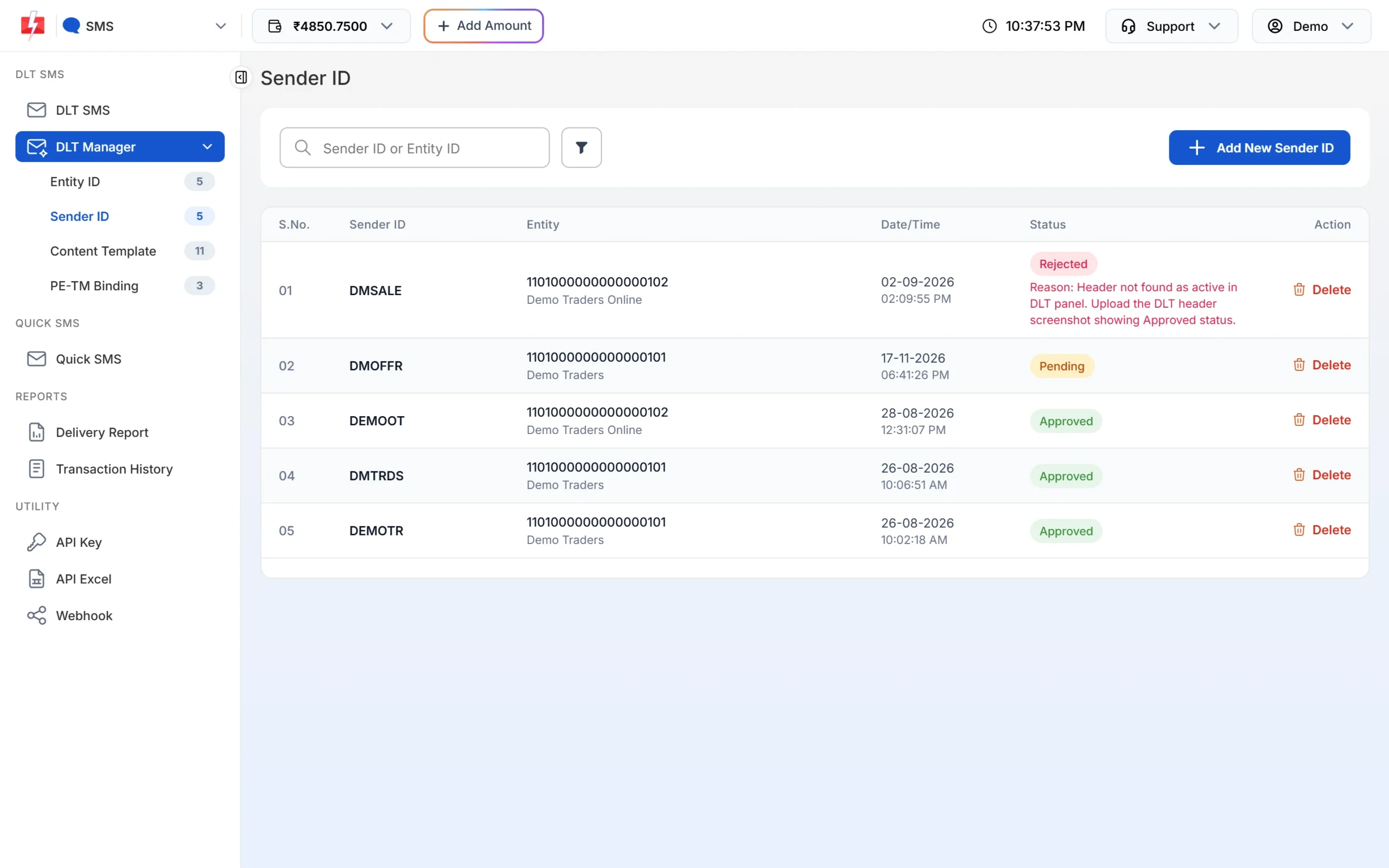
Sender ID list with each header’s entity and status.
Common header problems
| Problem | Fix |
|---|---|
| Header rejected on DLT for brand mismatch | Pick a header closer to your registered name, or attach brand proof. |
| Header already taken | Choose another option. If the header is your registered brand, raise it with your portal’s support with proof. |
| “Sender ID already approved” in Fast2SMS | The header is already in your account. Use the existing row. |
| “Sender ID blocked, contact Fast2SMS support.” | The header is on a block list. Contact support and mention if it is active on DLT. |
| “Sender ID is not valid.” when sending | The header is not approved in your account, or the capital letters differ. |
| Header stopped working after a long gap | It may have been deactivated for not being used. Ask for reactivation on your DLT portal. |
Frequently asked questions
How many characters can a DLT header have?
Up to six on the phone today. Service and transactional headers are normally six letters. Fast2SMS accepts approved headers of 3 to 6 characters.
Is a header the same as a sender ID?
Yes. DLT portals say header, SMS providers say sender ID. Both mean your registered sender name.
Can I use numbers in my header?
Numeric headers have been used for promotional SMS. Service and transactional headers use letters.
Can I change my header after approval?
You cannot edit an approved header. Register a new one, link new templates to it and stop using the old one.
Can two companies have the same header?
No. A header is unique across all DLT portals.
Do I need a separate header for OTP SMS?
No, it is optional. One letter header can carry OTP and service templates if each template is in the right category.
How many headers can I register?
There is no fixed number in the rules, but the reviewer looks at how many headers you already have, so register only the ones you will use.