
A new DLT template can normally have up to three variables. More are allowed only in special cases, with written reasons and a separate approval on the DLT portal, and at least 30% of the template must be fixed text. Each variable must be tagged for what it holds, and each tag has its own maximum length, for example 40 characters for {#alphanumeric#} and 120 for {#url#}. This page sums up the DLT variable limits and shows how variables work when you send from Fast2SMS.
How many variables can a DLT template have?
TRAI’s 2025 amendment to the commercial communication regulations (TCCCPR 2018) lets operators allow more than three variables in a content template only in special circumstances, on request with reasons and proper justification from the business. In that case:
- A separate authority at the operator checks the sample message and records why more variables are needed.
- Every variable must be pre-tagged for its purpose, and nothing other than that kind of value may be sent in it.
- At least thirty percent of the characters in the template must be fixed content.
So plan for three variables or fewer. If you need more, expect extra questions and a slower approval.
How long can each variable be?
The length limit depends on the tag. These are the limits used by the DLT portals at the time of writing:
| Tag | Holds | Maximum length |
|---|---|---|
{#numeric#} |
Digits only (OTP, amount, quantity) | 40 digits |
{#alphanumeric#} |
Letters and numbers (name, order ID, date). Cannot start with www or http. | 40 characters |
{#url#} |
Web link, must match a whitelisted CTA | 120 characters |
{#urlott#} |
App or OTT link, must match a whitelisted CTA | 120 characters |
{#cbn#} |
Callback number, must match a whitelisted CTA | 3 to 14 characters |
{#email#} |
Email address | 40 characters |
The TRAI regulation also mentions a 30-character limit for a variable: where a value cannot fit in thirty characters, the operator may allow more than one variable of the same type next to each other, after checking your reasons and sample message. Keep values short to stay safe.
{#num#}, {#alp#}, {#urg#}, {#uro#}, {#cbn#} and {#eml#}. Fast2SMS accepts both forms when you add a template.Other variable rules people miss
- Fixed text between variables. Two variables cannot sit side by side, except
{#alphanumeric#}next to{#alphanumeric#}. - Brand name stays fixed. Do not put your business name inside a variable.
- Links and numbers need CTAs. A
{#url#},{#urlott#}or{#cbn#}value must match a link or number you whitelisted on your portal, or the SMS fails. - Do not send empty values. Use a fallback such as “Customer” when a name is missing, so the message still reads correctly.
- Longer values mean more SMS parts. An English SMS fits 160 characters in one part and a Unicode (Hindi) SMS fits 70. Long variable values can push the message into two parts and double the cost.
How variables work when you send from Fast2SMS
On the DLT SMS page, after you pick a template, the panel shows one box for each variable. Type the value for each one. The phone preview shows the final message and the counter under it shows the characters and SMS parts.
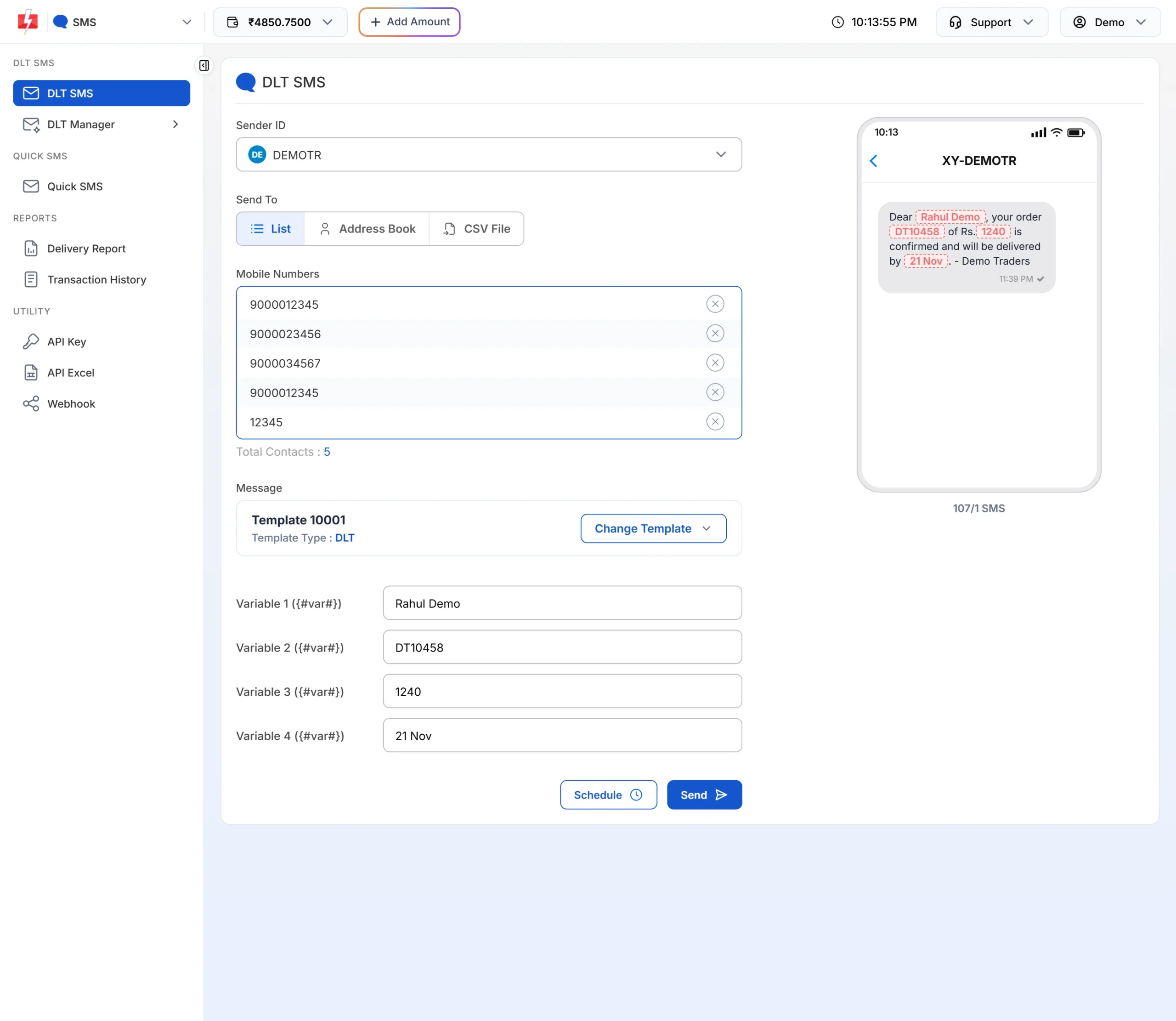
To send different values to each person, use CSV File under Send To and map each variable to a column of your file. In the API, pass the values in variables_values, separated by a pipe, such as Rahul|DT10458|1240.
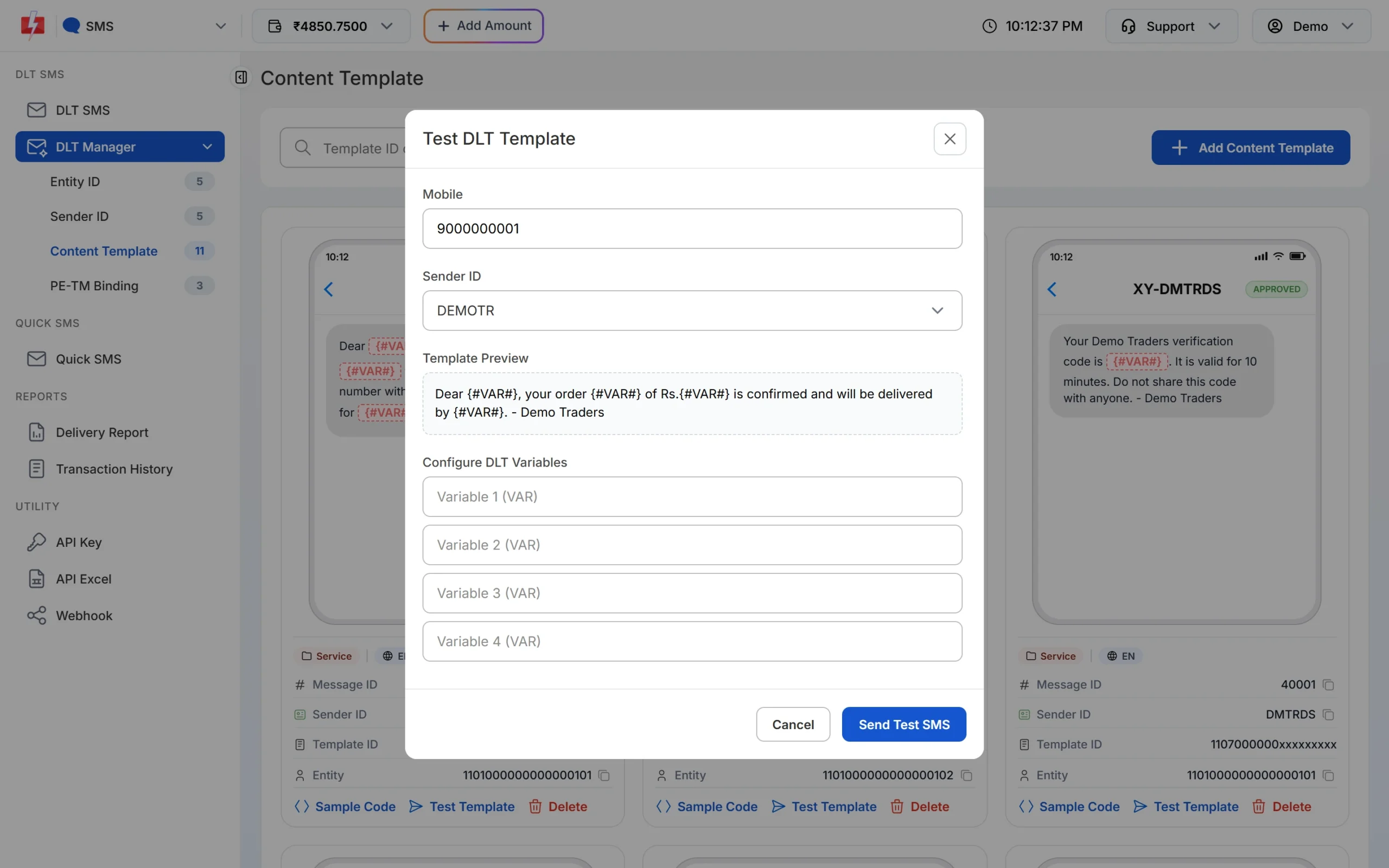
You can also try values before a campaign: open DLT Manager > Content Template, click Test Template on an approved card and fill each variable.
Frequently asked questions
What is the maximum number of variables in a DLT template?
Three in normal cases. More are allowed only with written justification and a separate approval, and at least 30% of the template must be fixed text.
What is the character limit of a DLT variable?
It depends on the tag: 40 for numeric, alphanumeric and email, 120 for URL and URLOTT, and 3 to 14 for callback numbers, at the time of writing.
Can two variables be next to each other in a DLT template?
Only two alphanumeric variables. All other variables need fixed text between them.
Can I use {#var#} for every variable?
New templates must use the typed tags. Older templates with {#var#} need to be migrated to tagged variables.
What happens if my variable value is too long?
The message can fail the DLT check, because the value does not fit its tag. It can also use more SMS parts.
Is the brand name allowed as a variable?
No. Keep the brand name as fixed text so the reviewer and the customer can see who is sending.