
You can send SMS alerts from an ESP32, a Wi-Fi Arduino board or a Raspberry Pi with one HTTPS request to the Fast2SMS DLT SMS API. The device reads a sensor, and when a value crosses your limit it calls the API with your approved DLT template. Two things decide whether this works well: the message must use a DLT template approved for your business, and your API key must never sit in code you share.
This guide is for makers and small teams building tank-level, temperature, power-cut or door alerts. It covers the DLT set-up, safe ways to store the key, and working code for ESP32 and Raspberry Pi.
Before you start
- A Fast2SMS account with wallet balance.
- DLT registration, an approved sender ID and an approved alert template, added in DLT Manager. An alert like “Alert from Demo Traders: {#var#} reading is {#var#}. Please check. – Demo Traders” fits a Service Implicit (transactional) template, so it also reaches DND numbers.
- The template’s Message ID from its card in DLT Manager > Content Template. The API uses this number, not the 19-digit DLT Template ID.
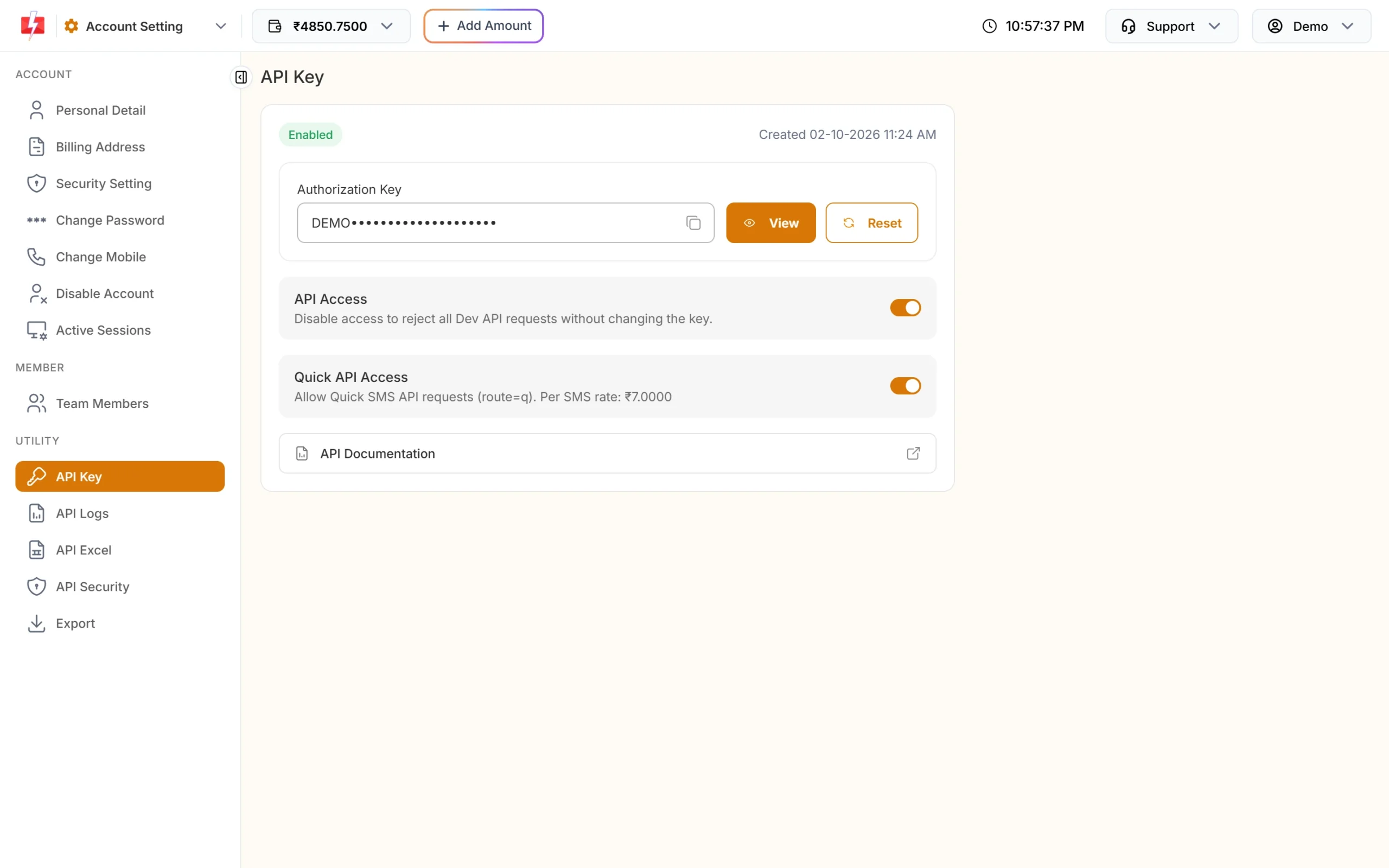
- Your API key from API Key in the panel.
- A board with internet: ESP32, ESP8266, an Arduino board with Wi-Fi, or a Raspberry Pi. A plain Arduino Uno has no network of its own.
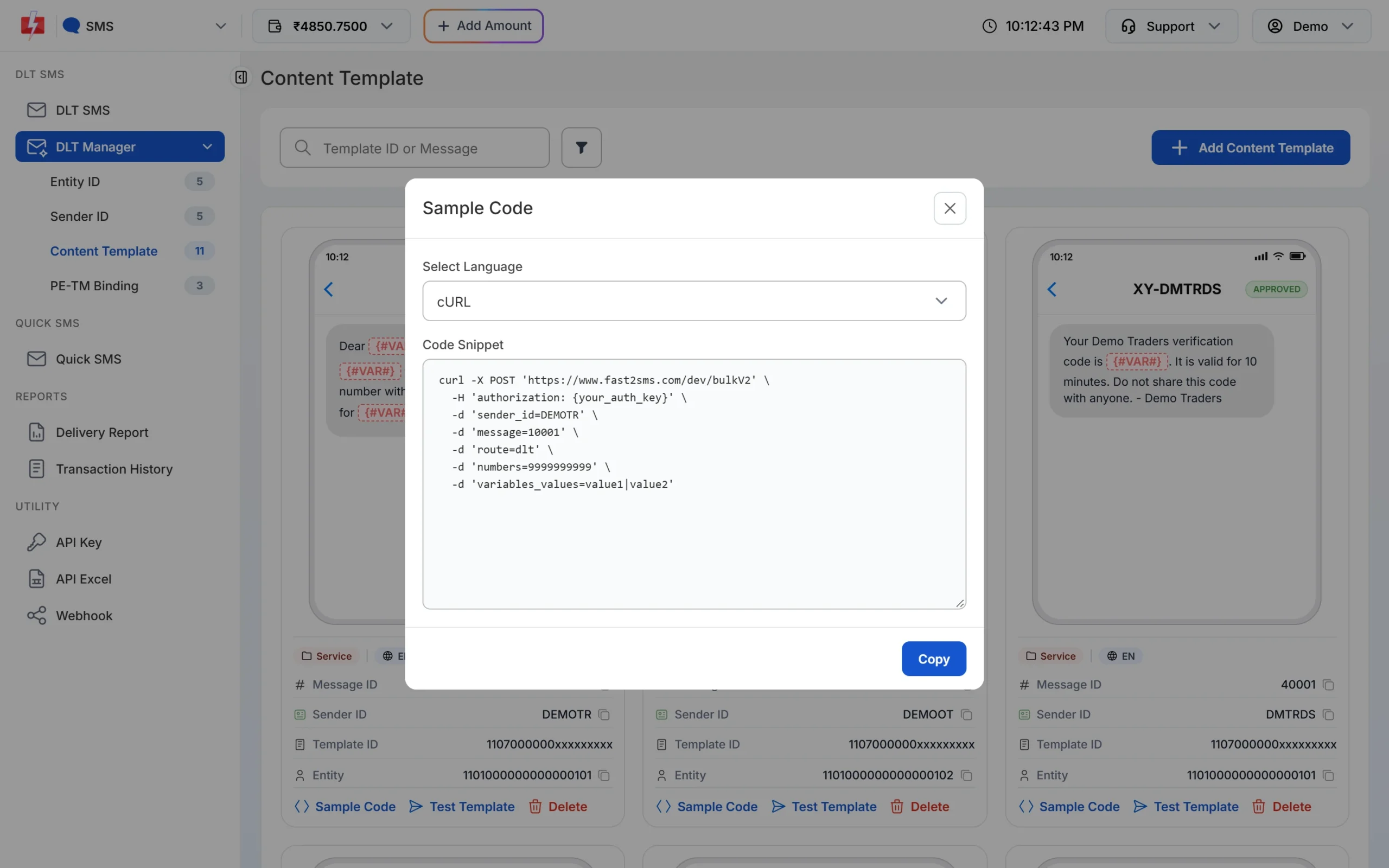
Keep the API key off shared code
Your API key can send any of your approved templates and spend your wallet balance. Anyone who sees it can use it. Devices and their code get shared a lot: GitHub repositories, forum posts, a board given to a friend. Pick one of these two set-ups.
| Set-up | Where the key lives | Good for |
|---|---|---|
| Relay (recommended) | On your own server. The device calls your server with its own device token, and the server calls Fast2SMS. | Many devices, devices at customer sites, any code you publish |
| Direct | In a separate secrets file on the device that is never committed or shared | One or two devices you own and keep with you |
- Never paste the key into the main sketch or script. Keep it in
secrets.h, an environment variable or a config file listed in.gitignore. - If the key may have leaked, open API Key and click Reset. The old key stops working at once, and you confirm with an OTP.
- With a relay server on a fixed public IP, turn on API Security and whitelist only that IP. Calls from any other IP then fail with error 414. This does not suit devices on home or mobile internet whose public IP changes.
ESP32 code (Arduino IDE)
-
Create secrets.h
Add a tab named
secrets.hand list it in.gitignore. For HTTPS, paste the root certificate of www.fast2sms.com in PEM format. You can export it from your browser: open the site, view the certificate, select the top certificate in the chain and export it as Base-64. Update it if requests later fail with a TLS error.// secrets.h - keep this file out of git and never share it #define WIFI_SSID "your-wifi-name" #define WIFI_PASS "your-wifi-password" #define F2S_API_KEY "YOUR_API_KEY" static const char F2S_ROOT_CA[] = "-----BEGIN CERTIFICATE-----\n" "...paste the root certificate here...\n" "-----END CERTIFICATE-----\n"; -
Add the sketch
This sketch reads an analog sensor every 5 seconds. When the value is above the limit, it sends one SMS and then waits at least 15 minutes before it tries again, so a stuck sensor cannot drain your wallet.
#include <WiFi.h>
#include <WiFiClientSecure.h>
#include <HTTPClient.h>
#include "secrets.h"

const int SENSOR_PIN = 34;                           // analog input
const int ALERT_LEVEL = 3000;                        // your limit
const unsigned long GAP_MS = 15UL * 60UL * 1000UL;   // one SMS per 15 minutes at most
unsigned long lastTry = 0;
bool triedOnce = false;

bool online() { return WiFi.status() == WL_CONNECTED; }

bool sendSmsAlert(int reading) {
  WiFiClientSecure client;
  client.setCACert(F2S_ROOT_CA);
  HTTPClient https;
  if (https.begin(client, "https://www.fast2sms.com/dev/bulkV2") == false) return false;
  https.addHeader("authorization", F2S_API_KEY);
  https.addHeader("Content-Type", "application/json");
  char body[256];
  snprintf(body, sizeof(body),
    "{\"route\":\"dlt\",\"sender_id\":\"FSTSMS\",\"message\":\"111111\","
    "\"variables_values\":\"Tank 1|%d\",\"numbers\":\"9999999999\"}", reading);
  int code = https.POST((uint8_t*)body, strlen(body));
  String resp = https.getString();
  https.end();
  Serial.printf("HTTP %d %s\n", code, resp.c_str());
  return code == 200 && resp.indexOf("\"return\":true") >= 0;
}

void setup() {
  Serial.begin(115200);
  WiFi.begin(WIFI_SSID, WIFI_PASS);
  while (online() == false) delay(500);
}

void loop() {
  int reading = analogRead(SENSOR_PIN);
  bool gapOver = (triedOnce == false) || (millis() - lastTry > GAP_MS);
  if (reading > ALERT_LEVEL && gapOver && online()) {
    lastTry = millis();
    triedOnce = true;
    sendSmsAlert(reading);
  }
  delay(5000);
}
Replace
FSTSMSwith your approved sender ID (exact case),111111with your template’s Message ID and9999999999with the numbers to alert, separated by commas. The values invariables_valuesfill the template’s variables in order, separated by|, and each value is cut to 40 characters. -
Check the first send
Open the Serial Monitor. A successful call returns
"return":truewith a request ID. Then open API Logs in the panel to see the request and its result, and Delivery Report to see delivery.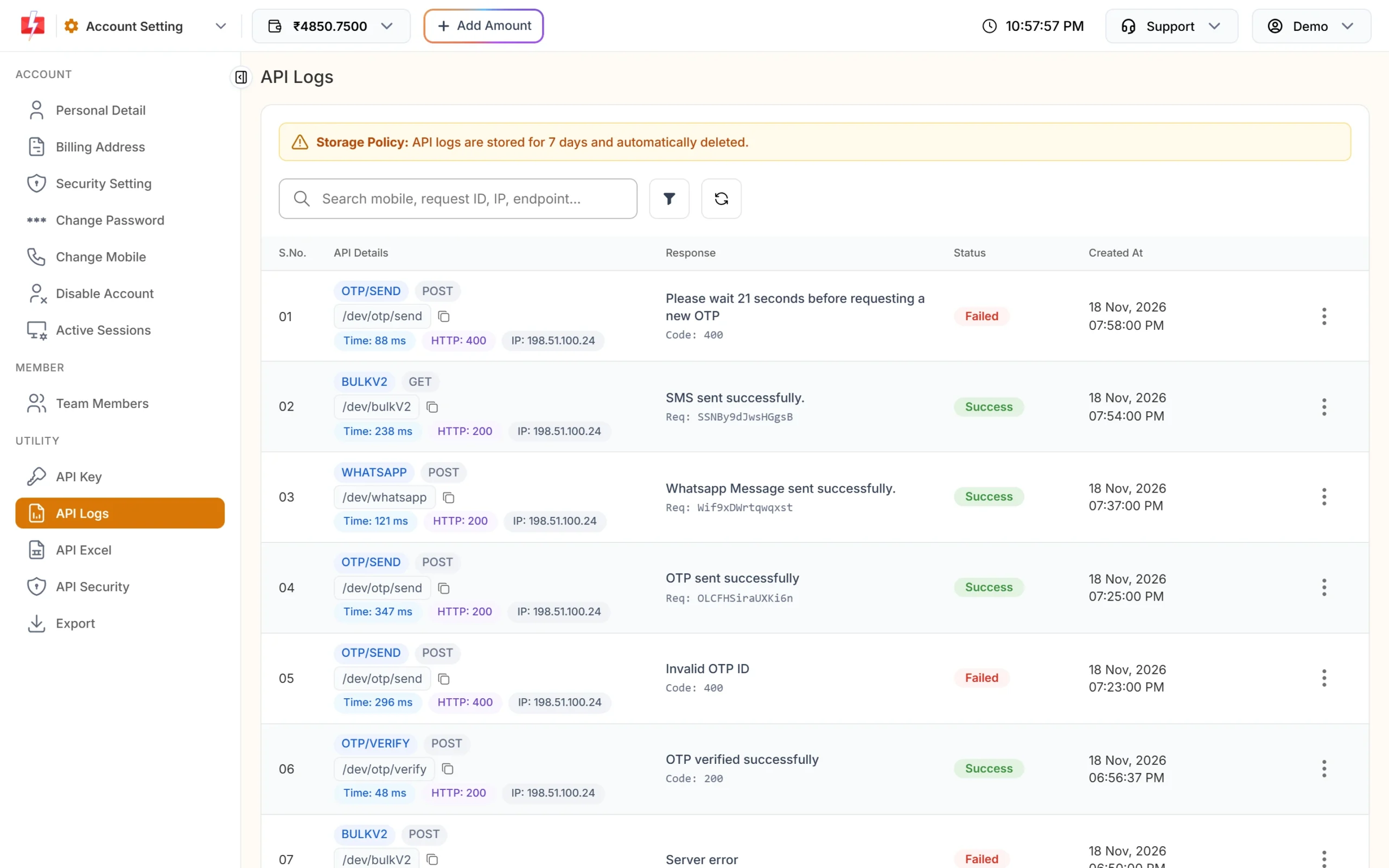
Every API call from your device appears in API Logs with its IP.
Raspberry Pi code (Python)
On a Raspberry Pi, keep the key in an environment variable, for example in the systemd service file that runs your script, not in the script itself.
import os, time, requests

API_KEY = os.environ["F2S_API_KEY"]
GAP = 15 * 60          # one SMS per 15 minutes at most
last_try = 0

def read_sensor():
    return 0           # replace with your sensor reading

def send_alert(value):
    r = requests.post(
        "https://www.fast2sms.com/dev/bulkV2",
        headers={"authorization": API_KEY},
        json={"route": "dlt", "sender_id": "FSTSMS", "message": "111111",
              "variables_values": f"Tank 1|{value}", "numbers": "9999999999"},
        timeout=15,
    )
    data = r.json()
    print(r.status_code, data)
    return data.get("return") is True

while True:
    value = read_sensor()
    if value > 3000 and time.time() - last_try > GAP:
        last_try = time.time()
        send_alert(value)
    time.sleep(5)
Relay server example
For devices you do not fully control, let them call your server instead. This small Flask app checks a device token and then calls Fast2SMS with the key that stays on the server.
import os, hmac, requests
from flask import Flask, request, abort

app = Flask(__name__)
F2S_KEY = os.environ["F2S_API_KEY"]
DEVICE_TOKEN = os.environ["DEVICE_TOKEN"]

@app.post("/alert")
def alert():
    token = request.headers.get("X-Device-Token", "")
    if not hmac.compare_digest(token, DEVICE_TOKEN):
        abort(401)
    reading = str(request.json.get("reading", "")).replace("|", "")[:40]
    r = requests.post(
        "https://www.fast2sms.com/dev/bulkV2",
        headers={"authorization": F2S_KEY},
        json={"route": "dlt", "sender_id": "FSTSMS", "message": "111111",
              "variables_values": f"Tank 1|{reading}", "numbers": "9999999999"},
        timeout=15,
    )
    return r.json(), r.status_code
The numbers to alert are fixed on the server, so a stolen device token can only trigger your own alert to your own numbers.
Common problems and fixes
| Response or symptom | Cause | Fix |
|---|---|---|
| status_code 412, Invalid Authentication | Wrong or reset API key | Copy the current key from API Key into your secrets file |
| status_code 414, IP is blacklisted | API Security is on and the device IP is not whitelisted | Whitelist the IP, or send through a relay with a fixed IP |
| status_code 406, Invalid Sender ID | Sender ID not approved or wrong case | Use the sender exactly as in DLT Manager |
| status_code 424, Invalid Message ID | You used the DLT Template ID, or the template is not linked to that sender | Use the Message ID from the template card |
| HTTP 200 but “return”: false | Usually low wallet balance (status_code 416) | Always check “return”, not only the HTTP code |
| Dozens of SMS in a few minutes | No cooldown, or the device retries on every loop | Keep a minimum gap between alerts, as in the code above |
Frequently asked questions
Can an ESP32 send SMS without a GSM module?
Yes. Over Wi-Fi, the ESP32 calls the Fast2SMS API over HTTPS and Fast2SMS delivers the SMS. No SIM or GSM module is needed on the board.
Do I need DLT to send IoT alerts?
Yes for the DLT SMS API. The alert text must match a template approved on DLT and added in DLT Manager, sent from your approved sender ID.
Is it safe to keep the API key on the ESP32?
Only for a device you own and never share, with the key in a separate secrets file. For anything else, use a relay server so the key stays off the device.
Can I send to more than one number?
Yes. Put several 10-digit numbers in the numbers field, separated by commas.
Can I use GET instead of POST?
Yes, the API accepts both. Keep the key in the authorization header, not in the URL, because URLs end up in logs.
How do I stop repeated alerts from one fault?
Add a cooldown, like the 15-minute gap in the examples, and send a second alert only when the value goes back to normal and crosses the limit again.