
OTP autofill lets the phone read the code from the SMS so the user does not type it. On Android apps this works with Google’s SMS Retriever API and an 11-character app hash. On iPhones and websites it works with the right input field and message format. In India there is one extra rule: the SMS text must match your approved DLT template, so the app hash or the website line must be part of the template. This guide shows how to set it up with Fast2SMS.
Which autofill method fits your app
| Method | Where it works | What the SMS needs | User action |
|---|---|---|---|
| SMS Retriever API | Your Android app | The code and your app’s 11-character hash | None |
| SMS User Consent API | Your Android app | A 4 to 10 character code with at least one number. No hash. | Taps Allow on a prompt |
| iOS code suggestion | iPhone apps and Safari | A clear code in the SMS | Taps the code shown above the keyboard |
| WebOTP | Websites in Chrome on Android | A last line like @www.yourbrand.com #482913 |
Taps to allow, or none |
The facts about Google and Apple features here are from their developer documentation at the time of writing.
The DLT rule you must plan for
Every OTP SMS in India must match an approved DLT content template, word for word. Only the variable parts can change. So anything autofill needs, like the app hash or the @domain #code line, has to be written into the template when you register it on your DLT portal. You cannot add it later from your code.
The app hash is the same for every user of one app build, so put it in the template as fixed text. A hash can contain characters like + or /, which an alphanumeric variable tag does not allow, so fixed text is the safe choice.
Android: SMS Retriever with Smart OTP
-
Get your app hash
The hash comes from your app’s package name and the certificate that signs the app users install. If you use Play App Signing, use the app signing certificate from the Play Console, not your upload key. A debug build signed with another key has a different hash. One way to compute it on Linux:
keytool -exportcert -alias YOUR_ALIAS -keystore YOUR_KEYSTORE.jks \
  | xxd -p | tr -d "[:space:]" \
  | (printf "com.yourbrand.app " && cat) \
  | sha256sum | tr -d "[:space:]-" | xxd -r -p | base64 | cut -c1-11
Run
keytoolalone first to check it prints the certificate. On macOS useshasum -a 256in place ofsha256sum. Google’s sampleAppSignatureHelperclass can also print the hash. Never compute the hash inside the app at run time and send it to your server. -
Register a DLT template that ends with the hash
Write a short OTP template with the hash as fixed text at the end, for example:
{#numeric#} is your OTP to log in to YourBrand. Do not share it with anyone. -YourBrand AbC1dEf2GhIKeep the whole SMS short and in English. Google asks for a message of no more than 140 bytes. Get the template approved on your DLT portal, then add it in Fast2SMS under DLT Manager, Content Template, Add Content Template, with the exact approved text.
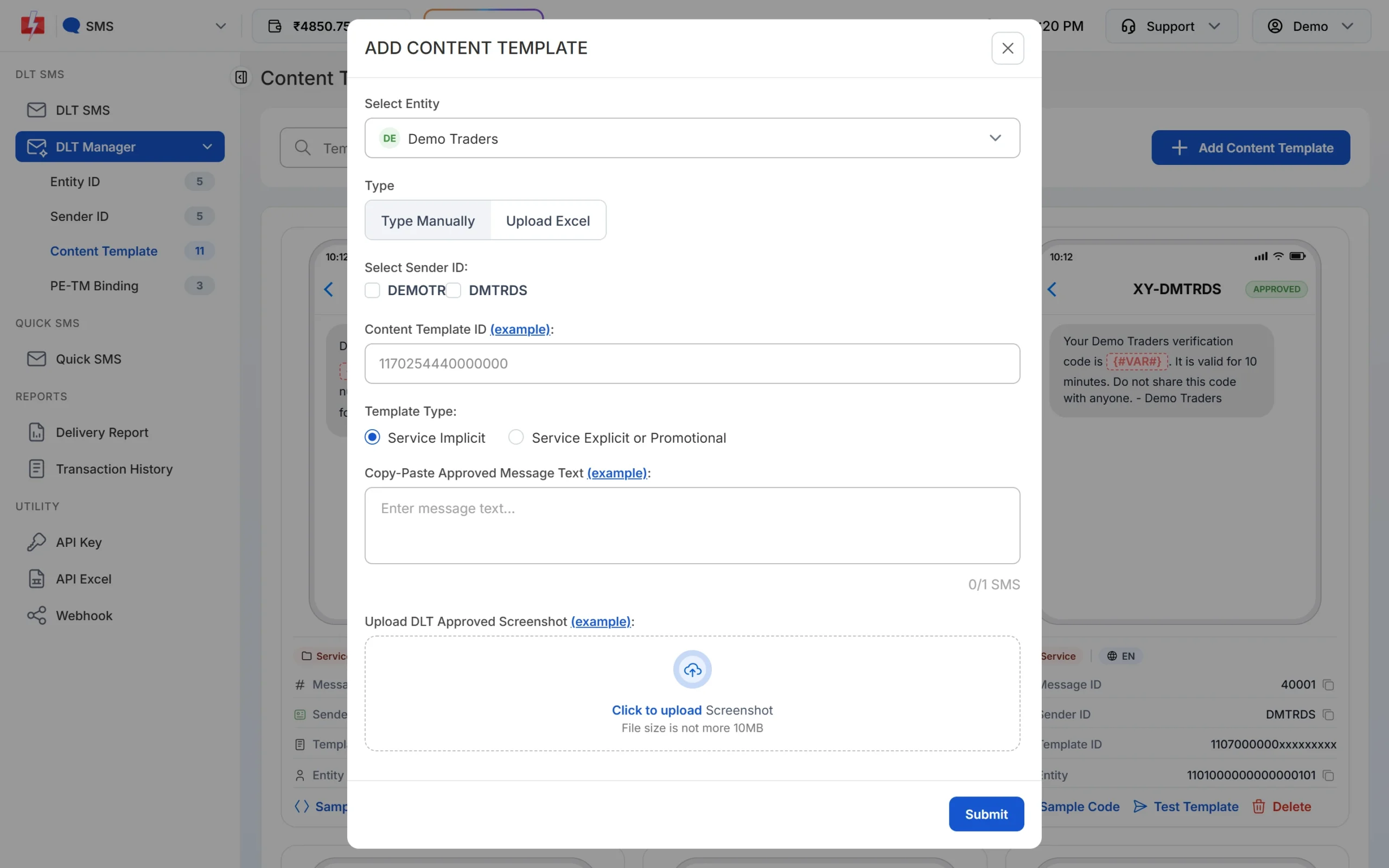
Paste the approved text exactly, including the hash. -
Create the Smart OTP template
In Smart OTP open OTP Template List, click Add OTP Template, choose your entity and sender, pick the new template in Select Template and select the OTP variable. Save and copy the OTP ID.
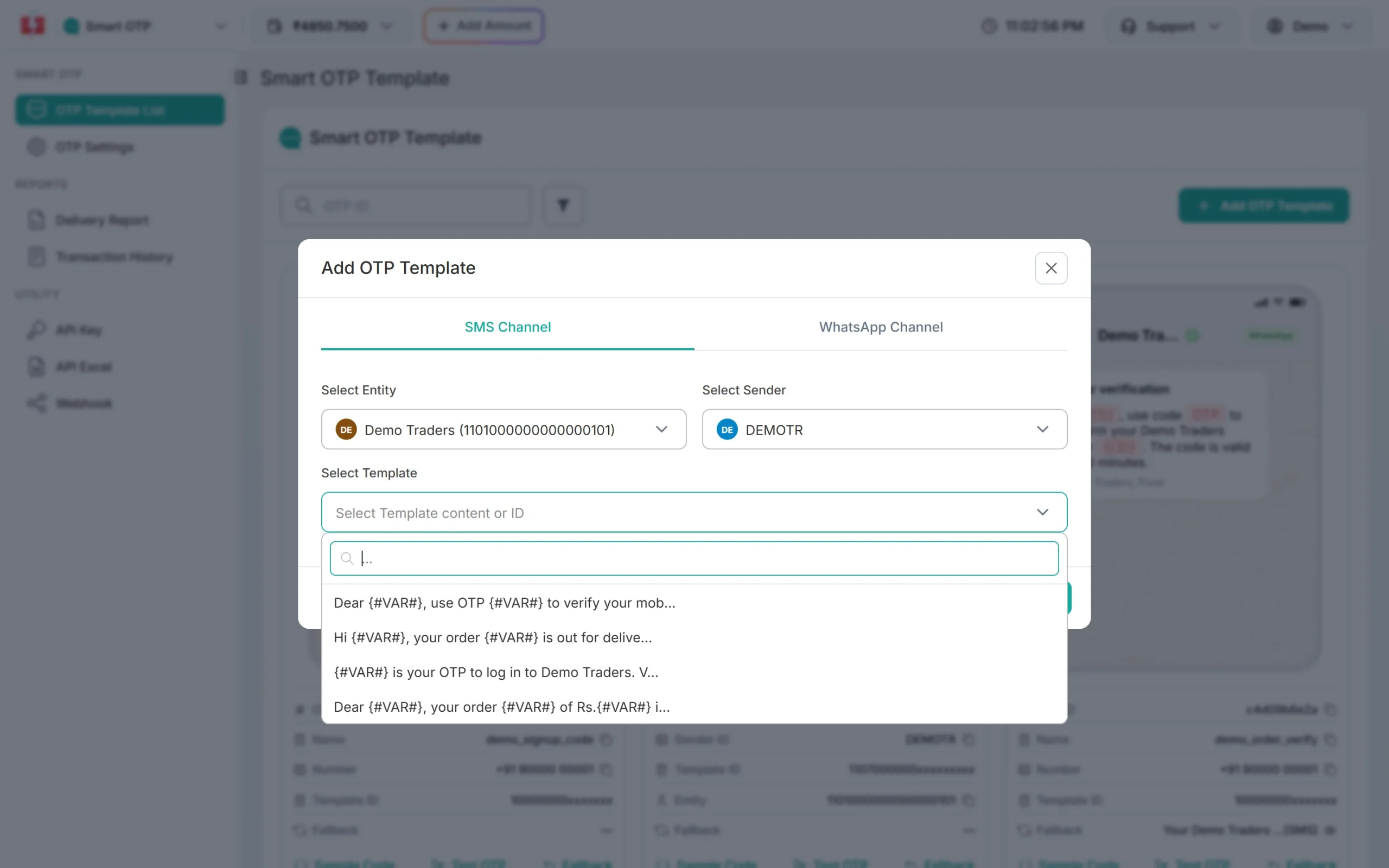
Pick the autofill template for your Android app. -
Start the retriever, then send the OTP
In the app, call
SmsRetriever.getClient(context).startSmsRetriever()and register a broadcast receiver for the SMS retrieved action. Then ask your server to call the Fast2SMS Send OTP API. The retriever waits up to 5 minutes for one matching SMS.curl -X POST "https://www.fast2sms.com/dev/otp/send" \ -H "authorization: YOUR_API_KEY" \ -H "Content-Type: application/json" \ -d '{"mobile":"9999999999","otp_id":"YOUR_OTP_ID","otp_expiry":5}' -
Read the code and verify on your server
When the SMS arrives, your receiver gets the full text. Take the digits out with a regular expression and send them to your server. Your server calls the Verify OTP API with the mobile and the code. Never decide “verified” inside the app.
Android: SMS User Consent (no hash)
If you cannot change your DLT template, use the SMS User Consent API. It needs no hash. Your app starts listening before the SMS arrives, and Android shows the message and asks the user to allow your app to read it. The message must contain a 4 to 10 character code with at least one number, so a normal numeric OTP works. It listens for 5 minutes. You can pass a sender number to filter messages. Fast2SMS SMS arrive from your sender ID header, not a phone number, so start it without a sender filter.
iPhone and Safari: one-time-code
iOS can suggest the code from a new SMS above the keyboard. Help it by marking the input field:
- In a web page:
<input type="text" inputmode="numeric" autocomplete="one-time-code"> - In an iOS app: set the text field’s content type to one-time code.
Keep the code easy to spot in the SMS, for example at the start: “482913 is your OTP to log in to YourBrand.”
Websites on Android: WebOTP
Chrome on Android can read the code into your web page with the WebOTP API. The SMS must end with a line that has your website’s host after @ and the code after #, with one space between them. The template needs two variables for the code, for example:
{#numeric#} is your OTP to log in to YourBrand. Do not share it.
@www.yourbrand.com #{#numeric#}
With Smart OTP, set the first variable as the OTP variable and send "variables_values":"{otp}". Fast2SMS puts the same OTP into the second variable too. On the page, ask for the code like this:
if ("OTPCredential" in window) {
  const ac = new AbortController();
  navigator.credentials
    .get({ otp: { transport: ["sms"] }, signal: ac.signal })
    .then((otp) => { document.querySelector("#otp").value = otp.code; })
    .catch(() => {});
}
The same last-line format also helps Safari suggest the code. Keep autocomplete="one-time-code" on the field for other browsers.
Common problems and fixes
The Android app does not pick up the SMS
Check that the hash in the SMS matches the build on the phone. A debug build, an upload key or a new signing key all give a different hash. Also check the SMS is short enough and that the app started the retriever before the SMS arrived, less than 5 minutes earlier.
The SMS fails or never arrives after I added the hash
The text sent must match the approved DLT template exactly. If you added the hash in your code instead of in the template, operators can reject the SMS. Register a new template with the hash and use its OTP ID.
The fallback came on WhatsApp, so autofill did not work
SMS Retriever reads SMS only. If the SMS failed and the Smart OTP fallback sent the code on WhatsApp, the user copies it from WhatsApp. WhatsApp Authentication templates have their own one-tap and zero-tap options for Android apps.
iOS does not suggest the code
Make sure the input has autocomplete="one-time-code" (web) or the one-time code content type (app), and that the code is clearly visible in the message.
Frequently asked questions
Do I need a new DLT template for OTP autofill on Android?
For SMS Retriever, yes, because the 11-character app hash must be in the SMS and the SMS must match the template. The SMS User Consent API works with your existing OTP template.
Can I pass the app hash as a variable?
It is safer as fixed text. The hash does not change for a given app build, and it can contain characters that an alphanumeric variable does not allow.
Does OTP autofill work with Smart OTP?
Yes. Smart OTP sends the SMS from your DLT template, so if the template has the hash or the WebOTP line, autofill works as normal.
What is the 11-character hash in OTP SMS?
It is a short code made from your Android app’s package name and signing certificate. Android uses it to pass the SMS only to your app.
Does WebOTP work on iPhone?
Safari does not support the WebOTP JavaScript API, but it understands the same message format and can suggest the code on the keyboard.
Is autofill safe?
Yes, when the code is still checked on your server with the Verify OTP API. Autofill only saves typing.