
A promotional voice call campaign plays your recorded offer, sale or event announcement to a list of customers in one go. In Fast2SMS you run it from Bulk Voice Call with the Simple type: name the campaign, add numbers, pick your approved recording and send. You pay only for answered calls, and calls go out only between 10 AM and 9 PM to non-DND numbers.
This guide is for shops, showrooms, restaurants, gyms and service businesses that want to announce a sale, a new branch or a festival offer by voice. It covers the setup, the content rules your recording must follow, timing and how to read the results.
Before you start
- A paid transaction of ₹100 or more on your account. Until then the panel blocks voice uploads and sending.
- Enough wallet balance for the campaign. Fast2SMS holds an estimate when you send and refunds the unused part after the calls.
- An approved voice file with your offer. Upload it under Voice Files as an MP3 or WAV up to 5 MB, or record it in the browser. The operator usually approves it within a few hours.
- A list of customers who know your business. Promotional calls are only placed to non-DND numbers.
What your offer recording must (and must not) contain
The operator checks every voice file before you can use it. When you click Upload Voice File, the Voice File Rules popup lists the rules. The one must-have rule is simple: say your company or brand name clearly in every voice file.
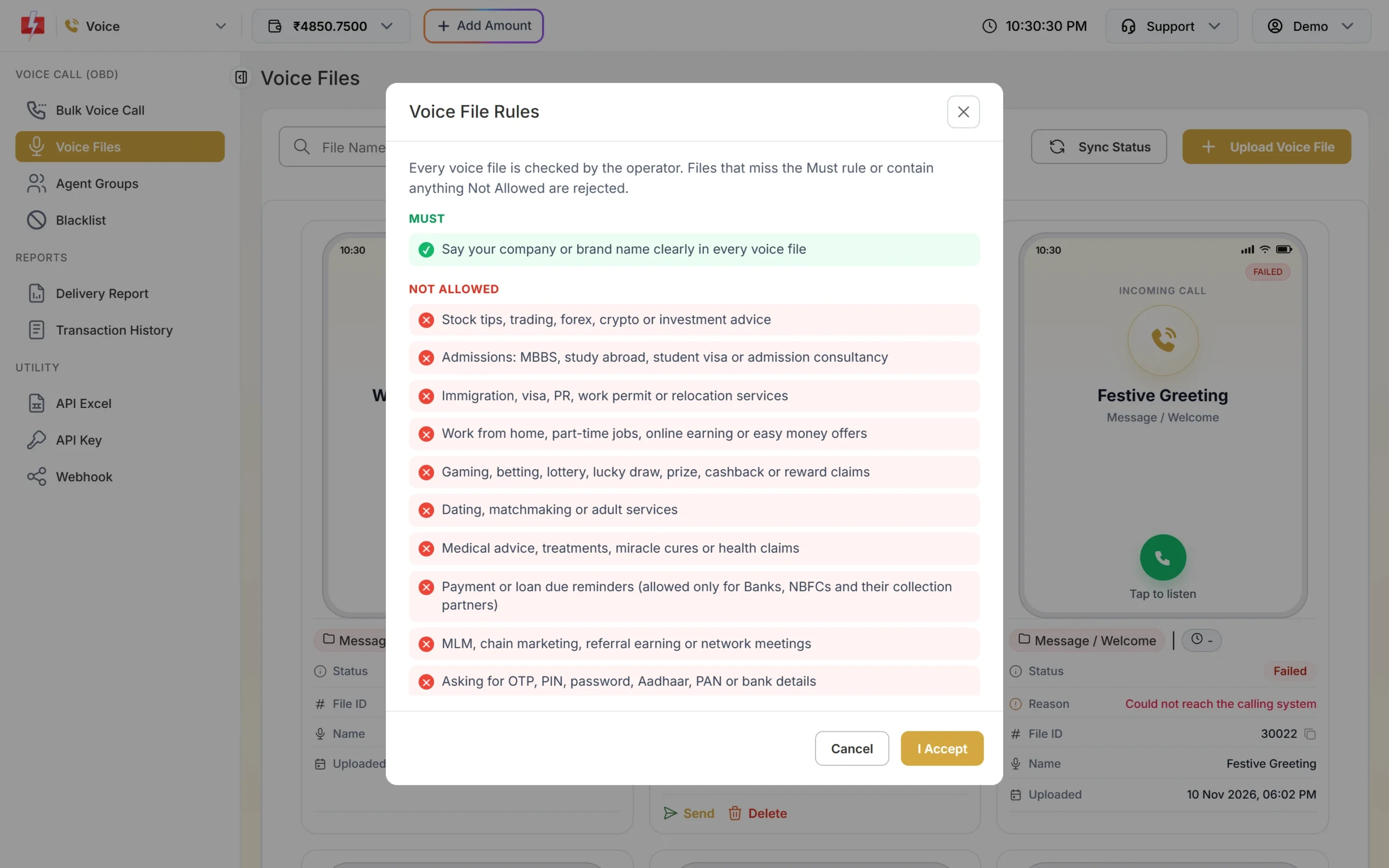
Some promotional topics are not allowed at all in voice calls, even if your business is genuine:
- Stock tips, trading, forex, crypto or investment advice
- Admissions consultancy, study abroad, immigration or visa services
- Work from home, part-time jobs or easy money offers
- Gaming, betting, lottery, lucky draw, prize, cashback or reward claims
- Dating, matchmaking, medical claims or miracle cures
- MLM or referral earning, and political, election, rally or protest campaigns
- Illegal, fake, tobacco or vaping products
A normal shop offer such as “flat 20% off on all kurtas this weekend at our MG Road store” is fine. A “you have won a prize, press 1 to claim” call is not, because prize and reward claims are on the list.
How to run a promotional voice call campaign
-
Upload your offer recording
Open Voice Files in the Voice menu, click Upload Voice File, read the rules and click I Accept. Give the file a clear Name (for example “Diwali offer 2026”), choose Used As = Message / Welcome, and attach your MP3 or WAV. ₹10 is charged per upload and refunded automatically if the operator rejects the file.
Sending in bulk? For high voice call volumes our team offers discounted rates. Talk to our team or see voice call pricing.
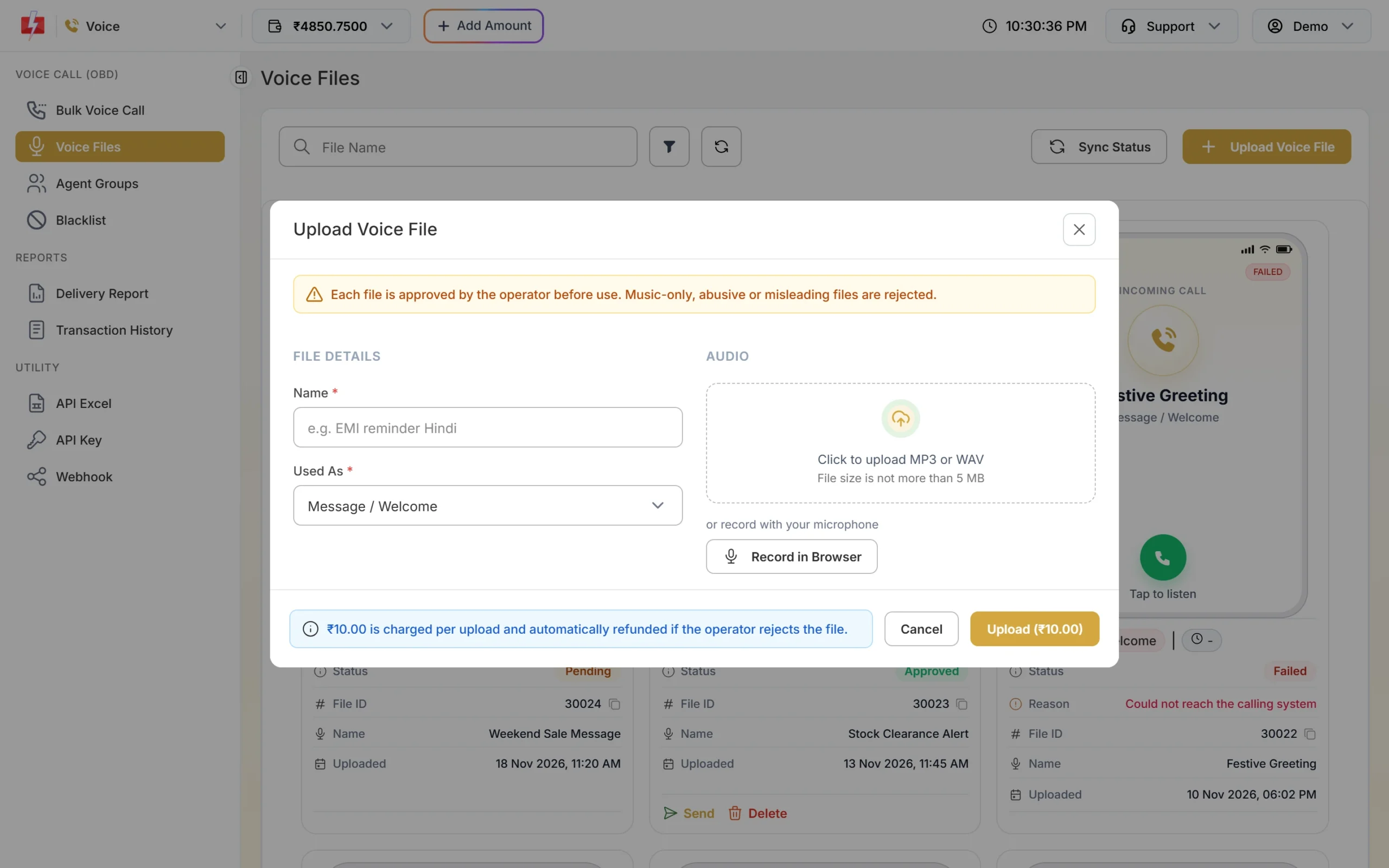
Upload once, use the approved file in many campaigns. -
Create the campaign
Go to Bulk Voice Call. Type a Campaign Name you will recognise in reports, such as “Diwali sale – Demo Traders”. Keep Campaign Type on Simple, which plays one recorded voice file to every number.
-
Add your customer numbers
Under Send To, use List to paste numbers (one per line), Address Book to pick saved groups, or CSV File to upload a list. Total Contacts updates as you add numbers. One campaign can have up to 1,00,000 numbers.
-
Pick the offer recording
Click Voice File and choose your approved file. The phone preview on the right shows the file name, the call type and its length, so you can check you picked the right one.
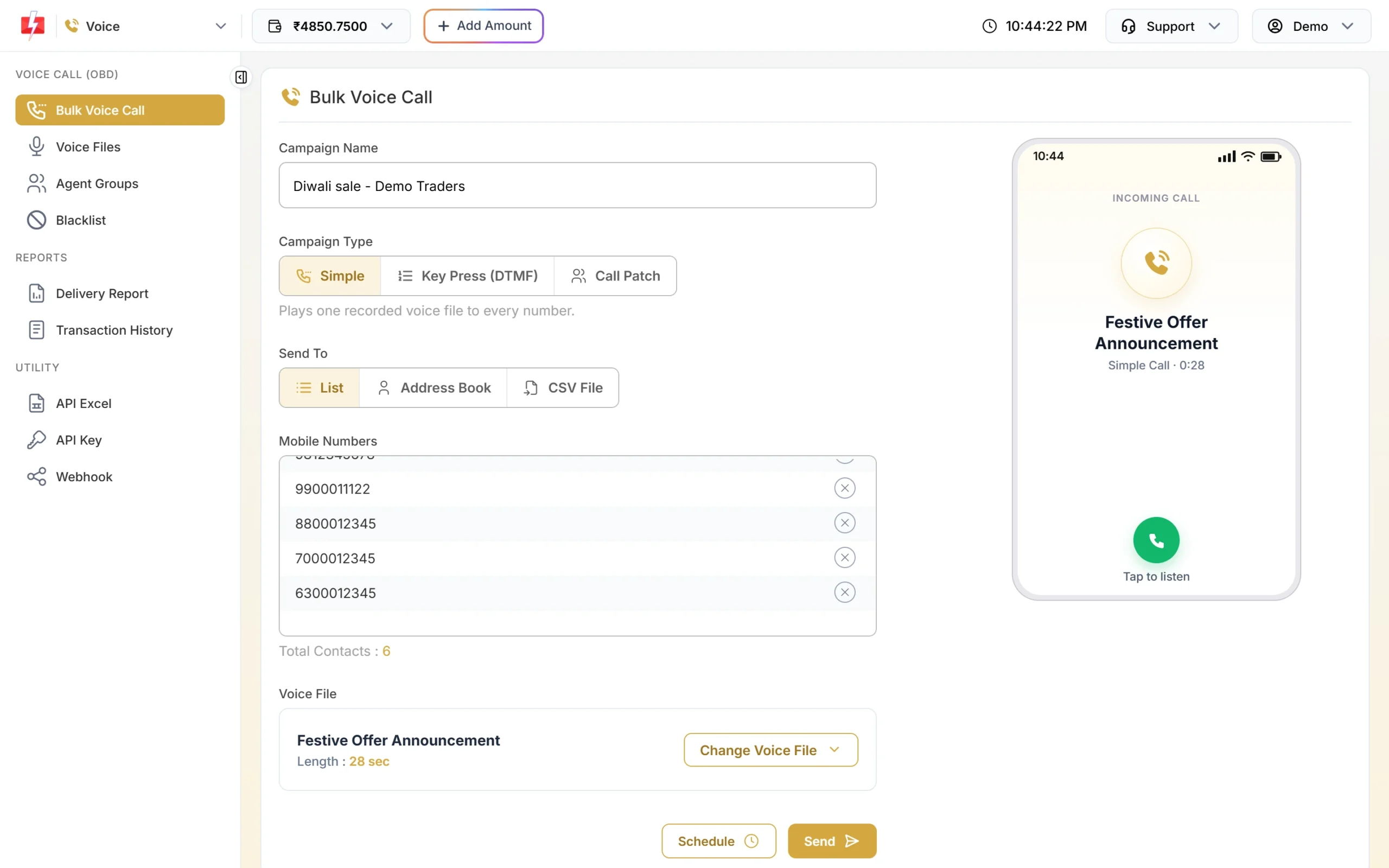
A filled promotional campaign, ready to review. -
Send now or schedule
Click Send to start now, or Schedule to pick a date and time inside 10 AM to 9 PM. The Campaign Preview & Confirmation popup then shows valid, duplicate, invalid and blacklisted numbers, the pulses per call and the cost. Nothing is sent until you click Confirm & Send or Confirm & Schedule.
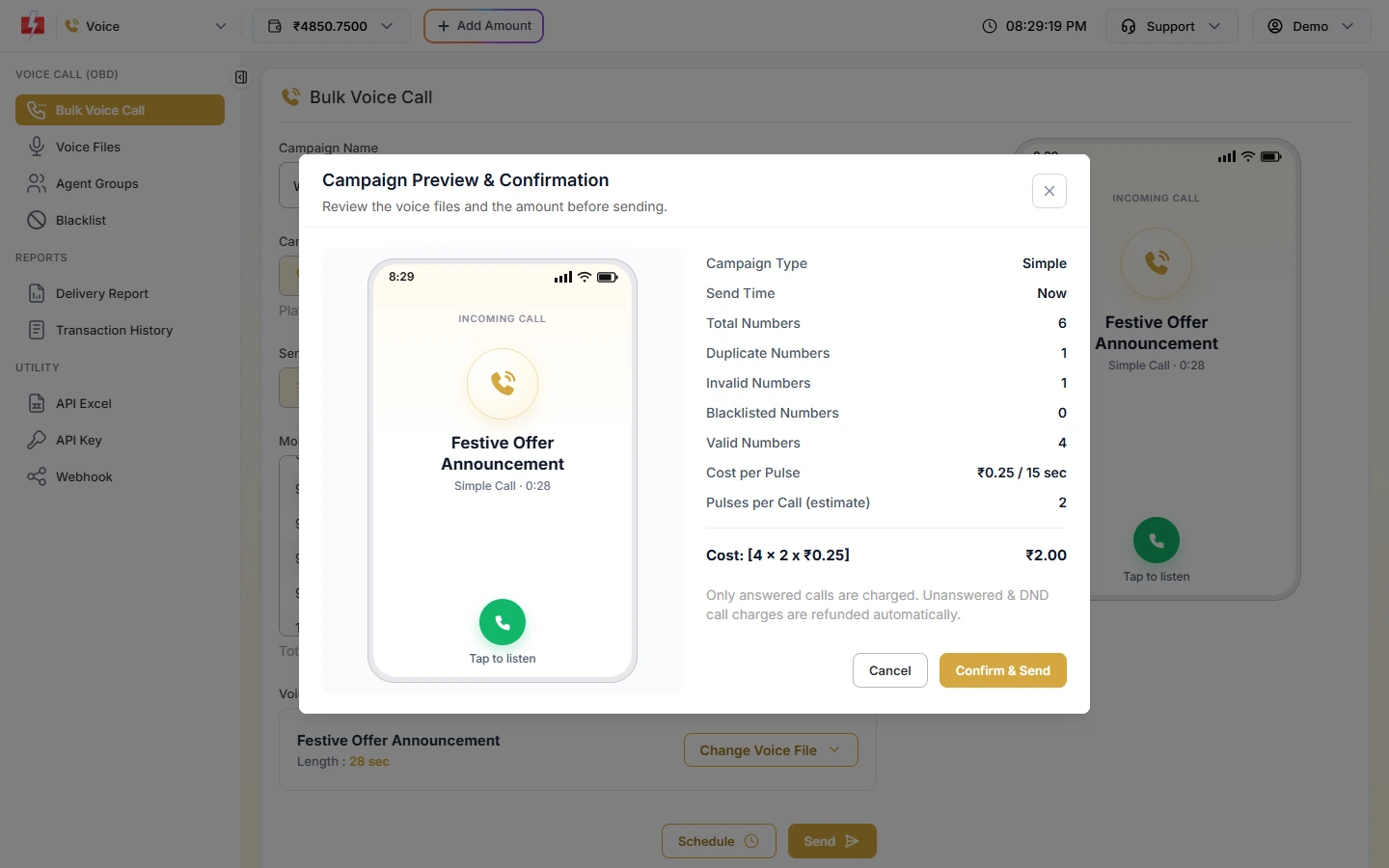
Check the count and cost before you confirm. -
Check who answered
Open Delivery Report > Voice Report and click the campaign. You see each number with Answered, No Answer, Busy, Failed or DND, the call duration and the charge. Use Download for an Excel file.
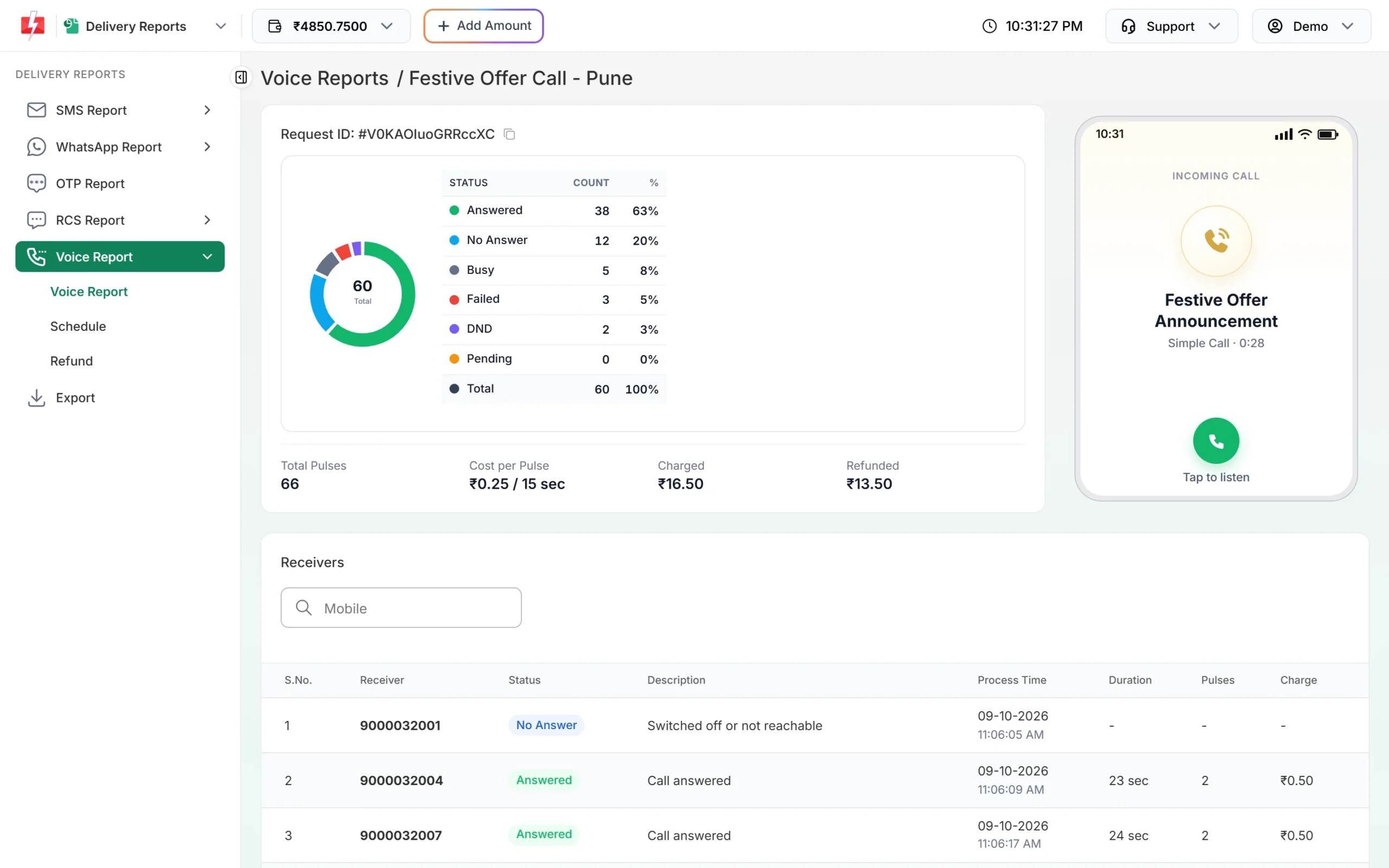
Results for every number in the campaign.
Timing, DND and the 9 PM limit
| Rule | What happens in Fast2SMS |
|---|---|
| Calling hours | Calls go out only between 10:00 AM and 9:00 PM IST. |
| Send after 8:50 PM or before 10 AM | The campaign is scheduled for 10:00 AM the same or next morning. You can cancel it from Voice Schedule. |
| Still calling at 9 PM | The campaign is paused with “Paused at the end of calling hours (9 PM).” |
| DND numbers | Not dialled by the operator. Shown as DND in the report, charged ₹0. |
| Your own blacklist | Numbers in your voice Blacklist are never called. |
For big lists, start in the morning so the whole list is called before 9 PM. In India, TRAI has set the 140 number series for promotional calls, and customers can block promotional calls through the DND registry. Rules can change, so check TRAI’s latest directions before a large campaign.
Tips for a promotional call that people listen to
- Say your brand name in the first 3 to 5 seconds. People hang up on calls they cannot place.
- One offer per call. “20% off this weekend at our MG Road store” works better than a list of five deals.
- Keep it under 30 seconds. At ₹0.25 per 15-second pulse (at the time of writing), a 28-second message costs 2 pulses per answered call. A 35-second one costs 3.
- Give one clear next step, such as the store address or “reply on WhatsApp to this number”. If you want people to talk to you on the call itself, use a Call Patch campaign instead.
- Call people who know you. Use your own customer list, not bought data. It lowers complaints and gives better answer rates.
Common problems and fixes
| Problem | Fix |
|---|---|
| Offer recording rejected | Open Voice Files, read the Reason on the card, fix the recording and upload again. After a rejection you can upload the next file after 1 hour. |
| “Voice calls can only be sent between 10:00 AM and 9:00 PM (TRAI).” | Pick a schedule time inside calling hours. |
| Many numbers show DND | DND numbers are not called and cost nothing. Use SMS or WhatsApp for those customers if they have opted in. |
| “Insufficient wallet balance. This campaign needs Rs X.” | Recharge with Add Amount and send again. |
Frequently asked questions
Can I send promotional voice calls to DND numbers?
No. The operator does not dial DND numbers. They appear as DND in your report and are not charged.
Do I need a DLT template for a promotional voice call?
No. The Bulk Voice Call form does not ask for DLT details. Instead, each voice file is approved by the operator before you can use it.
What time can I send promotional voice calls?
Between 10:00 AM and 9:00 PM IST. A campaign sent after 8:50 PM is scheduled for 10:00 AM the next morning.
Can I offer a prize or cashback in a voice call?
No. Gaming, betting, lottery, lucky draw, prize, cashback and reward claims are on the Not Allowed list, so such files are rejected.
How much does a promotional voice call cost?
At the time of writing, ₹0.25 per 15-second pulse, only for answered calls. Missed, busy and DND calls cost nothing.
Can I run the same offer every day for a week?
Yes. Choose a date range in Schedule and Fast2SMS creates one campaign per day, up to 31 days.