
Push SMS is a message your business sends on its own, such as an OTP, an order update or an offer. Pull SMS is a message sent only because the customer asked for it first, usually by texting a keyword like BAL or INFO to a number and getting an automatic reply.
Fast2SMS SMS (DLT SMS, Quick SMS and the SMS API) is push SMS. If you want customers to write to you and get an automatic answer, use WhatsApp or RCS, where Fast2SMS has a team inbox and keyword auto replies.
Push SMS vs pull SMS at a glance
| Push SMS | Pull SMS | |
|---|---|---|
| Who starts it | The business | The customer, by sending a keyword or request |
| Examples | OTP, payment received, delivery update, festival offer | “BAL” for account balance, “PNR” for train status, “INFO” for a brochure link |
| What you need | A sender ID (header), approved DLT templates and your number list | A number customers can text, and a system that reads the keyword and replies |
| Cost to the customer | Free to receive | The customer’s SMS to you may be charged by their operator |
| In Fast2SMS | DLT SMS, Quick SMS and the SMS API | Not on SMS. Use WhatsApp or RCS with keyword auto replies |
When to use each
- Use push SMS for anything you need to tell the customer at a set time: OTPs, bills, reminders, delivery updates and offers. In India these go out on DLT templates. Transactional (Service Implicit) templates reach DND numbers, promotional ones do not.
- Use a pull-style flow when customers want to ask for information whenever they like, such as store timings, a price list or order status. A chat channel is easier here because the customer can reply, send photos and talk to a person if needed.
How to set up keyword replies on RCS or WhatsApp
-
Open Inbox Settings
In the RCS app, go to Inbox Settings > Auto Reply and pick your bot. WhatsApp has the same keyword auto replies under its own Inbox Settings.
-
Create an auto reply
Click Create Auto Reply, add keywords such as “timing” or “price list”, choose how the keyword should match (Contains, Exact Match, Starts With or Ends With) and write the reply. Turn the rule on with the status switch.
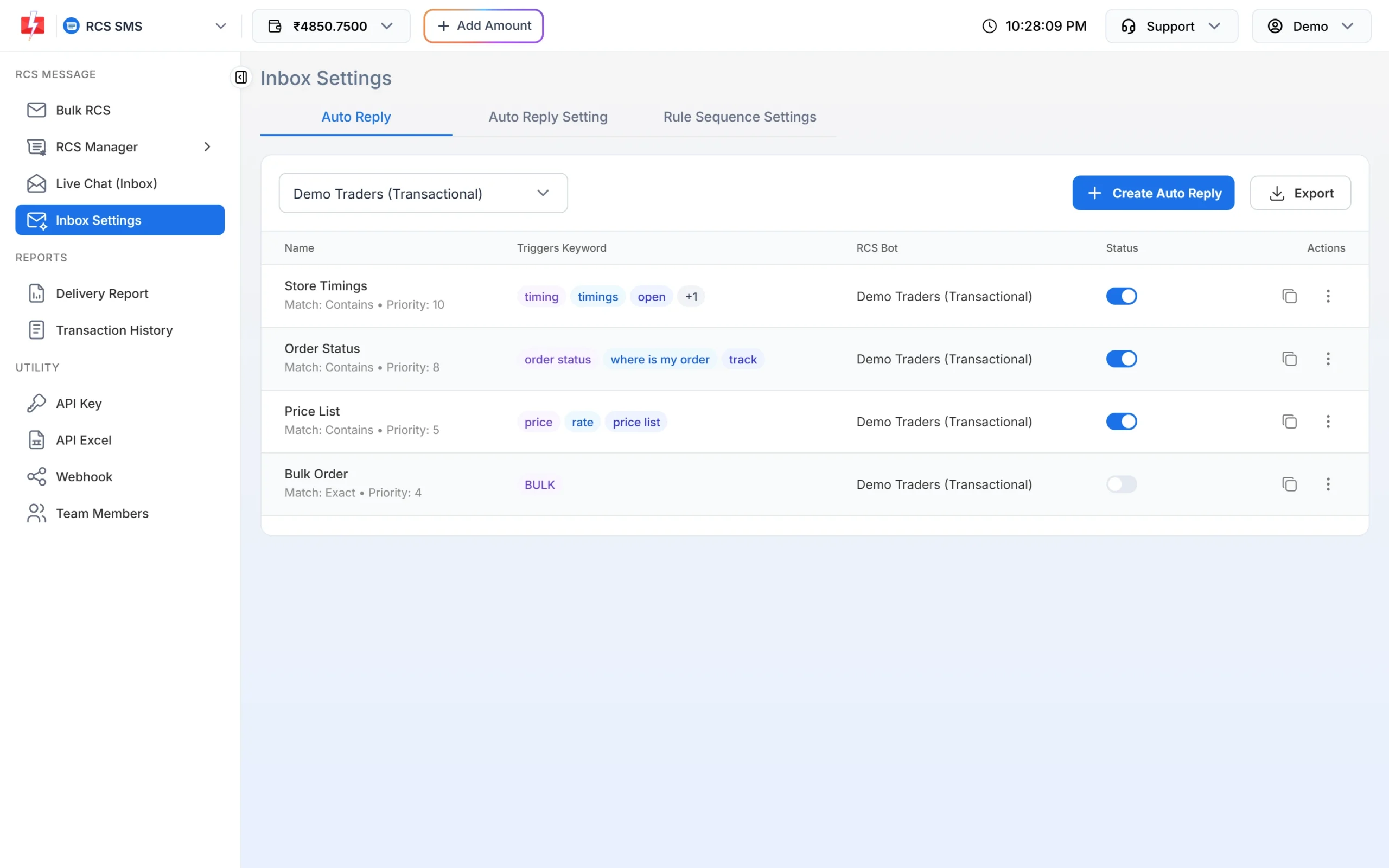
Keyword auto replies work like pull SMS on a chat channel. -
Tell customers the keyword
Mention the keyword in your push SMS, on your website or on your shop counter, for example “Reply PRICE on our WhatsApp to get today’s rates”.
Frequently asked questions
Is OTP a push SMS or a pull SMS?
An OTP is a push SMS. Your app sends it when the user taps “Send OTP”, on a transactional DLT template.
Can customers reply to my bulk SMS?
SMS sent with a DLT header cannot be replied to like a normal mobile number. Add a WhatsApp link or a phone number in the template if you want replies.
Does Fast2SMS give a number for incoming SMS?
The Fast2SMS SMS app has no inbox for incoming SMS. For two-way conversations, use the WhatsApp or RCS live chat, where replies come into a shared team inbox.
Which is cheaper, push or pull?
You pay per SMS you send in both cases. See the current rates on the bulk SMS pricing page.