
Yes, OTP and transactional SMS reach DND numbers in India. DND (Do Not Disturb) only stops promotional messages. If a customer has turned on DND, your OTPs, order updates and payment alerts sent on a Service Implicit (transactional) DLT template are still delivered. Your offers and sale messages on a promotional template are not.
This guide explains how DND works for SMS, why promotional SMS fail on DND numbers, how to see DND numbers in your Fast2SMS report, and how a person can check or change their own DND status.
What is DND and NCPR?
DND is the common name for the National Customer Preference Register (NCPR) run under TRAI rules. Any mobile user in India can register on it to stop commercial promotional calls and SMS. They can block all promotional messages, or only some categories such as banking offers, real estate or education.
The register is checked by the operator during DLT scrubbing, at the moment your SMS is sent. You do not upload or download a DND list. The operator decides for each number.
Which SMS reach DND numbers?
| Type of SMS | Reaches DND numbers? | Examples |
|---|---|---|
| Transactional / Service Implicit DLT template | Yes | OTP, order confirmation, delivery update, payment received, appointment reminder |
| Promotional DLT template (Service Explicit or Promotional) | No, unless the customer allows it | Sale, discount, new stock, festival offer |
| Quick SMS in Fast2SMS (no DLT template) | Yes. The panel shows “For DND + Non DND numbers” | Messages without a DLT template, sent from a random sender ID. Personal or spam content is not allowed and messages may be reviewed before delivery. |
| Bulk voice calls in Fast2SMS | No. Only non-DND numbers are called | Voice reminders and announcements |
A transactional template must carry only genuine transactional or service content. If you put an offer inside an “order update” template, the operator can block the template or header. That hurts all your messages, not only the offer.
Why don’t promotional SMS reach DND numbers?
When a customer registers on DND, they tell their operator they do not want commercial offers. During scrubbing, the operator checks each promotional SMS against that preference. If the customer blocked all promotions, or blocked the category your offer falls in, the SMS is rejected. Some operators call this “preference not matched”.
There is no paid route or setting that gets a promotional DLT SMS past DND. Providers who promise “bulk SMS to DND numbers” for offers are either using transactional templates for promotions, which breaks the rules, or are not sending through DLT at all.
How to see DND numbers in your Fast2SMS report
-
Filter the SMS report by DND
Open Delivery Report > SMS Report. Click the filter button, open Delivery Status, tick DND and click Apply Filters. You now see only campaigns that had DND numbers.
-
Hover the info icon for counts
Next to each status there is a small info icon. Hover over it to see the count of each result for that campaign, for example Total, Failed and DND. In the summary cards at the top, DND numbers are counted inside Failed.
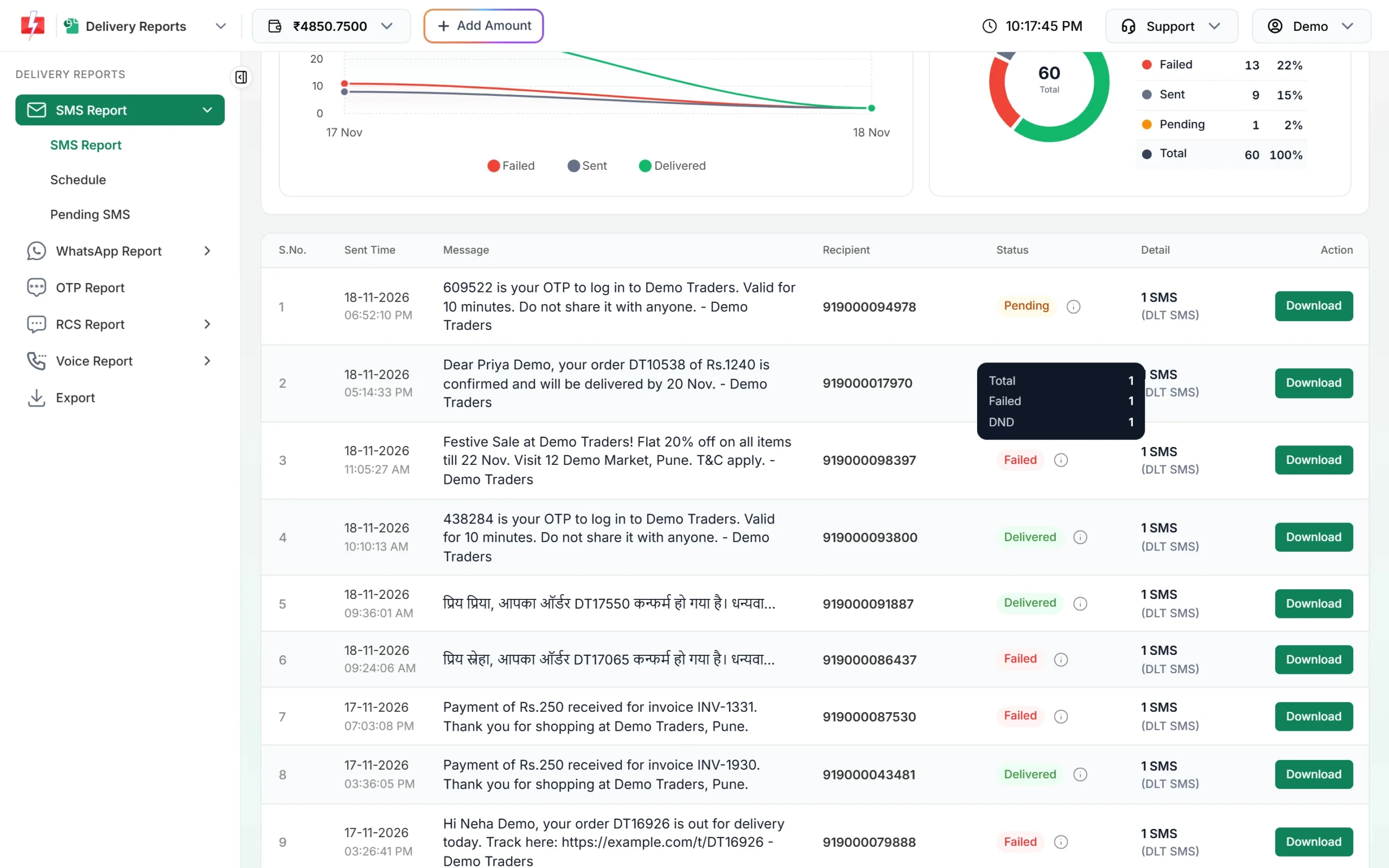
The info icon shows how many numbers in a campaign were DND. -
Open the campaign for each number
Click the message text to open Delivery Details. In Receivers, a DND number shows Status DND and Description DND activated.
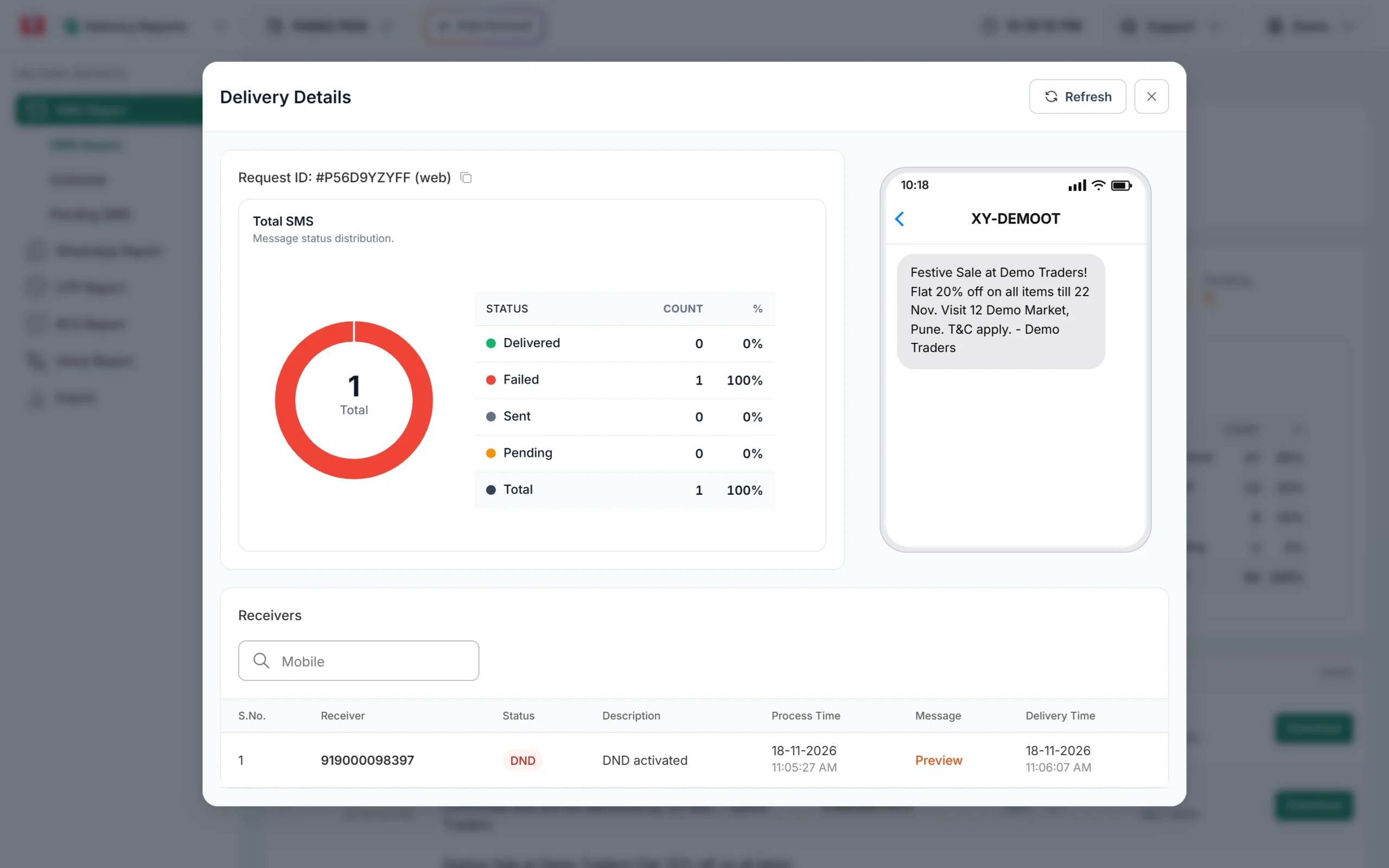
A promotional SMS that was not delivered because the number is on DND.
How to check if a number is on DND
A business cannot look up another person’s DND status in a public register. The easy ways to know are:
- Your Fast2SMS report. After a promotional campaign, numbers on DND show as DND. Keep a note of them and avoid sending them offers again.
- The customer checks their own number. A mobile user can check or change their DND preference by calling or sending an SMS to 1909, through their operator’s app or website, or through the TRAI DND app.
How can a customer turn DND on or off?
The customer does it from their own phone. They can call or SMS 1909, or use their operator’s app or the TRAI DND app, and choose to block everything or only some categories. They can also remove DND the same way. A change can take some time to apply across operators. You cannot do this for a customer from Fast2SMS.
For more on registering, see our post on how to register for DND.
Common problems and fixes
Many numbers in my offer campaign show DND. That is normal for promotional SMS. Reduce wasted cost by removing numbers that showed DND in past campaigns.
My OTP shows DND. Check the template category in DLT Manager > Content Template. An OTP template must be Service Implicit (badge Service). If it was registered as promotional, register a new transactional template on your DLT portal and add it to Fast2SMS. Also check your sender ID: a 6-digit numeric header is promotional only.
A customer on DND says they want my offers. Ask them to change their preference with their operator, or take their consent in the way DLT records it.
Frequently asked questions
Can transactional SMS be sent to DND numbers?
Yes. SMS sent on a Service Implicit (transactional) DLT template, such as OTPs and order updates, are delivered to DND numbers.
Can OTP SMS reach DND numbers?
Yes, as long as the OTP is sent on an approved transactional template with an alphabetic header. You can also use Fast2SMS Smart OTP, which sends OTPs on SMS and WhatsApp.
Why are my promotional SMS not delivered to some numbers?
Those numbers are most likely on DND for that category. The Fast2SMS report shows them as DND with “DND activated”.
Am I charged for DND numbers?
DLT SMS are charged when the campaign is sent, for each valid number. DND numbers are not refunded automatically. For bulk voice calls, DND numbers are not called and not charged.
Is there a way to send bulk promotional SMS to DND numbers?
Not through DLT promotional templates. The operator blocks them. Only customers who have given you consent, or who remove DND, can receive your offers.
How long does DND take to activate?
It depends on the operator. It is not instant across all networks, so a new DND registration may take some time before your messages are affected.
What does “DND activated” mean in my report?
It means the number is registered on DND and the operator did not deliver your promotional message.