
In Fast2SMS, a promotional RCS bot can send offers only between 7:00 AM and 10:00 PM and to each number at most 4 times a month. A transactional RCS bot is only for informative messages, such as order or payment updates, and has no monthly limit. Neither needs a DLT template, and both can reach DND and non-DND numbers.
This page explains the RCS rules that decide whether your message goes out: bot category, sending hours, the monthly limit, opt-in and what content is not allowed.
Promotional vs transactional RCS at a glance
| Rule | Promotional bot | Transactional bot |
|---|---|---|
| What you can send | Offers, sales, new arrivals, event invites | Only informative messages: orders, delivery, payments, bookings, service updates |
| Sending hours | 7:00 AM to 10:00 PM | Any time |
| Limit per customer | Max 4 promotional RCS per number per month | No monthly limit |
| DLT template | Not needed (open template) | Not needed (open template) |
| DND numbers | Can be reached | Can be reached |
| Personal or spam messages | Not allowed | Not allowed |
An approved brand can also have an OTP bot for one-time passwords. You can see the category of each bot in RCS Manager > Bots.
How to check which rules apply to your bot
-
Look at the bot category
Go to RCS Manager > Bots. Each bot shows its Bot ID and its category, for example promotional or transactional, with the status Active or Inactive.
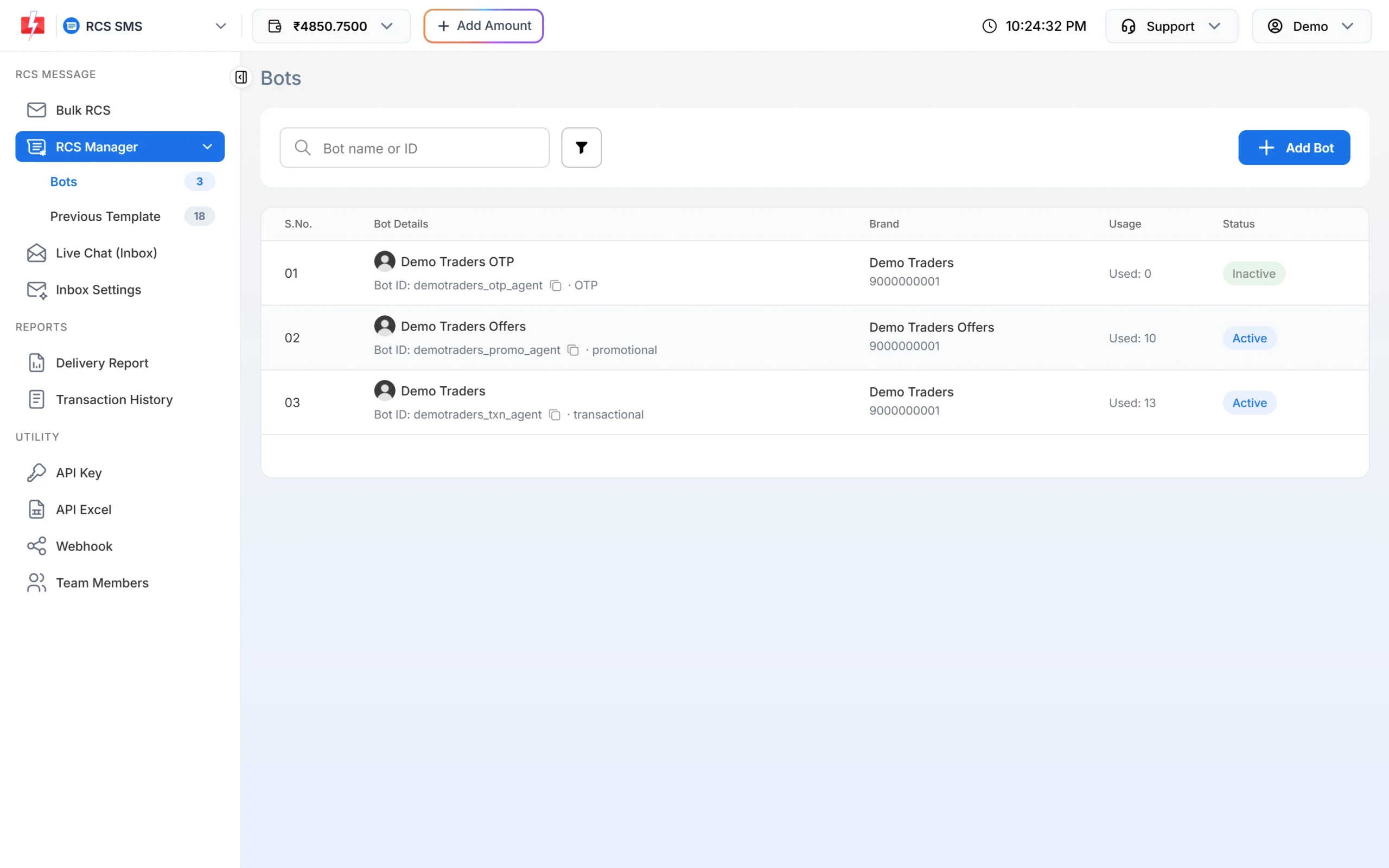
The category is shown next to each Bot ID. -
Pick the right bot when sending
On Bulk RCS, the RCS BOT dropdown shows the category in brackets, such as (Promotional) or (Transactional). Choose by message, not by convenience. A sale message from a transactional bot breaks the rules for that bot.
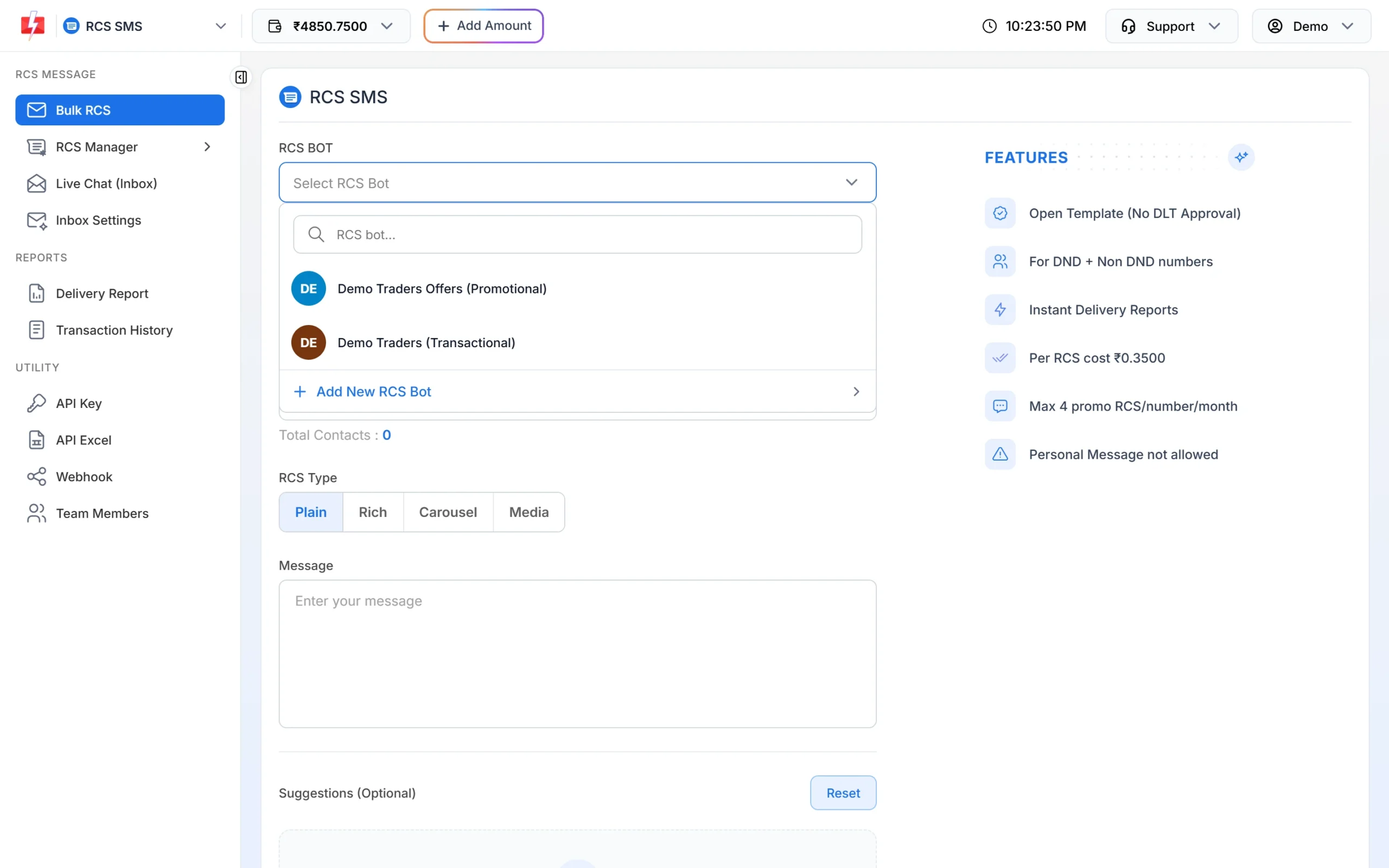
Choose the bot that matches the message. -
Read the FEATURES box
After you choose a bot, the FEATURES box on the right lists the rules for it. For a promotional bot it shows “Open Template (No DLT Approval)”, “For DND + Non DND numbers”, “Max 4 promo RCS/number/month” and “Personal Message not allowed”.
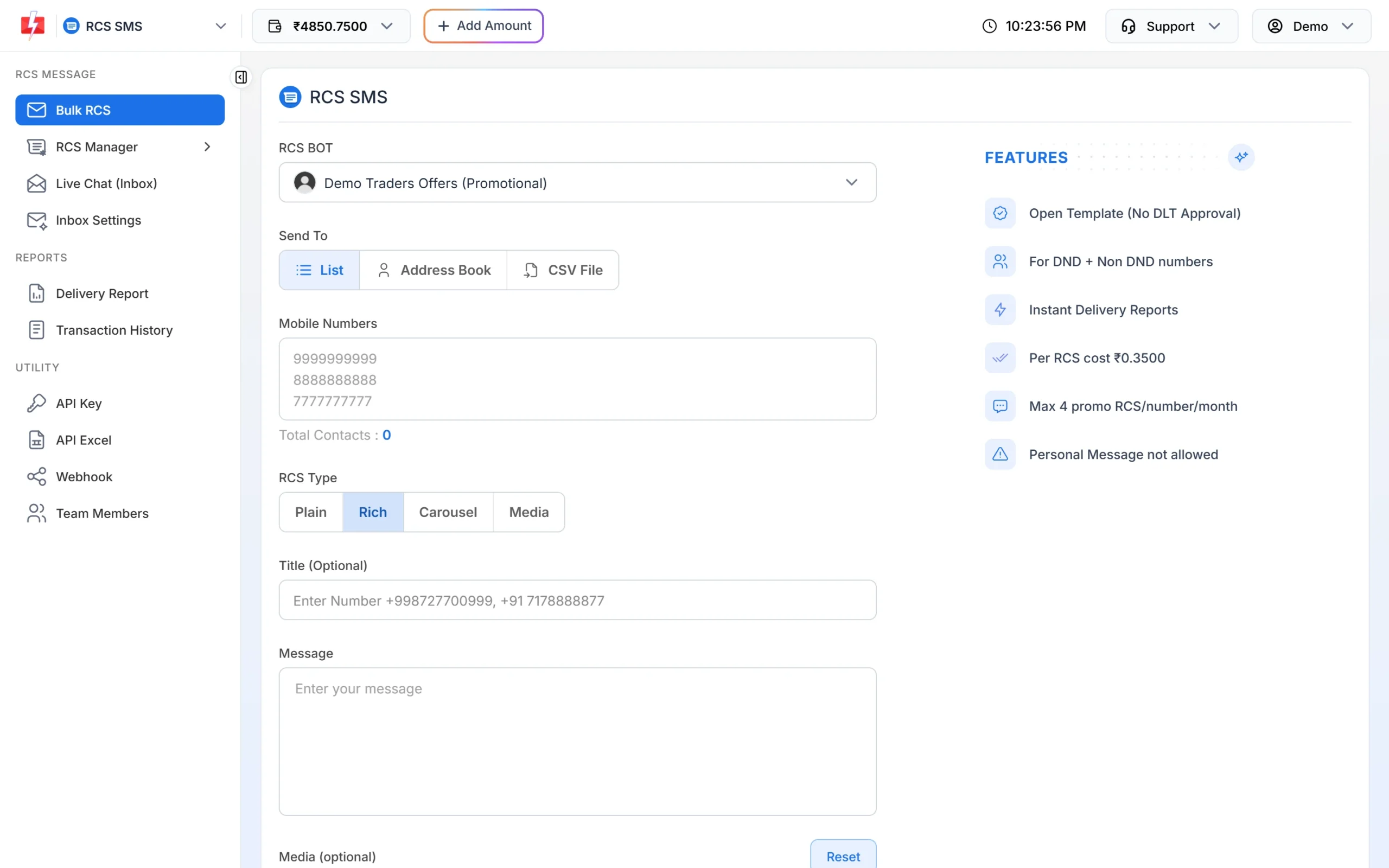
The rules for the selected bot.
RCS sending hours for promotional messages
Promotional bots can send only from 7:00 AM to 10:00 PM. If you click Send outside these hours, you see “Promotional messages are allowed from 7:00 AM to 10:00 PM”. If you schedule a promotional campaign between 10 PM and 7 AM, it is moved to 7:01 AM. Transactional messages, such as a late-night order confirmation, can go any time.
The 4 promotional RCS per month limit
Each mobile number can receive at most 4 promotional RCS messages a month. A fifth promotional message to the same number fails with “Monthly Limit Reached (4 Promo RCS Allowed)” in the delivery report. Failed messages are refunded to your wallet automatically within 48 hours, but the message does not reach the customer.
Tip: Plan your offers for the month. If you run weekly sales, send RCS for the biggest ones and use SMS or WhatsApp for the rest.
Is DLT registration needed for RCS?
No DLT template is needed to send RCS from Fast2SMS. RCS messages are open templates: you write the text, media and buttons in the panel each time. Instead of DLT, your brand goes through RCS registration, where the operator checks your website, domain email, GST certificate and opt-in form.
Opt-in and content rules
- Opt-in is required. Your website must have a form where customers tick a box agreeing to receive messages from your brand. The operator rejects RCS applications without this proof.
- No personal messages. RCS from Fast2SMS is for business messages to customers, not one-to-one personal chat.
- No spam on transactional bots. Transactional bots are only for informative messages. Keep offers on the promotional bot.
- Use your real brand. Customers see your verified brand name and logo, so the message must match the business that was approved.
Common problems and fixes
| What you see | Why | What to do |
|---|---|---|
| Promotional messages are allowed from 7:00 AM to 10:00 PM | You sent from a promotional bot at night. | Schedule it for the morning. |
| Failed: Monthly Limit Reached (4 Promo RCS Allowed) | The number already got 4 promotional RCS this month. | Wait until next month or reach the customer on another channel. |
| Bot not in the dropdown | The bot is pending, rejected or Inactive. | Check RCS Manager > Bots or contact support. |
| Campaign moved to 7:01 AM | A promotional schedule was set for the night. | Nothing to do. Cancel it from the Schedule tab if you want a different time. |
Frequently asked questions
What time can I send promotional RCS in India?
From Fast2SMS, promotional RCS can be sent between 7:00 AM and 10:00 PM. Transactional RCS has no time window.
How many promotional RCS can one customer receive?
Up to 4 promotional RCS per number per month. Messages above this limit fail and are refunded.
Can I send offers from a transactional RCS bot?
No. Transactional bots are only for informative messages. Use a promotional bot for offers.
Can RCS messages reach DND numbers?
Yes. RCS from Fast2SMS works for DND and non-DND numbers. The 4 per month limit still applies to promotional messages.
Do I need a DLT template for RCS?
No. RCS uses open templates, so no DLT template approval is needed. Your brand must be approved for RCS instead.
Can I change my bot from transactional to promotional?
Each bot has one category. To send both offers and updates, you need one bot of each kind. Use Add Bot in RCS Manager to request another bot, or ask support.