
Omnichannel messaging means using SMS, WhatsApp, RCS and voice calls together in a planned way: each message goes on the channel that suits it best, and a second channel catches the customers the first one missed. It does not mean sending the same offer five times on five channels. This guide gives small businesses a simple omnichannel messaging strategy, a channel-by-message plan, ready playbooks for common businesses, and the Fast2SMS features that help you run it from one panel and one wallet.
Why one channel is not enough
Every channel has a gap:
- SMS reaches every mobile, even basic phones, but it is text only. Promotional SMS do not reach DND numbers and go out only in the daytime.
- WhatsApp carries images, PDFs and buttons and lets customers reply, but only customers who use WhatsApp and gave you their opt-in. Limits start at the tier Meta gives your business: often 250 unique customers per 24 hours for a new, unverified business and 2,000 (2K) once the business is verified (at the time of writing), and the limit grows with good quality.
- RCS shows rich cards and carousels with your verified brand name in the phone’s normal messages app, but only on phones and networks that support RCS. Other numbers come back as “Non-RCS“.
- Voice calls reach people who do not read messages, such as many older or rural customers, but cost more per contact and run only between 10 AM and 9 PM.
A small business that uses two or three channels together reaches more of its own customers, with the right format, at a cost it controls.
The four channels side by side
| SMS | RCS | Voice call | ||
|---|---|---|---|---|
| Reaches | Every mobile | WhatsApp users who opted in | RCS-ready phones | Any phone that answers |
| Format | Text and a link | Text, image, video, PDF, buttons | Rich cards, carousels, images, buttons | Recorded audio, key press |
| Customer can reply | Limited | Yes, in Live Chat | Yes, in Live Chat | By pressing a key or talking to an agent (Call Patch) |
| Setup needed | DLT entity, header, templates | Number connected via Meta, approved templates | Brand registration and an approved bot | Operator-approved voice file |
| Time rules | Promotional only in daytime; service any time | Templates any time; free text within 24 hours of the customer’s last message | Promotional 7 AM to 10 PM; max 4 promotional RCS per number per month | 10 AM to 9 PM; DND numbers are not called |
| Charged for | Each SMS part per valid number | Each message by template category | Each message at send; failed and Non-RCS refunded | Answered calls only, per 15-second pulse |
How to build your omnichannel strategy, step by step
-
Keep one customer list
Everything starts with clean numbers. Put your customers in the Fast2SMS Address Book, split into groups such as “VIP Buyers”, “Wholesale Dealers” or “Customers Pune”. The same groups can be picked when you send SMS, WhatsApp, RCS or voice campaigns. Note who opted in to WhatsApp and who asked to stop receiving offers, and respect that on every channel.
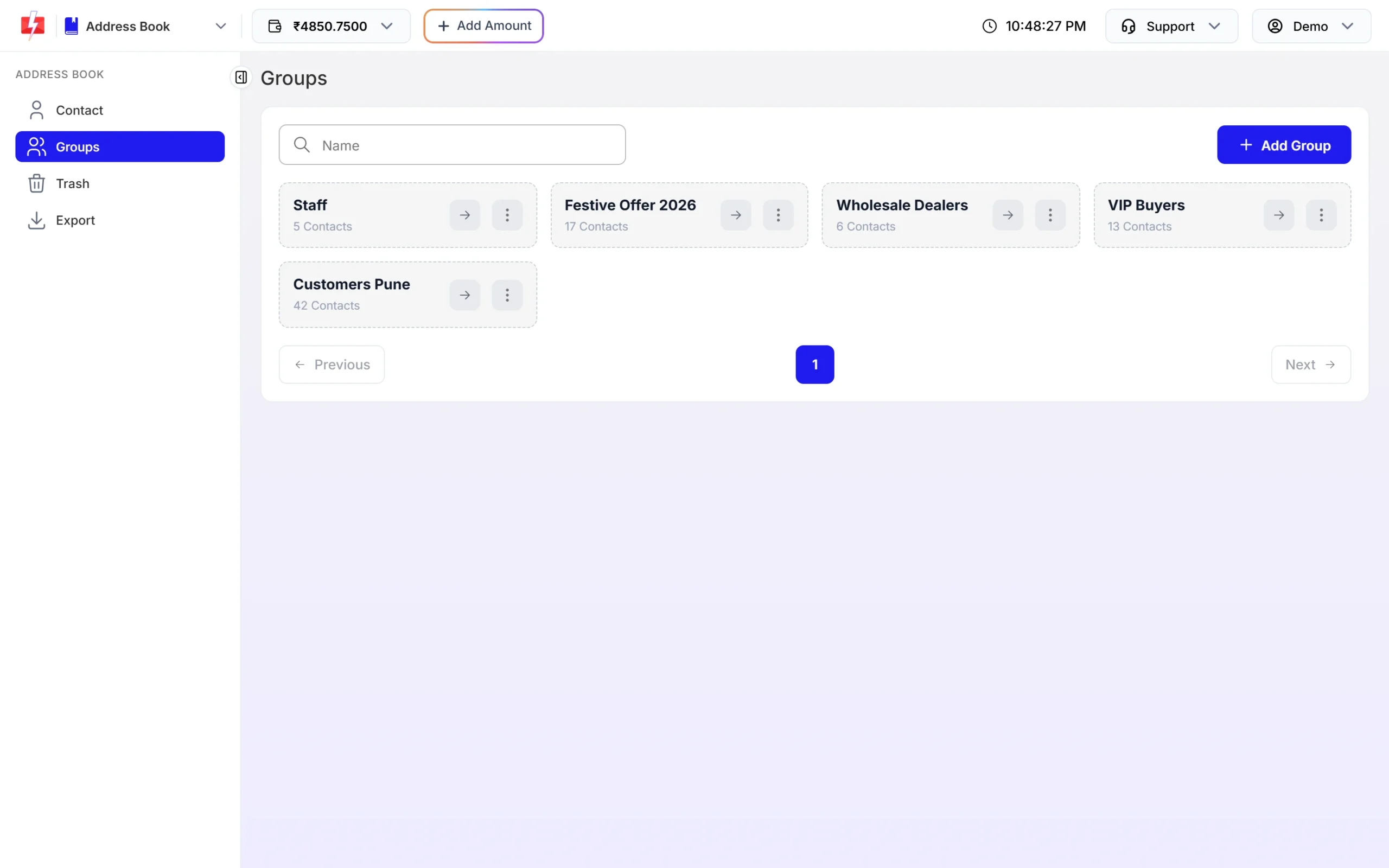
One set of groups for every channel. -
Give each message a main channel and a backup
Decide once, write it down, and follow it. Use the table in the next section as a start.
-
Turn on automatic fallback for OTPs
OTPs are the one place where a missed message costs you a customer straight away. With Smart OTP, add an SMS template and tick SET FALLBACK TEMPLATE to add a WhatsApp template (or the other way round). If the first message fails, the same OTP goes on the other channel within about two minutes. The fallback message is charged like a normal OTP.
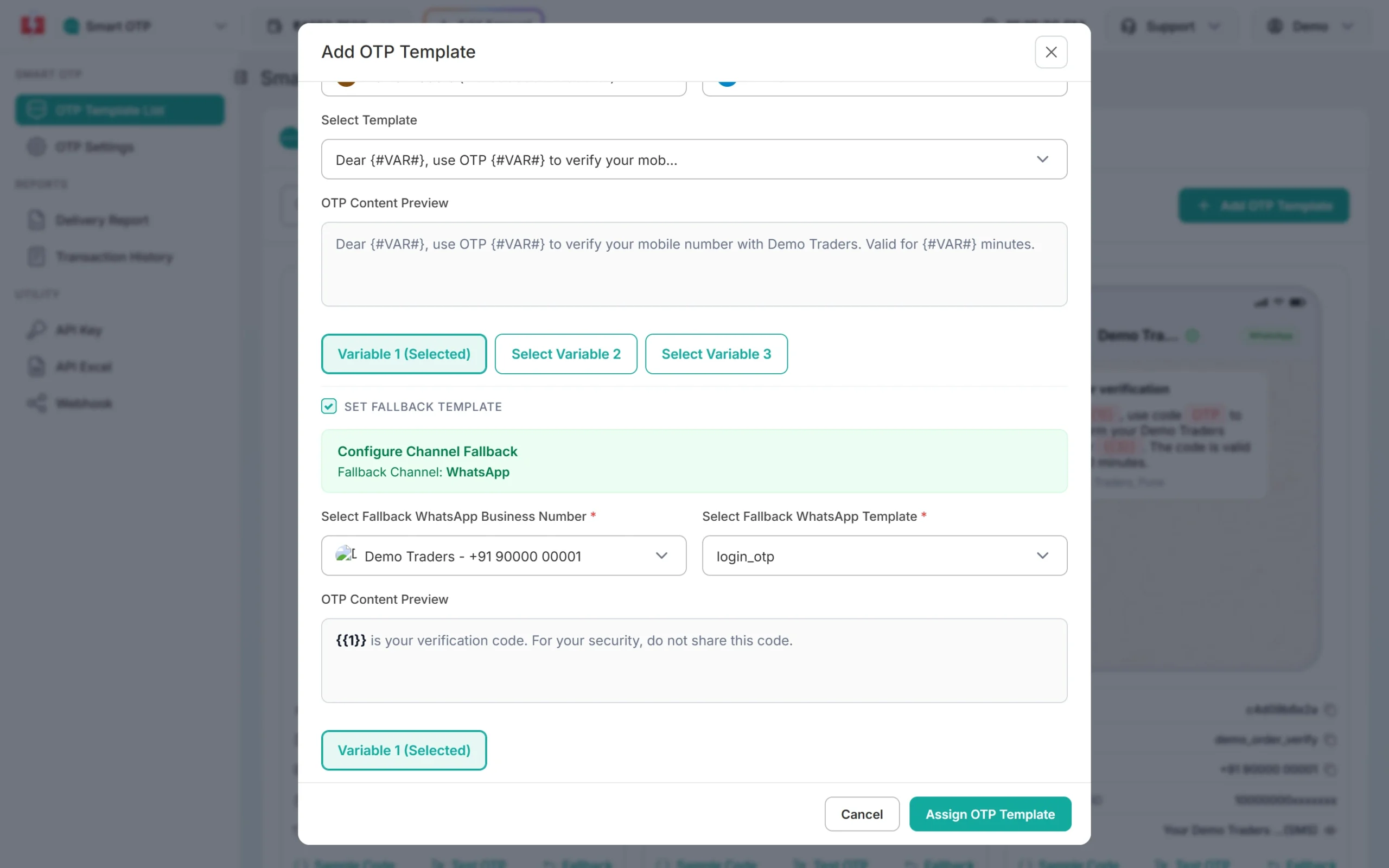
An SMS OTP with a WhatsApp fallback. In the OTP report, the fallback shows as a second row under the same request, with its own channel badge.
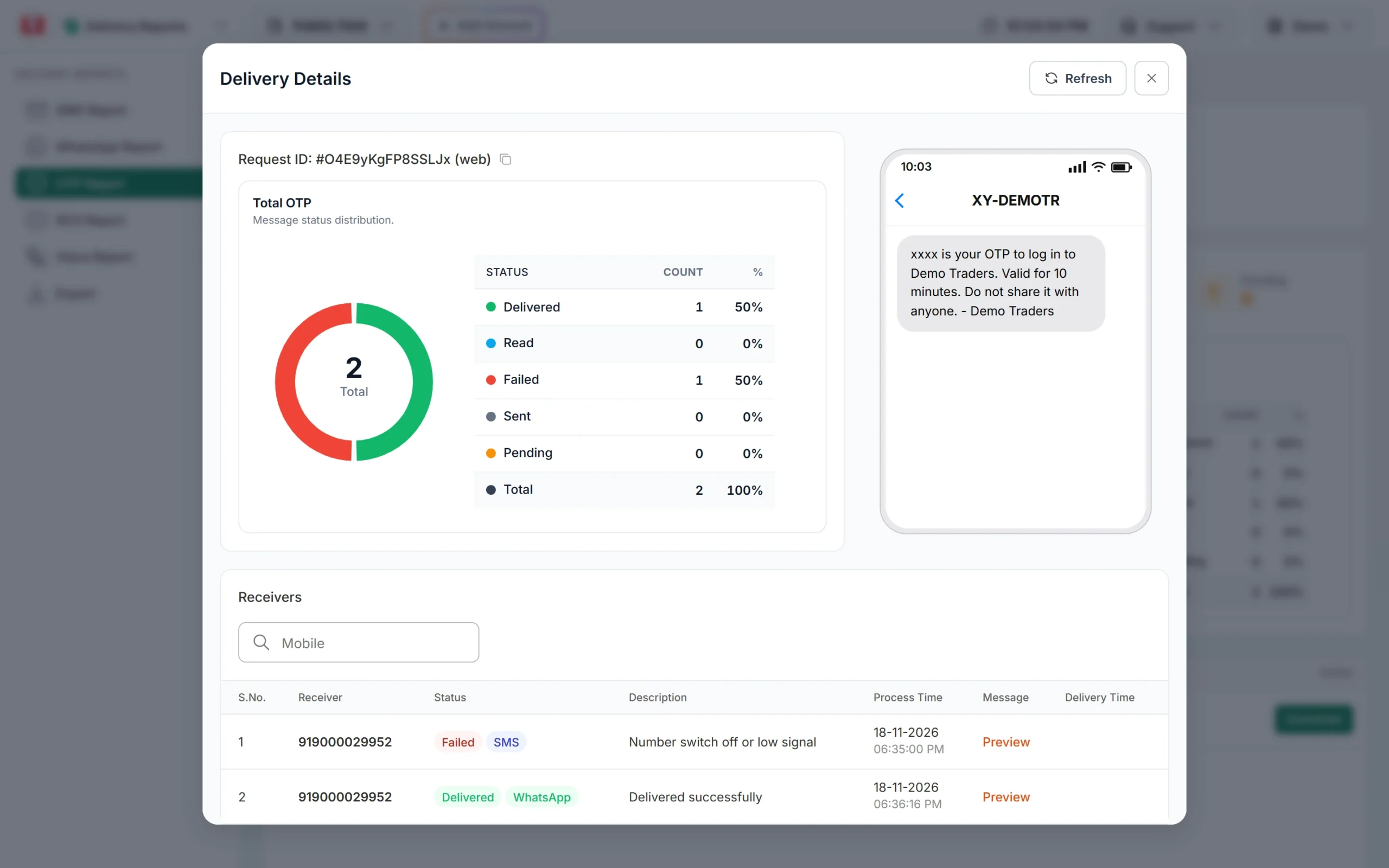
The SMS failed, and the WhatsApp fallback was delivered. -
Send RCS first, then SMS to Non-RCS numbers
RCS does not fall back to SMS automatically today. Campaigns, our multi-channel flow launching soon, will add this. After an RCS campaign, open the campaign in Delivery Reports > RCS Report. Numbers marked Non-RCS (“Number is unreachable / not RCS enabled”) are refunded automatically. Click Download on the campaign row, pick out the numbers marked Non-RCS, and send them the same offer as a DLT SMS.
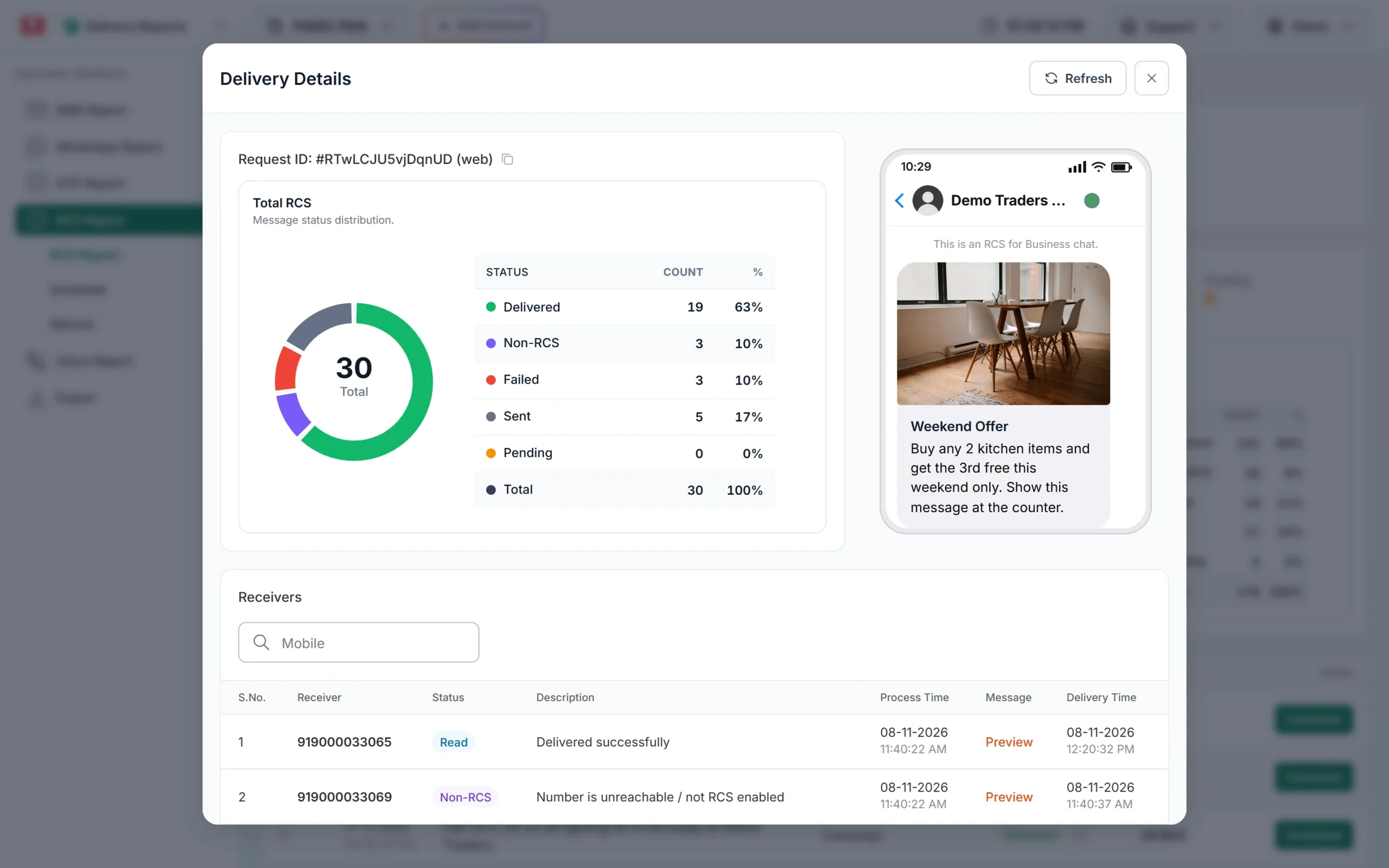
Non-RCS numbers are the ones to reach by SMS. -
Add voice for customers who do not read messages
For payment reminders, important notices or surveys, a recorded call in Hindi or your local language works where text does not. A Key Press campaign can ask “Press 1 to confirm” and shows the key each person pressed in the report. A Call Patch campaign connects interested callers straight to your staff. You pay only for answered calls.
-
Answer replies in one shared inbox
Two-way channels bring replies. WhatsApp and RCS each have a Live Chat (Inbox) where your team can answer, add labels and notes, and assign chats. Add up to 5 staff as Team Members. Set a welcome message, out-of-office hours and keyword auto replies so no customer waits without an answer.
-
Measure each channel and move your budget
Compare delivery, read or answer rates and sales per channel in Delivery Reports, and the cost in Transaction History. Shift money towards the channel that brings orders for your customers, not the one that looks newest.
Which channel for which message
| Message | Main channel | Backup |
|---|---|---|
| Login or sign-up OTP | Smart OTP on WhatsApp or SMS | Automatic fallback to the other channel |
| Order confirmation, invoice | WhatsApp utility template (with PDF) | SMS for customers not on WhatsApp |
| Shipping and delivery updates | SMS (reaches everyone, any time) | WhatsApp with a “Track order” button |
| Appointment reminder | SMS a day before | Voice call on the morning of the visit for no-shows |
| Payment or fee due | SMS or WhatsApp utility | Voice call in the local language |
| Festival sale or new stock | RCS rich card or WhatsApp marketing with an image | Promotional SMS to Non-RCS or non-WhatsApp numbers in the daytime |
| Feedback or survey | WhatsApp with reply buttons | Voice Key Press call |
| Customer questions | WhatsApp or RCS Live Chat with auto replies | A call from your team (Call Patch) |
Ready playbooks for small businesses
Local shop: festival sale
- Three days before: WhatsApp marketing template with the sale poster to opted-in customers.
- Same day: promotional SMS (daytime only) to the rest of your list, with your shop address.
- Sale day: a short voice call to regular older customers who rarely read messages.
- After the sale: a thank-you service SMS to buyers, with no offer in it.
Clinic or diagnostic lab
- At booking: SMS confirmation with date and time.
- A day before: WhatsApp reminder with a location button, SMS for the rest.
- Report ready: SMS or WhatsApp with a download link from your own whitelisted domain.
- Patients who did not come: a Call Patch call that connects them to your front desk.
Coaching institute or school
- Attendance and fee alerts: SMS to parents, because it reaches every phone.
- Timetables and study material: WhatsApp with PDFs.
- Admission season: RCS carousel of courses, then SMS to Non-RCS numbers.
- Parent meeting: voice call in Hindi or the local language with “Press 1 to confirm”.
Online store
- Sign-up and COD verification: Smart OTP with fallback.
- Order and shipping updates: WhatsApp utility templates, SMS as backup.
- Abandoned carts and new arrivals: WhatsApp marketing or RCS, only to customers who opted in.
- Delivery problems: Live Chat on WhatsApp with keyword auto replies for “order status”.
Rules so omnichannel does not become spam
- Do not send the same offer on every channel to the same person. Pick one main channel per customer and use the backup only for those it missed.
- Respect opt-outs everywhere. If a customer asks to stop on WhatsApp, stop offers on SMS, RCS and voice too.
- Keep promotions in the right hours. Promotional SMS in the daytime window, promotional RCS 7 AM to 10 PM, voice 10 AM to 9 PM.
- Use the right template type. Service messages stay free of offers on every channel. WhatsApp checks template categories, and DLT checks SMS templates.
- Watch your WhatsApp quality rating. Too many blocks or reports lower it and can limit your number.
What omnichannel costs
In Fast2SMS, all channels use the same prepaid wallet. Click the wallet balance at the top of the panel to see your current rate for SMS, each WhatsApp category, RCS and voice. Because the price per message differs by channel, the backup plan above usually saves money: you send the richer, costlier message only to those who can receive it, and a plain SMS to the rest. Failed WhatsApp messages and failed or Non-RCS RCS messages are refunded automatically, and unanswered voice calls are refunded about 1 hour after the campaign finishes. See the SMS, WhatsApp and RCS pricing pages for current rates.
Sending in bulk? For high WhatsApp volumes our team offers discounted rates. Talk to our team or see WhatsApp pricing.
Frequently asked questions
What is omnichannel messaging?
It is using several channels, such as SMS, WhatsApp, RCS and voice, in one plan, so each message goes where it works best and a backup channel reaches customers the first one missed.
What is the difference between multichannel and omnichannel?
Multichannel means you are present on several channels. Omnichannel means the channels work together: one customer list, one plan per message, and fallback from one channel to another.
Is omnichannel messaging only for big companies?
No. A small business can start with SMS plus WhatsApp, add OTP fallback, and add RCS or voice later. There is no monthly fee in Fast2SMS, so you pay only for what you send.
Does Fast2SMS send SMS automatically when RCS fails?
Not automatically today. Non-RCS numbers are marked in the report and refunded. You can download the campaign report and send an SMS campaign to those numbers. Campaigns, launching soon, will add an SMS fallback.
Which channels support automatic fallback in Fast2SMS?
Smart OTP supports automatic fallback between SMS and WhatsApp. For campaigns, today you send the backup channel yourself to the numbers the first channel missed. Campaigns, our multi-channel flow launching soon, will add this.
Do I need DLT registration for WhatsApp, RCS and voice?
DLT is for SMS. WhatsApp needs a number connected through Meta and approved templates, RCS needs brand registration, and voice files are approved by the operator.
Can my team reply to WhatsApp and RCS customers from one login?
Yes. Add staff as Team Members and give each one access to the WhatsApp numbers or RCS bots they handle. They log in separately and see only Live Chat.