
Yes, you can send an OTP over RCS in India. Google’s RCS for Business has a separate OTP bot type for login codes, password resets and payment confirmation codes. But RCS reaches only phones that have RCS turned on, so for logins most businesses should use RCS OTP as an extra channel, not the only one.
This page explains the rules for RCS OTP, what it costs in Fast2SMS, how to send one with the RCS API, and why Smart OTP (SMS and WhatsApp with fallback) is the safer choice for sign-up and login codes.
RCS OTP rules in short
Google sorts every RCS business bot (Google calls it an agent) by use case. In India, OTP, transactional and promotional bots are available. The multi-use type, which mixes offers and service messages, is not available in India.
| Bot type | Can send OTP? | What else it can send |
|---|---|---|
| OTP | Yes: login and 2FA codes, password resets, codes to complete a payment or order | Nothing else. No product news, offers or discounts. |
| Transactional | No login OTPs | Updates about something the customer already bought or uses, such as order and delivery updates or fraud alerts |
| Promotional | No | Offers, sales and marketing messages |
So if you want to send OTPs over RCS, you need a bot registered in the OTP category. You cannot send login codes from your promotional bot.
How to send an OTP over RCS in Fast2SMS
-
Register your brand for RCS
Open Create RCS, answer the eligibility questions and submit the RCS Registration Form. You need a working website with Terms and Privacy pages, an email on the same domain, a GST certificate and an opt-in form. When you register, tell our team you also need an OTP bot.
-
Find the Bot ID of your OTP bot
Go to RCS Manager > Bots. Each bot shows its category (OTP, promotional or transactional), its Bot ID with a copy button and its status. Use only a bot that shows Active.
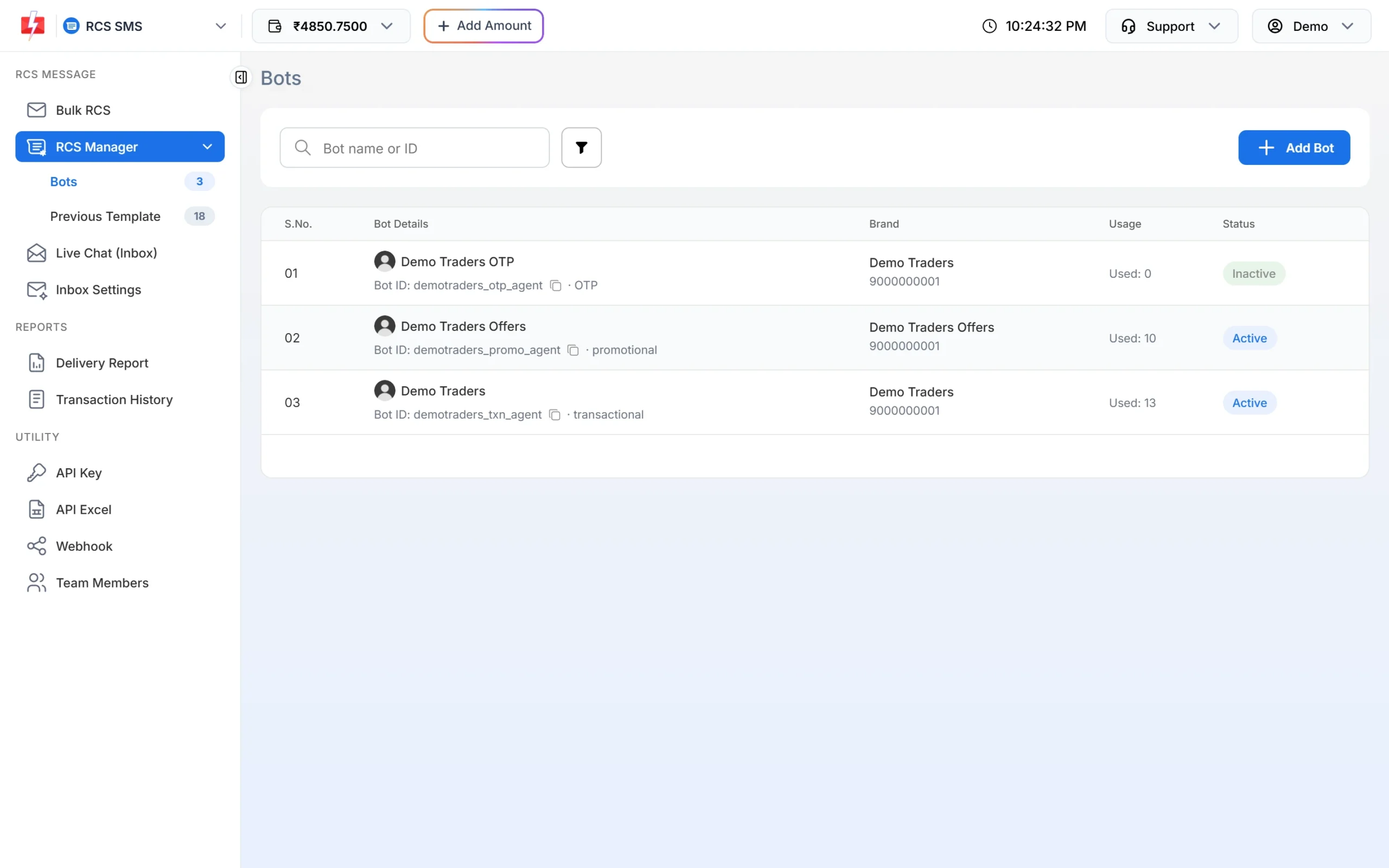
The OTP bot is listed with its own Bot ID and category. -
Create the OTP in your own app
The RCS API sends the text you give it. Your app creates the code, saves it with an expiry time, and checks it when the user types it in. Keep the message short, for example: “123456 is your Demo Traders login code. It is valid for 10 minutes. Do not share it with anyone.”
-
Send it with the RCS API
Call the RCS API with the OTP bot’s
bot_id, one number intoandtypeset toplain. The response gives arequest_idyou can use to find the message in the RCS delivery report.curl -X POST "https://www.fast2sms.com/dev/rcs" \ -H "authorization: YOUR_API_KEY" \ -H "Content-Type: application/json" \ -d '{"bot_id":"YOUR_OTP_BOT_ID","to":"9999999999","type":"plain","message":"123456 is your Demo Traders login code. Valid for 10 minutes. Do not share it."}'
What RCS OTP costs
At the time of writing, every RCS message costs ₹0.35 in Fast2SMS, whatever the type. The amount is charged from your wallet when the message is sent. Messages that fail or go to numbers that cannot receive RCS (shown as Non-RCS) are refunded to your wallet automatically within 48 hours.
Sending in bulk? For high RCS volumes our team offers discounted rates. Talk to our team or see RCS pricing.
Why RCS alone is not enough for login OTPs
- Not every phone gets RCS. Feature phones, phones with RCS turned off and many iPhones cannot receive it. Those numbers come back as Non-RCS.
- No automatic SMS fallback today. Fast2SMS does not send an SMS automatically when RCS fails (Campaigns, our multi-channel flow launching soon, will add this). Your app has to notice the failure and send the code another way, and by then the user may have given up.
- A late OTP is useless. If your login screen waits for a code that will never arrive, the user leaves. A second channel should go out quickly.
The safer setup: Smart OTP with fallback
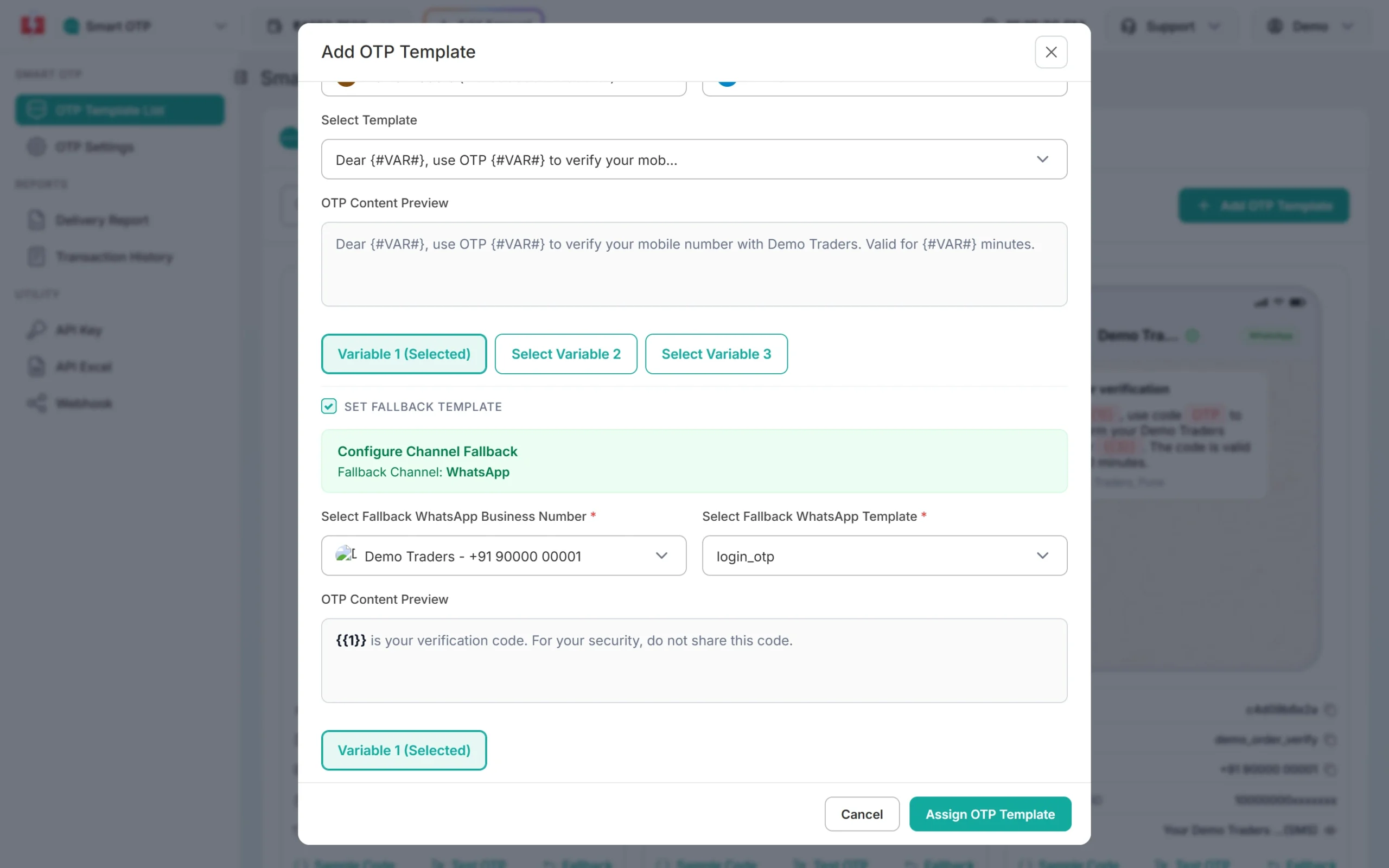
Smart OTP is our multi-channel OTP. It sends the code on SMS or WhatsApp on a priority route, sends it again on the other channel if the first one fails, and checks the code with the Verify OTP API, so you do not have to store codes yourself. You set the fallback when you create the OTP template.
| RCS OTP bot | Smart OTP | |
|---|---|---|
| Reaches | Phones with RCS on | Every mobile by SMS, plus WhatsApp users |
| Fallback | Not automatic today; you build it yourself | Built in (SMS to WhatsApp or WhatsApp to SMS) |
| Code creation and checking | Your app | Fast2SMS (Send OTP and Verify OTP APIs) |
| Needs | Approved RCS brand and OTP bot | Approved DLT OTP template and/or WhatsApp authentication template |
A good use of RCS OTP is as an extra: for example, a payment confirmation code to Android customers who already chat with your brand on RCS, while logins stay on Smart OTP.
Frequently asked questions
Is DLT registration needed to send OTP over RCS?
No. RCS does not use DLT templates. Your brand and bot are checked and approved by the operator instead. SMS OTPs still need an approved DLT template.
Can I send OTPs from my promotional RCS bot?
No. Google does not allow login OTPs from promotional bots. Use a bot registered in the OTP category.
Will the customer see my brand name on the RCS OTP?
Yes. RCS messages show your approved brand name, logo and a verified tick, which helps customers trust the code.
What happens if the number does not support RCS?
The message is marked Non-RCS and the charge is refunded within 48 hours. No SMS is sent automatically, so send the code by SMS or WhatsApp from your app, or use Smart OTP.
Does Fast2SMS verify RCS OTPs for me?
No. With the RCS API your app creates and checks the code. Smart OTP is the option where Fast2SMS creates and verifies the code.
Can an OTP message on RCS have buttons?
The RCS API supports buttons, but keep OTP messages plain. A short text with the code, the validity time and a warning not to share it works best.