
A SIP trunk is a phone line delivered over the internet to a phone system (an IP-PBX) that you own, set up and look after. Cloud telephony gives you the business number, the phone system and the calling screen together, hosted online, so your team only needs a browser. If you already run your own PBX with an IT team, a SIP trunk can fit. If you want a business number, IVR, team calling and call recording without hardware or SIP setup, cloud telephony is the simpler choice for most Indian businesses.
This guide explains what a SIP trunk is, how it compares with cloud telephony, and how Fast2SMS Cloud Telephony gives you the same result with no SIP configuration at all.
What is a SIP trunk?
SIP stands for Session Initiation Protocol. It is the common standard used to start, manage and end voice calls over an internet (IP) connection. A “trunk” is an old telephone word for a bundle of lines that connects a telephone exchange to an office phone system.
Put together, a SIP trunk is the internet version of those office lines. Instead of copper lines or a PRI line, the telecom operator sends your calls over a data connection to your own IP-PBX. The PBX then decides which desk phone or softphone rings.
The important point: a SIP trunk is only the line. It does not include the phone system itself. The PBX, the phones, the IVR menu, recording storage and call reports all come from equipment or software that you buy and run.
What you need to run a SIP trunk
- An IP-PBX: a box in your office or PBX software on a server.
- A SIP trunk connection from a licensed telecom operator, with its own paperwork and contract.
- A steady internet line with enough bandwidth for your calls, often with a fixed IP address.
- Firewall and security setup, so that strangers cannot misuse your lines to make calls on your bill.
- Desk IP phones or softphone apps for staff, each set up with its own login.
- Someone to manage it: an IT person or vendor to configure routing, IVR, recording and updates, and to fix problems.
When a SIP trunk makes sense
- You already own an IP-PBX and many desk phones, and you want cheaper lines for it.
- You have in-house IT staff who can manage the PBX and its security.
- Your phone system has to work closely with other equipment in your office.
What is cloud telephony?
Cloud telephony (also called a cloud PBX or hosted PBX) moves the whole phone system online. The provider runs the PBX, the numbers, the IVR and the recording storage. You manage everything from a web panel, and your team makes and takes calls from a browser. There is nothing to install in your office. For a closer look at the phone-system side, read cloud PBX for small business.
SIP trunk vs cloud telephony: side by side
| SIP trunk + your own PBX | Cloud telephony (Fast2SMS) | |
|---|---|---|
| What you get | Phone lines only; the PBX is yours to buy | Number, phone system, IVR, recording and reports together |
| Hardware | PBX box or server, IP phones, network setup | None. A laptop, desktop or phone browser and a headset |
| Setup | SIP accounts, codecs, firewall, routing rules | Buy a number in the panel and choose where calls go |
| Who manages it | Your IT team or a vendor | You, from the Fast2SMS panel |
| Where staff can work | Usually where the phones are set up | Anywhere with internet, in the browser Web Phone |
| IVR menu | Built in the PBX by whoever manages it | Drag-and-drop IVR builder in the panel |
| Call recording and logs | Depends on your PBX and storage | Included: recording per number, Call History with filters and export |
| Adding a person | New phone, new SIP account, configuration | Assign an agent licence to a team member |
| Cost pattern | PBX and phones up front, trunk rental, call charges by plan | Fixed yearly price per number and per extra agent, no per-minute charge |
How Fast2SMS gives you the same result without SIP setup
Fast2SMS does not sell SIP trunks. Cloud Telephony is a hosted phone system that you use inside the Fast2SMS panel. There is no SIP server to configure, no desk phone and no app to install: you make and answer calls on the Web Phone in your browser. Here is what replaces each part of a SIP trunk and PBX setup.
-
Get a business number (instead of trunk lines)
Complete KYC once in Account Setting > KYC (telecom rules require it before you buy a number; review usually takes about 1 working day). Then open Cloud Telephony > My Numbers, click Buy a Number, pick a number from the list and pay from your Fast2SMS wallet.
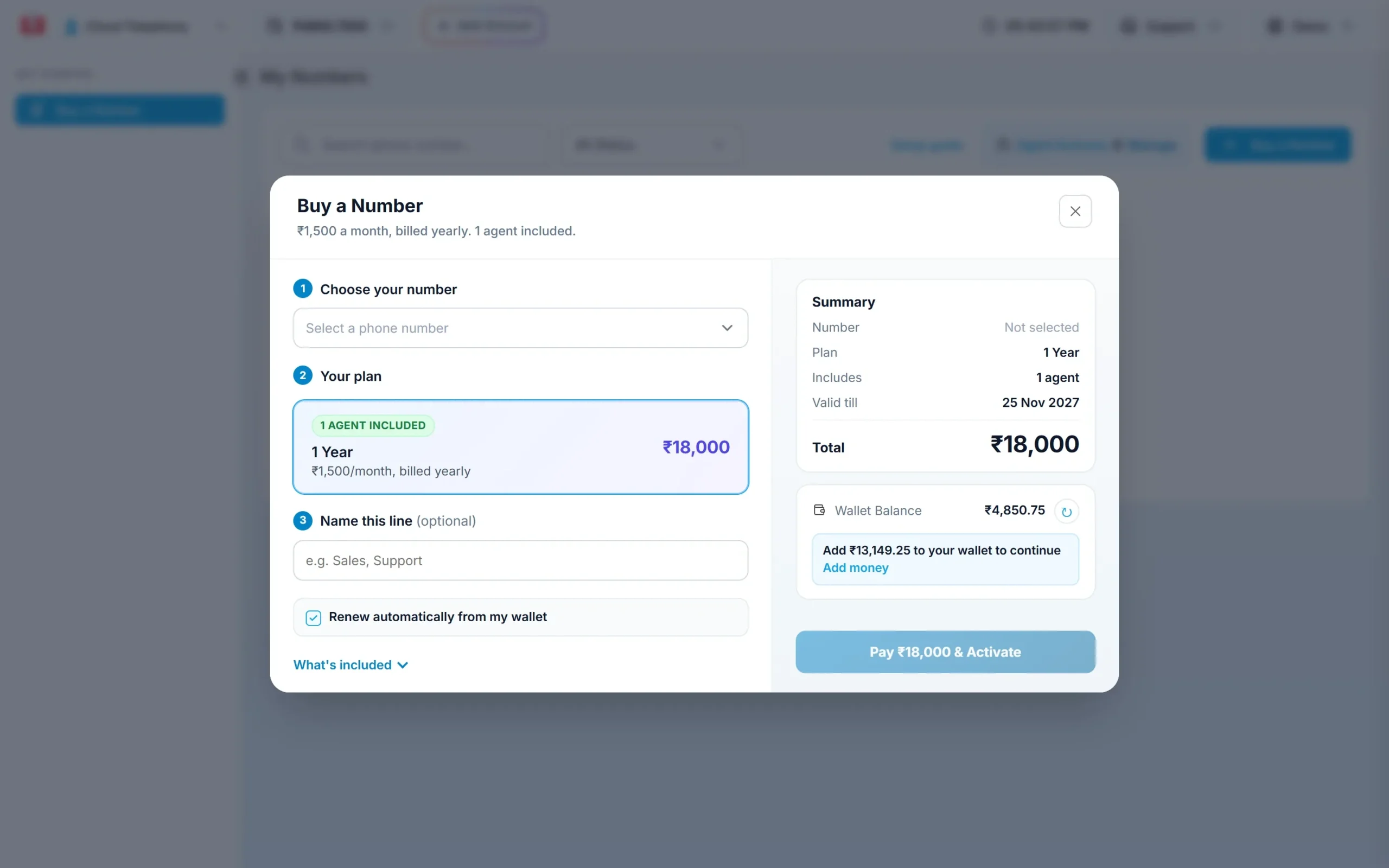
Buy a Number: choose a number, see the yearly plan and pay from the wallet. -
Follow the setup guide (instead of PBX configuration)
After your first number is active, the Your number is ready guide opens. It walks you through four things: where incoming calls go, adding your team, setting up a call menu and making calls.
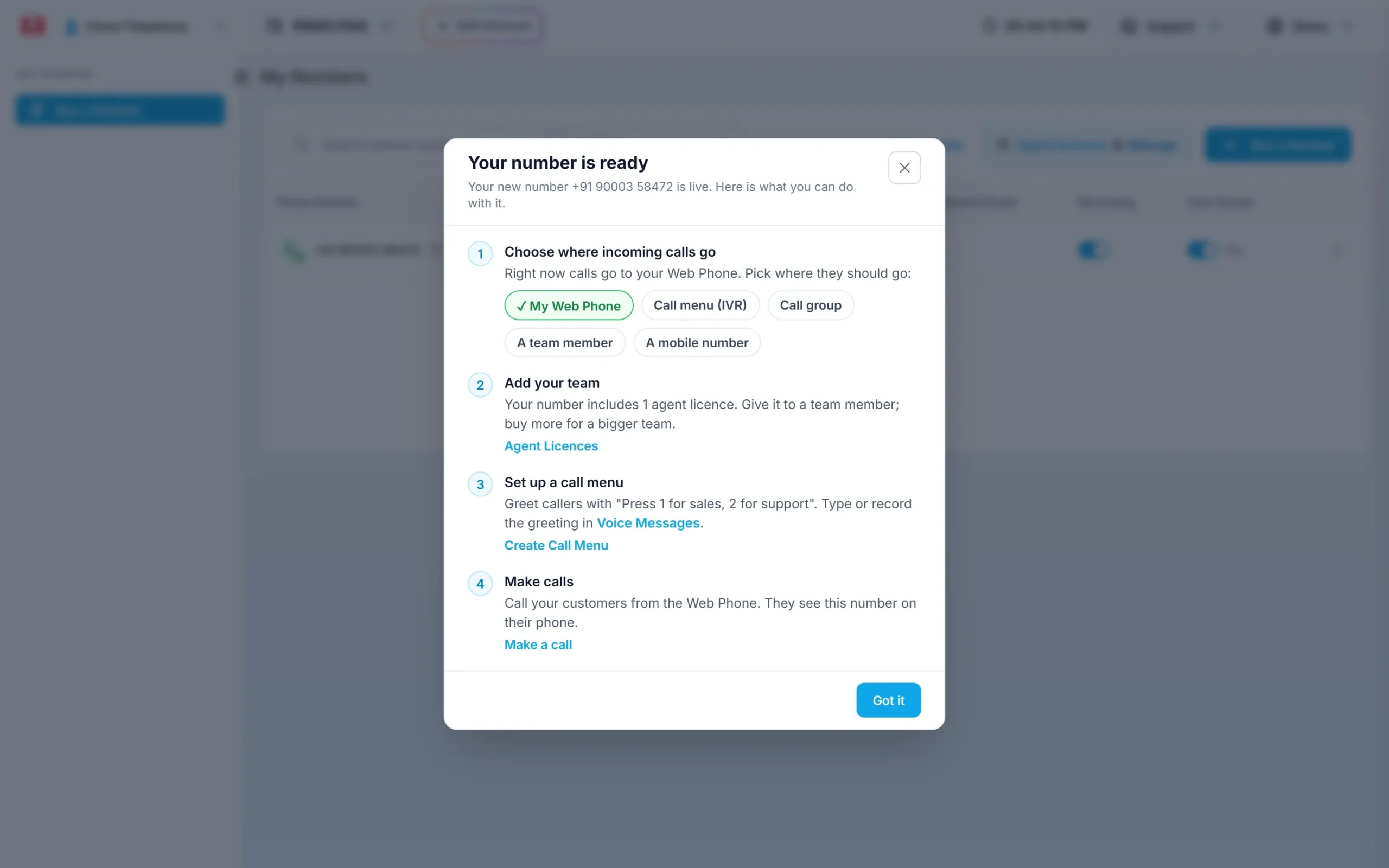
The setup guide shown after buying the first number. -
Choose where incoming calls go (instead of PBX routing rules)
In My Numbers, open the row menu and click Configure Route. Pick a Routing Destination: Main Admin (Web Phone), Direct Agent (Team Member), Call Group (Queue), IVR Flow, Forward to External Mobile, or Disconnect / Hangup. Click Save Changes. More on this in call routing.
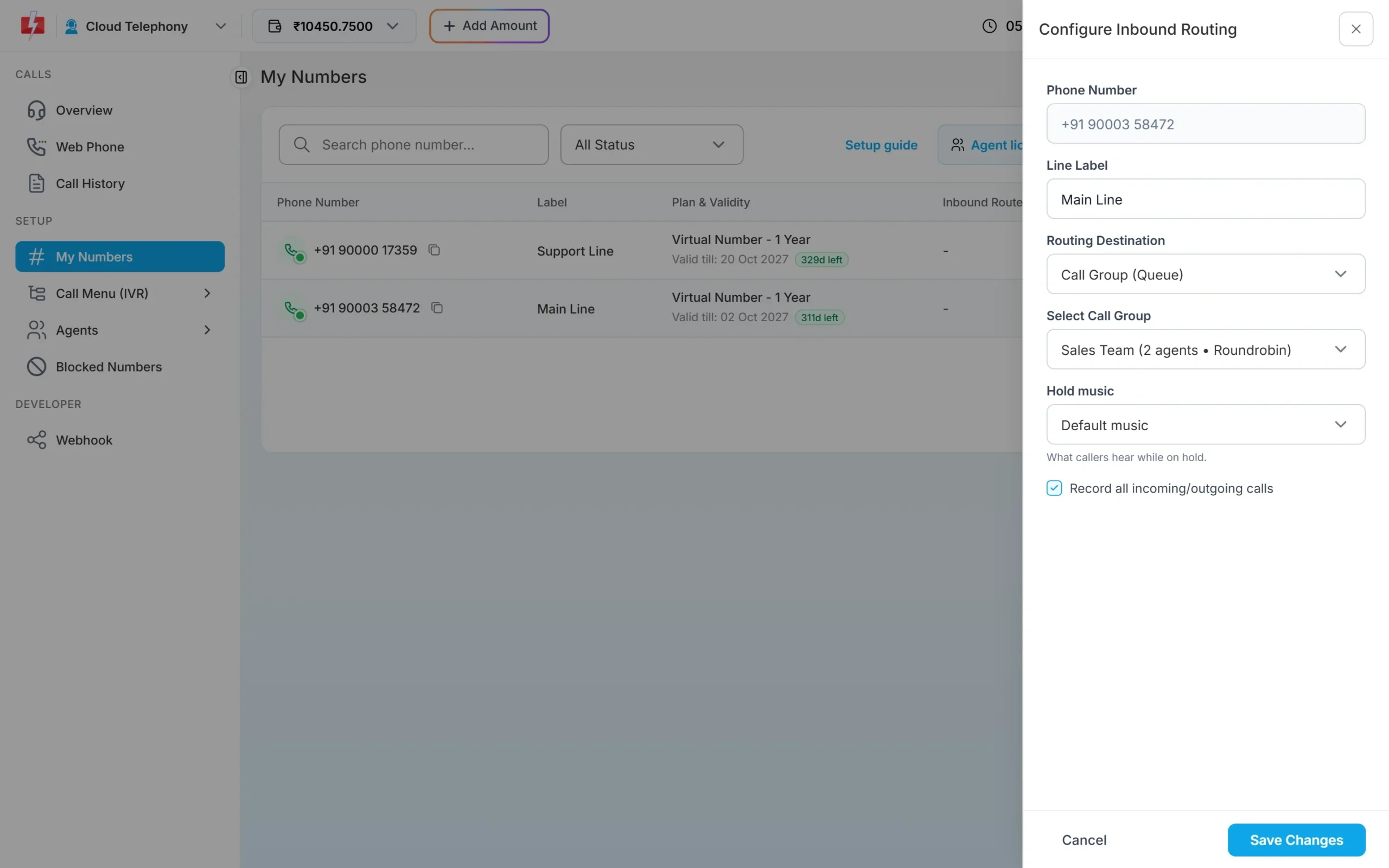
Routing a number to a call group, with hold music and recording. -
Add your team (instead of SIP accounts and desk phones)
Each number includes 1 agent licence. Go to Agents > Licences, buy more if needed, and click Assign to Member. Each team member gets a short extension such as 101 or 102; you, the owner, are 100.
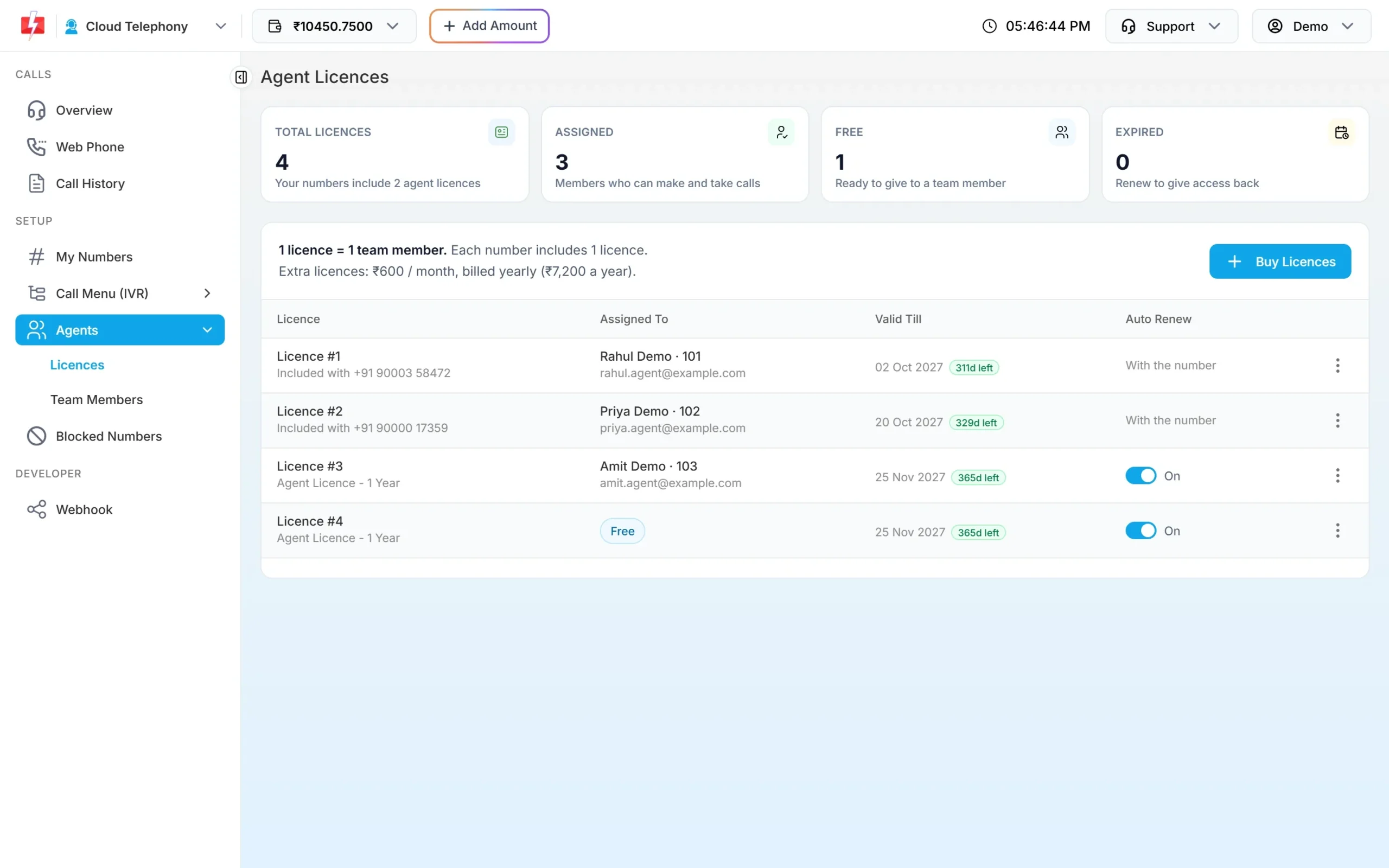
Agent Licences: who can make and take calls. -
Make and take calls in the browser (instead of IP phones)
Open Web Phone, pick the number to call from in Call from, type a number or an extension and click Call. Incoming calls ring in the browser with Answer and Decline. Away from your laptop? Calls can ring your mobile, and Move to my mobile moves a live call to your own phone.
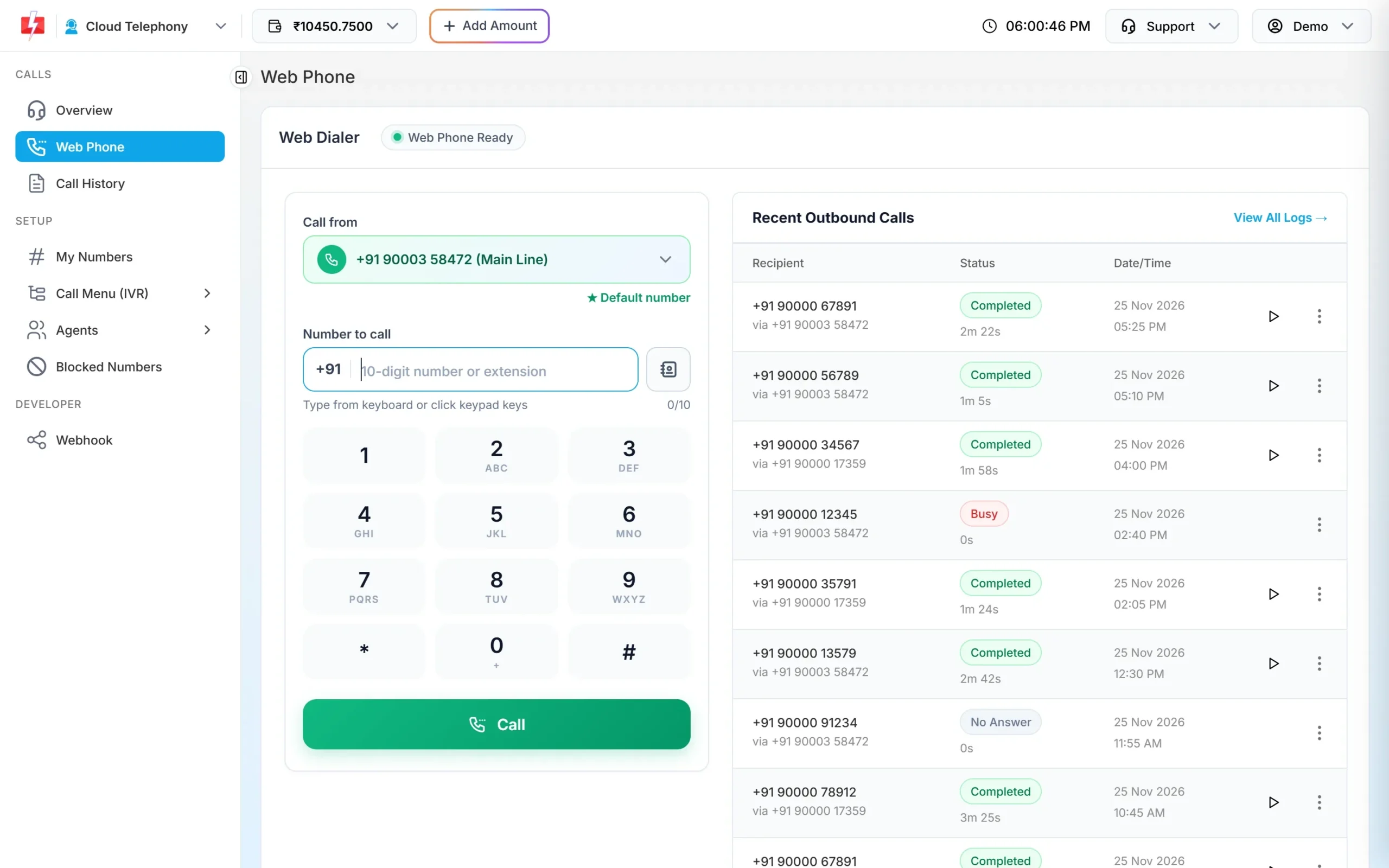
The Web Phone: your business phone in a browser tab. -
See every call and recording (instead of PBX logs)
Call History lists every incoming and outgoing call with the agent, status, duration and recording. You can filter, play, download and export.
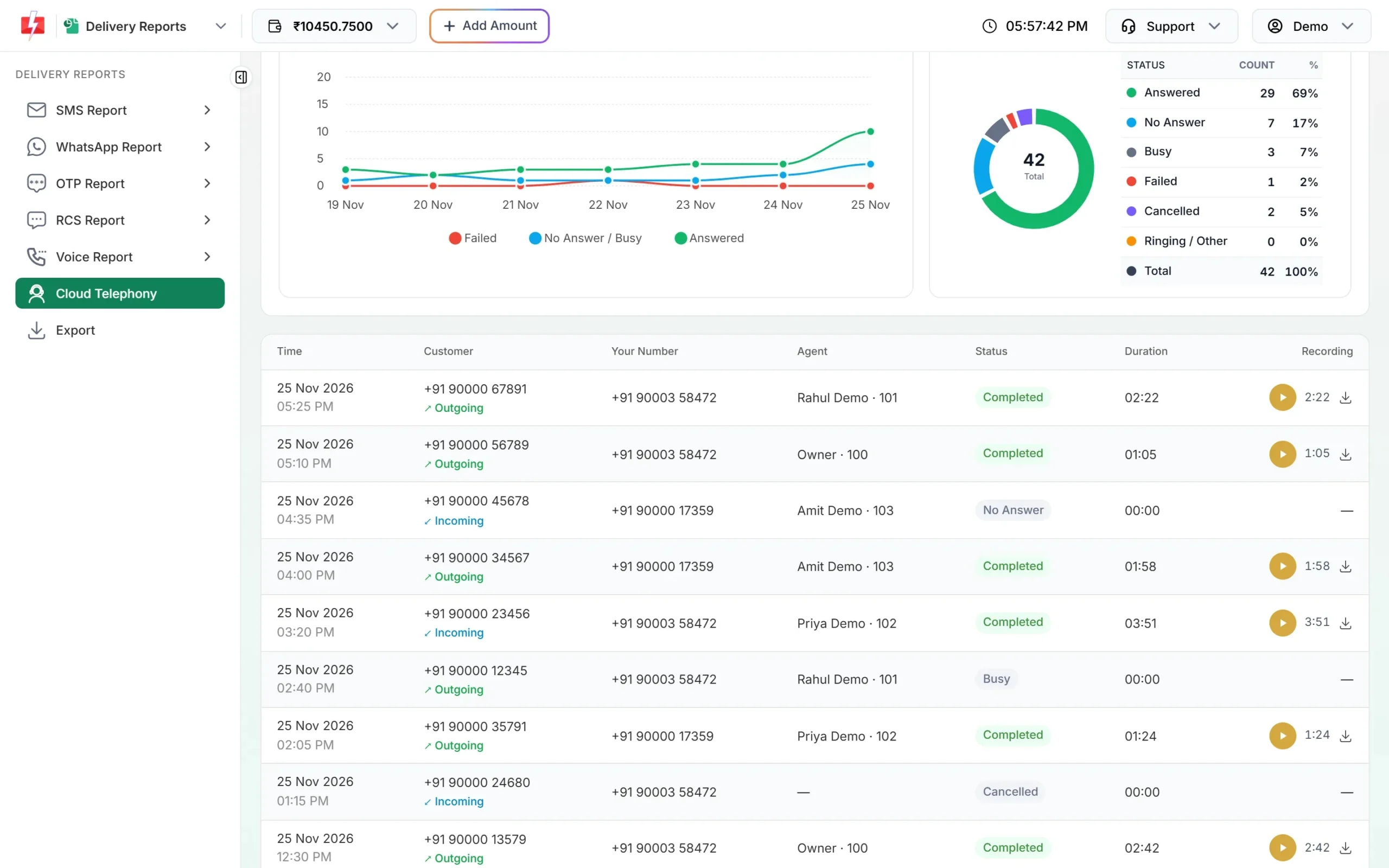
Call History with recordings you can play or download.
What Fast2SMS Cloud Telephony costs
At the time of writing, a virtual number costs ₹1,500 per month, billed yearly (₹18,000 a year), and it includes 1 agent licence. Each extra agent licence costs ₹600 per month, billed yearly (₹7,200 a year). There is no setup fee, and calls, IVR and call recording have no per-minute charge. You pay from your Fast2SMS wallet. See the Cloud Telephony pricing page for current rates.
With a SIP trunk, the line rental is only one part of the bill. You also pay for the PBX, the phones, installation, and the time of whoever keeps it running. Compare the total cost, not just the line price.
Moving from a PBX and SIP trunk to cloud telephony
- Start with one number. Buy a cloud number for one team, for example support, and run it alongside your old system for a few weeks.
- Copy your call flow. Rebuild your old IVR in the IVR builder. Our IVR setup guide shows each step.
- Tell customers the new number. Cloud Telephony gives you a new number from the available list, so update your website, invoices and Google Business Profile.
- Train the team on the Web Phone. A headset and a browser tab are all they need.
Frequently asked questions
Does Fast2SMS sell SIP trunks?
No. Fast2SMS Cloud Telephony is a hosted phone system with virtual numbers, IVR, call groups, recording and a browser Web Phone. You do not need a SIP trunk or a PBX to use it.
Can I connect my IP-PBX or SIP desk phones to Fast2SMS?
No. Calls are made and answered only on the Web Phone inside the Fast2SMS panel, in a laptop, desktop or phone browser. No SIP settings are needed or shared.
What do my agents need?
A Fast2SMS team member login with an agent licence, a browser, a stable internet connection and a headset. Each agent gets a short extension like 101.
Can I take business calls on my mobile?
Yes. You can route a number to a mobile, let a team member’s mobile ring when they are not online, or use Move to my mobile during a call.
Is KYC needed before I buy a number?
Yes. Telecom rules require KYC. Submit it in Account Setting > KYC; our team usually reviews it within 1 working day.
Is a SIP trunk cheaper than cloud telephony?
The line itself can look cheaper, but you also pay for the PBX, phones, setup and upkeep. For small and mid-sized teams, a fixed yearly cloud price is usually easier to plan.