
Smart OTP has two settings you can change: how many times a user can try to verify one OTP, and how many seconds must pass before another OTP can go to the same number. Both live on the OTP Settings page and apply to SMS and WhatsApp OTPs. This guide shows how to set them, what values to pick, and how to fix the API error “Please wait N seconds before requesting a new OTP”.
The two OTP settings at a glance
| Setting | What it controls | Allowed values | If you never save the page |
|---|---|---|---|
| Max Verify OTP Limit (Per SMS) | How many verify tries one OTP allows. When the tries are used up, the OTP is cancelled. | 1 to 100 | 10 tries |
| SMS Resend / Time Limit (Seconds) | The wait before the same OTP template can go again to the same number on the same channel. | 0 to 3600 seconds. 0 means no wait. | 10 seconds |
The settings are for your whole account. They apply to every OTP ID, to SMS and WhatsApp, and to the API as well as to Test OTP in the panel. “Per SMS” in the label means per OTP, on either channel.
How to change the OTP settings
-
Open OTP Settings
Switch to the Smart OTP app from the top-left menu and click OTP Settings under SMART OTP. The page says “Control verify attempts and resend time for OTP SMS and WhatsApp.”
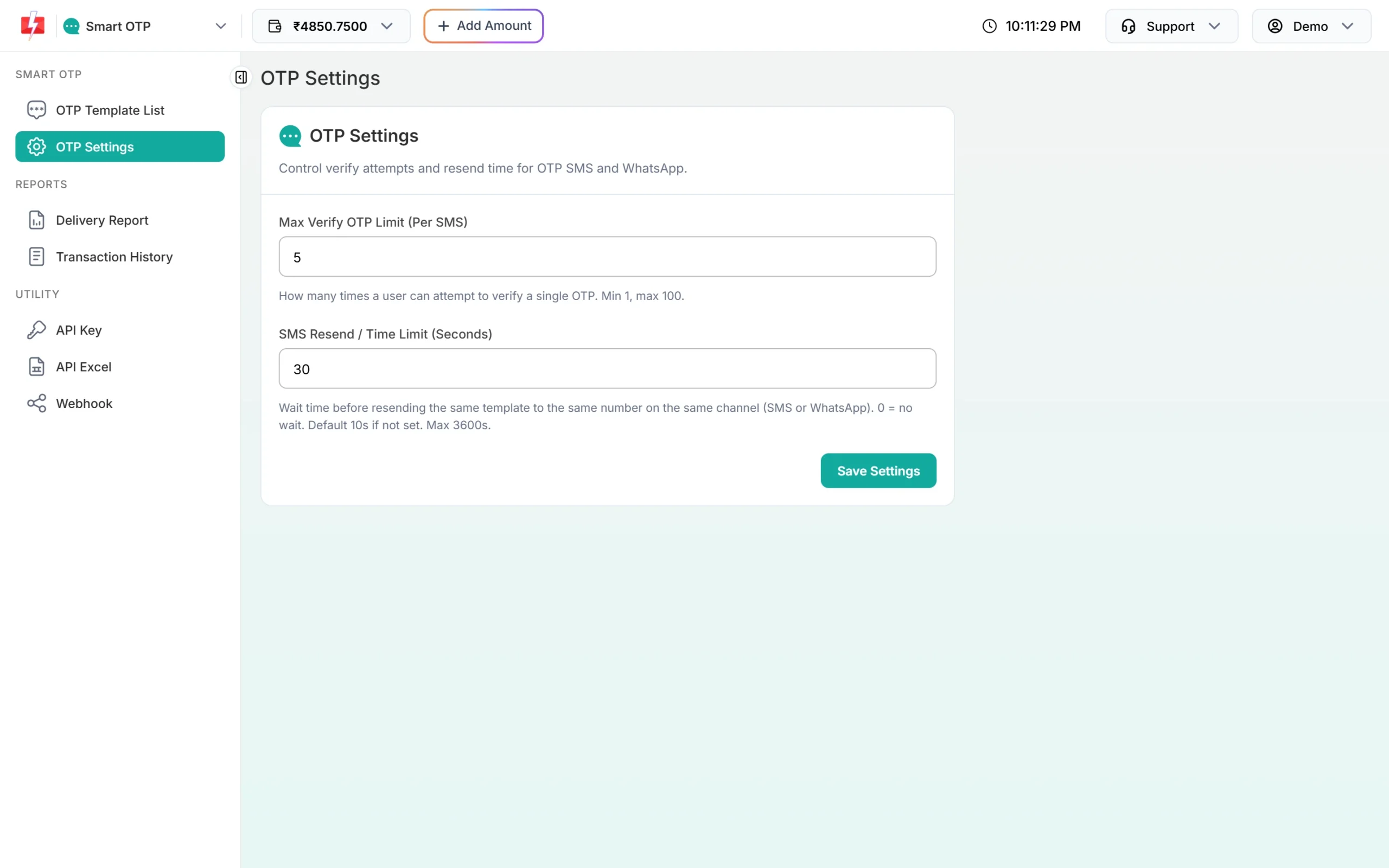
Both settings on one page. -
Set Max Verify OTP Limit
Type a number from 1 to 100. This is how many times a user can try one code. For login and signup, 3 to 5 is a good range: enough for a typo, too few to guess a 6-digit code.
-
Set SMS Resend / Time Limit
Type the number of seconds, from 0 to 3600. Many apps use 30 seconds. A longer wait cuts repeat sends and cost. A wait of 0 removes the check, which is only sensible while you are testing.
-
Save
Click Save Settings. You see “Settings updated successfully”. The new values apply to the next OTP sent or verified.
Fix “Please wait N seconds before requesting a new OTP”
This API error means your SMS Resend / Time Limit is still running. You tried to send another OTP with the same OTP ID, to the same number, on the same channel, too soon after the last one. N is the number of seconds left.
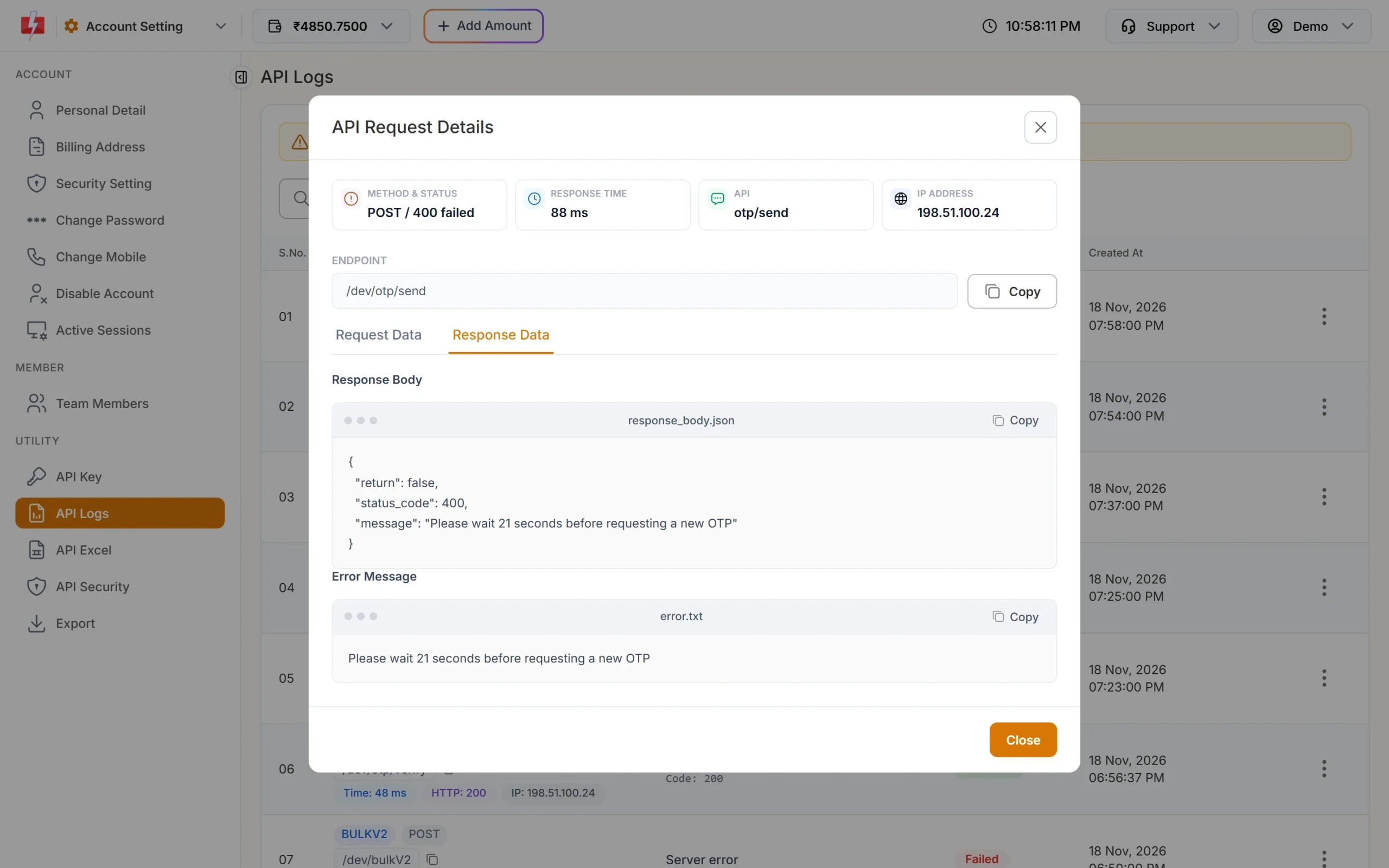
Full response:
{"return":false,"status_code":400,"message":"Please wait 21 seconds before requesting a new OTP"}How to fix it:
- In your app: show a countdown on the resend button with the same seconds as your setting. The button stays off until the timer ends, so users cannot trigger the error.
- Read N: if the error still comes back, take the number from the message and restart your countdown with it.
- Stop double calls: a double click or a form sent twice makes two calls a second apart. Disable the button after the first click.
- While testing: lower the wait or set it to 0 for a short time, then set it back before you go live.
The same error can come from Send OTP, Resend OTP and the panel’s Test OTP window, because all three use the same check.
What these settings do not change
Some OTP limits are fixed and are not on this page:
| Limit | Value | Set where |
|---|---|---|
| OTP expiry | 1 to 10080 minutes, default 15 | otp_expiry in each Send OTP call |
| OTP length | 4 to 10 digits, default 6 | otp_length in each Send OTP call |
| Resend window | 10 minutes from the last send | Fixed |
| Sends per OTP ID per number | 5 in 10 minutes, counting the first send | Fixed |
How the verify limit works
- Every wrong code uses one try and returns “Invalid OTP”.
- The wrong try that reaches your limit returns “Maximum verification attempts reached. OTP is no longer valid.” With a limit of 5, the fifth wrong code gets this answer.
- After that, the code is cancelled. Even the right code then returns “OTP not found or already verified”. Send a new OTP.
- Each new OTP starts with a fresh count.
Recommended values
| Use | Max Verify OTP Limit | SMS Resend / Time Limit |
|---|---|---|
| Login and signup | 3 to 5 | 30 to 60 seconds |
| Payment or account changes | 3 | 60 seconds |
| Testing your integration | 10 | 0 to 10 seconds |
These are common choices, not rules. Pick what suits your users and your risk.
Frequently asked questions
What are the default OTP settings?
If you never saved OTP Settings, users get 10 verify tries per OTP and must wait 10 seconds between sends.
Do the settings apply to WhatsApp OTP too?
Yes. Both settings apply to SMS and WhatsApp OTPs, even though the labels say SMS.
Can I set different limits for different OTP IDs?
No. OTP Settings are for the whole account. The wait is counted for each number, OTP ID and channel on its own.
Is the “Please wait” error charged?
No. The OTP is not sent when this error comes back.
Can I turn the resend wait off?
Yes, set SMS Resend / Time Limit to 0. We suggest keeping a wait in live use, because it stops repeat sends to the same number.
Can I change the 5-send limit or the 10-minute resend window?
No. Those two limits of the Resend OTP API are fixed.