
You can use a short link in a DLT SMS only if the short link’s own domain is whitelisted on your DLT portal. Public shorteners such as bit.ly are a common reason for blocked SMS, because the operator checks the domain that appears in the message, not the page it redirects to. The safest choice is a short link on a domain you own and have whitelisted.
This guide covers URL shorteners, app links (Play Store, App Store and APK files) and OTT links in DLT SMS, and how to test a link before a big campaign.
Why do links need whitelisting in DLT SMS?
Fraud SMS in India often carry fake links. To stop them, TRAI directed operators to block business SMS that contain a URL, APK link or OTT link the sender has not whitelisted. This rule has applied since 1 October 2024. Whitelisting is also called CTA whitelisting (CTA means call to action).
So every link in your SMS, even one written in the fixed text of the template, must be whitelisted on your DLT portal under your entity. If it is not, operators reject the SMS during scrubbing.
Can I use bit.ly or other URL shorteners in DLT SMS?
Usually not. Here is why:
- The operator reads the link as it appears in the SMS. For a bit.ly link, that domain is bit.ly, not your website.
- Public short domains are shared by thousands of senders, including fraudsters. You do not own them, so you cannot prove they belong to your business.
- If the shortener is not whitelisted under your entity, the SMS is blocked even when the final page is your own whitelisted site.
What works better:
- Use your own domain. A plain link such as yourshop.in/offer is short enough for most SMS.
- Use a branded short domain you own. For example, a short domain like ysh.in that only your business uses. Whitelist it on DLT like any other domain.
- Keep the link inside the variable limit. On DLT, link variables ({#url#} and {#urlott#}) allow up to 120 characters. A plain {#alphanumeric#} variable cannot carry links.
How to whitelist app store, APK and OTT links
| Link type | What to do |
|---|---|
| Play Store or App Store listing | Whitelist the exact listing link of your app on your DLT portal and use that same link in the SMS. |
| Direct APK download link | Whitelist it like any URL. We suggest the app store listing instead, because direct APK links are a common fraud pattern and attract extra attention. |
| OTT links (WhatsApp click-to-chat, YouTube and similar) | Whitelist them as OTT links where your portal offers that option, and use the {#urlott#} variable type if the link changes in each message. |
| Call-back numbers | Phone numbers in the SMS for customers to call back are also part of CTA whitelisting. Whitelist them and use the {#cbn#} variable (3 to 14 digits) when the number changes. |
Each portal has its own screens. We have step-by-step guides for Jio, Vi (Vilpower), BSNL, Tata and Smartping (Videocon).
How to test a template with a link in Fast2SMS
-
Find the template
Go to DLT Manager > Content Template. Search by Template ID or a word from the message. Only Approved templates have a Test Template button.
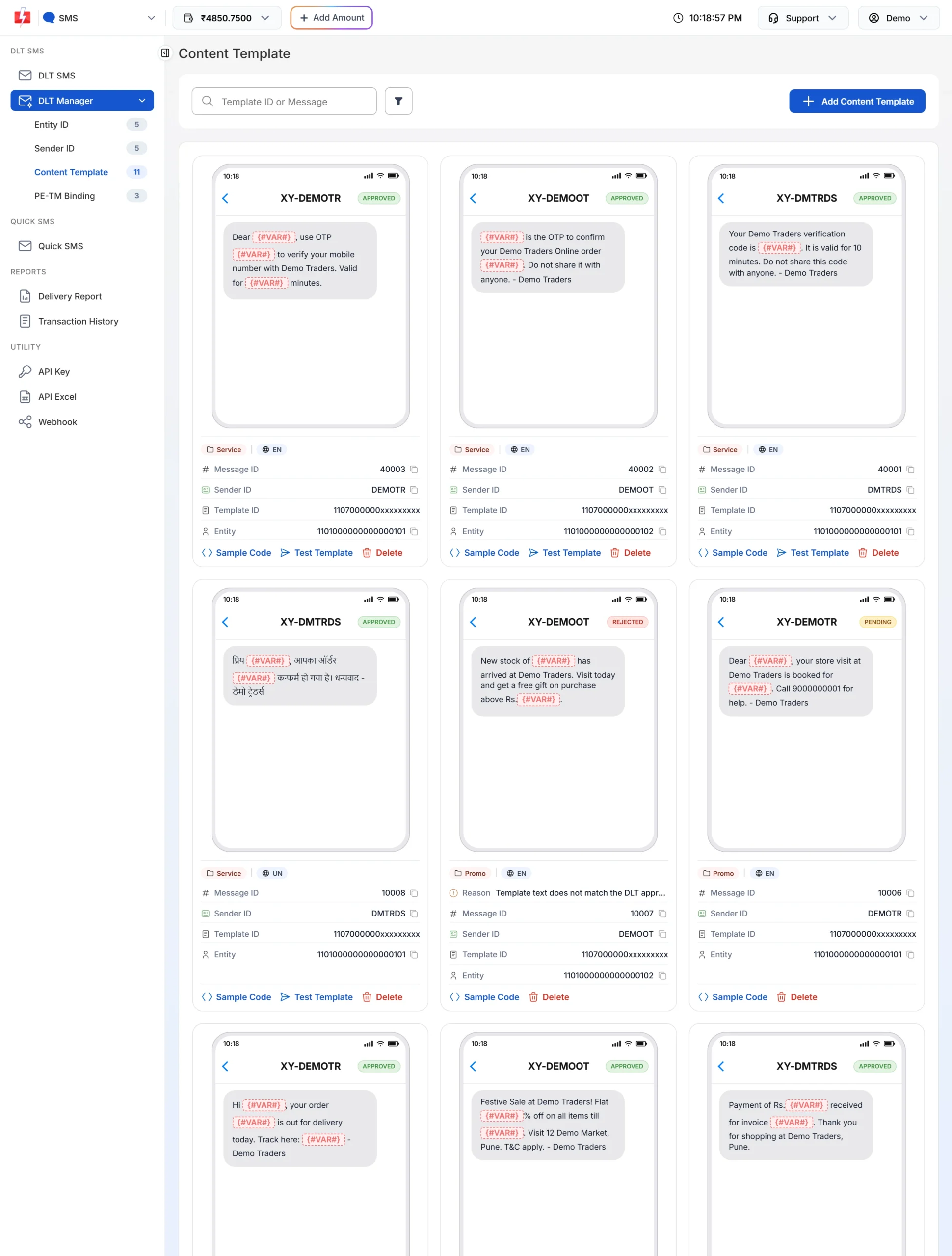
Templates with a link variable, such as “Track here: {#VAR#}”, should be tested before a campaign. -
Send a test SMS with your real link
Click Test Template. Enter your own Mobile number, pick the Sender ID and fill each variable. Put the exact link you plan to use, at its full real length. Click Send Test SMS. The window then checks the delivery report and shows “Delivered Successfully” or “Delivery Report Pending”. A test SMS is a real SMS from your account.
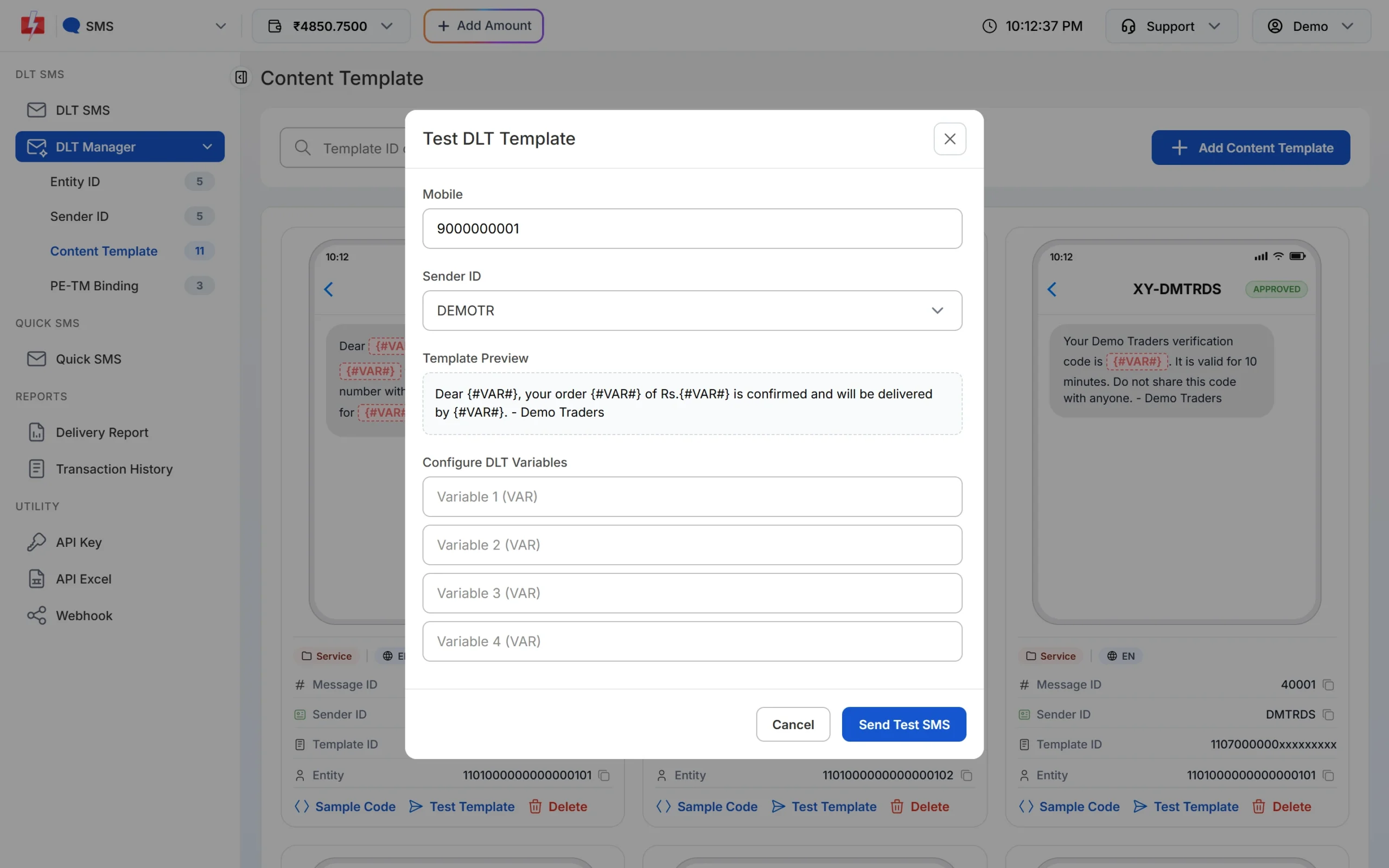
Test DLT Template: fill the variables exactly as in your campaign. -
Check the report if it fails
If the test fails, open Delivery Report > SMS Report, click the message and read the status and description. A link problem usually shows as a failure from the operator. Check the domain on your DLT portal, fix it and test again.
Common problems and fixes
My SMS with a link fails but the same SMS without a link is delivered. The link’s domain is not whitelisted under your entity, or you whitelisted a different domain (for example www.yourshop.in instead of yourshop.in, or the other way round). Whitelist the exact domain you use.
The link was whitelisted but SMS still fail. Check that the link sits in a link-type variable and is not longer than the limit. Also check that the template is linked to the header you are sending from.
I changed my short link service. A new short domain needs its own whitelisting. Do it before you switch.
Frequently asked questions
Can I use bit.ly links in DLT SMS?
It is risky and often blocked, because bit.ly is a shared domain that is not whitelisted under your entity. Use your own domain or a branded short domain that you own and have whitelisted.
Do I need to whitelist every link or only the domain?
Portals whitelist links by URL or domain, depending on the portal. Whitelist the domain you use and follow your portal’s format. Every link in the SMS must be covered.
Do links in the fixed part of the template also need whitelisting?
Yes. Any link in the SMS, fixed or variable, must be whitelisted.
Can I send a Play Store link in SMS?
Yes, once that link is whitelisted on your DLT portal. Use the exact link you whitelisted.
How long can a link variable be?
On DLT, {#url#} and {#urlott#} variables allow up to 120 characters at the time of writing.
Does Fast2SMS whitelist links for me?
No. Whitelisting is done by you on your DLT portal under your entity. Fast2SMS sends the SMS and shows you the result in the delivery report.