
A good voice message for bulk calls is short (15 to 30 seconds), says your brand name in the first few seconds, gives one message and ends with one clear action. This page shows how to record such a message on your phone or computer, which Used As type to pick in Fast2SMS, and ready-to-use script templates for offers, reminders, surveys, sales callbacks and the short helper files that Key Press and Call Patch calls need.
Use it before you upload your first voice file, or when a file was rejected and you want to record it again properly.
The 4-part structure of a good voice message
- Who is calling (2 to 4 seconds): “Namaste, this is Demo Traders, MG Road.” Required for approval.
- The one message (8 to 15 seconds): the offer, reminder or question.
- The action (3 to 6 seconds): visit, call back, or press a key.
- Close (1 to 2 seconds): “Thank you.”
Total: about 15 to 27 seconds. At the time of writing a call is charged ₹0.25 per 15-second pulse when answered, so 16 to 30 seconds is 2 pulses. Every extra 15 seconds adds a pulse to every answered call.
Sending in bulk? For high voice call volumes our team offers discounted rates. Talk to our team or see voice call pricing.
How to record a clear voice message
-
Write the script and time it
Write the exact words. Read it aloud with a stopwatch. If it runs over 30 seconds, cut words rather than speaking faster.
-
Record in a quiet place
A phone’s voice recorder is enough. Sit in a small room with curtains or furniture, switch off fans and AC, and hold the phone about 15 to 20 cm from your mouth. Record two or three takes and keep the best one.
- Speak a little slower than normal and smile while you talk. It shows in the voice.
- Leave half a second of silence at the start and end, not more.
- Avoid loud background music. A rejected file in Voice Files can show a reason such as “Audio is not clear”. Music-only files are rejected.
-
Save as MP3 or WAV
Fast2SMS accepts MP3 or WAV files up to 5 MB. Most phone recorders save as M4A, so convert the file to MP3 first, or use Record in Browser in the upload popup to record straight from your computer’s microphone.
-
Upload with the right Used As
In Voice Files, click Upload Voice File, accept the Voice File Rules, enter a Name and choose Used As. ₹10 is charged per upload and refunded if the operator rejects the file. Approval usually takes a few hours.
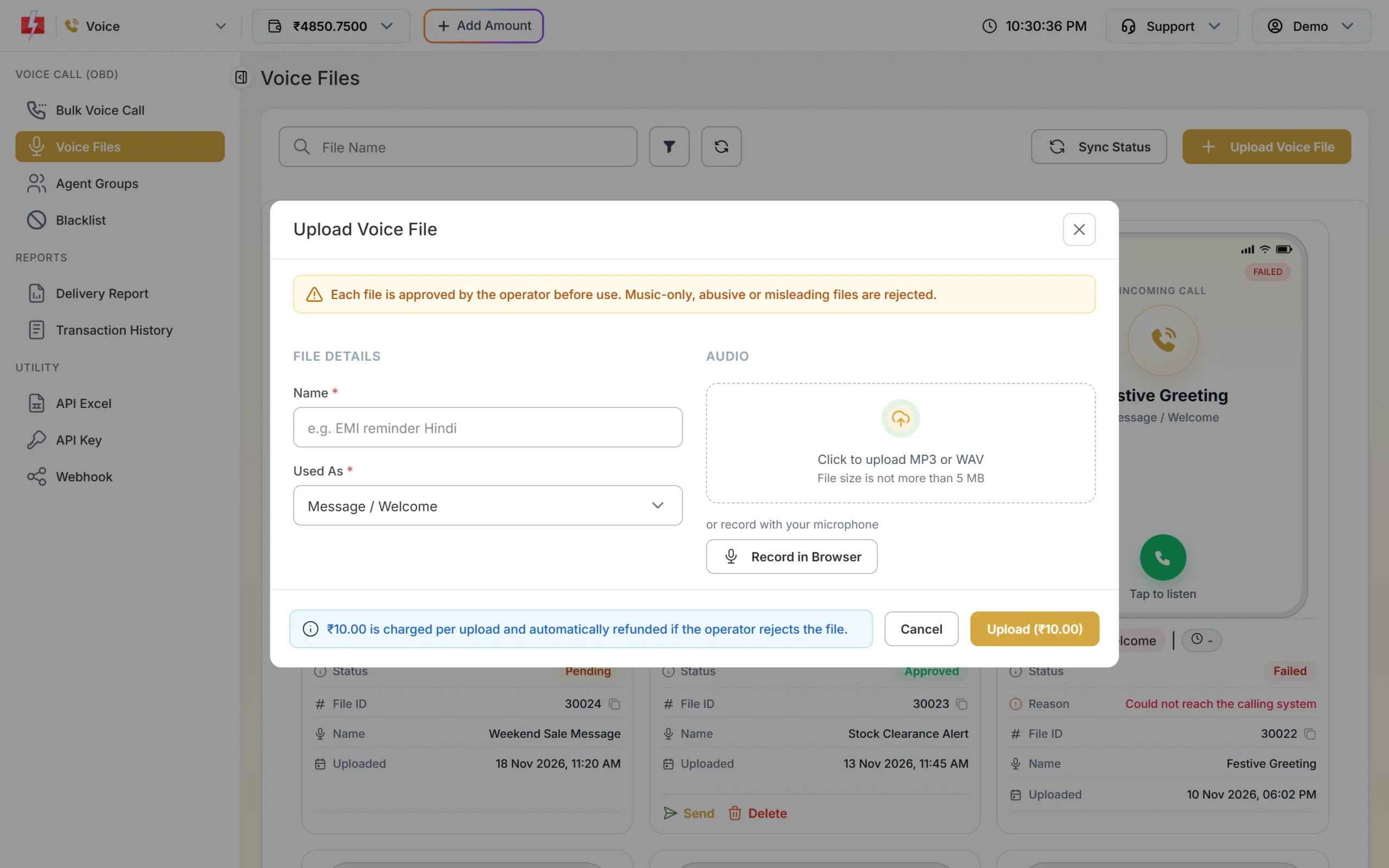
Pick the Used As type that matches where the file plays in the call. -
If it is rejected, read the reason
Filter Voice Files by Status = Rejected. Each rejected card shows a Reason. Fix that one thing and record again. After a rejection you can upload a new file after 1 hour.
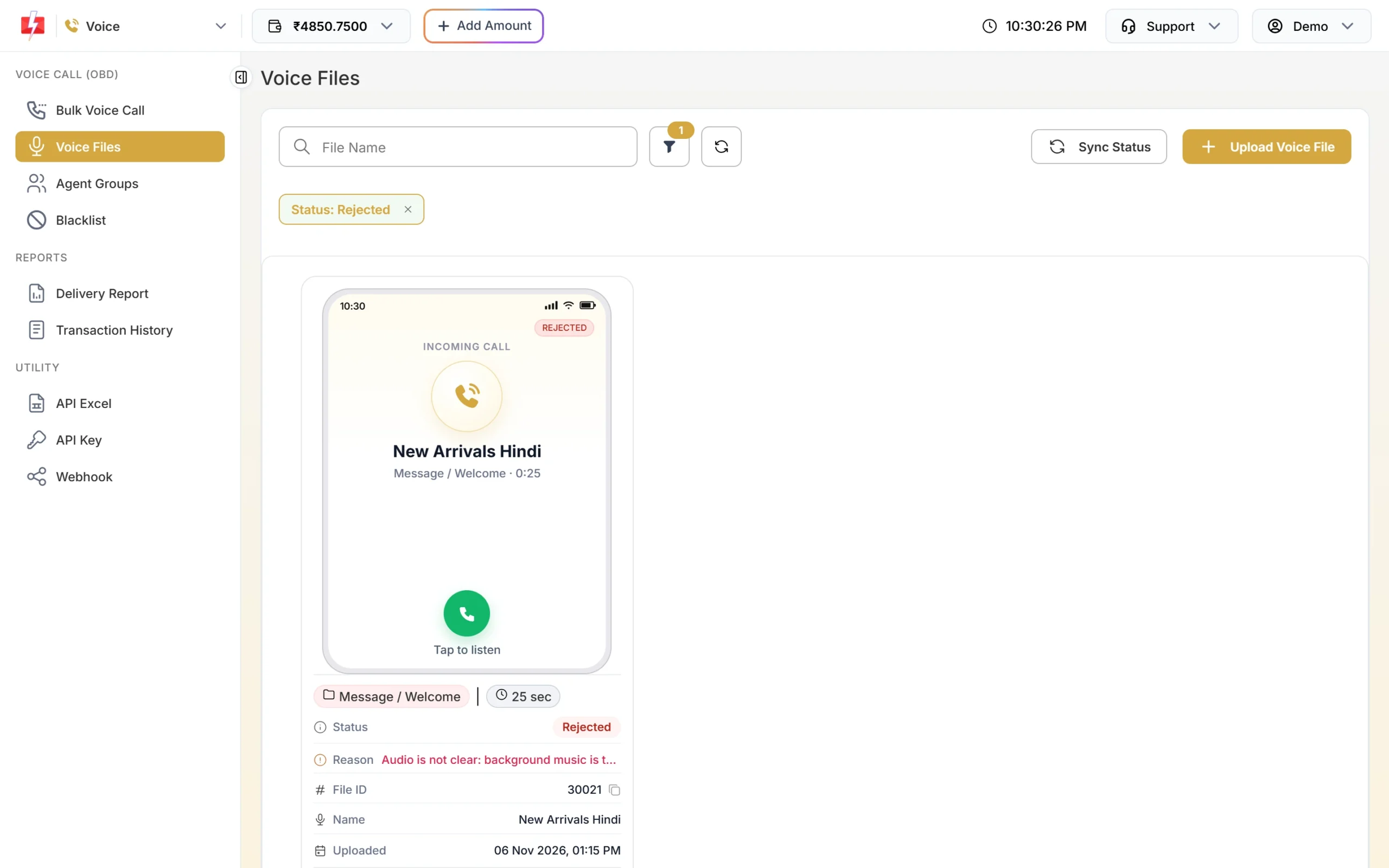
The Reason tells you what to fix before you record again.
Which Used As type to pick
| Used As | Where it plays | Typical length |
|---|---|---|
| Message / Welcome | The full message in a Simple call, or a greeting before the menu | 15 to 30 sec |
| Menu (press a key) | The question in Key Press and Call Patch calls | 10 to 20 sec |
| Thank You | After the key press, or when no agent picks up | 3 to 8 sec |
| No Key Pressed | When the person does not press any key | 3 to 6 sec |
| Wrong Key Pressed | When the person presses a key you did not allow | 3 to 6 sec |
| No Agent Available | Call Patch, when no agent answers | 4 to 8 sec |
Script templates you can copy
Replace the brand, place, date and offer with your own. Keep the structure.
Offer or sale (Simple)
“Namaste, this is Demo Traders, MG Road, Pune. This Saturday and Sunday, get flat 20 percent off on all kurtas and sarees. Visit our MG Road store between 10 AM and 9 PM. Thank you.”
New store or branch (Simple)
“Hello, this is Demo Bakers. Our new branch opens this Friday at FC Road, next to the bus stop. Come in for fresh cakes and snacks. See you there.”
Appointment confirmation (Key Press, Menu)
“Hello, this is Demo Clinic, Andheri. You have an appointment tomorrow at 11 AM. Press 1 to confirm. Press 2 if you cannot come. Again, press 1 to confirm or 2 to cancel.”
Delivery update (Simple)
“Hello, this is Demo Traders. Your order will be delivered today between 2 PM and 6 PM. Please keep your phone switched on. Thank you.”
Feedback survey (Key Press, Menu)
“Hello, this is Demo Service Centre. How was your car service last week? Press 1 for very good, 2 for okay, 3 for not good.”
Sales callback (Call Patch, Menu)
“Hello, this is Demo Interiors. You asked about a modular kitchen on our website. To talk to our designer now, press 1.”
Event invitation (Simple)
“Hello, this is Demo Motors. You are invited to our test drive weekend on 23 and 24 November at our Baner showroom, 10 AM to 7 PM. We look forward to seeing you.”
Helper files for Key Press and Call Patch
- Thank You: “Thank you. We have noted your answer.”
- No Key Pressed: “Sorry, we did not get your answer. Please press a key now.”
- Wrong Key Pressed: “That key is not valid. Please press 1 or 2.”
- No Agent Available: “All our team members are busy right now. We will call you back soon. Thank you.”
Do not record: prize or cashback claims, stock tips, loan or payment due reminders (unless you are a bank, NBFC or their collection partner), or any request for OTP, PIN, Aadhaar, PAN or bank details. These are on the Not Allowed list and the file will be rejected.
Frequently asked questions
How long should a bulk voice call message be?
15 to 30 seconds works for most messages. Up to 30 seconds is 2 pulses per answered call; every extra 15 seconds adds one pulse.
Can I record the message on my mobile phone?
Yes. Record in a quiet room, convert the file to MP3 if needed, and upload it. You can also use Record in Browser on a computer.
Can I add background music?
Keep it very soft or leave it out. Loud music makes speech unclear, and music-only files are rejected.
Why must I say my brand name?
It is the one must-have rule for voice file approval. It also tells people who is calling, so fewer of them hang up.
Can I edit a voice file after uploading?
No. Record a new version and upload it as a new file. Approved files you no longer need can be deleted.