
There is no separate WhatsApp Business API login from Meta for daily work. You log in to your provider’s panel. On Fast2SMS, the account owner logs in at fast2sms.com and opens the WhatsApp section; team members log in on the agent login page with their own email and password and see only Live Chat. Both work in a computer or phone browser, and agents can also use the Android app.
Who logs in where
| Who | Where to log in | What they see |
|---|---|---|
| Account owner | fast2sms.com login, then the WhatsApp app in the panel | Everything: Bulk WhatsApp, Live Chat, Chat Automation, WhatsApp Manager, reports, wallet and settings |
| Team member (agent) | The agent login page, with the email and password you set for them | Only Live Chat, for the numbers assigned to them |
| Developer or software | No login; uses your API key in each request | Sends messages and reads reports through the API |
| Meta settings | Meta’s WhatsApp Manager, opened from the number’s Meta Manager menu | Meta’s own view of your number and templates |
How the account owner logs in
- Go to fast2sms.com and log in to your account.
- Switch to the WhatsApp app from the app menu at the top left.
- If no number is connected yet, you see the registration page with Login with Facebook. That Facebook login is used once, to connect your number, not every day.
On a phone browser, Live Chat opens in a mobile layout, so you can answer customers on the go.
How team members log in
Add your staff in Team Members with Add Agent: name, email, password, role (Chat Agent or Admin), WhatsApp access and the numbers they can use. Then share the login link from Open Login URL. The same page has a Download Android App button for agents who prefer an app.
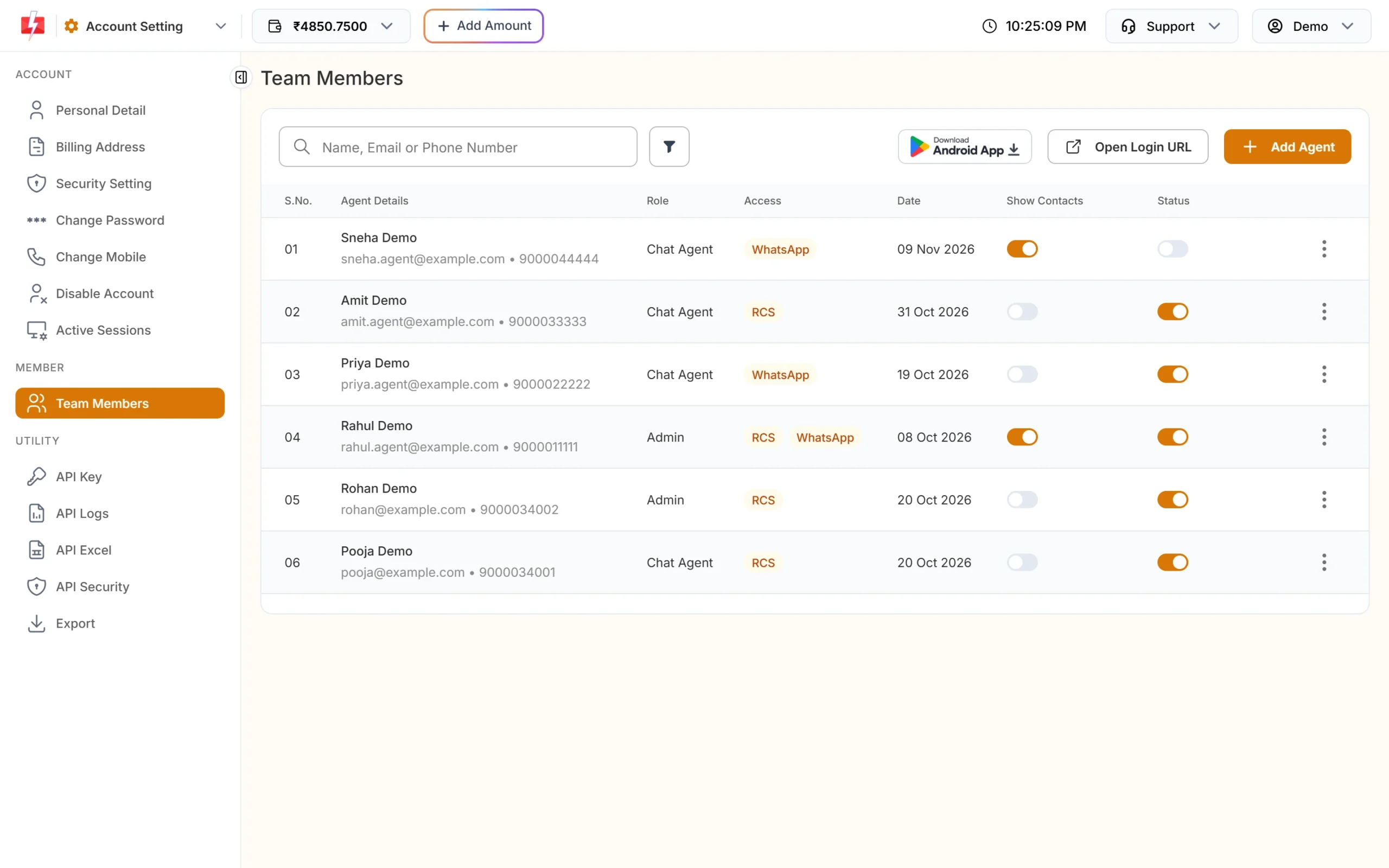
- A Chat Agent sees only chats assigned to them; an Admin agent sees all chats.
- An agent needs WhatsApp access and at least one assigned number, or the login is refused.
- An agent login stays active for 30 days, and you can switch an agent off with the Status toggle.
Common login problems
| Message or problem | Fix |
|---|---|
| “No WhatsApp or RCS access assigned. Please contact your admin.” | The owner should tick WhatsApp access for the agent and assign a number. |
| “Invalid credentials or account inactive.” | Check the email and password, and that the agent’s Status is on. |
| Live Chat and WhatsApp Manager are greyed out for the owner | No number is connected yet. Connect one with Login with Facebook. |
| Login with Facebook only shows “Loading Facebook…” | Turn off ad-blockers or privacy extensions for fast2sms.com, or try another browser. |
Frequently asked questions
Can I log in to the WhatsApp Business API on my phone?
Yes. Open the Fast2SMS panel in your phone browser. Agents can also use the Android app.
Can several people use one WhatsApp API number?
Yes. Add each person as a team member with their own login and assign the number to them.
Do I need to log in to Facebook every day?
No. Facebook login is only for connecting a number. Daily work happens in the Fast2SMS panel.
Is there a Meta login for the WhatsApp API?
Your number lives in Meta’s WhatsApp Manager under your business portfolio, which you can open from Fast2SMS with Meta Manager. You do not need it for sending or replying.