
Skip to content
Fast2SMS Help Center
API Docs Contact Us Sign up free

Why was I logged out of Fast2SMS?

Fast2SMS logs you out automatically when a device is not used for 48 hours, when the account password or registered mobile number is changed, or when someone logs that device out from Active Sessions. You can see the exact reason for each logout in Account Setting > Active Sessions. This page lists every reason and what to do.

Stay in control of your logins

Active Sessions shows every device on your account and why it was logged out.

Sign up free →Book a free meeting

How to find the reason

  1. Log in again and open Active Sessions

    Log in, click Account Setting and choose Active Sessions in the left menu.

  2. Find the device in “Logged out”

    The Logged out list keeps devices from the last 30 days. Each card shows the device, IP address, login and logout time, and a Reason.
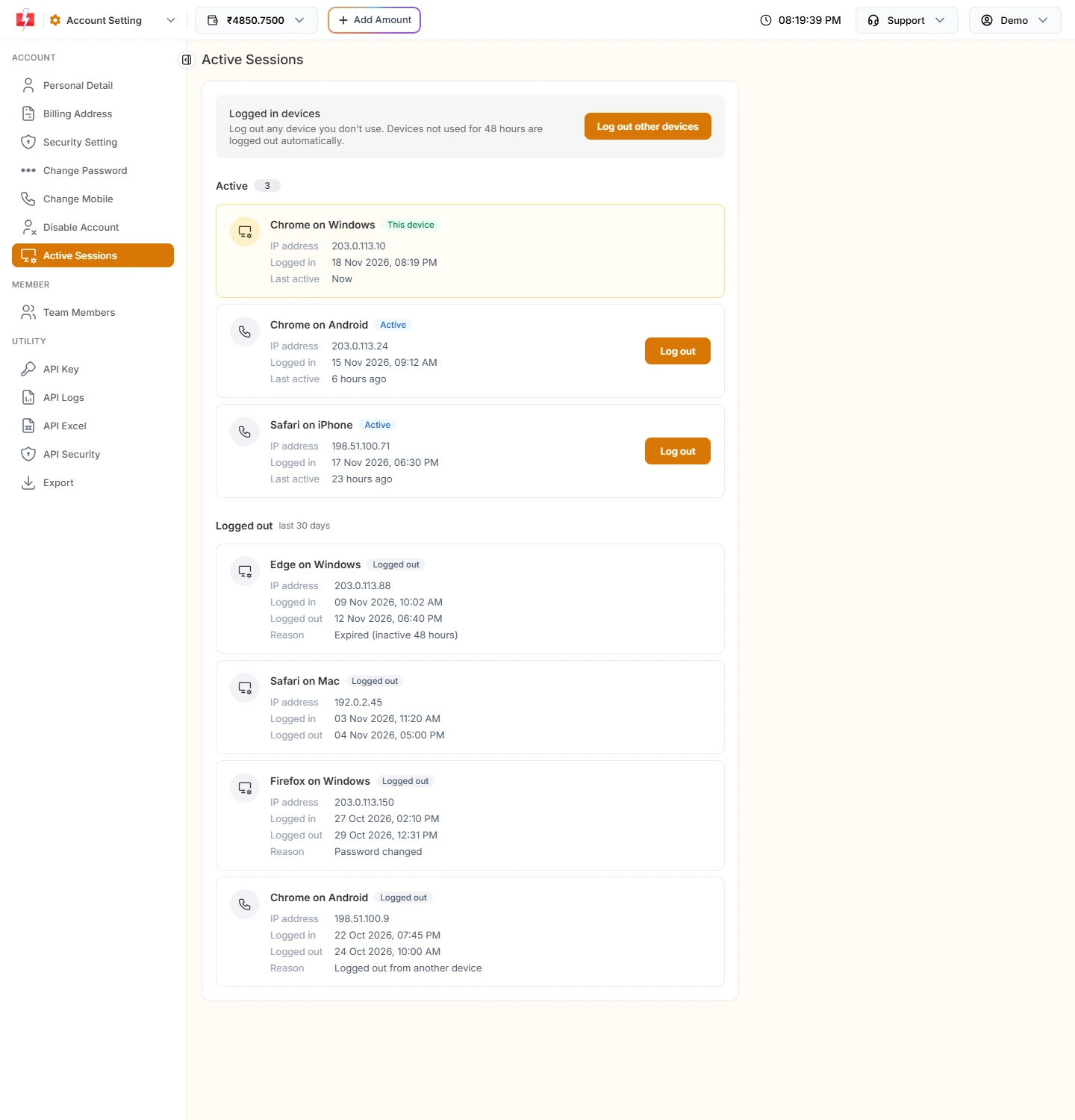
    Fast2SMS Active Sessions page with active devices and logged out devices showing reasons such as Expired (inactive 48 hours), Password changed and Logged out from another device
    The Reason line tells you why the device was logged out.

Every logout reason and what to do

Reason shown Why it happened What to do
Expired (inactive 48 hours) The device was not used for 48 hours Nothing. Log in again. This is normal.
Password changed The password was changed. All other devices are signed out. If you did not change it, reset your password at once and contact support
Mobile number changed The registered mobile was changed. Other devices and the mobile app are signed out. Log in with the new number. If you did not change it, contact support
Logged out from another device Someone used Log out or Log out other devices on Active Sessions Check who else has your password
Logged out everywhere All sessions of the account were ended Log in again
Logged out Log Out was used on that device Log in again

Other messages you may see

  • “Your session has expired. Please refresh the page and try again.” A page was open too long. Refresh it and try again.
  • An OTP at login when 2FA is off. Fast2SMS asks for an OTP if you have not logged in for a month.
  • “Your account is blocked, contact Fast2SMS support to enable it.” The account was disabled. Only support can turn it on again.

A logout reason you cannot explain, such as “Password changed” when you changed nothing, is a warning sign. Change your password, log out other devices and turn on 2F Authentication in Security Setting.

Protect your account

Turn on 2F Authentication so every login needs an OTP on your mobile.

Sign up free →Book a free meeting

Frequently asked questions

Why does Fast2SMS log me out after 2 days?

Devices that are not used for 48 hours are logged out automatically. Using the panel within that time keeps the session active.

I changed my password and my phone got logged out. Why?

Changing the password signs out all other devices. Log in on the phone with the new password.

Can I stay logged in forever?

No. Any device idle for 48 hours is logged out for safety.

Does being logged out stop my scheduled campaigns or API?

No. Logging out of the panel does not cancel scheduled sends, and the API works with your API key, not your login.

Back to sending

Log in to Fast2SMS and pick up where you left off.

Sign up free →Book a free meeting

Related guides

  • How to see logged-in devices and log out other devices in Fast2SMS
  • How to turn on two-factor authentication and secure your Fast2SMS login
  • How to change your registered mobile number or email in Fast2SMS
  • How to disable (close) your Fast2SMS account

Related articles

  • Team member can’t see WhatsApp chats or numbers? Live Chat access problems fixed
  • How to contact Fast2SMS support: ticket, email, meeting and feature requests
  • Fast2SMS new panel tour: dashboard, apps, wallet rates and where everything moved
  • Paid but wallet not credited, or payment failed? What to do after a Fast2SMS recharge

    New to Fast2SMS?

    Get ₹50 free credit when you sign up.

    Sign up free or book a free meeting

    Topics

    • Bulk SMS
    • WhatsApp
    • OTP
    • RCS
    • Voice Call
    • DLT
    • Delivery Report
    • Transaction
    • Address Book
    • Webhooks

    On this page

    1. How to find the reason
    2. Every logout reason and what to do
    3. Other messages you may see
    4. Frequently asked questions
    5. Related guides
    Sign up free

    Products

    • Bulk SMS Service
    • WhatsApp Business API
    • OTP SMS
    • RCS Messaging
    • Voice Call (OBD)
    • Cloud Telephony
    • Quick SMS without DLT
    • Campaign Flow Builder
    • Integrations

    Pricing

    • Bulk SMS Pricing
    • WhatsApp Pricing
    • RCS Pricing
    • Voice Call Pricing
    • Cloud Telephony Pricing

    Guides

    • How to send bulk SMS in India
    • Send bulk WhatsApp messages
    • Official WhatsApp Business API
    • WhatsApp OTP API
    • RCS business messaging
    • Bulk voice call service
    • WooCommerce SMS & WhatsApp plugin
    • Shopify SMS & WhatsApp app
    • DLT Registration

    Bulk SMS for

    • Bulk SMS API
    • OTP SMS provider in India
    • Bulk SMS for marketing
    • Bulk SMS for E-commerce
    • Bulk SMS for Schools
    • Bulk SMS for Hospitals
    • Bulk SMS for Real Estate
    • Bulk SMS in Delhi
    • Bulk SMS in Mumbai

    Company

    • About Us
    • Why Fast2SMS
    • Certificates
    • SMS Reseller
    • Contact Us
    • API Docs
    • Sitemap
    Fast2SMS [email protected] +91 6262778822

    Social links

    Meta Business Partner
    © 2026 Fast2SMS. All rights reserved. Privacy Policy · Terms · Article sitemap · Page sitemap