
WhatsApp error 368 means Meta has restricted or disabled your WhatsApp Business Account for breaking a platform policy. Error 131031 means the account is locked, either for a policy violation or because some data in the request (such as the two-step verification PIN) did not match the account. In both cases messages stop until the restriction ends or Meta reverses it.
This page explains how Meta’s restrictions work, where to see the reason, and how to request a review.
What error 368 and 131031 mean
| Code | Meaning | Fix |
|---|---|---|
| 368 | The WhatsApp Business Account is restricted or disabled for violating a platform policy | Read the violation in Business Support Home and request a review |
| 131031 | The account is locked for a policy violation, or Meta could not match data in the request (for example the two-step PIN) with the account | Check the violation; if it is a data mismatch, confirm the PIN |
Why Meta restricts an account
At the time of writing, Meta first sends a warning that names the broken policy. Repeat problems lead to longer limits:
- A 1 or 3 day block on template messages and on adding numbers.
- A 5, 7 or 30 day block on all messages and on adding numbers.
- An account lock, an open-ended block on all messages that is lifted only through an appeal.
- Permanent disabling, if nothing changes after several warnings.
Common triggers are spam, sending to people who did not opt in, using the wrong template category, high-risk content and many users blocking or reporting your messages. Serious violations such as scams can lead to removal straight away.
How to fix error 368 or 131031
-
Check the number in WhatsApp Manager
In Fast2SMS, open WhatsApp Manager and click Numbers. Click Sync Details to get the latest data from Meta. Look at the Status column and the Quality value under Messaging limit. A restricted number may show a status such as Flagged, Violation or Banned instead of Connected.
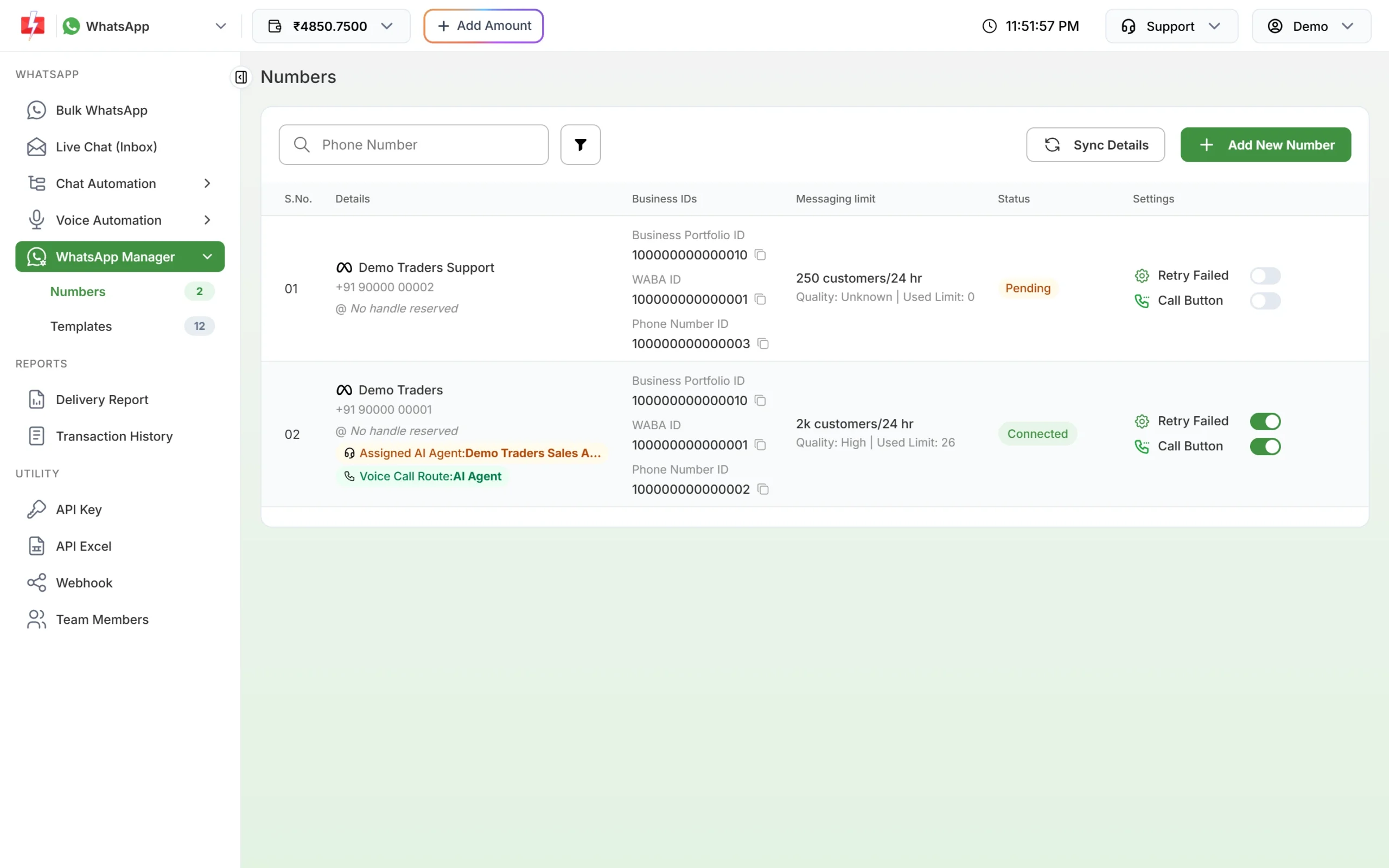
Status and quality for each number. -
Open your Meta account and read the violation
Click the three-dot menu on the number and choose Meta Manager. It opens the templates page of your WhatsApp account in Meta Business Manager. Then go to Business Support Home (under All tools) and select the WhatsApp account. Meta lists the policy, examples, the active restriction and how long it lasts.
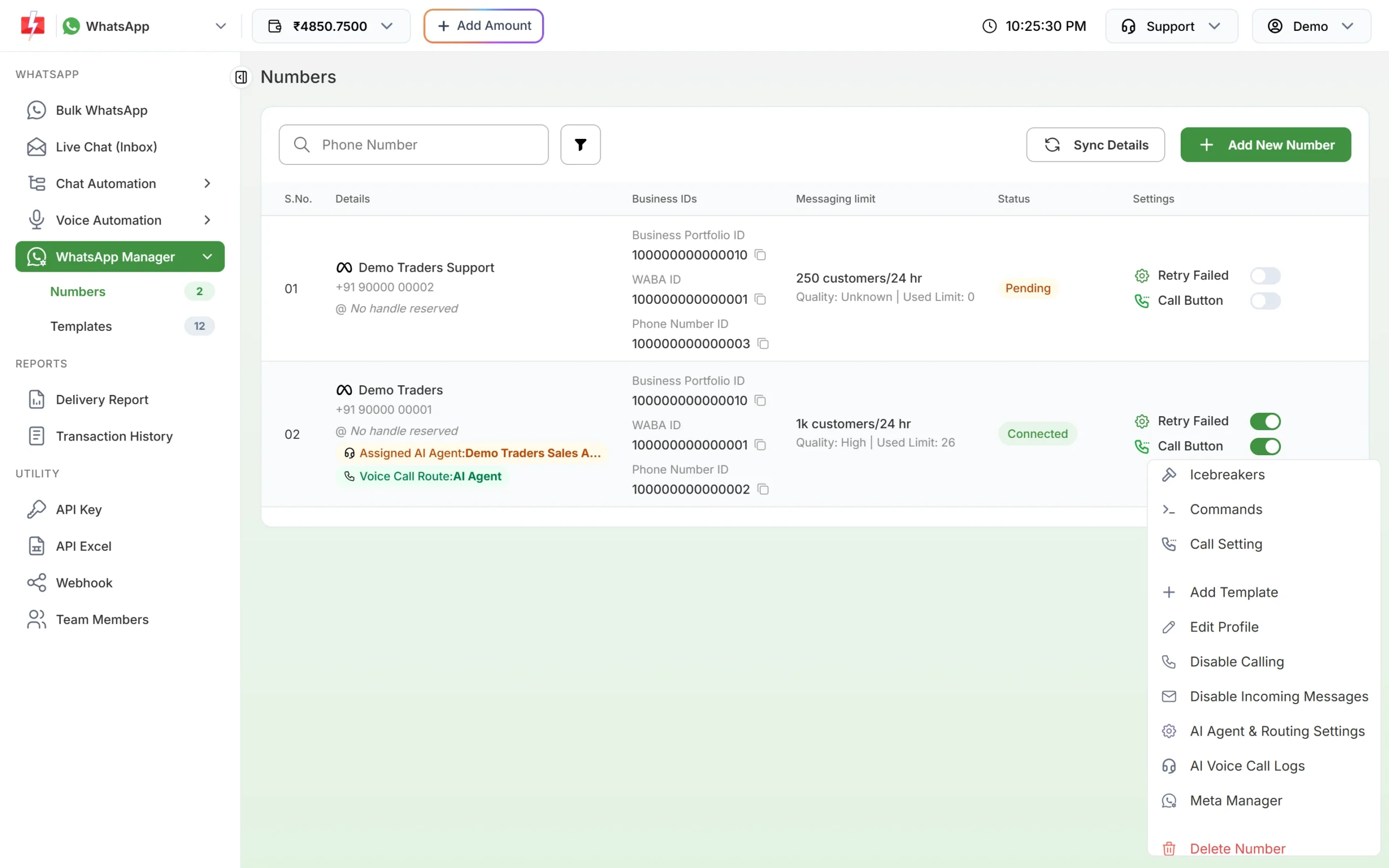
Meta Manager takes you to your account in Meta Business Manager. -
Request a review
In Business Support Home, pick the violation, click Request Review, explain what happened and what you changed, and submit. Meta says a decision usually takes 24 to 48 hours. The result is either Unchanged or Reversed. Meta also notes that some spam violations cannot be appealed, and then you wait for the restriction to end.
-
If 131031 mentions a data mismatch
If the error details talk about data not matching the account rather than a policy, the usual cause is a wrong two-step verification PIN. Contact Fast2SMS support with the Request ID so the team can check it with you.
How to avoid account restrictions
- Message only people who opted in to hear from you on WhatsApp.
- Pick the right template category. Offers belong in Marketing, not Utility.
- Give an easy way to stop messages, and respect opt-outs.
- Watch the quality rating in the Numbers tab and slow down when it drops to Medium.
- Keep the admin email in Meta Business Manager up to date, so you see warnings.
Frequently asked questions
How long does a WhatsApp account restriction last?
At the time of writing, Meta uses blocks of 1, 3, 5, 7 or 30 days. An account lock has no end date and is removed only through an appeal.
Can I appeal a WhatsApp Business Account restriction?
Yes, from Business Support Home with Request Review. Meta says some spam violations cannot be appealed.
How long does Meta take to answer a review request?
Meta says it typically takes 24 to 48 hours.
Can Fast2SMS remove a Meta restriction?
No. Only Meta can lift or reverse a restriction. Fast2SMS support can help you read the violation and prepare your review request.
Are messages that failed with error 368 refunded?
Yes. Every failed WhatsApp message is refunded to your Fast2SMS wallet automatically.
Can I just connect a new number to get around the block?
Meta’s blocks also stop you from adding numbers to the restricted account, and repeat violations lead to longer limits. Fix the cause first.