
Your WhatsApp quality rating is Meta’s score of how customers react to your messages: High (green), Medium (yellow) or Low (red). It mainly depends on how many people block or report you, and it decides whether your messaging limit can grow and whether your templates keep working. This guide explains the WhatsApp quality rating, the phone number statuses you see in Fast2SMS, and what to do when quality drops.
What is the WhatsApp quality rating?
Meta rates every business phone number. The rating is based on how your messages were received by customers over the past seven days, with recent messages counting more. The main signals are:
- customers who block your number,
- customers who report your messages as spam,
- the reasons people pick when they block a business.
Templates also get their own quality rating. Meta looks at negative feedback and low read rates for each template.
Quality rating labels in Fast2SMS
| Shown in Fast2SMS | Meta colour | What it means |
|---|---|---|
| High | Green | Little or no negative feedback. Your number is healthy. |
| Medium | Yellow | Some customers are blocking or reporting you, or not reading. Fix it now. |
| Low | Red | Many customers are unhappy. Templates may be paused and growth stops. |
| Unknown | None yet | Meta has no feedback data yet, common for new numbers and new templates. |
How to check your quality rating
-
Open WhatsApp Manager > Numbers
In the WhatsApp sidebar, click WhatsApp Manager > Numbers. In the Messaging limit column you will see a line like “Quality: High | Used Limit: 46”. The Status column shows whether the number is Connected.
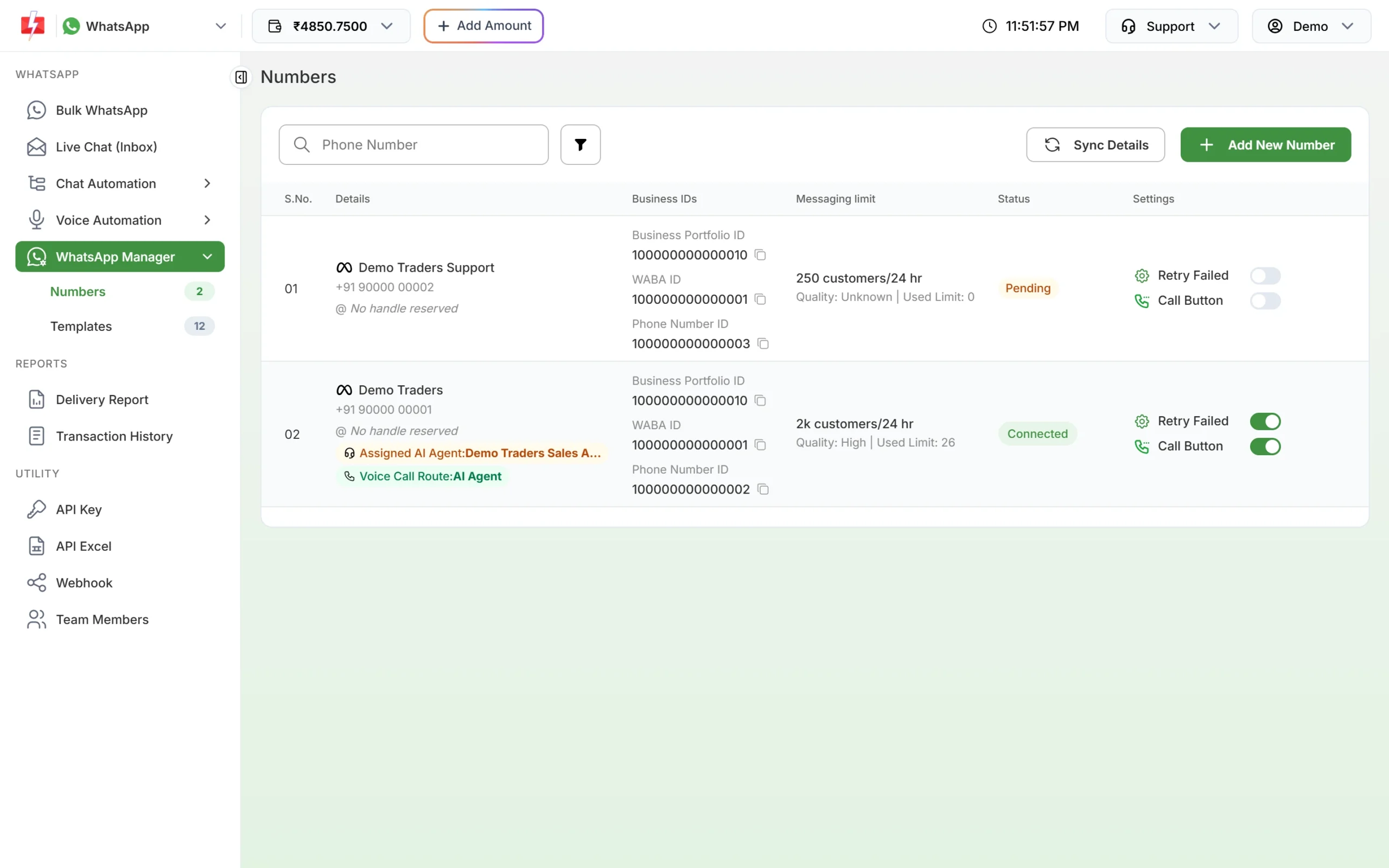
Quality and status for each number. -
Click Sync Details for fresh values
Quality, status and limit come from Meta. Click Sync Details at the top of the page to update them. To see Meta’s own view, open the number’s action menu and choose Meta Manager.
-
Check template status
Open WhatsApp Manager > Templates and use the filter. Under Status you can pick APPROVED, PENDING, REJECTED, PAUSED or DISABLED. A template with poor feedback can move from APPROVED to PAUSED or DISABLED.
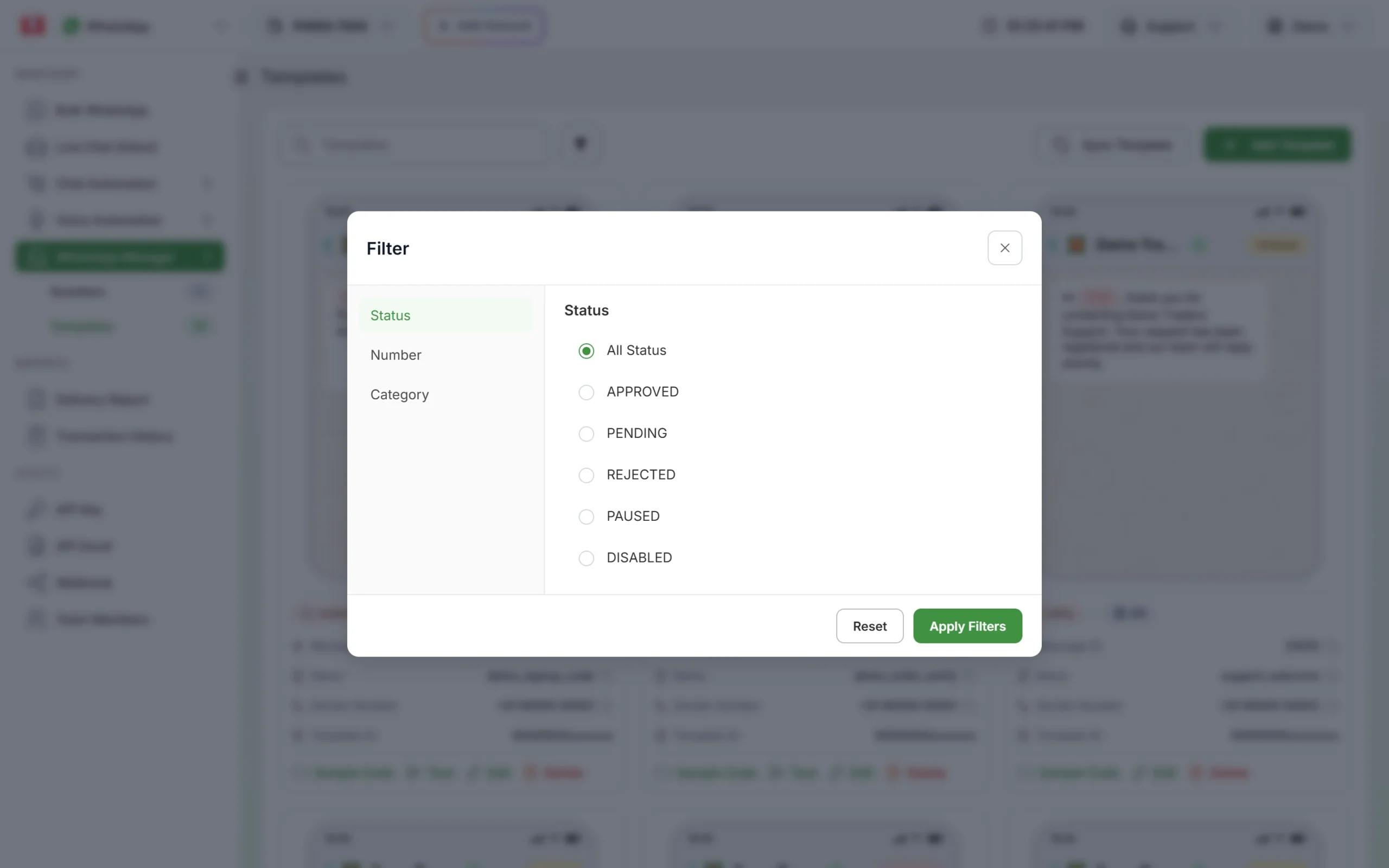
Filter templates by status to find paused ones.
What a low quality rating does
- Your messaging limit stops growing. Meta raises limits only for businesses sending high-quality messages across all numbers and templates.
- Templates can be paused or disabled. Only APPROVED templates can be sent. In Fast2SMS, a paused template disappears from the Bulk WhatsApp picker, and queued messages that use it fail with “Template is PAUSED”. Failed messages are refunded to your wallet.
- Repeated problems lead to restrictions. Meta says accounts that keep breaking its policies, or get excessive negative feedback, can get short blocks on templates, longer blocks on all messaging, an account lock, and finally removal from the platform.
Phone number status in Fast2SMS
The Status column on the Numbers page shows Meta’s status for the number. Only Connected numbers can send.
| Status | What it means | What to do |
|---|---|---|
| Connected (green) | The number is live on the API and can send and receive. | Nothing. |
| Pending (orange) | Onboarding is not finished. | It will not appear in Select Sender Number. Finish the setup and click Sync Details. |
| Flagged | An older Meta status for low quality. | Improve quality as below, then sync. |
| Banned, Violation | WhatsApp has blocked the number for policy reasons. | Read the notice in Meta Business Manager. A banned number must be unbanned through Meta’s appeal process. |
| Disconnected, Rejected, Failed | The number is not working on the API. | Check Meta Business Manager and contact Fast2SMS support. |
For numbers in the red statuses (Banned, Rejected, Failed, Violation, Disconnected), the Add Template and Edit Profile options are hidden from the number’s menu.
How to improve your quality rating and reduce blocks
- Message only people who opted in. Collect permission that names your business and says they will get WhatsApp messages from you. Do not upload bought or scraped lists.
- Make the first line useful. Start with the customer’s name and the reason for the message: their order, their appointment, an offer on something they bought before.
- Give an easy way out. Add a quick reply button such as “Stop promotions” to marketing templates, and remove those customers from your next list. A customer who can stop easily does not need to block you.
- Use the right category. Offers go in Marketing templates. Order and payment updates go in Utility. Sending promotions dressed as updates annoys customers.
- Send less, to the right people. Split your list by interest and do not send the same offer to everyone every day.
- Answer replies. Use Live Chat (Inbox) or automatic replies so customers who write back get an answer.
- Pause a template that is hurting you. If one template’s feedback is bad, stop using it and write a better one.
What happens when users report your messages as spam?
A report is a strong negative signal. A few reports from a large campaign lower your quality rating. Many reports in a short time can get templates paused and, if it keeps happening, can lead Meta to limit or remove your account. That is why one careless blast to an old, cold list can undo months of good work.
Common problems and fixes
| Problem | Fix |
|---|---|
| Quality shows Unknown for weeks | Meta has no feedback yet. Send a few campaigns to opted-in customers and sync again. |
| Template missing from Bulk WhatsApp | It is no longer APPROVED. Check its status with the Templates filter. |
| Delivery Report shows “Template is PAUSED” | Meta paused the template due to feedback. Use another approved template. The failed messages are refunded. |
| Number not listed in Select Sender Number | Only Connected numbers are listed. Check the Status column on the Numbers page. |
Frequently asked questions
How is the WhatsApp quality rating calculated?
Meta looks at how customers reacted to your messages over the past seven days, mainly blocks, spam reports and the reasons people give when they block you. Recent messages count more.
How long does it take for quality to improve?
The rating looks at the last seven days, so old mistakes stop counting once you send better messages for a while. Meta does not promise a fixed time. Keep sending only to engaged customers and check the rating daily.
Does a Low quality rating reduce my messaging limit?
Not since Meta’s October 2025 change. It does stop your limit from going up and can get templates paused.
Can I see which customers blocked me?
No. Meta does not share who blocked or reported you. Watch the quality rating and your failed messages in the Delivery Report instead.
Why is my number status Pending in Fast2SMS?
The number has not finished onboarding with Meta. It cannot send until it shows Connected. Click Sync Details after finishing the setup, or book a call with support.
Will Fast2SMS refund messages that fail because a template was paused?
Yes. Every failed WhatsApp message is refunded to your wallet automatically, whatever the reason.