
A DLT consent template is a short statement you register on your DLT portal that explains what kind of messages a customer agrees to receive from your brand. You need one before you can register Service Explicit or Promotional content templates. You do not need one for Service Implicit (transactional) messages such as OTPs and order updates.
This guide explains what consent means under DLT, the difference between explicit and inferred consent, how customers give and take back consent, and how to register a consent template on your DLT portal.
What is a consent template in DLT?
There are two kinds of templates on a DLT portal:
- A content template is the actual SMS text you send, with variables like {#var#}.
- A consent template describes the scope of what the customer agrees to. For example: “Demo Traders would like to send you offers and new product updates by SMS.” It has no variables and no real offer text.
On most portals you register the consent template first. After it is approved, you choose it while registering a Service Explicit or Promotional content template. That is how the operator knows which consent covers which message.
When do you need a consent template?
| Template category | Consent template needed? | Typical use |
|---|---|---|
| Service Implicit (transactional) | No | OTP, order, delivery, payment, appointment, account alerts |
| Service Explicit | Yes | Messages to existing customers about related products or services, after they agree |
| Promotional | Yes, on portals that link consent to promotional templates | Offers, sales, new launches |
Operators have been moving Service Explicit into the Promotional category. At the time of writing, Fast2SMS treats both the same way in the panel: as Service Explicit or Promotional, with promotional sending hours.
Explicit consent vs inferred consent
Inferred consent comes from an existing relationship or a transaction the customer started. If someone buys from you, they expect an order confirmation and a delivery update. You do not need to ask for permission separately for those messages. This is why Service Implicit templates need no consent template.
Explicit consent is a clear, recorded “yes” from the customer to receive a certain kind of message, usually commercial. It must be verifiable on DLT. Explicit consent is what lets a promotional or service explicit message reach a customer who would otherwise not receive it, for example a customer on DND.
How do customers give and revoke consent?
TRAI asked operators to build a Digital Consent Acquisition (DCA) system. In this system, the consent request goes to the customer from a common short code in the 127xxx series. The message names the brand and the purpose of the consent, and tells the customer how to revoke it. The customer confirms, and the consent is stored on DLT, where every operator can check it during scrubbing.
Customers can take back consent in the same system. Under the TRAI amendments of 2025, every promotional message must also carry an option to opt out, and after a customer opts out, the sender cannot ask them for consent again for 90 days. Rules in this area are still changing, so check your DLT portal for the method it offers at the time you register.
How to register a consent template on your DLT portal
Each portal (Jio, Airtel, Vi, BSNL, Smartping and others) has its own screens, but the steps are close to this:
-
Open the consent section
Log in to your DLT portal as the Principal Entity. Open the templates area and choose the option for consent templates (on some portals it is called Consent Registration).
-
Fill in the details
Enter a clear template name (not “Test” or “Sample”), your brand name exactly as your business uses it, and the scope of consent. The scope should say who you are, what you will send and why. Do not add variables, prices or offer text.
-
Submit and wait for approval
Submit the template. When it is approved, note its consent ID or name. You will choose it when you register your Service Explicit or Promotional content templates.
-
Register the content template and add it to Fast2SMS
Register the actual promotional SMS as a content template linked to that consent. After DLT approves it, open Fast2SMS DLT Manager > Content Template > Add Content Template. Select your entity and sender IDs, enter the Content Template ID, choose Service Explicit or Promotional as the Template Type, paste the approved text and upload the DLT approval screenshot.
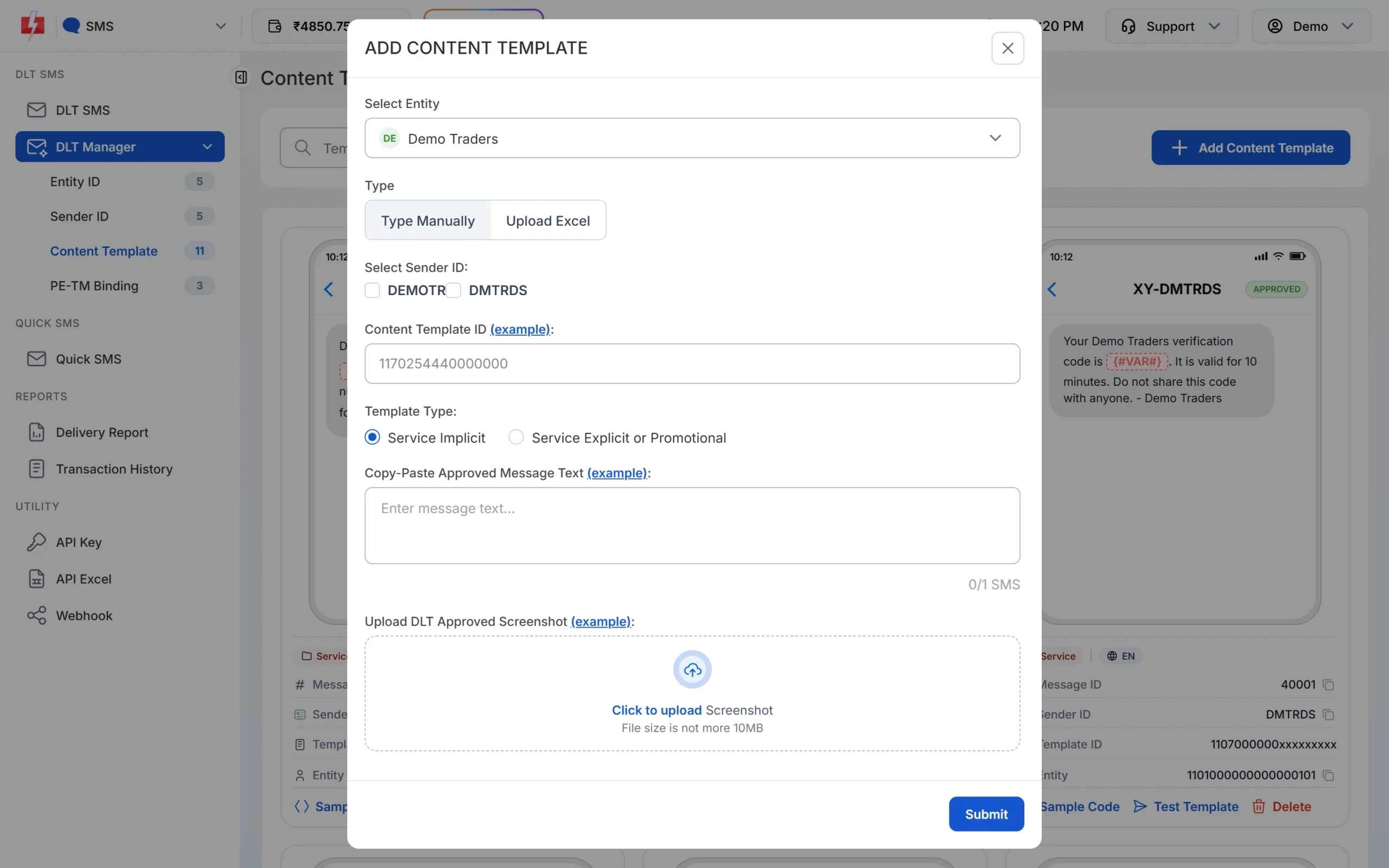
Choose Service Explicit or Promotional for templates that need consent.
Fast2SMS does not store your consent templates. You keep them on your DLT portal. In Fast2SMS you only add the content template that uses them.
Common reasons a consent template is rejected
- The brand name does not match your entity or belongs to someone else.
- The template name is generic, such as “Test” or “Consent 1”.
- The scope contains variables such as {#var#}, or real offer text.
- The scope does not say clearly who is sending and what the customer will receive.
Frequently asked questions
Do I need a consent template for OTP SMS?
No. OTPs are sent on Service Implicit (transactional) templates, which do not need a consent template.
What is the difference between a consent template and a content template?
A consent template describes what the customer agrees to receive. A content template is the actual SMS text you send. Promotional and service explicit content templates are linked to a consent template.
Can a consent template have variables?
No. A consent template is a fixed statement of scope. Variables belong only in content templates.
Does consent let my promotional SMS reach DND numbers?
Valid consent recorded on DLT can allow the messages it covers to reach that customer even if they are on DND. Consent you only collected on your own website does not count.
How many consent templates can I register?
You can register more than one, for example one for each brand or type of message. Keep each scope clear and specific.
Do I add the consent template in Fast2SMS?
No. Fast2SMS only needs your approved content templates. The consent link stays on your DLT portal and is checked by the operator.
Can a customer withdraw consent?
Yes. Customers can revoke consent through the operator’s consent system, and every promotional message must offer a way to opt out.