
Appointment confirmation and reminder SMS templates are registered on DLT as Service Implicit, because they give an existing customer information about a booking they made. This page has 14 appointment reminder SMS templates for clinics, diagnostic labs, salons, service centres and consultants: booking confirmed, day-before reminder, rescheduled, cancelled, token number, report ready and more. Each one comes with variable tags, a sample message, the character count and SMS parts, plus the steps to send it from Fast2SMS.
Appointment SMS: what to send and when
| When | Message | DLT category |
|---|---|---|
| Right after booking | Booking confirmed, with date, time and place | Service Implicit |
| 1 day before | Reminder with a number to call for changes | Service Implicit |
| 2 to 3 hours before | Short same-day reminder with the address | Service Implicit |
| On change or cancellation | New time, or cancellation note | Service Implicit |
| After the visit | Report ready, follow-up due | Service Implicit |
| Any time | “Book a free check-up this week”, seasonal offers | Promotional (10 AM to 9 PM, not to DND numbers) |
Service Implicit reminders reach numbers on DND and are not limited to daytime hours, so an early-morning reminder for a 9 AM slot still goes out. Change the brand names in the samples (Demo Clinic, Demo Labs, Demo Salon, Demo Motors) to your own. Counts are for the sample shown.
Booking and reminder templates
1. Appointment confirmed
DLT category: Service Implicit. Variables: {#alphanumeric#}.
Dear {#alphanumeric#}, your appointment at Demo Clinic is confirmed for {#alphanumeric#} at {#alphanumeric#}. Please arrive 10 minutes early. - Demo ClinicSample message (123 characters, English, 1 SMS): Dear Anita, your appointment at Demo Clinic is confirmed for 22 Nov at 11 AM. Please arrive 10 minutes early. – Demo Clinic
2. Reminder one day before
DLT category: Service Implicit. Variables: {#alphanumeric#}, {#cbn#}.
Reminder: {#alphanumeric#}, your appointment at Demo Clinic is tomorrow at {#alphanumeric#}. To reschedule, call {#cbn#}. - Demo ClinicSample message (116 characters, English, 1 SMS): Reminder: Anita, your appointment at Demo Clinic is tomorrow at 11 AM. To reschedule, call 9000000001. – Demo Clinic
The callback number in a {#cbn#} variable must be whitelisted as a CTA on your DLT portal.
3. Same-day reminder with address
DLT category: Service Implicit. Variables: {#alphanumeric#}.
Dear {#alphanumeric#}, see you today at {#alphanumeric#} at Demo Clinic, 12 MG Road, Pune. - Demo ClinicSample message (82 characters, English, 1 SMS): Dear Anita, see you today at 11 AM at Demo Clinic, 12 MG Road, Pune. – Demo Clinic
The address is fixed text. If you have several branches, register one template per branch, or put the branch name in an {#alphanumeric#} variable.
4. Appointment rescheduled
DLT category: Service Implicit. Variables: {#alphanumeric#}, {#cbn#}.
Your Demo Clinic appointment has been moved to {#alphanumeric#} at {#alphanumeric#}. Call {#cbn#} if this time does not suit you. - Demo ClinicSample message (124 characters, English, 1 SMS): Your Demo Clinic appointment has been moved to 23 Nov at 4 PM. Call 9000000001 if this time does not suit you. – Demo Clinic
5. Appointment cancelled
DLT category: Service Implicit. Variables: {#alphanumeric#}, {#cbn#}.
Your Demo Clinic appointment on {#alphanumeric#} has been cancelled. To book a new slot, call {#cbn#}. - Demo ClinicSample message (109 characters, English, 1 SMS): Your Demo Clinic appointment on 22 Nov has been cancelled. To book a new slot, call 9000000001. – Demo Clinic
6. Missed appointment
DLT category: Service Implicit. Variables: {#cbn#}.
We missed you at Demo Clinic today. To book a new appointment, call {#cbn#}. - Demo ClinicSample message (93 characters, English, 1 SMS): We missed you at Demo Clinic today. To book a new appointment, call 9000000001. – Demo Clinic
Clinic and lab templates
7. Token number for today
DLT category: Service Implicit. Variables: {#alphanumeric#}, {#numeric#}.
Dear {#alphanumeric#}, your token number for Dr {#alphanumeric#} at Demo Clinic today is {#numeric#}. Please wait for your turn. - Demo ClinicSample message (111 characters, English, 1 SMS): Dear Anita, your token number for Dr Mehta at Demo Clinic today is 14. Please wait for your turn. – Demo Clinic
8. Online consultation link
DLT category: Service Implicit. Variables: {#alphanumeric#}, {#url#}.
Your online consultation with Demo Clinic starts at {#alphanumeric#} today. Join here: {#url#} - Demo ClinicSample message (117 characters, English, 1 SMS): Your online consultation with Demo Clinic starts at 6 PM today. Join here: https://democlinic.in/v/2210 – Demo Clinic
9. Home sample collection
DLT category: Service Implicit. Variables: {#alphanumeric#}.
Our Demo Labs technician will visit on {#alphanumeric#} between {#alphanumeric#} to collect your sample. Please stay fasting if advised. - Demo LabsSample message (135 characters, English, 1 SMS): Our Demo Labs technician will visit on 22 Nov between 7 AM and 9 AM to collect your sample. Please stay fasting if advised. – Demo Labs
10. Report ready
DLT category: Service Implicit. Variables: {#alphanumeric#}, {#url#}.
Dear {#alphanumeric#}, your Demo Labs report is ready. View or download it here: {#url#} - Demo LabsSample message (109 characters, English, 1 SMS): Dear Anita, your Demo Labs report is ready. View or download it here: https://demolabs.in/r/88213 – Demo Labs
11. Follow-up visit due
DLT category: Service Implicit. Variables: {#alphanumeric#}, {#cbn#}.
Dear {#alphanumeric#}, your follow-up visit at Demo Clinic is due on {#alphanumeric#}. Call {#cbn#} to book a slot. - Demo ClinicSample message (110 characters, English, 1 SMS): Dear Anita, your follow-up visit at Demo Clinic is due on 6 Dec. Call 9000000001 to book a slot. – Demo Clinic
Salon and service centre templates
12. Salon or spa booking confirmed
DLT category: Service Implicit. Variables: {#alphanumeric#}.
Hi {#alphanumeric#}, your {#alphanumeric#} booking at Demo Salon is confirmed for {#alphanumeric#}. See you soon. - Demo SalonSample message (105 characters, English, 1 SMS): Hi Neha, your hair spa booking at Demo Salon is confirmed for Sat 23 Nov 5 PM. See you soon. – Demo Salon
13. Vehicle service due
DLT category: Service Implicit. Variables: {#alphanumeric#}, {#cbn#}.
Your vehicle {#alphanumeric#} is due for service on {#alphanumeric#}. Call {#cbn#} to book a slot at Demo Motors. - Demo MotorsSample message (114 characters, English, 1 SMS): Your vehicle MH12AB1234 is due for service on 30 Nov. Call 9000000001 to book a slot at Demo Motors. – Demo Motors
Hindi appointment reminder template
Hindi SMS are Unicode: 1 part holds 70 characters. This short reminder fits in 1 part with a short name.
14. Reminder (Hindi)
DLT category: Service Implicit. Variables: {#alphanumeric#}.
प्रिय {#alphanumeric#}, Demo Clinic में आपका अपॉइंटमेंट कल {#alphanumeric#} बजे है।Sample message (61 characters, Unicode, 1 SMS): प्रिय Anita, Demo Clinic में आपका अपॉइंटमेंट कल 11 AM बजे है।
Tips to get appointment templates approved
- One purpose per template. A reminder that ends with “get 20% off on your next visit” becomes promotional. Keep reminders plain and send offers separately.
- Keep health details out. Do not put test names, diagnoses or medicines in the SMS. A link to a secure report page is safer.
- Date and time in
{#alphanumeric#}, token numbers in{#numeric#}, links in{#url#}, phone numbers in{#cbn#}. Each tag has its own length limit, 40 characters for{#alphanumeric#}. - Three variables or fewer, with fixed words between them. If you need more details, split them across two templates.
- Brand name fixed in the text, and the same text in your sample message on the DLT portal.
- Short is cheaper. Every template above stays in 1 SMS part in English. Check the counter on the send page before a big campaign.
How to add your appointment templates in Fast2SMS and send them
Add each approved template to Fast2SMS once. You can then send reminders from the panel, schedule them for a date and time, or send them from your booking software through the API.
-
Register the template on your DLT portal
Log in to the DLT portal where your business is registered and add a content template. Pick the category shown with the template, link it to one approved header, paste the text with its variable tags and add a sample message with realistic values. If the text has a
{#url#},{#urlott#}or{#cbn#}variable, whitelist that link or phone number as a CTA on the portal first. Once the portal approves it, note the Content Template ID and take a screenshot of the approved row. -
Add it in DLT Manager
In the Fast2SMS SMS app, open DLT Manager > Content Template and click Add Content Template. Select your entity, tick the Sender ID, enter the Content Template ID, choose Service Implicit as the Template Type (this option covers both Transactional and Service Implicit templates), paste the approved text exactly as the portal shows it in Copy-Paste Approved Message Text, upload the screenshot and click Submit.
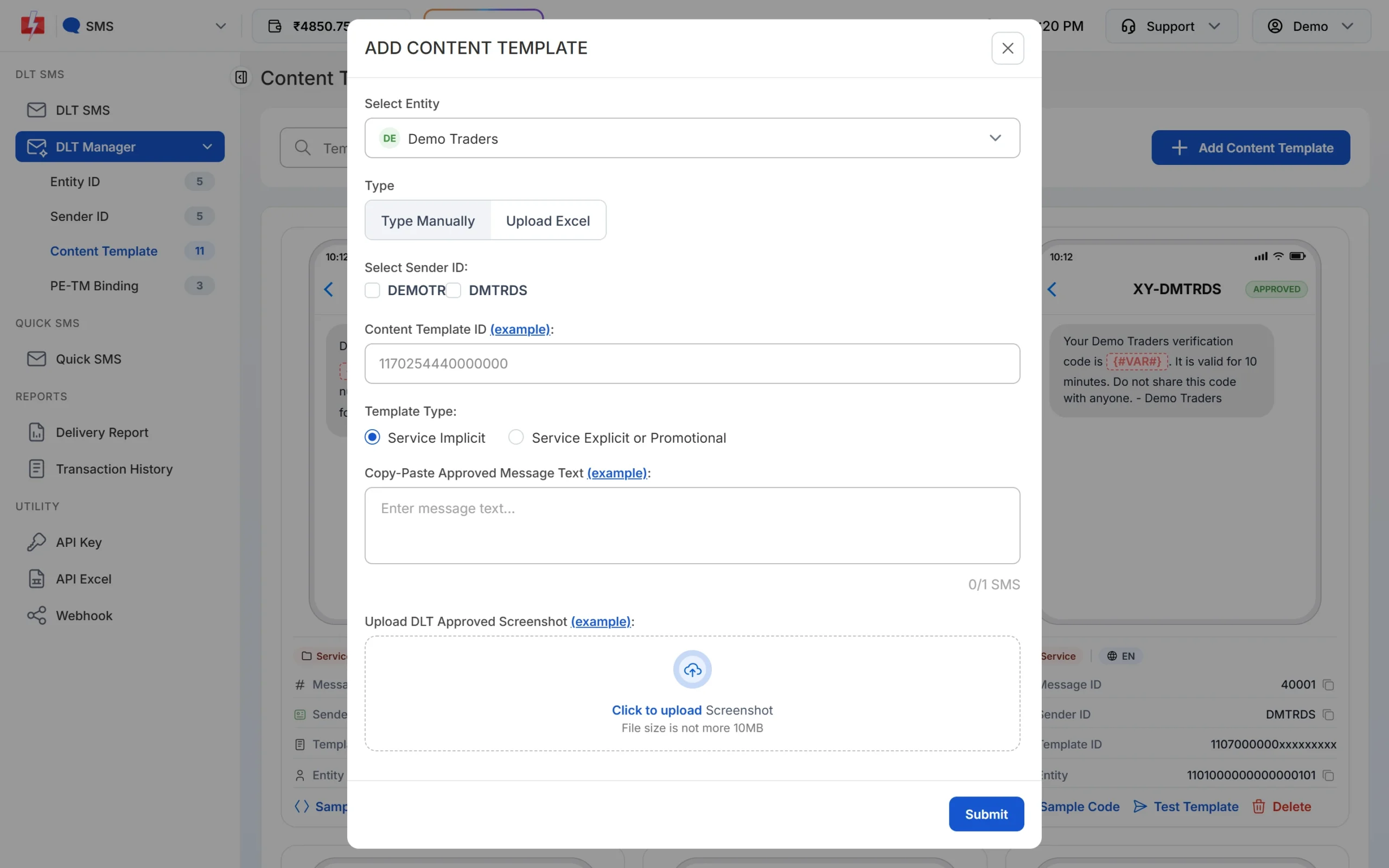
Paste the text exactly as it was approved, including spaces and full stops. -
Wait for Approved and note the Message ID
The template is saved as Pending while Fast2SMS checks it against your screenshot. When the card shows APPROVED, it also shows a Message ID. That short number is what you pass as
messagein the API. The card shows every variable as {#VAR#}, whatever tag you registered. Use Test Template to send one real SMS to your own number before a campaign.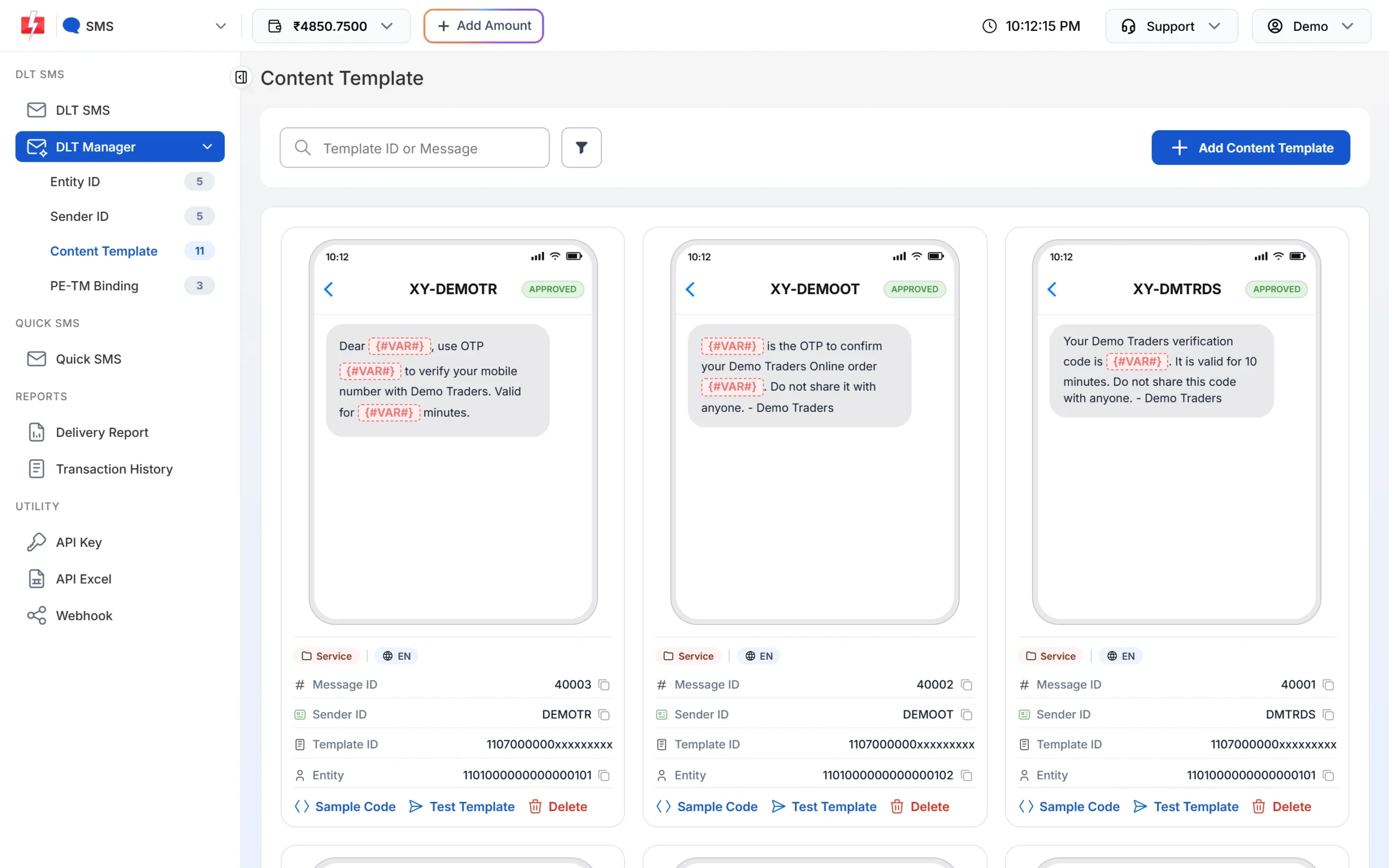
Each approved card shows its Message ID and the Test Template button. -
Pick the template on the DLT SMS page
Open DLT SMS, choose the Sender ID and add numbers under Send To: type them in List, pick contacts from Address Book or upload a CSV File. Then click Select DLT Template. The picker has All, Service Implicit and Service Explicit tabs.
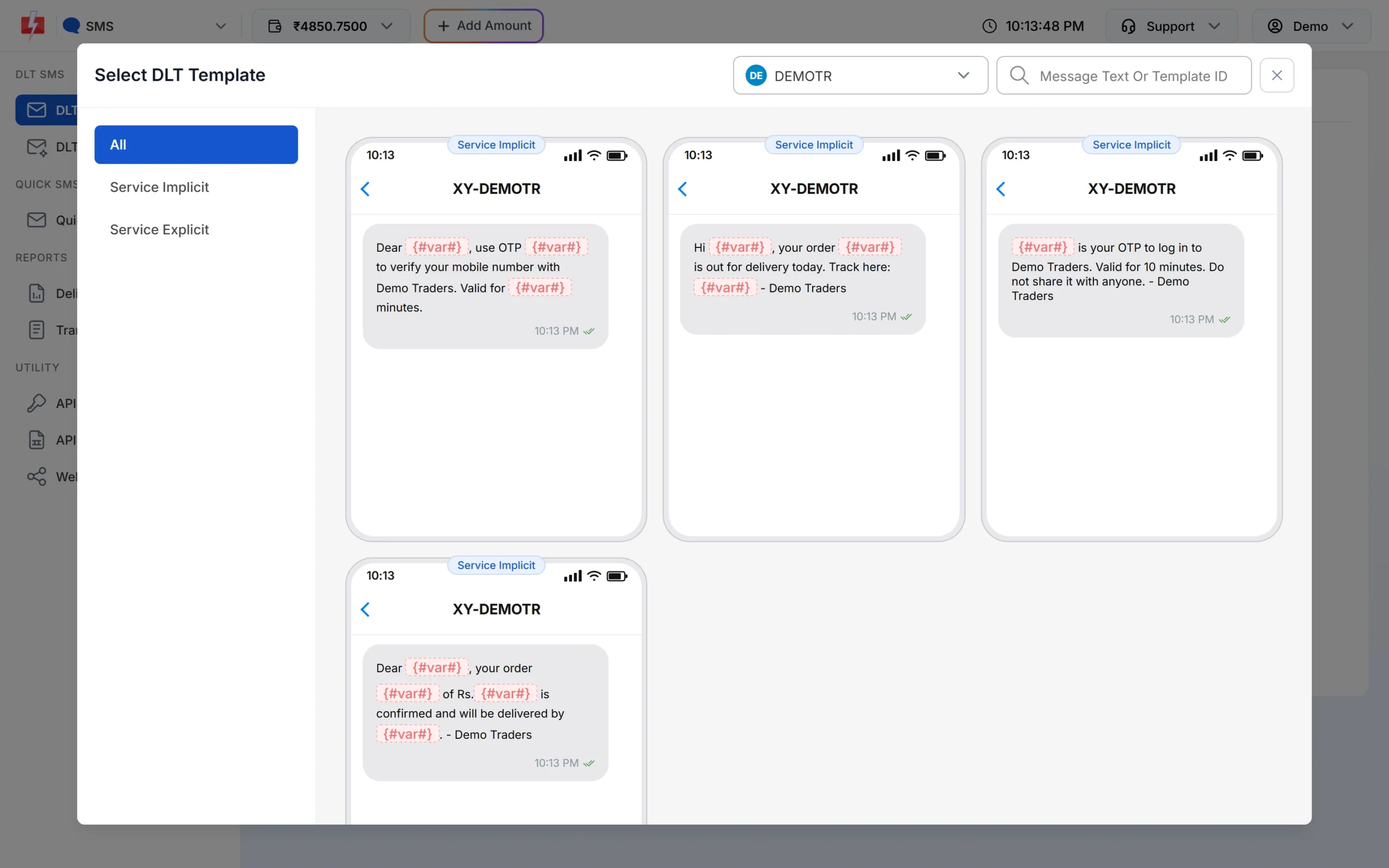
Only approved templates linked to the chosen sender are listed. -
Fill the variables and check the preview
The page shows one box for each variable. As you type, the phone preview shows the final SMS and the counter under it shows characters and SMS parts, such as 107/1 SMS. To send each person their own name, amount or date, use CSV File and map each variable to a column.
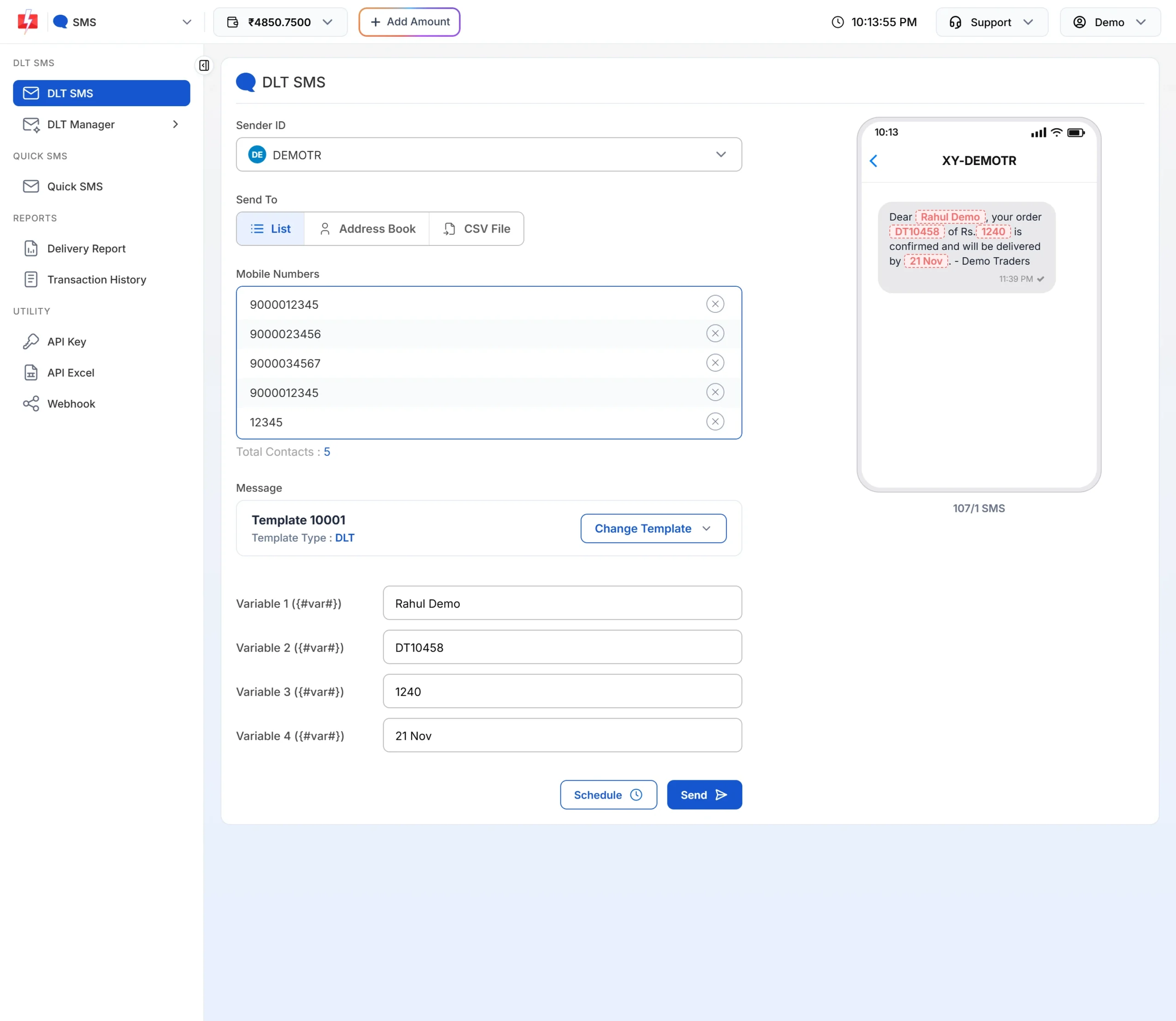
The counter shows how many parts each SMS will use. -
Check the cost, then send or schedule
Click Send. The Message Preview & Confirmation popup shows the cost per SMS, total messages, total, duplicate, valid and invalid numbers, and the total cost. Duplicates and invalid numbers are not charged. Click Confirm & Send, or close it and use Schedule to pick a date and time.
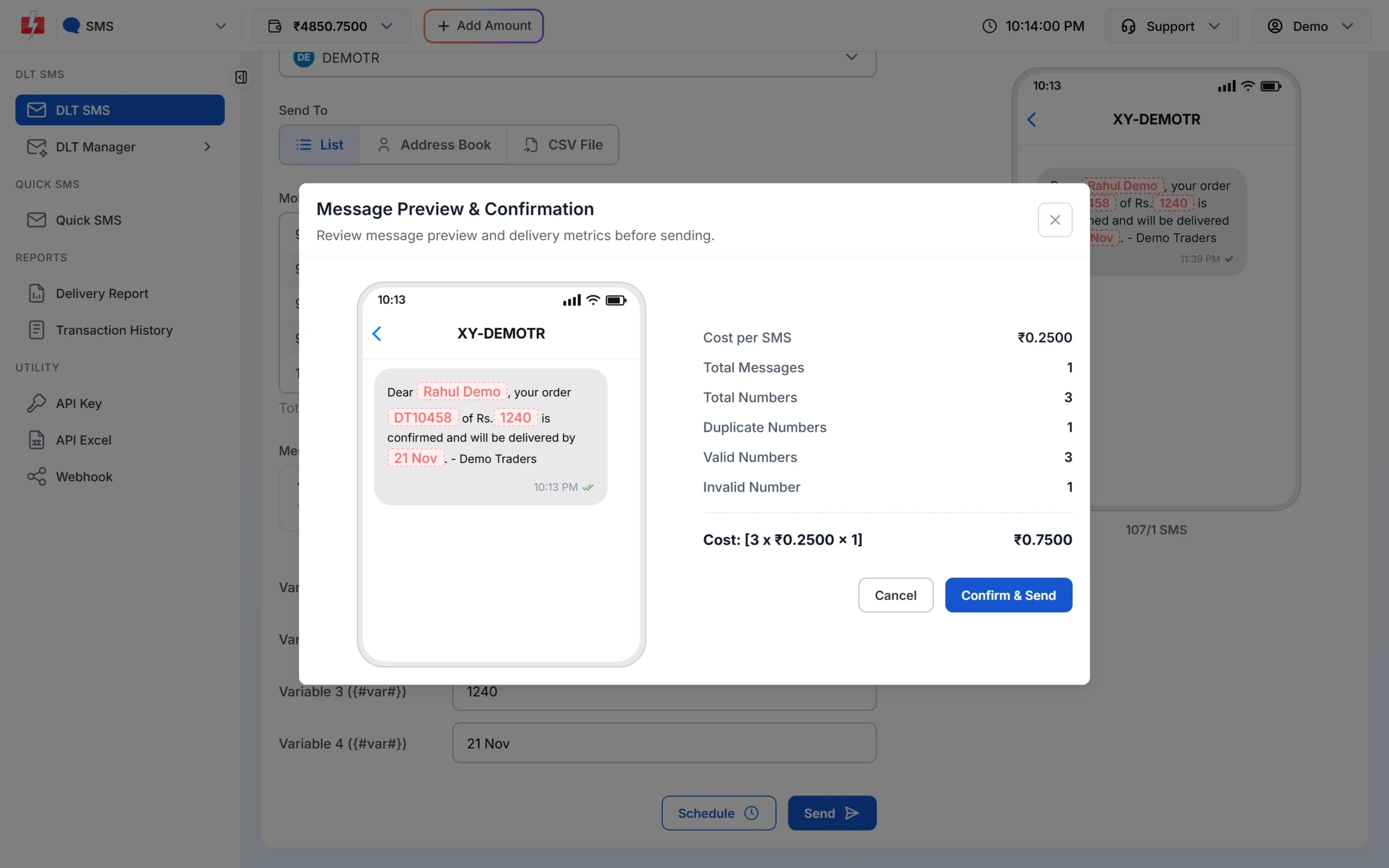
Nothing is sent until you click Confirm & Send.
Each SMS part is charged as one SMS for every valid number, so a template that runs into 2 parts costs twice as much per person as a 1-part template. Keep the text short to save money. See the current rates on the bulk SMS pricing page.
Sending in bulk? For high SMS volumes our team offers discounted rates. Talk to our team or see SMS pricing.
route=dlt, your Sender ID, the template’s Message ID and the values in variables_values. Add schedule_time in the format DD-MM-YYYY-HH-MM (IST) to send the reminder later, for example a day before the slot.Frequently asked questions
Which DLT category is used for appointment reminder SMS?
Service Implicit. The customer booked the appointment, so a confirmation or reminder about it is service information and needs no separate consent.
Can appointment reminders reach DND numbers?
Yes. Service Implicit SMS go to DND numbers and can be sent at any hour.
When should I send an appointment reminder?
A common plan is one SMS at booking, one the day before and a short one 2 to 3 hours before the slot.
Can I include a reschedule number or link?
Yes. Use {#cbn#} for a phone number or {#url#} for a link, and whitelist both as CTAs on your DLT portal.
Can I write the time like 11:30 in a variable?
Keep variable values simple, such as 11 AM or 4 PM, and make sure the sample message on your DLT portal shows the same style you will send.
Can I schedule reminders from the Fast2SMS panel?
Yes. Click Schedule on the DLT SMS page and pick a date and time. You can cancel it later under Delivery Report > Schedule, and the amount comes back to your wallet.
Are appointment reminders allowed on WhatsApp?
Yes, with a WhatsApp utility template approved by Meta. WhatsApp can add buttons such as “Confirm” or “Reschedule”.