
In India, promotional SMS can be sent only during the day. Fast2SMS delivers promotional SMS between 10 AM and 9 PM. If you send a promotional SMS outside these hours, Fast2SMS holds it and sends it at about 10 AM the next morning. Transactional and service messages such as OTPs, order updates and payment alerts have no time limit and go out 24 hours a day.
This guide explains which messages count as promotional, what happens after 9 PM, and how to schedule a campaign so it reaches customers at the right time.
What are the promotional SMS timings in India?
TRAI rules allow commercial promotional messages only in daytime hours, so that people are not disturbed at night. You will read two start times online, 9 AM and 10 AM. To stay on the safe side, Fast2SMS uses 10 AM to 9 PM for promotional SMS.
| Message type | When Fast2SMS sends it |
|---|---|
| Promotional SMS (template type Service Explicit or Promotional, or a 6-digit numeric header) | 10 AM to 9 PM. Sent after about 9 PM: held and sent at about 10 AM the next morning. |
| Transactional and Service Implicit SMS (OTP, order, delivery, payment, appointment) | Any time, 24×7. |
| Quick SMS (no DLT template, random sender) | 24×7. The panel shows “Send SMS 24×7 (no time limits)”. |
| Bulk voice calls | 10 AM to 9 PM only. |
| Promotional RCS messages | 7 AM to 10 PM. |
Rules and windows can change. The hours above are the ones Fast2SMS uses at the time of writing.
Which SMS count as promotional?
Fast2SMS treats an SMS as promotional when either of these is true:
- The DLT content template is registered as Service Explicit or Promotional. In DLT Manager these templates carry a Promo badge.
- The sender ID is a 6-digit number. Numeric headers are used only for promotional traffic, so templates on a numeric header are always treated as promotional.
Templates registered as Service Implicit carry a Service badge. They are not held at night.
What happens if I send a promotional SMS after 9 PM?
Your campaign is accepted and charged as usual, but it is not delivered at night. Fast2SMS keeps it and sends it at about 10 AM the next morning. If you schedule a promotional campaign for a time inside the night window, the schedule moves to about 10 AM.
The panel does not show a separate warning for this. So if you send an offer at 10 PM and see no delivery, the message is waiting for the morning. It is not lost.
How to schedule a promotional SMS inside the allowed hours
-
Choose your sender ID and promotional template
Open DLT SMS. Pick the Sender ID, then click Select DLT Template. Open the Service Explicit tab to see only your promotional templates and click the one you want.
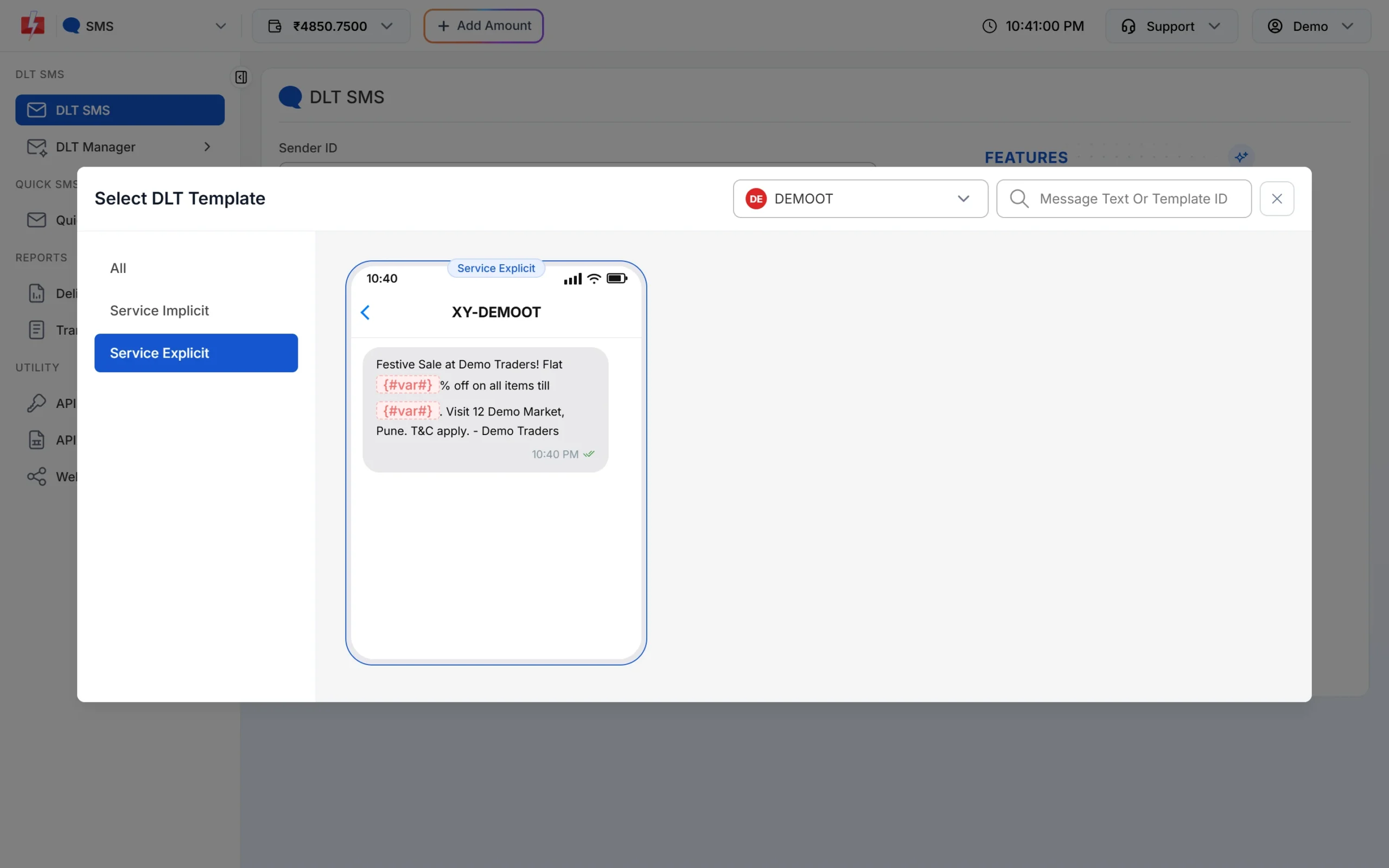
Promotional templates are listed under the Service Explicit tab. -
Add numbers and fill the variables
Under Send To, type the numbers in List, choose contacts from Address Book, or upload a CSV File. Fill each variable of the template. The phone preview shows the final message.
-
Pick a date and a daytime hour
Click Schedule. In the drawer, choose Select Date and Enter Time. Pick a time between 10 AM and 9 PM. If you select a date range, the same message is sent once every day in that range at the same time, and the cost is multiplied by the number of days.
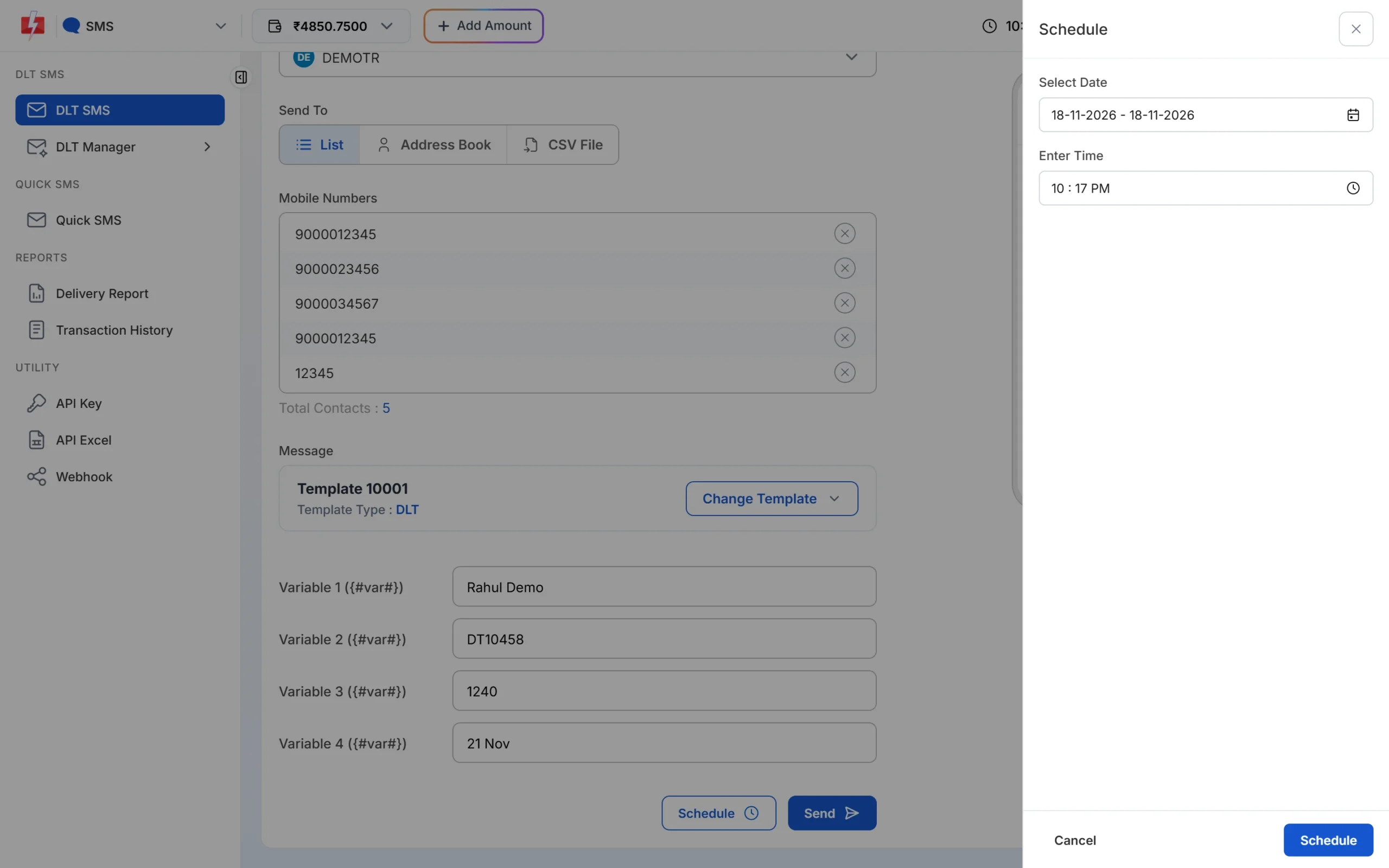
Choose a date and a time inside 10 AM to 9 PM. -
Check the cost and confirm
Click Schedule in the drawer. The Message Preview & Confirmation popup shows the cost per SMS, total numbers, duplicate and invalid numbers and the number of schedule days. Click Confirm & Schedule.
-
See or cancel scheduled campaigns
Go to Delivery Report > Schedule. Every upcoming campaign is listed with its time and a Cancel button. If you cancel before the campaign starts, the amount goes back to your wallet.
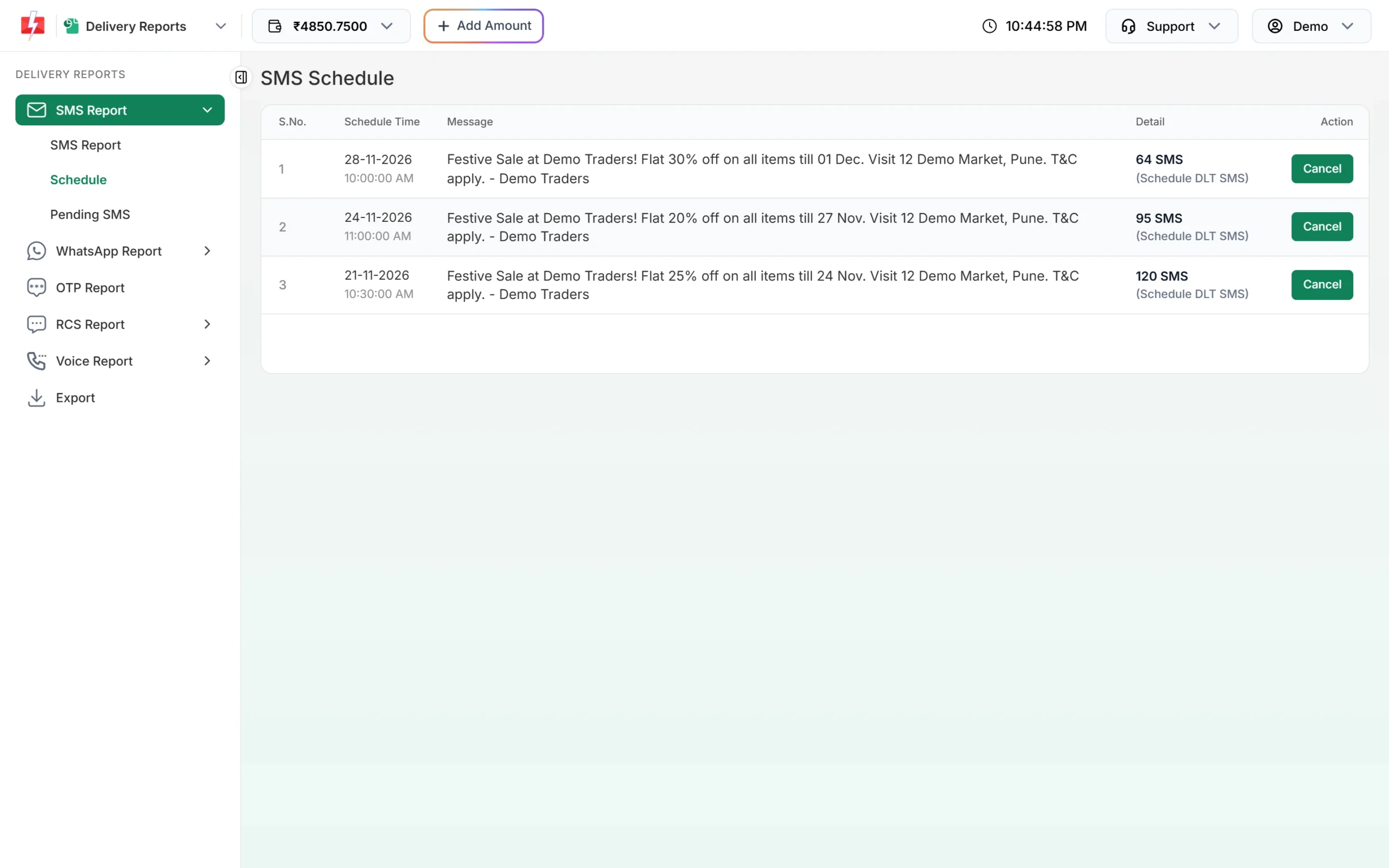
Upcoming scheduled SMS, with Cancel for each campaign.
Tips for timing your promotional SMS
- Send time-bound offers in the morning or early afternoon, so customers have the whole day to act.
- Do not set campaigns for 8:55 PM or later. They may be held to the next morning.
- Keep OTPs and order messages on Service Implicit templates. Never move them to a promotional template, or they will stop at night and miss DND numbers.
- Promotional SMS do not reach numbers on DND for that category, whatever time you send. See what DND and non-DND numbers are.
Frequently asked questions
Can I send promotional SMS after 9 PM in India?
No. Promotional SMS are not delivered at night. Fast2SMS holds them and sends them at about 10 AM the next morning.
Is the promotional SMS window 9 AM or 10 AM?
You will find both in different sources. Fast2SMS starts promotional sending at 10 AM, so your messages are inside the window in every case.
Are OTP SMS allowed at night?
Yes. OTP and other transactional or Service Implicit messages can be sent at any hour of the day or night.
Will a promotional SMS sent at 11 PM be lost?
No. It is held and sent at about 10 AM the next morning, so plan time-bound offers before 9 PM.
Do promotional SMS timings apply on Sundays and holidays?
Yes. The same 10 AM to 9 PM window applies every day of the week.
What time can I make bulk voice calls?
Fast2SMS bulk voice calls run only between 10 AM and 9 PM. A campaign sent outside these hours is scheduled for the next calling window.
Is Service Explicit treated as promotional for timing?
Yes. In Fast2SMS, templates of type Service Explicit or Promotional follow the promotional window.