
WhatsApp marketing for restaurants works when it starts with service: confirm the table, update the order, answer “what’s on the menu” in seconds, and only then send the weekend offer. Add DLT SMS for guests who are not on WhatsApp, Smart OTP for your own ordering site, and RCS for picture-rich menus. This guide shows which message goes on which channel, gives sample templates, and sets up an automated WhatsApp inbox for your restaurant in Fast2SMS.
It is for dine-in restaurants, cafes, bakeries, QSR outlets and cloud kitchens that want direct orders and repeat guests from their own customer list.
Which channel for which restaurant message
Booking and order updates are service messages. Offers, new dishes and festival menus are promotional. A restaurant’s busiest channel is usually incoming WhatsApp: guests asking for the menu, timings and location. Automate those first.
| Message | Best channel | Why |
|---|---|---|
| “Send menu”, “timings”, “location” questions | WhatsApp auto reply or chatbot | Answers come in seconds, even when the staff is busy at the counter. |
| Table booking confirmed | WhatsApp utility or SMS (Service Implicit) | The guest gets the time, party size and a button to call you. |
| Booking reminder (2 hours before) | SMS (Service Implicit) | Short, time-bound and cuts no-shows. |
| Direct order received / ready / out for delivery | WhatsApp utility, SMS backup | The guest knows when to expect the food and can reply with changes. |
| Feedback after the visit | WhatsApp utility with reply buttons | One tap to rate a specific visit. Unhappy guests reach you, not a review site. |
| Loyalty points earned | SMS (Service Implicit) | Expected after a bill and works on every phone. |
| OTP on your ordering site | Smart OTP | Stops fake orders on cash on delivery. |
| Weekend special, festival menu, new outlet | WhatsApp marketing with a photo, RCS carousel, promotional SMS | Food sells on pictures. Promotional rules apply. |
Sample DLT SMS templates for restaurants
These are examples to adapt and register on your DLT portal under your restaurant’s name. They are not pre-approved. Keep the restaurant name as fixed text, keep to three variables or fewer, and whitelist your links and callback number.
| Use | Example template to register | Category |
|---|---|---|
| Table booked | Your table for {#numeric#} at YourCafe is booked for {#alphanumeric#}. To change it, call {#cbn#}. | Service Implicit |
| Booking reminder | Reminder from YourCafe: your table is booked for today at {#alphanumeric#}. We look forward to seeing you. | Service Implicit |
| Order received | YourCafe has received your order {#alphanumeric#} of Rs {#numeric#}. It will be ready in about {#numeric#} minutes. | Service Implicit |
| Out for delivery | Your YourCafe order {#alphanumeric#} is on the way. Our rider will call you on arrival. | Service Implicit |
| Feedback | Thank you for dining at YourCafe today. Tell us how we did: {#url#} | Service Implicit |
| Loyalty points | You earned {#numeric#} points on your YourCafe bill today. Your balance is now {#numeric#} points. | Service Implicit |
| Order OTP | {#numeric#} is your OTP to confirm your order on YourCafe. Do not share it with anyone. | Service Implicit |
| Weekend offer | This weekend at YourCafe: {#alphanumeric#} at flat {#numeric#}% off. Order now at {#url#} | Promotional |
| Festival menu | Our {#alphanumeric#} special menu is now on at YourCafe. Book your table here: {#url#} | Promotional |
WhatsApp templates for restaurants: utility vs marketing
You need a template only when you message a guest first, or when more than 24 hours have passed since the guest last wrote to you. Inside those 24 hours, your staff and auto replies can send normal messages, photos and menus from the inbox.
| Template | Category | Example body | Extras |
|---|---|---|---|
| booking_confirmed | Utility | Hi {{1}}, your table for {{2}} at YourCafe is confirmed for {{3}}. | Call Phone Number button |
| order_ready | Utility | Hi {{1}}, your order {{2}} is ready for pickup at YourCafe. | None needed |
| visit_feedback | Utility | Hi {{1}}, thank you for visiting YourCafe on {{2}}. How was your meal? | Custom buttons: Loved it, It was okay, Not happy |
| weekend_special | Marketing | Hi {{1}}, this weekend only: {{2}} at YourCafe. Reply BOOK to reserve a table. | Image header, Visit website: Order online |
| birthday_treat | Marketing | Happy birthday {{1}}. Enjoy a free dessert on your next visit to YourCafe this month. | Copy offer code button |
| order_code | Authentication | Fixed by Meta: “{{1}} is your verification code.” | Copy code button |
Voice calls for restaurants
Voice is a small part of restaurant messaging. It fits two jobs: telling regular guests about a new outlet or a big event, and taking catering or party enquiries. Use Call Patch so interested guests can press a key and talk to your manager.
Sample script (Call Patch): “Namaste, this is YourCafe. We have opened our new outlet near City Mall, with the same menu you love. For party and catering bookings, press 1 to talk to our manager. Thank you.”
Calls go only to non-DND numbers between 10 AM and 9 PM, the file must say your restaurant name clearly, and prize, lucky draw, cashback and tobacco content are not allowed. You pay only for answered calls.
Smart OTP for your own ordering site
If you take orders on your own website or app, verify the guest’s number with Smart OTP before you accept a cash order. The code goes on SMS or WhatsApp, and if the first try fails, the same code is re-sent on the other channel. Use it also for loyalty sign-ups, so points are tied to a real number.
RCS for menus and launches
An RCS Carousel shows 2 to 10 dish cards, each with a photo, a short description and buttons such as “Order now” or “Call”. It appears in the phone’s normal messages app with your brand name and logo. Promotional RCS can reach the same number at most 4 times a month, between 7 AM and 10 PM. Brand registration needs your website, a domain email, GST certificate, Terms and Privacy pages and an opt-in form on your website.
How to set up your restaurant on Fast2SMS (step by step)
-
Connect your WhatsApp number
Open WhatsApp from the dashboard and click Login with Facebook. Follow the Meta steps to connect the number guests already know. The page shows the per-message rates by category before you start.
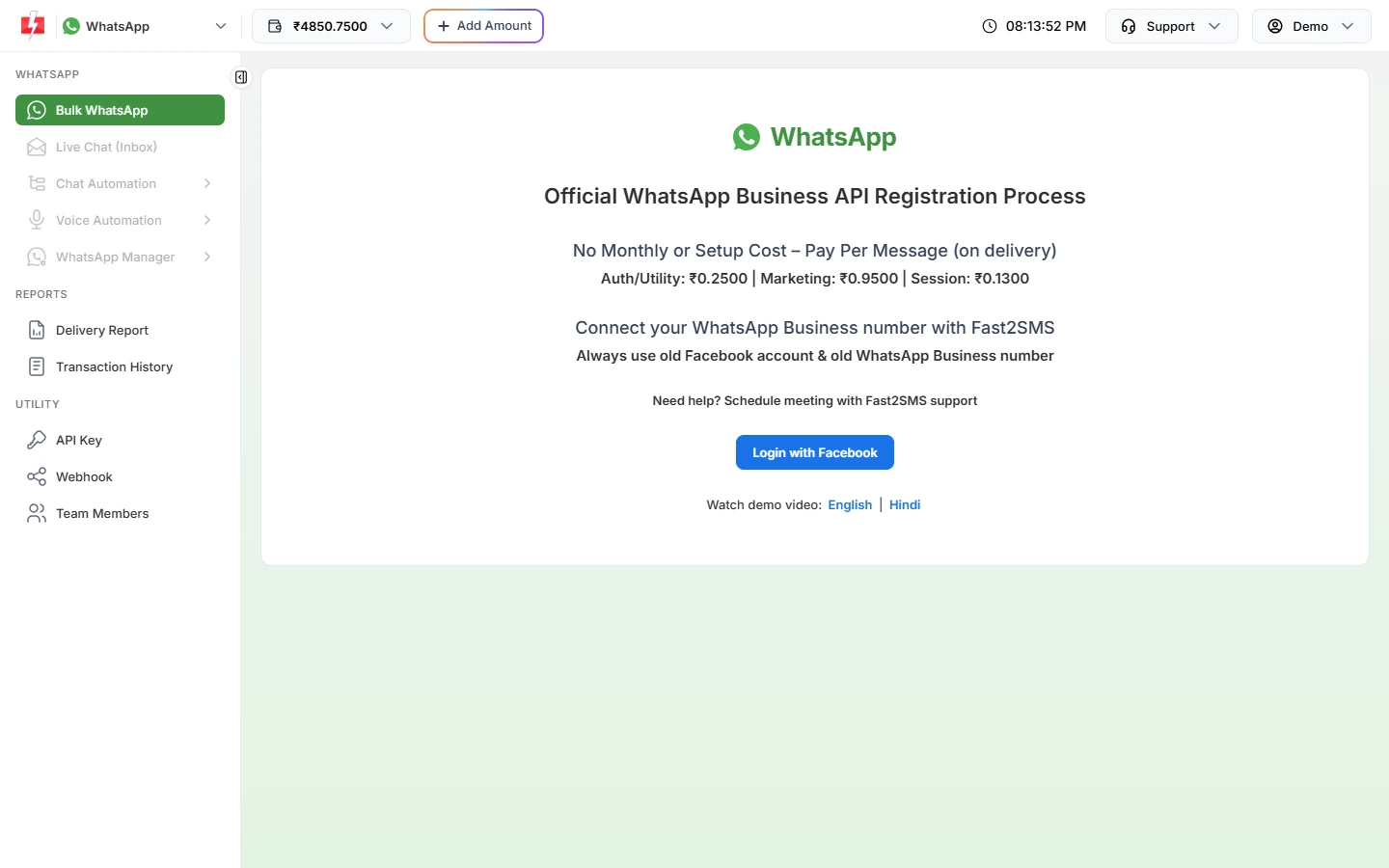
Connect once. Live Chat and automation open up after that. -
Set opening hours, welcome and away messages
Go to Chat Automation > Inbox Settings > Auto Reply Setting. Write a welcome message with your timings, switch on Out of Office Message, set your working hours per day in your time zone, and add a Delayed Response Message for busy hours. Click Save Settings.
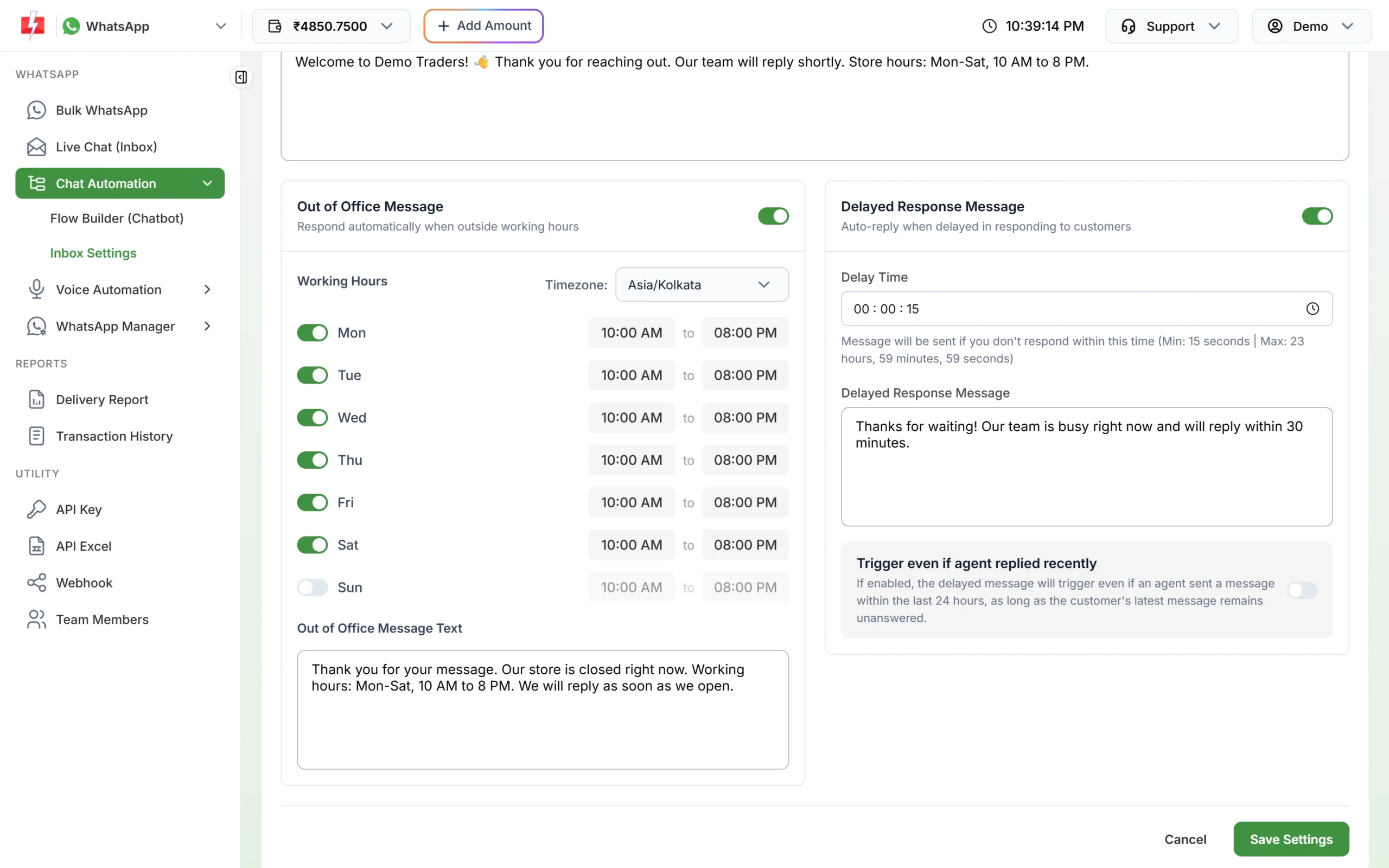
Guests get an answer even when the restaurant is closed. -
Add keyword auto replies
On the Auto Reply tab, click Create Auto Reply. Add keywords such as “menu”, “timing” and “address”, choose the match type and the reply. A reply can be text, an image of your menu, audio or video. The highest-priority rule that matches answers first.
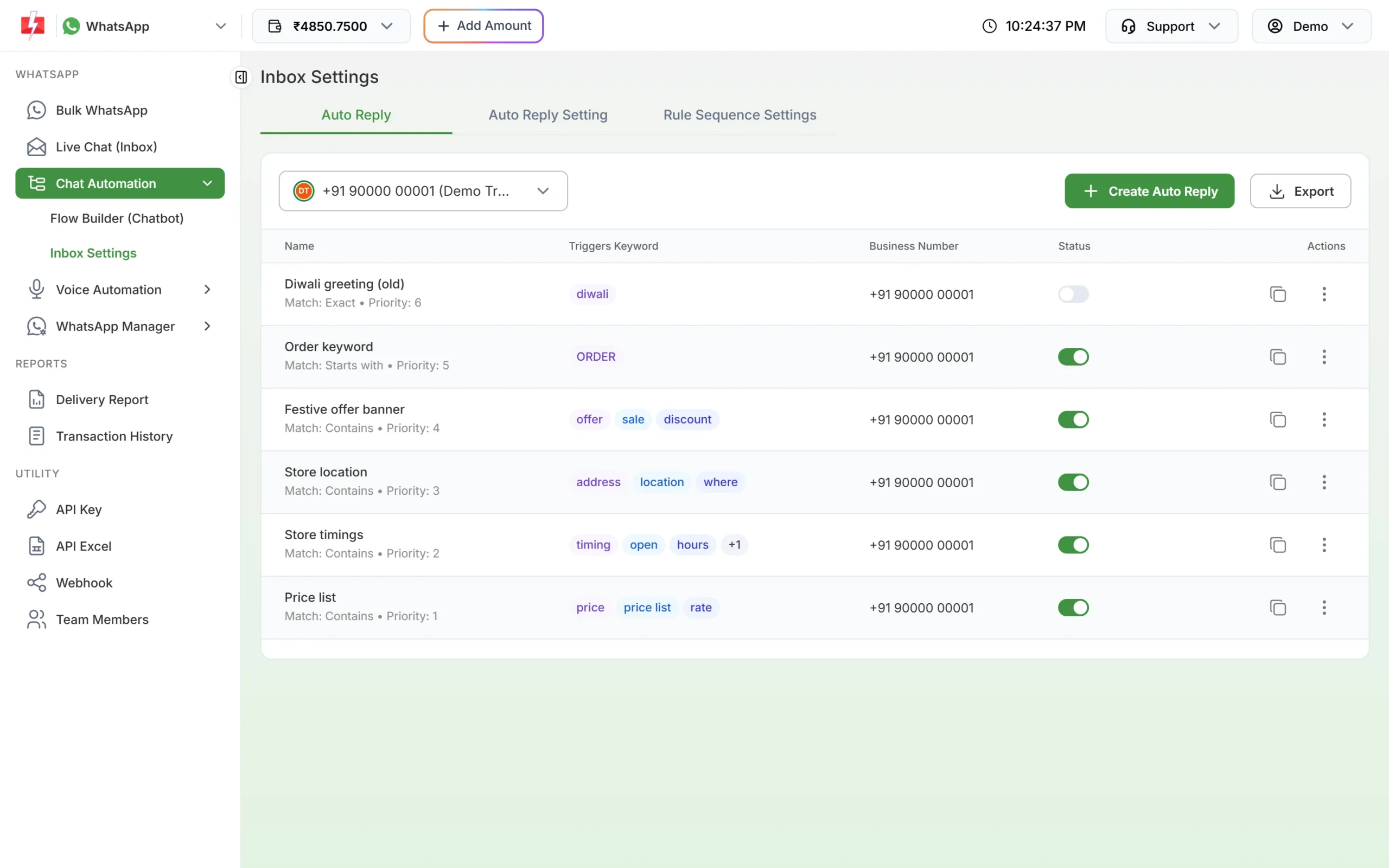
One rule per common question. -
Build a menu chatbot
For a full ordering flow, open Flow Builder (Chatbot) and create a workflow. Start it with keywords like “hi” or “menu”, then add a List node with up to 10 options (Veg, Non-veg, Combos, Desserts), a Media node for the menu PDF, and Assign Conversation to hand the chat to your staff.
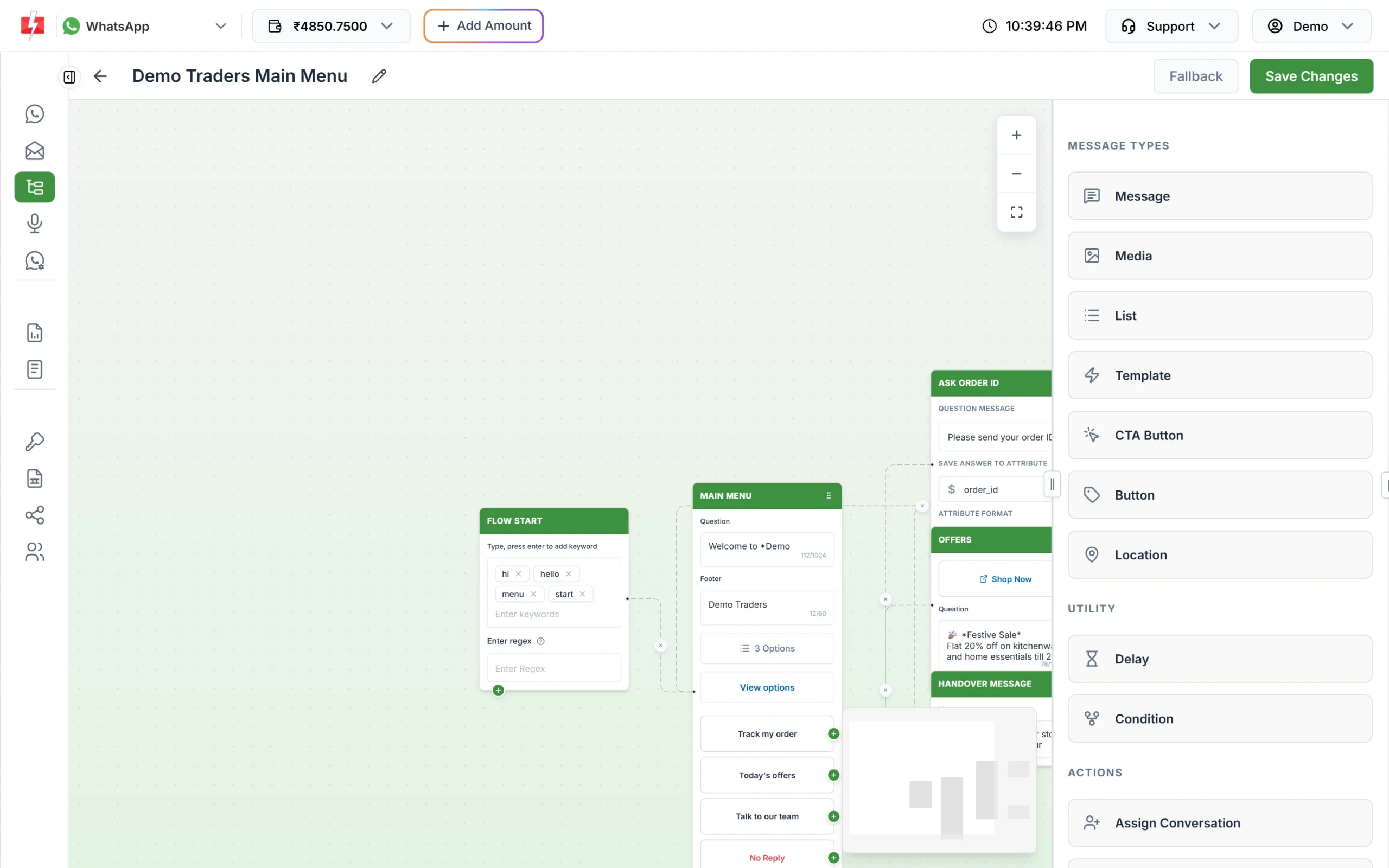
Guests pick from a menu instead of typing. -
Save quick replies for your staff
In Live Chat (Inbox), staff can insert Predefined Messages such as your address, delivery area and UPI details in one click. Add your own with Add Message. Give each staff member a login under Team Members.
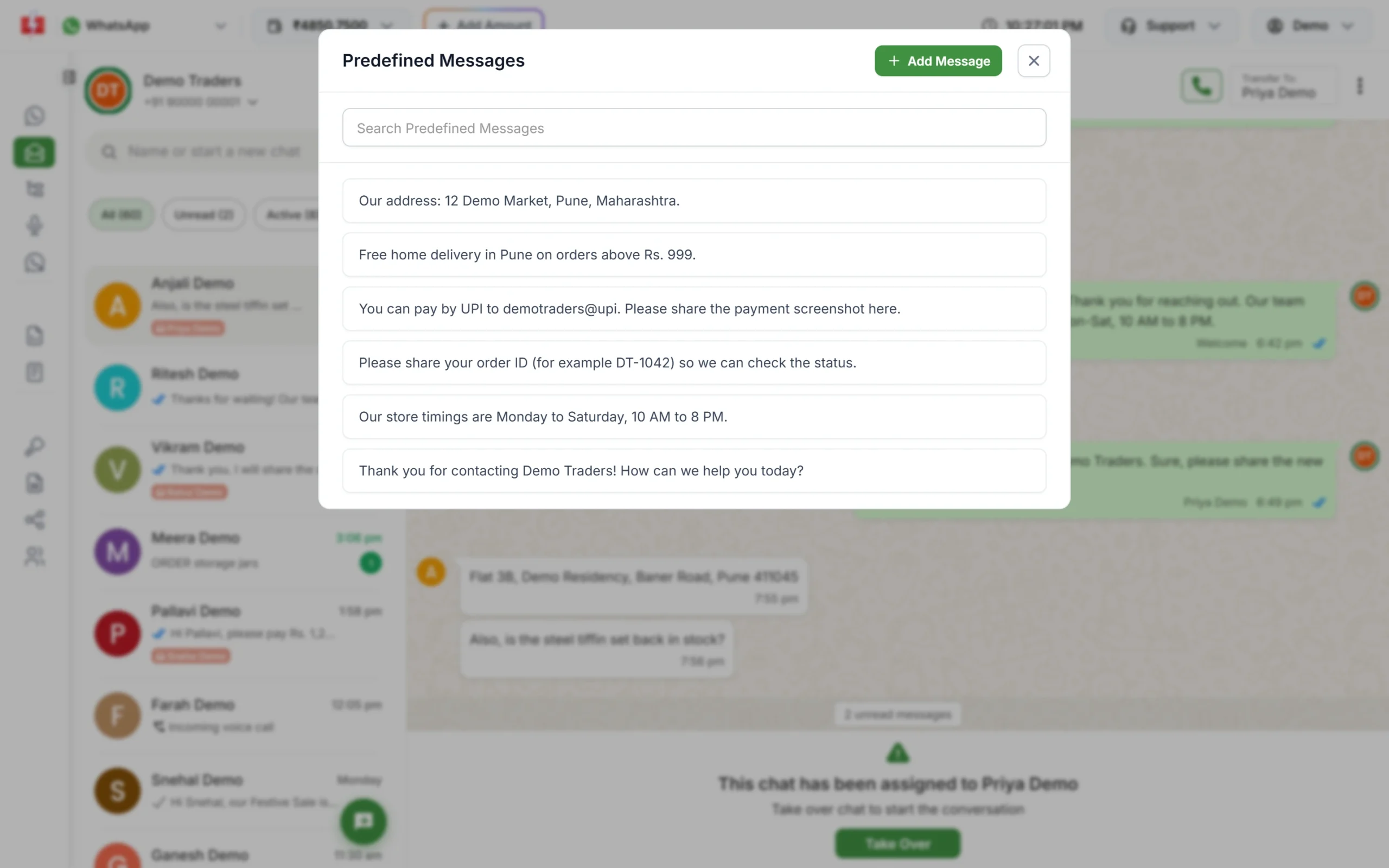
Same answer, every time, in one click. -
Group your guests and send the weekend offer
Import guests into Address Book and sort them into groups such as regulars, office lunch, party bookings. In Bulk WhatsApp, pick your marketing template, choose Address Book under Send To, select a group and schedule it for Friday afternoon.
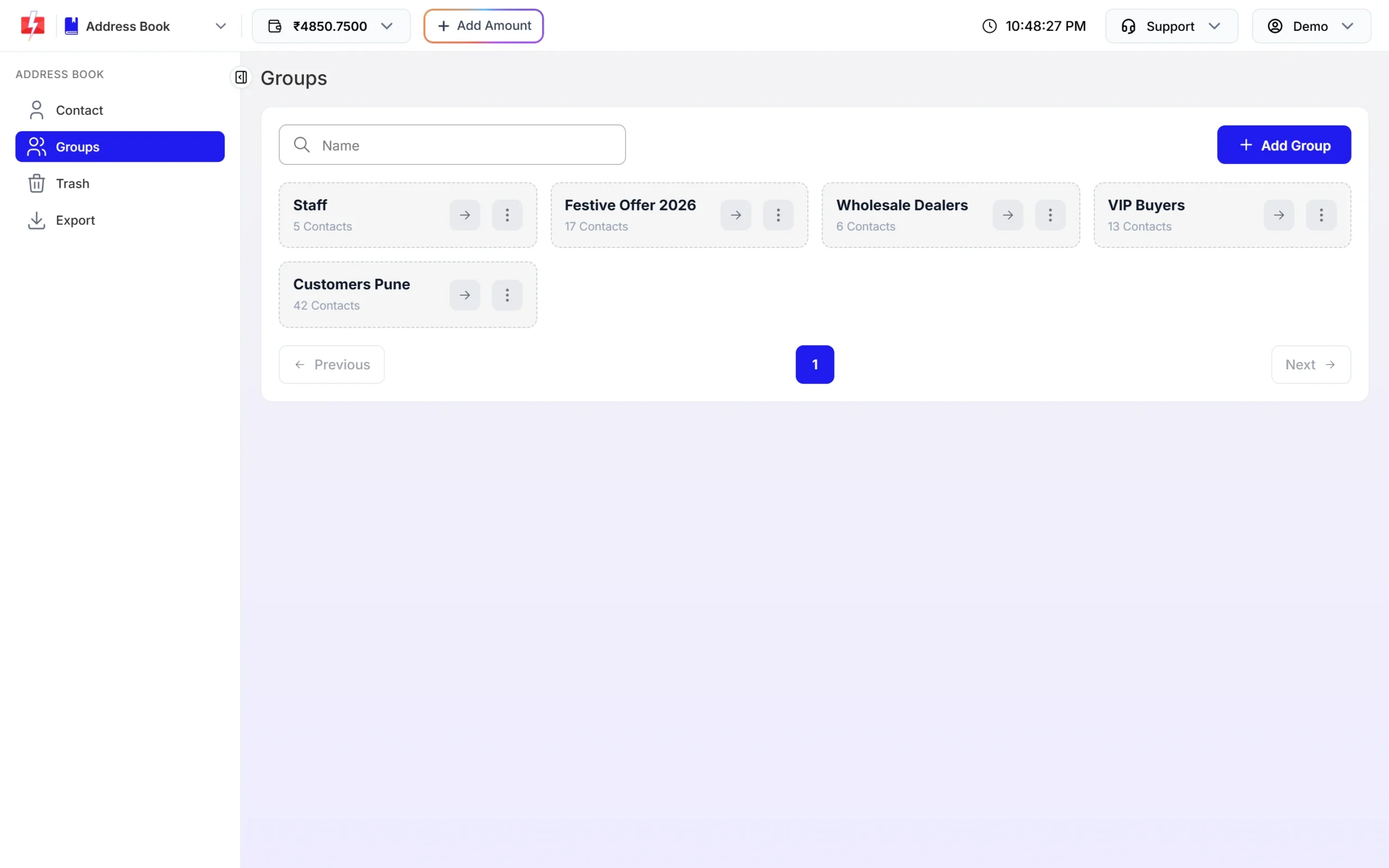
Send the right offer to the right group.
Automation options
- Auto replies, welcome, out-of-office and delayed messages: set the order in Rule Sequence Settings.
- Flow Builder chatbot: menus, buttons, media, delays and conditions, with an API Request node to check order status in your own system.
- API and webhooks: your POS or ordering site can send order updates automatically and receive guest replies on your URL.
- Scheduling: schedule offers for lunch and dinner hours, or repeat the same send daily across a date range.
- Google Sheets and Tally Prime: integrations are on the dashboard if you keep guests in a sheet or bill in Tally.
Compliance notes for restaurants
- Consent: ask for WhatsApp consent at booking or billing, and stop messaging anyone who opts out.
- Sending hours: Fast2SMS sends promotional SMS between 10 AM and 9 PM. A late-night offer is held until the next morning, so schedule dinner offers early in the evening.
- Alcohol and tobacco: keep them out of WhatsApp messages and voice files.
- No payment details: share your UPI ID or payment link, never ask guests for card numbers or OTPs.
How to estimate the cost
Incoming WhatsApp messages are free. Your replies inside the 24-hour window are charged at the session rate, including auto replies. Templates you send first are charged by category, and marketing costs more than utility. SMS are charged per number and per part, and RCS per message by type. See the current rates on the WhatsApp pricing, SMS pricing and RCS pricing pages.
Frequently asked questions
Can I send my menu automatically on WhatsApp?
Yes. Create an auto reply with the keyword “menu” and an image reply, or build a Flow Builder chatbot with a Media node for the menu PDF.
Can I message guests who ordered through a food delivery app?
Only if they gave you their number and consent directly. Order numbers shared for delivery are not consent for marketing.
Can I promote happy hours on WhatsApp?
No. Meta does not allow alcohol messaging in India at the time of writing.
Which DLT category is used for table booking SMS?
Service Implicit. Booking confirmations and reminders are expected by the guest. Offers are promotional.
Can several staff members reply from one WhatsApp number?
Yes. Add them under Team Members. Chat Agents see the chats assigned to them, and Admins see all chats.
What happens to messages that arrive after closing time?
Your Out of Office message replies automatically, and the chat waits in the inbox for your staff the next day.