
On DLT, the consent that counts is consent recorded on the operators’ consent register. A customer gives it to one brand, for a stated purpose, after confirming it with an OTP. They can take it back at any time. A tick box on your website or a signed form is not the same thing until it is recorded on DLT.
This page explains how customers give and revoke consent for promotional SMS on DLT, how long each kind of consent lasts under TRAI’s 2025 rules, and what this means for the messages your business sends.
Consent and DND preference are not the same
Customers control business SMS in two separate ways. Both are checked by the operator before your SMS is delivered.
| Preference (DND) | Consent | |
|---|---|---|
| Who it applies to | All senders, by category of business | One sender or brand |
| How it is set | The customer calls or texts 1909, or uses the operator’s app | The customer confirms a consent request with an OTP |
| Where it is kept | Preference register on DLT | Consent register on DLT |
| Effect on promotional SMS | Blocks promotions in the chosen categories | Lets that brand’s promotions through, for the purpose the customer agreed to |
Under the 2025 amendment to TCCCPR, a promotional message sent with explicit digital consent is delivered whatever preference the customer has registered. Without that consent, a promotional SMS to a customer who blocked promotions is stopped. For more on blocking, see DND numbers and SMS delivery.
How a customer gives consent on DLT
Operators run a Digital Consent Acquisition (DCA) facility for this. The 2025 regulation describes the flow like this:
- Your business starts the request. The Principal Entity (your registered business) asks for the customer’s consent, and the operator sends the request on its behalf.
- The customer gets a consent request from a 127xxx short code. All operators must use the 127xxx short code, or another code TRAI prescribes, for consent-seeking messages. The message must clearly state your business or brand name and what the consent is for.
- The customer confirms with an OTP. The operator records the consent on the DLT platform only after the customer verifies it.
- The customer gets a confirmation with revocation details. The confirmation message must also tell the customer how to revoke the consent.
Customers who do not want any consent requests at all can register that with their operator through SMS, IVR or online. After that, no consent-seeking message from any business is delivered to them.
How a customer revokes consent
- Through the revocation option. The DCA facility includes a way to revoke consent, and the confirmation message explains it.
- Through the opt-out in a promotional SMS. Every promotional message must now carry an opt-out option in the same message.
- Automatically, when the number is closed. When a mobile number is surrendered or closed, all consents on it are revoked and its preferences go back to default. The next person who gets that number starts clean.
After a customer revokes consent or opts out, you can ask them for consent again only after 90 days. The customer can opt in again on their own at any time.
How long consent lasts under the 2025 rules
| Kind of consent | Used for | How long it lasts |
|---|---|---|
| Inferred consent | Service and transactional messages to your existing customer: orders, deliveries, balance alerts, EMI reminders | For as long as the contract between you and the customer runs. It must be clear from the registered template itself. |
| Explicit consent for an ongoing transaction | Service messages that help a person finish a purchase or use they have started | 7 days, or as TRAI directs |
| Explicit digital consent for promotions | Offers and marketing from your brand | The 2025 text sets no fixed period. It ends when the customer revokes it or the number is closed. |
The 7-day limit exists because TRAI found businesses using a customer’s earlier consent to keep sending messages long after the customer had walked away from the purchase.
What this means for your business SMS
-
Put each message in the right category
OTPs, order updates and payment receipts go on Service Implicit templates. They rely on inferred consent and reach customers on DND. Offers go on promotional templates. A message that mixes an offer into a service update is treated as promotional.
-
Register a consent template for promotional messages
On your DLT portal, register a consent template that states your brand and the scope of what customers agree to, then link your promotional content templates to it. The DLT consent template guide walks through this.
-
Add the promotional template in Fast2SMS
In DLT Manager > Content Template, click Add Content Template and choose Service Explicit or Promotional as the Template Type. Fast2SMS does not store consent records. Those stay on DLT, and the operator checks them when your SMS goes out.
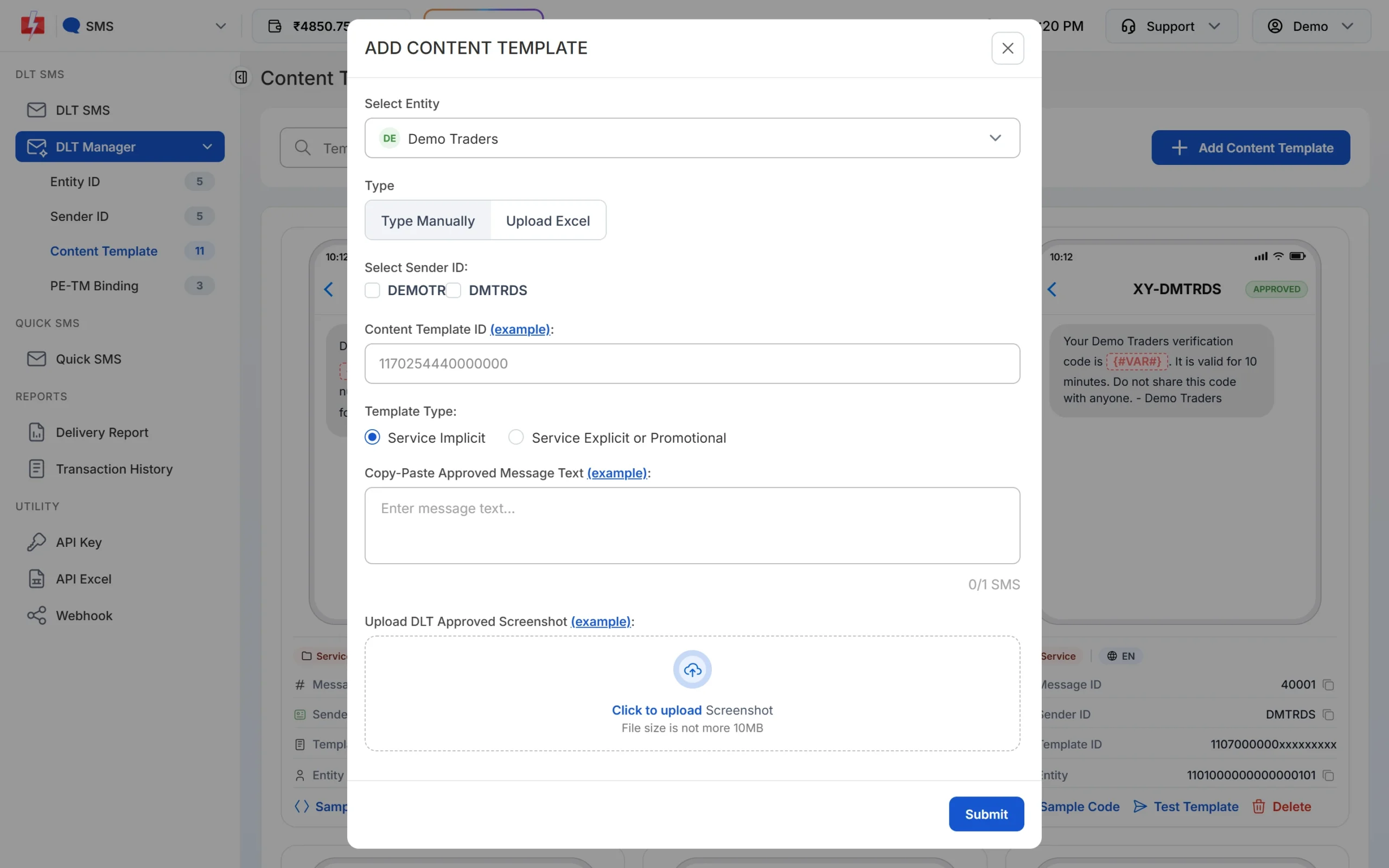
Templates that depend on consent use Service Explicit or Promotional. -
Read the delivery report
If a customer blocked promotions and has not given you consent, the operator stops the SMS. In Delivery Report, open the campaign to see each number. A blocked promotional SMS shows the status DND with the description “DND activated”.
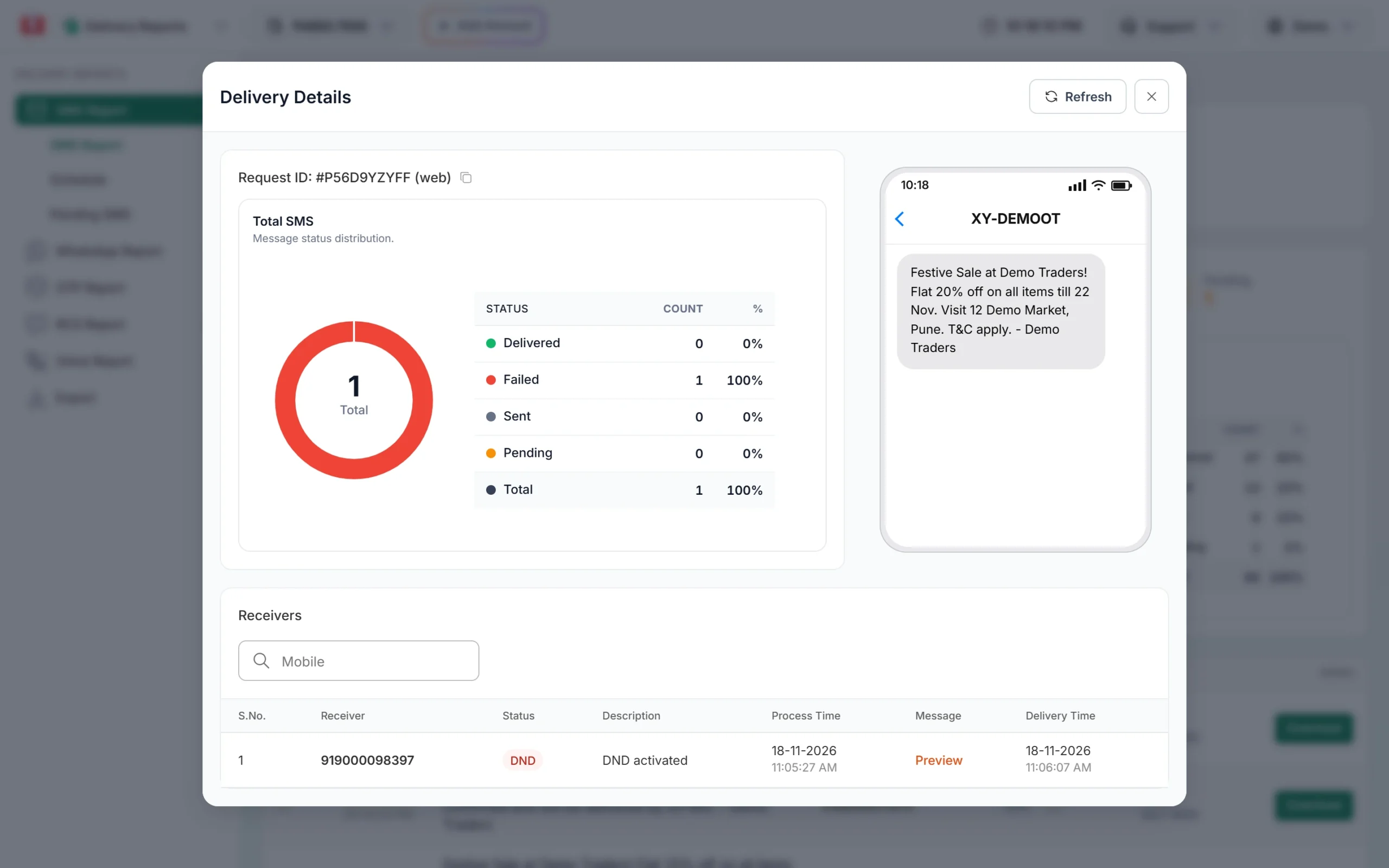
A promotional SMS stopped by the customer’s DND preference.
Common mistakes
- Treating a website sign-up as DLT consent. It shows the customer is interested, but the operator checks only the consent recorded on DLT.
- Asking again too soon. Sending a new consent request within 90 days of an opt-out goes against the regulation.
- Using a service template for an offer. The message is treated as promotional, and a template registered in the wrong category can be blacklisted after a complaint.
- Keeping old numbers forever. Consent ends when a number is closed, and the new owner of that number has given you nothing.
Frequently asked questions
How does a customer give consent for promotional SMS?
The customer receives a consent request from a 127xxx short code that names your brand and purpose, and confirms it with an OTP. The consent is then recorded on DLT.
How can a customer revoke consent given to a business?
Through the revocation option explained in the consent confirmation message, or through the opt-out in any promotional SMS. Consent is also revoked automatically if the number is closed.
What is the 127xxx short code?
It is the short code operators must use to send consent-seeking messages, unless TRAI prescribes another code.
Can I ask for consent again after a customer revokes it?
Only after 90 days from the date they revoked or opted out. The customer can opt in again earlier on their own.
Does consent let my promotional SMS reach DND numbers?
Yes. Explicit digital consent recorded on DLT lets your promotions reach that customer whatever their DND preference, for the purpose they agreed to.
Do OTPs and order updates need consent?
Not explicit consent. They rely on inferred consent from your relationship with the customer, as long as they stay free of promotional content.
Is consent collected on my website valid on DLT?
Not by itself. Only consent recorded on the DLT consent register is checked during scrubbing.
Does Fast2SMS store my customers’ consent?
No. Consent stays on DLT. In Fast2SMS you add your approved templates, and the operator checks consent when the SMS is sent.