
No, you do not need to install bulk SMS software on your PC to send business SMS in India. Fast2SMS runs in your web browser on Windows, Mac or Linux: you log in, upload your Excel list as a CSV file, pick your DLT template and send. If you want SMS to go out from your own software, such as billing, a CRM or your website, connect it with the SMS API or a ready integration instead.
This guide explains the three ways to send bulk SMS from a computer, why SIM-based desktop programs are risky for business use, and what to check before you pick a tool.
Three ways to send bulk SMS from a computer
| Way | Best for | What you need |
|---|---|---|
| Web panel (type or paste numbers, or pick from Address Book) | Small lists and quick sends | A browser, your login and approved DLT templates |
| Excel or CSV upload in the web panel | Campaigns to hundreds or thousands of customers, with names or amounts from your sheet | Your list saved as a CSV file (up to 20 MB) |
| SMS API or an integration | SMS sent automatically by your billing, CRM, online store or website | Your API key, or a ready integration such as Google Sheets, Tally Prime, Shopify or WooCommerce |
Why a browser panel is usually enough
- Nothing to install or update. Open the site, log in and send. It works the same on any computer.
- Your data is not stuck on one PC. Contacts, templates, schedules and reports stay in your account, so you can work from the office, from home or from your phone.
- Your team can help. You can add team members (agents) with their own logins.
- One wallet for every channel. The same account sends SMS, WhatsApp, RCS, Smart OTP and voice calls.
Be careful with SIM-based desktop software
Some PC programs send SMS through a mobile phone or SIM card connected to the computer. For business messages in India this is a risk:
- TRAI’s 2025 amendment to the TCCCPR restricts senders from using normal 10-digit mobile numbers for telemarketing. Commercial messages are meant to come from registered headers or specific number series.
- Under the same amendment, a sender found guilty of repeated violations can have outgoing services barred for 15 days for the first violation. After that, all their telecom resources can be disconnected across operators for one year and the sender blacklisted.
- Customers see a personal mobile number instead of your brand header, and you get no proper delivery report.
Business SMS in India should go out with a DLT-registered sender ID and approved templates. See can I send bulk SMS with my own mobile number and is bulk SMS legal in India.
How to send bulk SMS from your PC with Fast2SMS
-
Log in and open the SMS app
Log in at fast2sms.com in any browser and click the SMS tile on the dashboard. The same page has the Integration tiles for Shopify, WooCommerce, Tally Prime and Google sheet. Use Add Amount at the top if your wallet is empty.
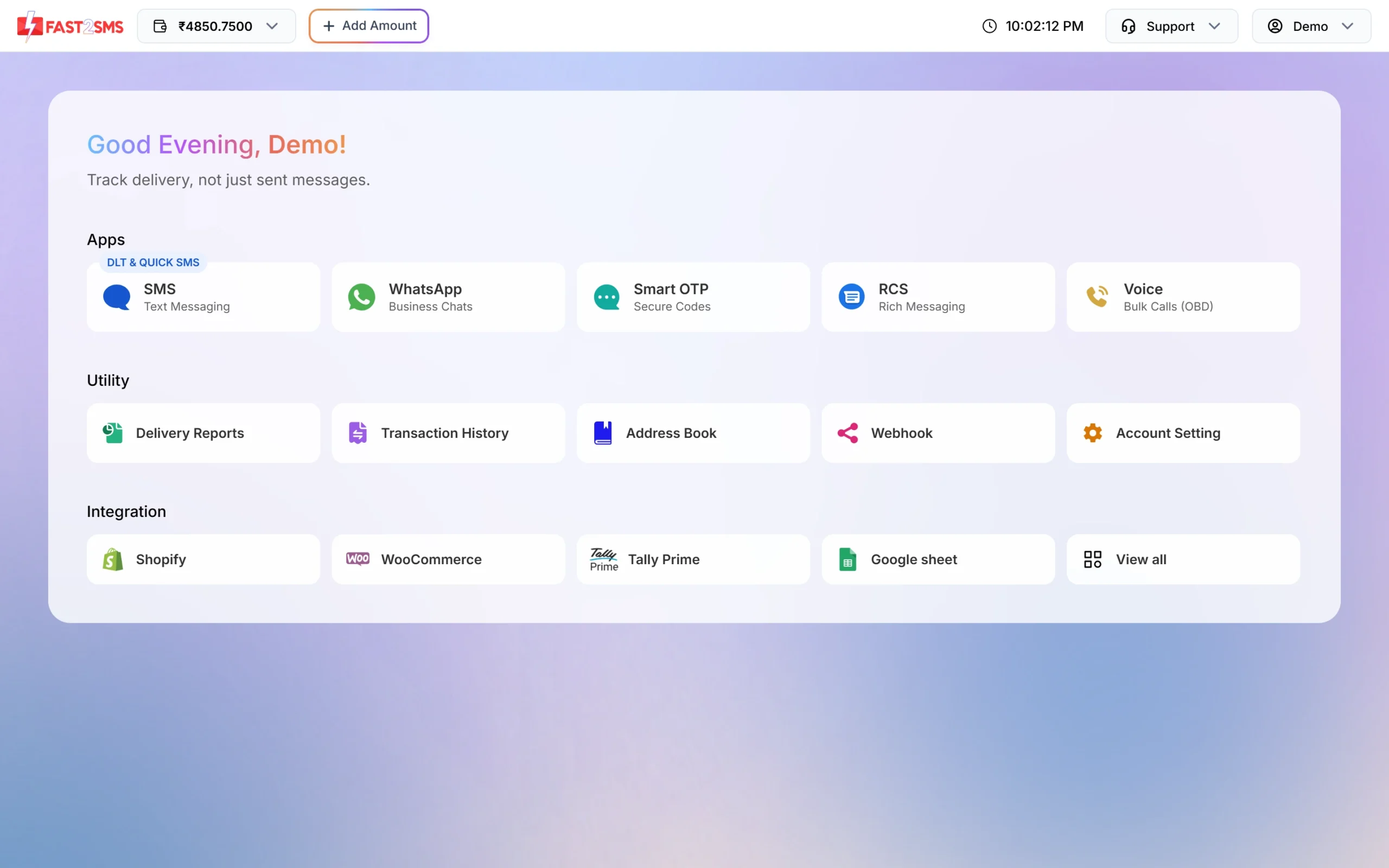
The SMS app and the integrations are on the dashboard. -
Get your Excel list ready
Keep the mobile numbers in one column, 10 digits each. Put names, amounts or dates in other columns if your template has variables. In Excel, use Save As and choose CSV. For Hindi text in the sheet, choose CSV UTF-8. Our guide to converting Excel to CSV shows each step.
-
Upload the file
Open DLT SMS, choose your Sender ID, and click CSV File under Send To. Upload the file (up to 20 MB), then select the column that has the mobile numbers. Sample CSV downloads an example file.
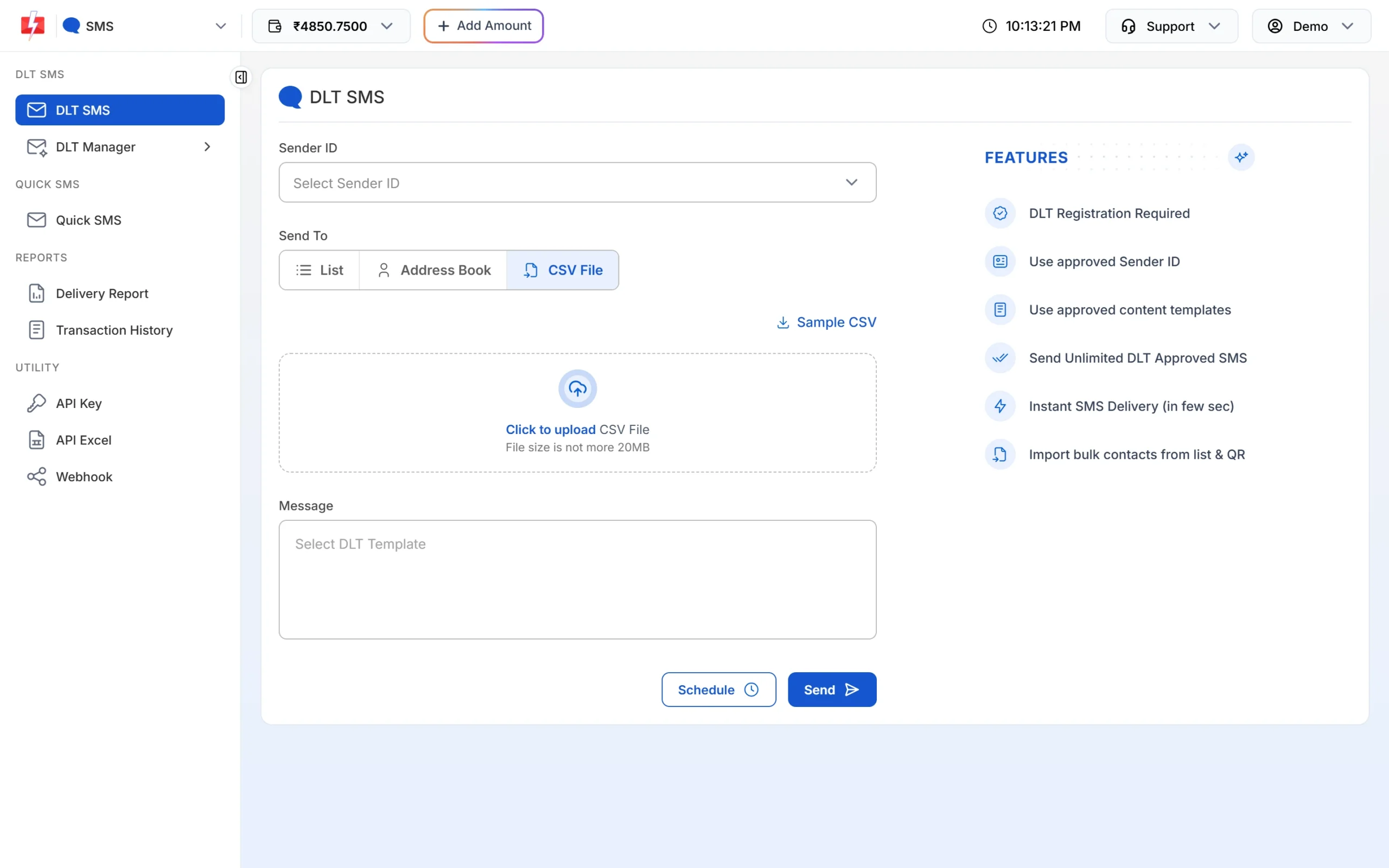
Upload your CSV file on the DLT SMS page. -
Pick the template and send
Click Select DLT Template, choose your template and map each variable to a column of your file or type the value. Click Send (or Schedule). The confirmation popup shows the cost, and duplicate and invalid numbers are removed before you pay.
-
Check the delivery report
Open Delivery Report to see each campaign. Click Download on a row to get the result for every number in Excel.
Connect your own software with the API
If your billing, CRM or website should send SMS by itself, use the DLT SMS API. Find your key in API Key under UTILITY. For any approved template, DLT Manager > Content Template > Sample Code gives ready code in cURL, PHP, Node.js and Python. Once you have an approved template, API Excel in the SMS menu gives you ready-made API links for your templates.
curl -X POST "https://www.fast2sms.com/dev/bulkV2" \
  -H "authorization: YOUR_API_KEY" \
  -H "Content-Type: application/json" \
  -d '{"route":"dlt","sender_id":"YOUR_SENDER_ID","message":"YOUR_MESSAGE_ID","variables_values":"value1|value2","numbers":"9999999999"}'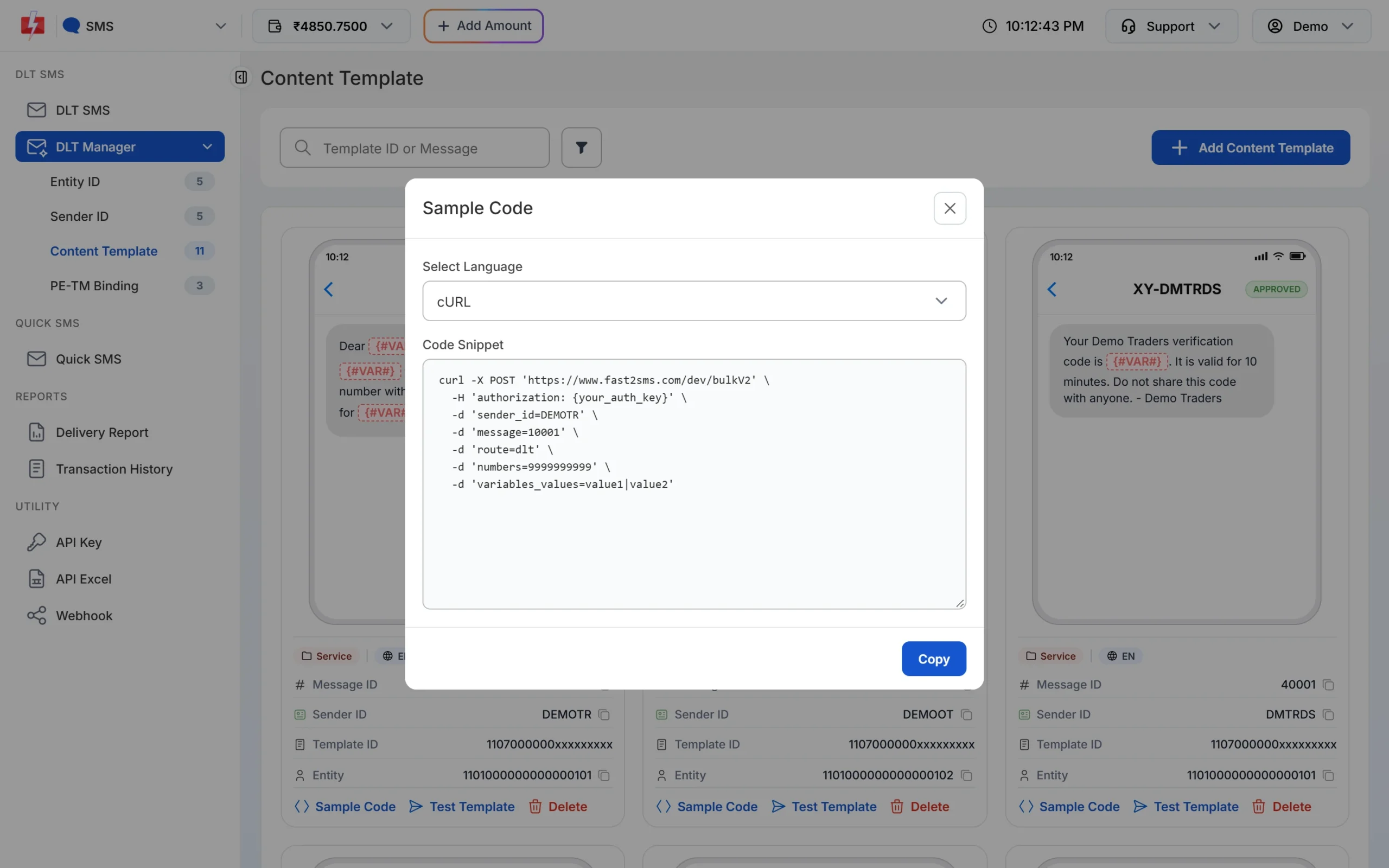
No-code options: send from Google Sheets, or connect apps through Pabbly, Zapier or n8n and CRMs such as Zoho. Developers can start with the DLT SMS API guide.
What to check before you choose a bulk SMS tool
- Does it support DLT, with your own entity, sender ID and templates?
- Can you upload Excel or CSV and fill template variables from columns?
- Does it show the full cost, with duplicates and invalid numbers removed, before you send?
- Can you schedule campaigns and cancel them?
- Is there a delivery report for every number, with failure reasons, and an export?
- Is there an API and webhooks for when you grow?
Frequently asked questions
Do I need to download software to send bulk SMS from my PC?
No. Fast2SMS works in your web browser. You need an internet connection, your login and approved DLT templates.
Does Fast2SMS work on Windows and Mac?
Yes. It runs in the browser, so it works the same on Windows, Mac and Linux.
Can I send bulk SMS from Excel on my computer?
Yes. Save the sheet as CSV, upload it on the CSV File tab of DLT SMS and choose the column with the mobile numbers.
How big can my upload file be?
The CSV file can be up to 20 MB.
Can I send SMS from my own mobile number with PC software?
Not as business SMS. Business SMS in India go out with a DLT-registered header, such as XY-DEMOTR, not a personal number.
Can my billing or accounting software send SMS automatically?
Yes, through the SMS API or a ready integration. The dashboard has integration tiles for Tally Prime, Shopify, WooCommerce and Google sheet.
Can I also send bulk SMS from my phone?
Yes. The same panel opens in your phone’s browser. See how to send bulk SMS from your phone.