
DLT error code 701 means the link in your SMS does not match the links whitelisted for your business on DLT, so the operator blocked the message. Airtel and SmartPing both use 701 for this. The fix is to whitelist the exact link (or its domain) on your DLT portal, or send only links that are already whitelisted.
This page explains 701 and the other CTA (call to action) codes for links, phone numbers and emails, and how to check a link before you send a campaign.
CTA error codes by operator
| Problem | Airtel | Jio | SmartPing |
|---|---|---|---|
| No link or CTA whitelisted for this message | 700 | – | 700 |
| Link does not match your whitelisted links | 701 | 680 | 701 |
| Email does not match your whitelisted data | 702 | 682 | 702 |
| Phone number does not match your whitelisted data | 703 | 681 | – |
| General CTA error | – | – | 642 |
| Whitelisted link is inactive or blacklisted | – | – | 5901, 5902, 5903 |
Note: at SmartPing, 703 is a technical timeout and not a CTA error. See the full lists for Airtel, Jio and SmartPing.
Why error 701 happens
Every link, phone number and email in a business SMS must be whitelisted on your DLT portal under your entity. The operator checks the link as it appears in the SMS. Common causes of 701:
- the domain was never whitelisted, or a different form of it was whitelisted (with or without
www), - a public URL shortener was used, so the SMS shows the shortener’s domain instead of yours,
- the link changes in each SMS but is placed in a normal text variable instead of a link variable,
- you moved to a new website or tracking domain and did not whitelist it first.
How to fix error 701
-
Whitelist the link on your DLT portal
Log in to the DLT portal where your business is registered and add the link, domain, phone number or email in the CTA whitelisting section. Use exactly the form you will send in the SMS. Wait until it is approved before your campaign.
-
Put the exact link in the SMS
On the DLT SMS page, after you pick the template, fill the variables and read the phone preview on the right. Check that the link in the preview is the same link you whitelisted, with the same domain.
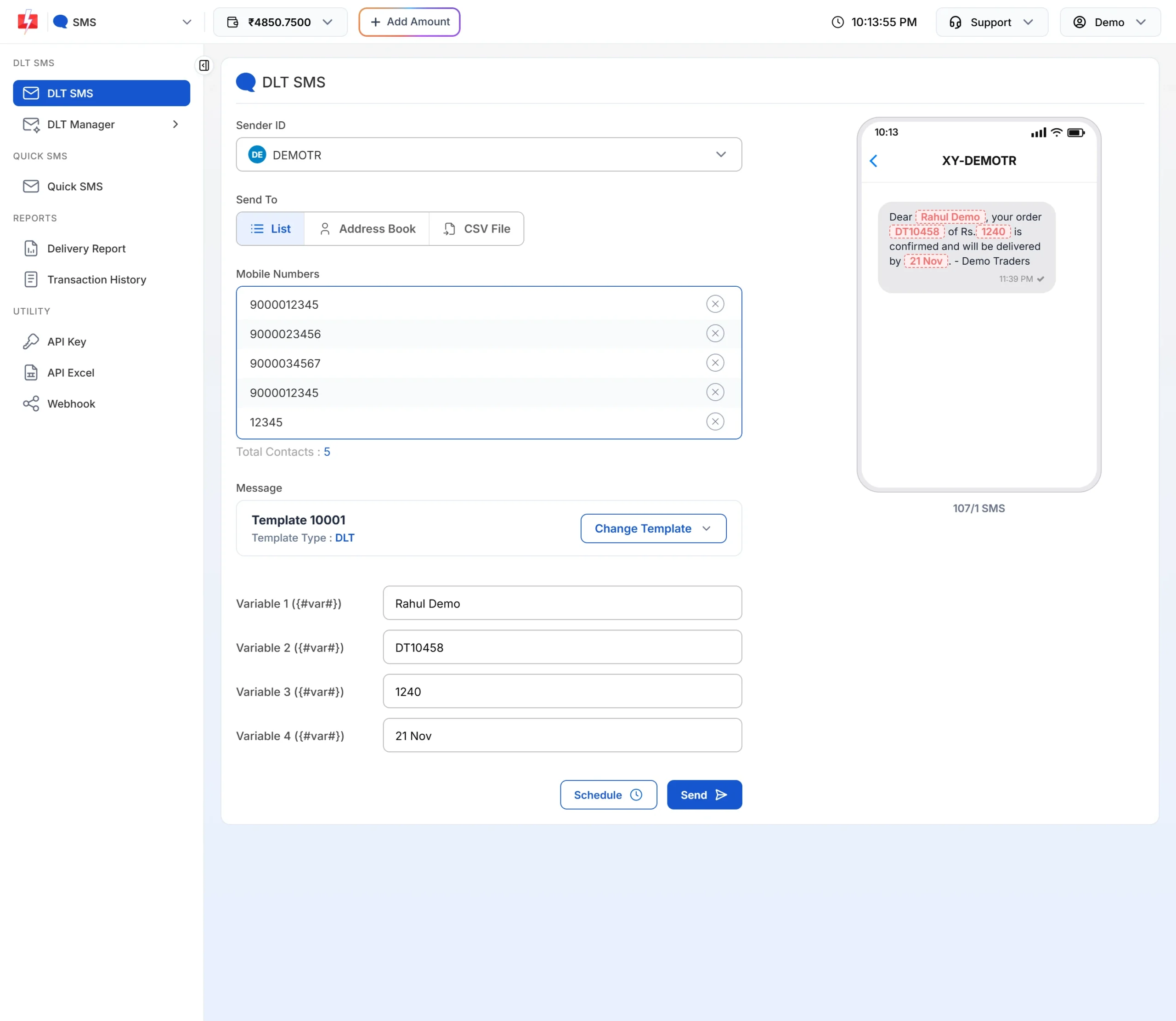
The preview shows the final SMS with your values. Check any link here. -
Test on your own number
In DLT Manager > Content Template, click Test Template on the approved card. Put the real link at its full length in the variable and click Send Test SMS. The window checks the delivery report for you. This is a real SMS, so the normal charge can apply.
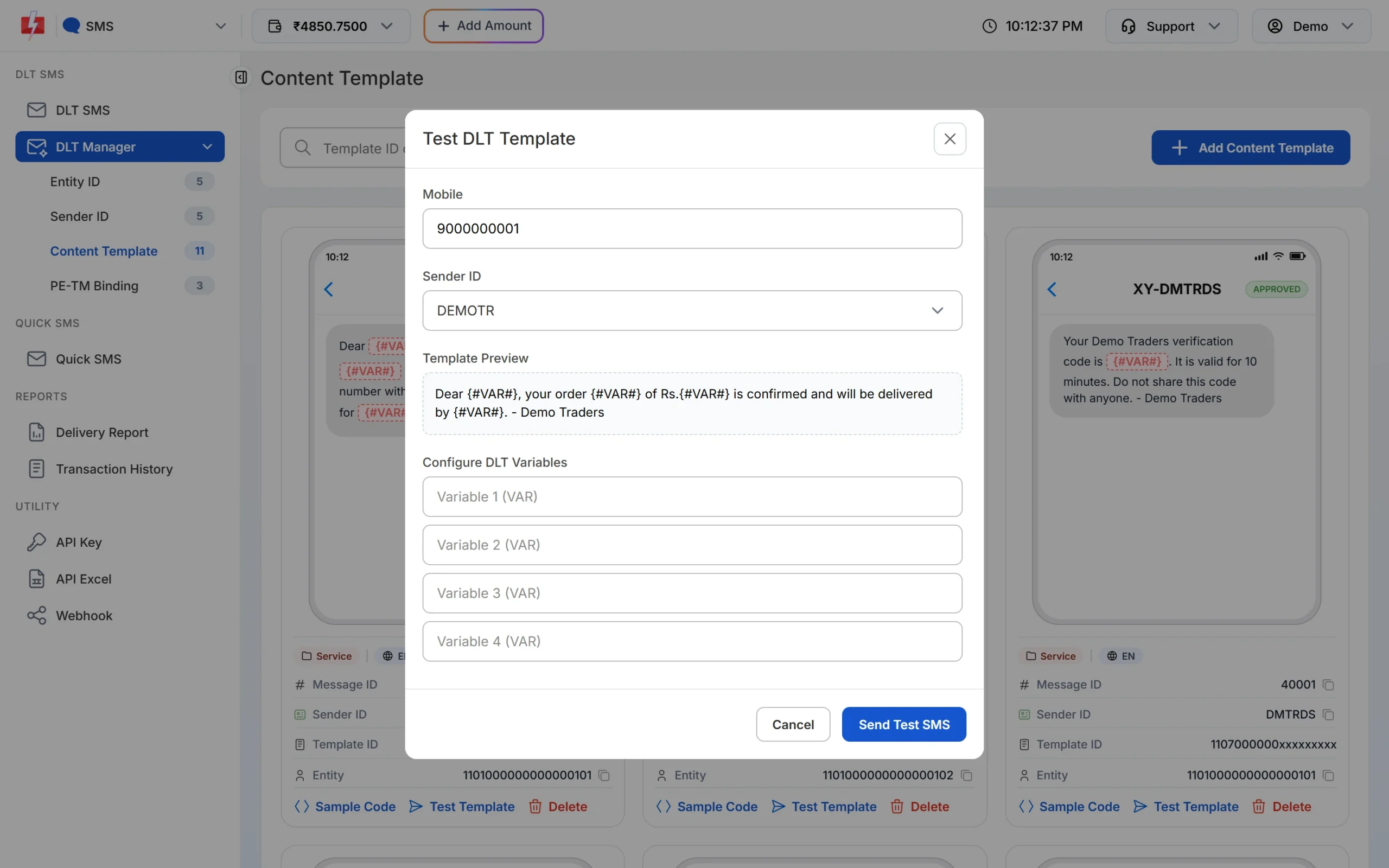
Test the link with one SMS before the full campaign.
Frequently asked questions
What does DLT error code 701 mean?
The link in your SMS does not match the links whitelisted for your business on DLT. Airtel and SmartPing use 701 for this.
What is CTA_URL_NOT_MATCHED?
It is Airtel’s name for error 701. The URL in the SMS is not one of your whitelisted URLs.
What does error 700 mean?
At Airtel and SmartPing, 700 means no link or CTA is whitelisted for the message at all. Whitelist your links first.
Can I use a URL shortener in DLT SMS?
Only if the short domain itself is whitelisted under your entity. A public shortener usually fails, so use your own domain or a short domain you own.
Do phone numbers and emails in an SMS need whitelisting?
Yes. Phone numbers and emails are CTAs too. Airtel reports a mismatch as 703 (phone) and 702 (email), and Jio as 681 and 682.
Are SMS blocked with error 701 refunded?
No. DLT SMS are charged when the campaign is created, and numbers that fail at the operator are not refunded automatically.