
“DLT scrubbing failed” means your SMS did not pass the operator’s DLT check, so it was not delivered. The plain words “scrubbing failed” are a general result: the operator does not say which check failed. Other scrubbing codes name the part that failed (entity, header, template, preference or consent), and a few mean the DLT system itself did not answer in time.
Below is what each text means and how to tell a setup problem from a passing one. For how scrubbing works in general, read what is DLT scrubbing.
DLT scrubbing failed: the exact texts and what they point to
| Error text | Operator and code | What it points to |
|---|---|---|
| SCRUBBING_FAILED, DLT scrubbing error, Message blocked by DLT Scrubbing | Jio 670, SmartPing 670 to 699 and 5108, Airtel 679 | A general scrubbing failure with no detail. |
| DLT_SCRUBBING_TIMEOUT, Connection timeout from DLT, DLT scrubbing database error | SmartPing 4000, 4001 and 4002, Airtel 508 | The DLT check did not complete at that moment. |
| DLT scrubbing content error | SmartPing 4004 | Something in the message text. |
| Entity error from DLT scrubbing | SmartPing 606 to 609 | Your Entity ID. See entity codes. |
| Telemarketer error from DLT scrubbing | SmartPing 619 | The telemarketer or your PE-TM chain. |
| Header error from DLT scrubbing | SmartPing 627 and 628 | Your sender ID (header). |
| Template error from DLT scrubbing | SmartPing 643 to 649 | Your content template. |
| Preference error from DLT scrubbing (DND) | SmartPing 653 to 659 | The customer’s DND choice. See error 650. |
| Consent error from DLT scrubbing | SmartPing 661 to 669 | Missing or expired consent. See the consent template guide. |
For every other code, see the full lists for Jio, Airtel and SmartPing.
What it means for your SMS
- In the Fast2SMS report, the number shows as Failed and the Description gives the operator’s reason. Numbers stopped because of DND show as DND.
- DLT SMS are charged when the campaign is sent, for every valid number, and numbers that later fail at the operator are not refunded automatically. See am I charged for failed SMS.
Setup problem or passing problem?
| What you see | Likely cause | What to do |
|---|---|---|
| All or most numbers failed with the same scrubbing text | Your DLT setup: template text, header, entity, links or PE-TM chain | Check your records (steps below) before you send again. |
| Timeout or database error on a few numbers | The DLT check did not complete at that moment | Send to those numbers again later. |
| Preference or consent errors on some numbers only | Those customers are on DND or have no consent for this message | Do not resend promotional content to them by SMS. |
| General “scrubbing failed” that keeps coming back | Not clear from the code alone | Contact Fast2SMS support with the Request ID. |
How to find and fix scrubbing failures
-
Open Delivery Details for the send
Go to Delivery Report and click the message. In Delivery Details, note the Request ID at the top and read the Status and Description of each number in Receivers.
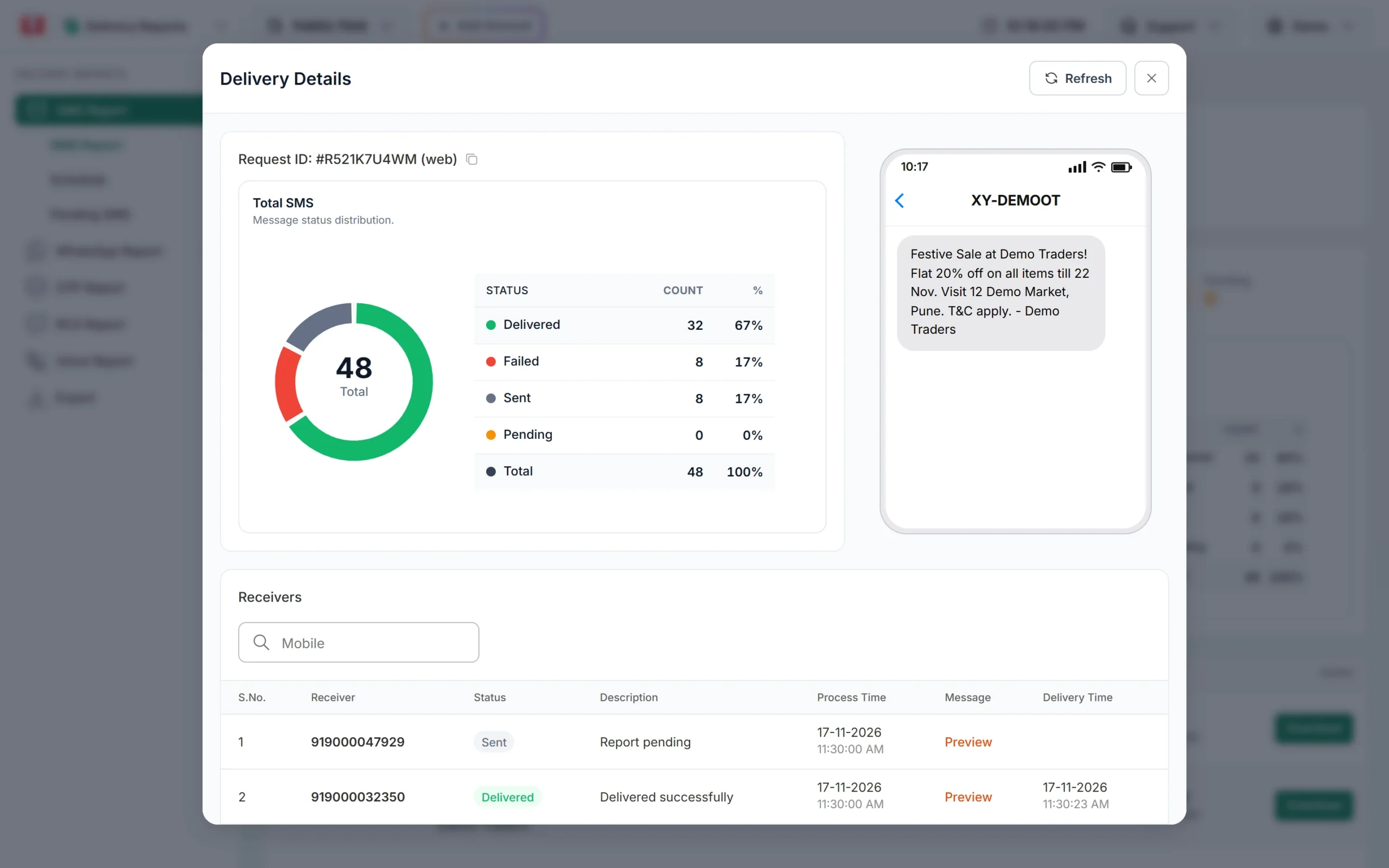
The Request ID and each number’s status and description. -
Check your DLT records
In DLT Manager, open Content Template and compare the text you sent with the approved text, word for word. Then check the Sender ID, Entity ID and PE-TM Binding pages. On your DLT portal, check that the header and template are active and that every link in the message is whitelisted.
-
Test, then send again
On the approved template card, click Test Template and send to your own number with realistic values. This is a real SMS, so the normal SMS charge can apply. If the cause is still unclear, share the Request ID and two or three failed numbers with Fast2SMS support.
Frequently asked questions
What does DLT scrubbing failed mean?
The operator’s DLT check stopped your SMS and did not say which part failed. Check your template, header, entity and PE-TM chain, or send again later if only a few numbers failed.
Will the SMS be delivered later?
No. A message stopped in scrubbing is not retried. Send it again once the cause is fixed.
Is a scrubbing timeout my fault?
A timeout or database error means the DLT check did not complete. It is not caused by your template. Resend to those numbers later.
Why did scrubbing fail on one operator only?
Each operator scrubs SMS to its own customers. Read the failure reason in the report, and share the Request ID with support if your setup looks fine.
Do OTP SMS go through scrubbing too?
Yes. OTPs and transactional SMS are checked for entity, header, template, links and PE-TM chain. They are not blocked by DND.