
You can check whether your SMS delivery reports are real without any special tools. Add a few of your own phones to every campaign, compare what the report says with what those phones actually received, and look at the details of the report for patterns that real operator reports do not have. These checks work with any SMS provider, including Fast2SMS.
This guide is for business owners and managers who pay for bulk SMS and want proof that “Delivered” means delivered.
Why it is worth auditing delivery reports
An SMS delivery report is created by the mobile operator and passed back to you by your SMS provider. You do not see the operator’s side directly. If the report is wrong, you pay for messages that never arrived and make decisions on false numbers. A short, regular check removes that doubt.
Seven checks to audit SMS delivery reports
-
Add your own “seed” numbers to every campaign
Keep 5 to 10 numbers of your staff or family, on different operators (Airtel, Jio, Vi, BSNL), and add them to every campaign. After sending, check two things: every seed number marked Delivered really has the SMS, and the time it arrived on the phone is close to the Delivery Time in the report.
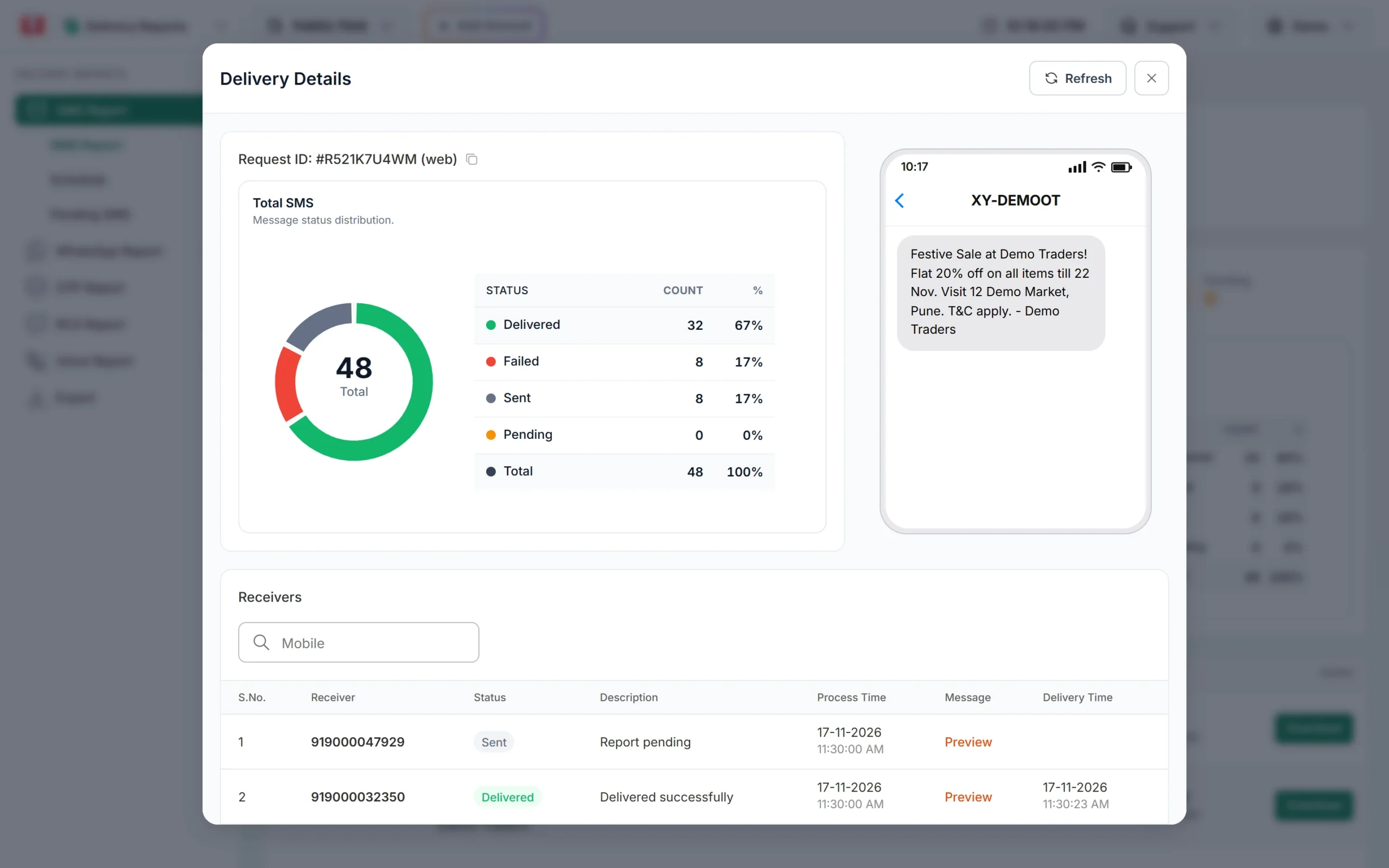
Each number has its own status and delivery time to compare with your phones. -
Switch one seed phone off
Before a campaign, switch off one seed phone. A switched-off phone cannot receive the SMS, so a real report cannot show it as Delivered at that moment. It should stay in Sent (“Report pending”) and change only after you switch the phone back on, or fail later.
-
Include a DND number in a promotional send
If someone on your team has DND active, add that number to a promotional campaign. Promotional SMS do not reach DND numbers, so a real report shows it as DND with a reason like “DND activated”, not Delivered.
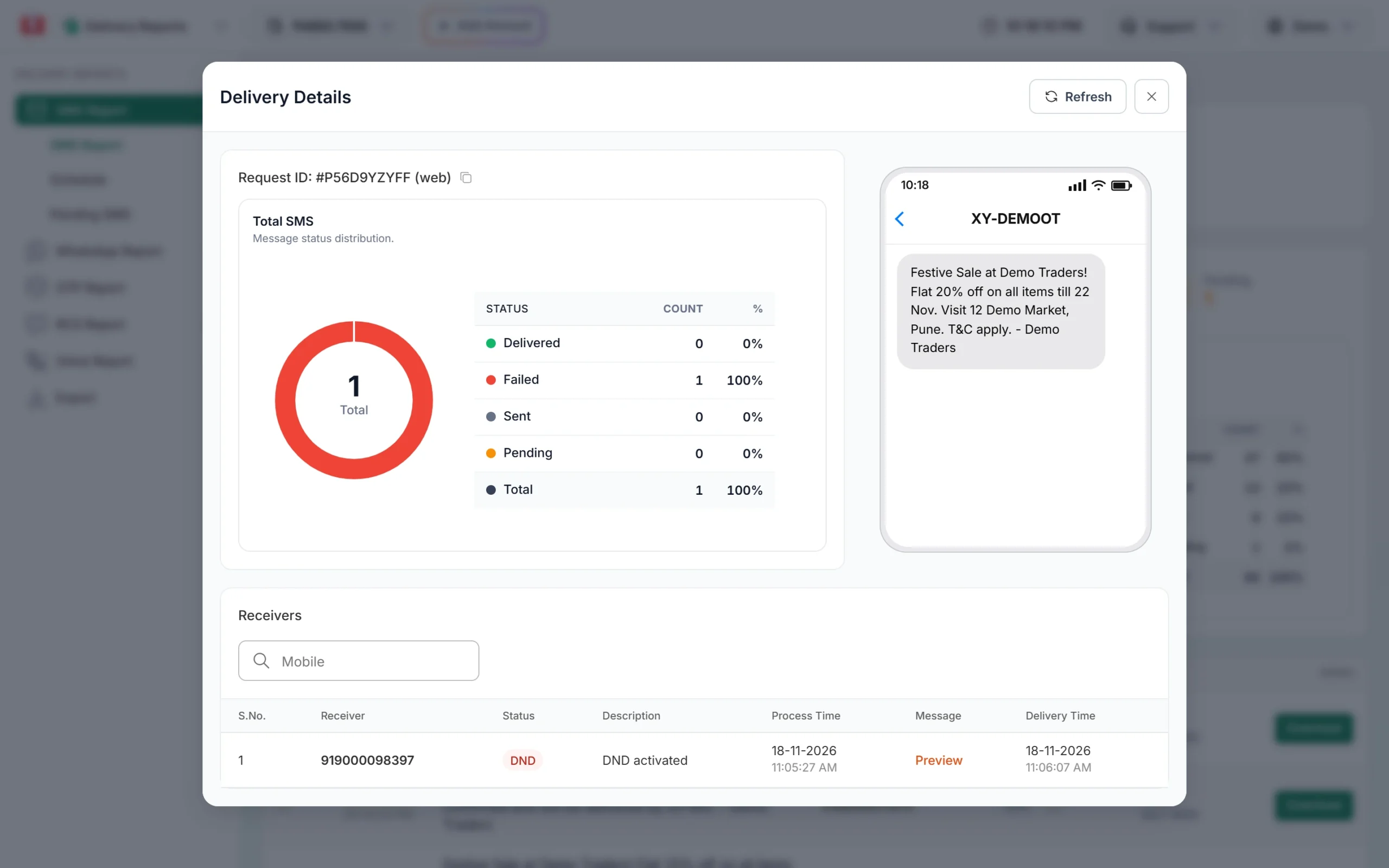
A DND number on a promotional template fails with a clear reason. -
Check that failures have reasons
Real reports for real lists have failures, and each failure has a reason such as “Number not exist”, “Number switch off or low signal” or an operator error. A report that only says “Failed” for everything, or has no failures at all on a large and old list, needs questions.
-
Ask for per-number reports, not only totals
A total like “9,800 of 10,000 delivered” cannot be checked. You need every number with its status, reason and times. In Fast2SMS, click Download on a campaign row or use Delivery Report > Export.
-
Match the report to what you paid
The numbers in the report should match the numbers you were charged for. In Fast2SMS the confirmation popup shows Cost: [numbers x rate x parts] before you send, and each campaign is one debit row in Transaction History > SMS, for example “DLT SMS (95 SMS)”.
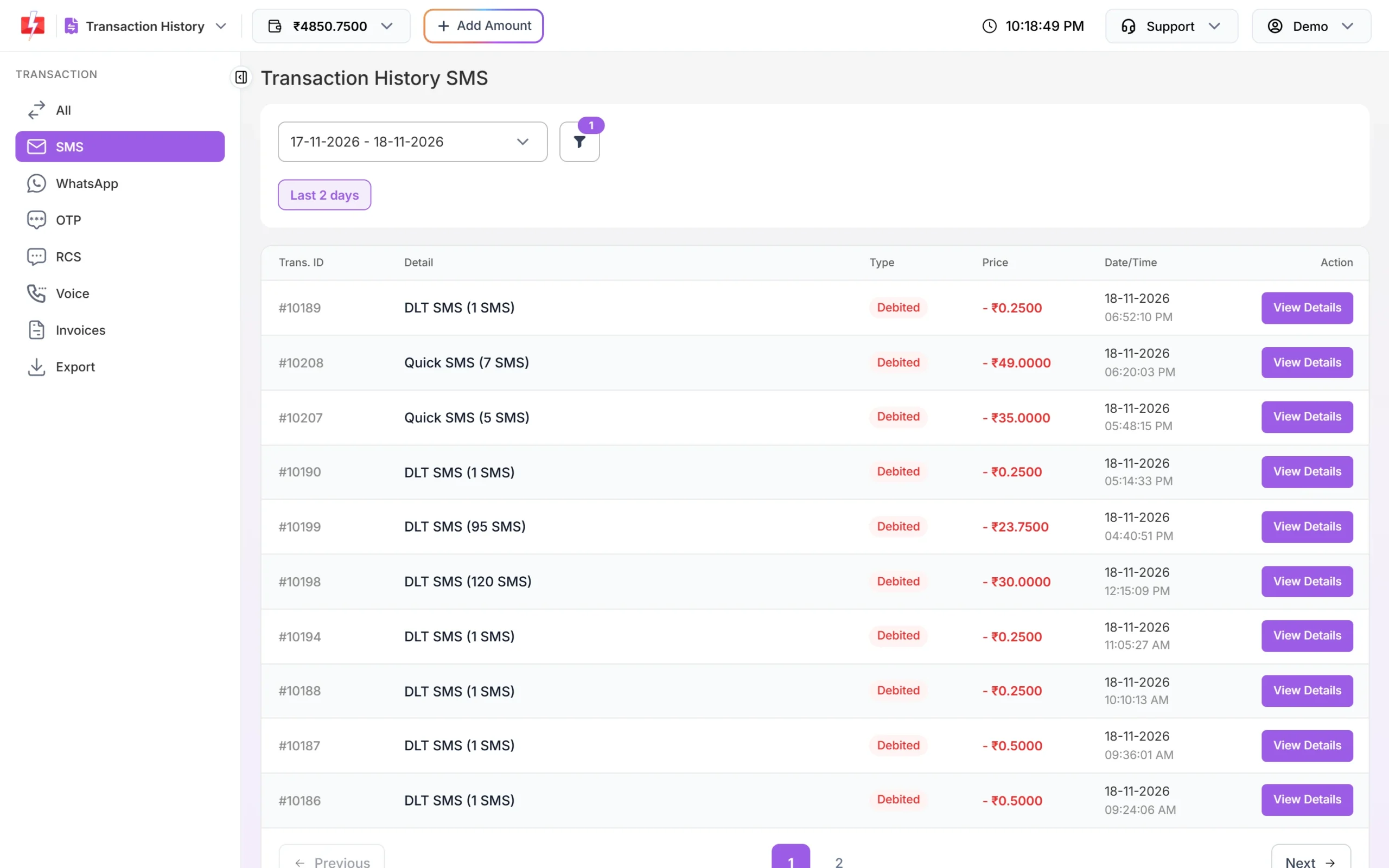
Each campaign appears as one debit you can match to the report. -
Compare with results you can see yourself
Delivery is not the only signal. If a campaign shows a high delivered count but no link clicks, replies or store visits at all, check it with seed numbers. For OTPs, compare delivered OTPs with verified OTPs. A big gap is a reason to dig in. See OTP conversion rate.
Real report or red flag?
| What a real report looks like | Red flag |
|---|---|
| A mix of Delivered, Failed and some Sent on large lists | 100% Delivered on a large, old list |
| Failures with a reason per number | “Failed” with no reason, or no failures ever |
| Delivery times spread over seconds and minutes | Every number with exactly the same delivery time |
| Switched-off seed phone stays in Sent | Switched-off seed phone shows Delivered |
| DND number fails on a promotional template | DND number shows Delivered on a promotional template |
| Report counts match what you were charged | Charged numbers and report numbers do not match |
One odd result is not proof of anything. A pattern across several campaigns is what matters.
A note on what you pay
With DLT SMS on Fast2SMS, every valid number is charged when the campaign is sent, and duplicate and invalid numbers are removed before you pay. Numbers that fail at the operator are not refunded automatically, so an honest report also helps you clean your list and spend less. See Am I charged for failed SMS? and the bulk SMS pricing page.
Sending in bulk? For high SMS volumes our team offers discounted rates. Talk to our team or see SMS pricing.
If you send by API
- Store the delivery report for every message on your side, using webhooks or the DLR API with the request ID. You then have your own record to compare with the panel.
- Check that
delivery_timeis present only for Delivered numbers and that failed numbers carry afailure_reasonor description. - Run the seed-number checks above on API sends too.
Frequently asked questions
How can I check if SMS delivery reports are fake?
Add your own phones on different operators to each campaign, switch one off, and include a DND number on promotional sends. Then compare the report with what the phones show.
Is 100% SMS delivery possible?
For a small list of active phones, yes. For a large or old list, some numbers are usually closed, switched off or on DND, so a few failures are normal.
Does Delivered mean the customer read the SMS?
No. SMS reports show delivery to the phone, not reading. Use clicks, replies or OTP verification to measure what happened next.
The report says Delivered but my customer says they did not get it. Is the report wrong?
Not always. The SMS may be in a spam or promotions folder, or deleted. See SMS shows Delivered but not received.
How often should I audit?
Keep seed numbers in every campaign. Do the deeper checks (switched-off phone, DND number, cost match) when you start with a provider and then every few months.
What should I ask an SMS provider before I sign up?
Ask for a per-number report with reasons and delivery times, a way to download it, and a test send to your own phones. See how to choose a bulk SMS provider.